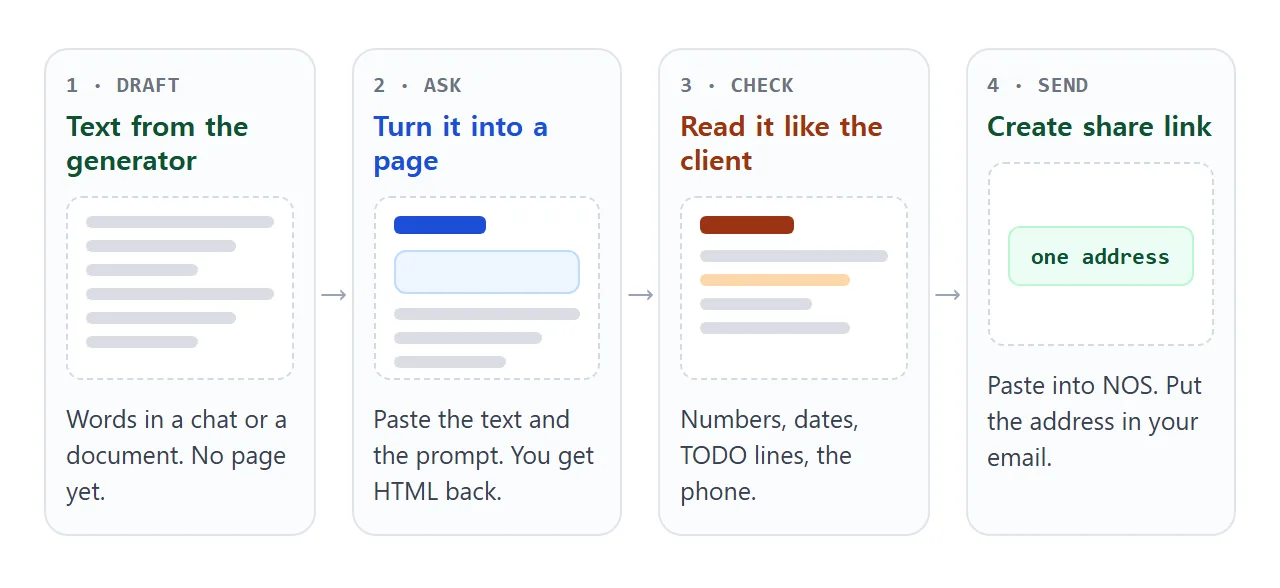
An AI proposal generator gives you text: a problem, a scope, a timeline, a price. To send it, paste that text into an AI chat and ask for a one-page HTML page. Check it, then put it behind a share link in a NOS document.
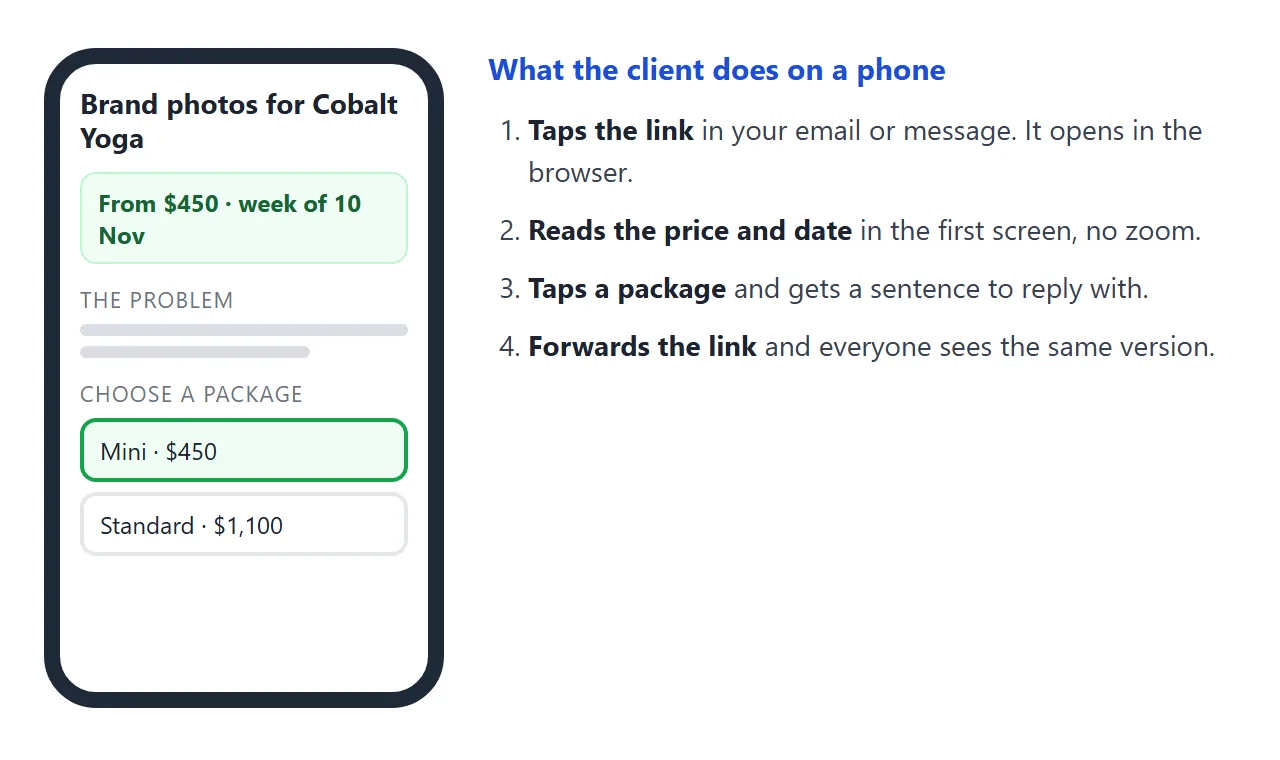
The client opens the link on a phone, with no download.
The step people lose time on is the one after the text. One freelancer, writing about learning proposals, bought a Canva template and "spent an embarrassing amount of time on something I hoped looked polished enough to send."
You already have the words. Here is what they can become: price and date at the top, packages the client can tap, and a sentence they can reply with.
<!doctype html>
<html lang="en">
<head>
<meta charset="utf-8">
<meta name="viewport" content="width=device-width, initial-scale=1">
<title>Proposal - Brand photos for Cobalt Yoga</title>
<style>
  * { box-sizing: border-box; }
  body { margin: 0; background: #f3f4f6; font-family: system-ui, -apple-system, "Segoe UI", sans-serif; color: #1f2937; line-height: 1.55; }
  .page { max-width: 720px; margin: 0 auto; background: #fff; padding: 24px 20px 32px; min-height: 100vh; }
  .tag { margin: 0; font-size: 13px; letter-spacing: .06em; text-transform: uppercase; color: #6b7280; }
  h1 { margin: 6px 0 4px; font-size: 27px; line-height: 1.15; }
  .meta { margin: 0 0 16px; font-size: 14px; color: #6b7280; }
  .summary { display: grid; grid-template-columns: repeat(3, 1fr); gap: 8px; margin-bottom: 4px; }
  .summary div { background: #f0fdf4; border: 1px solid #bbf7d0; border-radius: 10px; padding: 10px 12px; }
  .summary small { display: block; font-size: 12px; color: #4b5563; }
  .summary b { font-size: 17px; color: #166534; }
  h2 { margin: 24px 0 8px; font-size: 13px; letter-spacing: .08em; text-transform: uppercase; color: #6b7280; }
  p { margin: 0 0 8px; font-size: 16px; }
  ul { margin: 0; padding-left: 20px; }
  li { margin-bottom: 4px; font-size: 16px; }
  .pack { display: flex; gap: 12px; align-items: flex-start; padding: 12px; border: 2px solid #e5e7eb; border-radius: 12px; margin-bottom: 8px; cursor: pointer; }
  .pack input { width: 20px; height: 20px; margin-top: 3px; flex: none; }
  .pack .t { flex: 1; }
  .pack .t b { display: block; font-size: 16px; }
  .pack .t span { font-size: 14px; color: #4b5563; }
  .pack .p { font-weight: 700; white-space: nowrap; }
  .pack.on { border-color: #16a34a; background: #f0fdf4; }
  .reply { margin-top: 12px; padding: 12px 14px; background: #f9fafb; border-radius: 10px; font-size: 15px; }
  .reply textarea { width: 100%; margin-top: 6px; padding: 8px; font: inherit; font-size: 15px; border: 1px solid #d1d5db; border-radius: 8px; resize: none; }
  .out li { color: #4b5563; }
  .who { margin-top: 24px; padding-top: 14px; border-top: 1px solid #e5e7eb; font-size: 15px; }
  @media (max-width: 480px) { .summary { grid-template-columns: 1fr; } }
</style>
</head>
<body>
<div class="page">
  <p class="tag">Proposal</p>
  <h1>Brand photos for Cobalt Yoga</h1>
  <p class="meta">Prepared for Lena Moreau · by Jonas Berg · valid until 31 Oct 2026</p>

  <div class="summary">
    <div><small>From</small><b>$450</b></div>
    <div><small>Shoot</small><b>Week of 10 Nov</b></div>
    <div><small>Photos delivered</small><b>Within 7 days</b></div>
  </div>

  <h2>1. The problem</h2>
  <p>The studio website uses phone snapshots. New visitors cannot tell what a class feels like, and the photos do not match the new brand colours.</p>

  <h2>2. What I will do</h2>
  <ul>
    <li>Photograph a real class, the lobby and the teachers.</li>
    <li>Edit the photos for the website and for social posts.</li>
    <li>Deliver them in a shared folder, named and sized for the web.</li>
  </ul>

  <h2>3. Choose a package</h2>
  <label class="pack on"><input type="radio" name="pk" value="Mini" data-price="450" data-what="1 hour, 15 edited photos"><span class="t"><b>Mini</b><span>1 hour, 15 edited photos</span></span><span class="p">$450</span></label>
  <label class="pack"><input type="radio" name="pk" value="Standard" data-price="1100" data-what="3 hours, 40 edited photos"><span class="t"><b>Standard</b><span>3 hours, 40 edited photos</span></span><span class="p">$1,100</span></label>
  <label class="pack"><input type="radio" name="pk" value="Full day" data-price="1900" data-what="6 hours, 80 edited photos"><span class="t"><b>Full day</b><span>6 hours, 80 edited photos</span></span><span class="p">$1,900</span></label>

  <div class="reply">
    Reply with this sentence (tap it to select, then copy):
    <textarea id="reply" rows="3" readonly></textarea>
  </div>

  <h2>4. Not included</h2>
  <ul class="out">
    <li>Printed photos or frames.</li>
    <li>A second shoot day.</li>
    <li>Photos of people who have not agreed to be photographed.</li>
  </ul>

  <div class="who"><b>About me.</b> Jonas Berg, photographer. Reach me at jonas@example.com.</div>
</div>

<script>
  const packs = document.querySelectorAll('.pack');
  const reply = document.getElementById('reply');

  function update() {
    const picked = document.querySelector('input[name="pk"]:checked');
    packs.forEach((p) => p.classList.toggle('on', p.contains(picked)));
    const price = Number(picked.dataset.price).toLocaleString('en-US');
    reply.value = 'Hi Jonas, I choose the ' + picked.value + ' package (' + picked.dataset.what +
      ', $' + price + '). Please confirm the shoot date.';
  }

  document.querySelectorAll('input[name="pk"]').forEach((r) => r.addEventListener('change', update));
  reply.addEventListener('focus', () => reply.select());
  document.querySelector('input[name="pk"]').checked = true;
  update();
</script>
</body>
</html>
Make it with AI
Whatever produced your draft, the page is a second, smaller job. Paste this prompt into ChatGPT, Claude or Gemini, and put your draft at the bottom.
Turn the proposal text below into ONE self-contained HTML page, to be read on a phone.
Rules:
- Plain HTML, CSS and JavaScript in one file. No images, no external files, no form that sends data.
- One column, a viewport meta tag, text at least 16px.
- Start with a box showing the price and the delivery date.
- Then one short section per heading in my text, in my order.
- Keep my wording. Do not change any number, date or name.
- If something is missing, write TODO. Do not invent clients, past work or prices.
My draft:
...
The two lines about wording and numbers matter most. Without them, a model may smooth a sentence and quietly change a figure.
What to check in the result
A draft is easy to skim and hard to proofread. Read the page the way the client will.
- Every number. The price, extras, the deposit, the dates. Compare each with your own notes.
- Every TODO. Replace it or delete the line. Search the page for the word.
- Claims you did not make. Past clients, results and promises the AI added to sound confident.
- Your phone. Open it on your own phone first, and look for tiny text or a sideways scroll.
If the page looks wrong, fixing AI-generated HTML covers the usual causes.
Or skip the AI for the layout
If the text is already right, you do not need an AI to lay it out. This page reads a plain-text draft and builds the sections itself.
<!doctype html>
<html lang="en">
<head>
<meta charset="utf-8">
<meta name="viewport" content="width=device-width, initial-scale=1">
<title>Draft to page</title>
<style>
  * { box-sizing: border-box; }
  body { margin: 0; background: #f3f4f6; font-family: system-ui, -apple-system, "Segoe UI", sans-serif; color: #1f2937; line-height: 1.55; }
  .page { max-width: 720px; margin: 0 auto; background: #fff; padding: 24px 20px 32px; min-height: 100vh; }
  h1 { margin: 0 0 6px; font-size: 27px; line-height: 1.15; }
  .box { display: grid; grid-template-columns: repeat(auto-fit, minmax(150px, 1fr)); gap: 8px; margin: 14px 0 4px; }
  .box div { background: #eff6ff; border: 1px solid #bfdbfe; border-radius: 10px; padding: 10px 12px; }
  .box small { display: block; font-size: 12px; color: #4b5563; }
  .box b { font-size: 17px; color: #1d4ed8; }
  h2 { margin: 24px 0 8px; font-size: 13px; letter-spacing: .08em; text-transform: uppercase; color: #6b7280; }
  p { margin: 0 0 8px; font-size: 16px; }
  ul { margin: 0; padding-left: 20px; }
  li { margin-bottom: 4px; font-size: 16px; }
</style>
</head>
<body>
<div class="page" id="page"></div>

<script>
  // Paste the text from your AI proposal generator between the quote marks.
  // Rules: "# " is the title. "Label: value" lines before the first "## " go in the box at the top.
  // "## " starts a section. "- " is a bullet. A blank line starts a new paragraph.
  const DRAFT = [
    '# Newsletter setup for Brightwater Books',
    'Prepared for: Omar Haddad',
    'Price: $1,350',
    'Ready: 3 weeks after you say yes',
    'Valid until: 31 Oct 2026',
    '',
    '## The problem',
    'Customers ask when new books arrive, and the answer lives in three places. A monthly newsletter would put it in one.',
    '',
    '## What I will do',
    '- Set up the newsletter service and a sign-up link.',
    '- Write and design the first two issues.',
    '- Show you how to write the third one yourself.',
    '',
    '## Not included',
    '- Paid advertising.',
    '- Issues after the third.',
    '',
    '## About me',
    'Priya Nair, freelance copywriter. priya@example.com'
  ].join('\n');

  const page = document.getElementById('page');
  const box = document.createElement('div');
  box.className = 'box';
  let list = null;
  let seenSection = false;

  function add(tag, text) {
    const el = document.createElement(tag);
    el.textContent = text;  // textContent keeps stray < and & in your text from breaking the page
    page.appendChild(el);
    return el;
  }

  DRAFT.split('\n').forEach((line) => {
    if (line.startsWith('## ')) {
      if (!seenSection) { page.appendChild(box); seenSection = true; }
      list = null;
      add('h2', line.slice(3));
    } else if (line.startsWith('# ')) {
      add('h1', line.slice(2));
    } else if (line.startsWith('- ')) {
      if (!list) { list = document.createElement('ul'); page.appendChild(list); }
      const li = document.createElement('li');
      li.textContent = line.slice(2);
      list.appendChild(li);
    } else if (line.trim() === '') {
      list = null;
    } else if (!seenSection && line.includes(': ')) {
      const i = line.indexOf(': ');
      const cell = document.createElement('div');
      const label = document.createElement('small');
      const value = document.createElement('b');
      label.textContent = line.slice(0, i);
      value.textContent = line.slice(i + 2);
      cell.append(label, value);
      box.appendChild(cell);
    } else {
      list = null;
      add('p', line);
    }
  });
</script>
</body>
</html>
Lines such as Price and Valid until, written before the first section, become the box at the top. The text is placed on the page as plain text, so a stray angle bracket or ampersand in your draft cannot break the page.
You still read it before sending. The page formats your words; it does not check them.
Send it as a link
Paste the HTML into a NOS document and choose Create share link. HTML to link walks through it.
The result is a page anyone with the link can open in a browser, on a phone too, with no account. They can read it but not edit it. Scripts run, so the package buttons work.
A client's tap on a package is theirs alone: it is not saved and you do not see it. That is why the page gives them a sentence to copy into a reply.
Send the link in the body of your email or message with one line saying what it is. To change anything later, edit the code in your NOS document and save. The same link shows the new version.
Ways to send the draft, compared
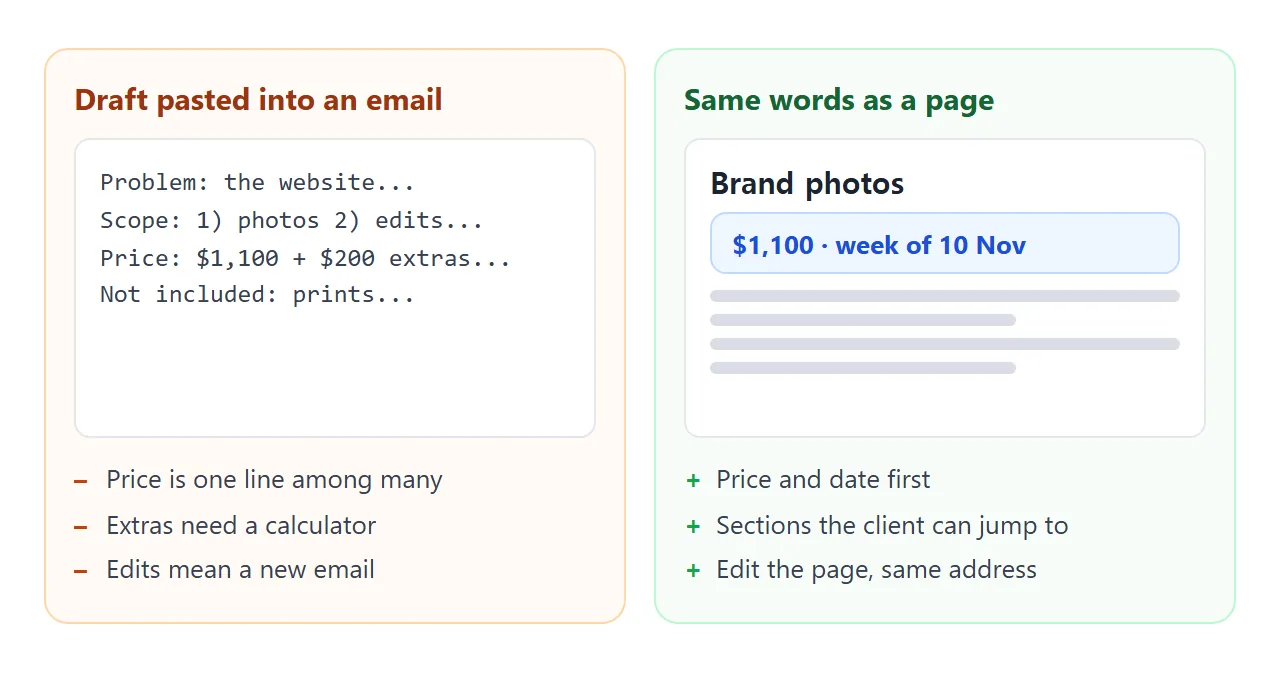
| Text pasted in the email | Attached file | Link to a page | |
|---|---|---|---|
| Opens on a phone | Yes | After a download | Yes, in the browser |
| Price and date first | Only if you format it | Depends on the file | Yes, by design |
| Change after sending | Send a new email | Send a new file | Edit the page, same link |
| Tappable packages | No | No | Yes |
| Forwarded inside the client | Pasted text | Many copies | One address |
For personal Gmail accounts, Google's help page gives the attachment limit as 25 MB, and Gmail adds a larger file as a Drive link instead (as of October 2026). Work and school accounts can have limits set by an administrator.
A one-page proposal is far below that, so size is rarely the problem. Changing it after it is sent is. See email vs link for documents.
One freelancer says their proposals are usually a one-page Google Doc or a five-to-seven-slide deck. A link is another route to the same reader.
For what to put on the page itself, read how to send a proposal to a client.
When it does not work
| What you see | Cause | Fix |
|---|---|---|
| The page shows code in the chat | You copied the chat text, not the code block | Copy only the code, from the doctype line to the last html tag |
| A logo or photo is missing | Images from other sites are blocked | Ask for no images, or a logo drawn in SVG |
| A number is different from your draft | The AI rewrote it | Compare with your notes, fix it, and keep the "do not change" rule |
| A contact form does nothing | Forms cannot send to a server from the link | Write your email address as plain text |
| The client sees the old price | They hold an old file or pasted copy | Send only the link from now on |
| The text is tiny on a phone | No viewport meta tag | Ask the AI to add one and a 16px base size |
Related reading
A proposal is one link in a chain. After a yes you will likely send a quote and a contract. Each can be a page behind its own link.
For the wider picture, the proposal link guide covers writing for the colleague who was not on the call.