The example: one job, two ways to say yes
The sample is a proposal from Fieldstone Grounds Co. to the property manager of Maple Ridge Medical Plaza for year-round grounds care. Both businesses, every person, price and date in it are invented for illustration, and the prices are not market rates.
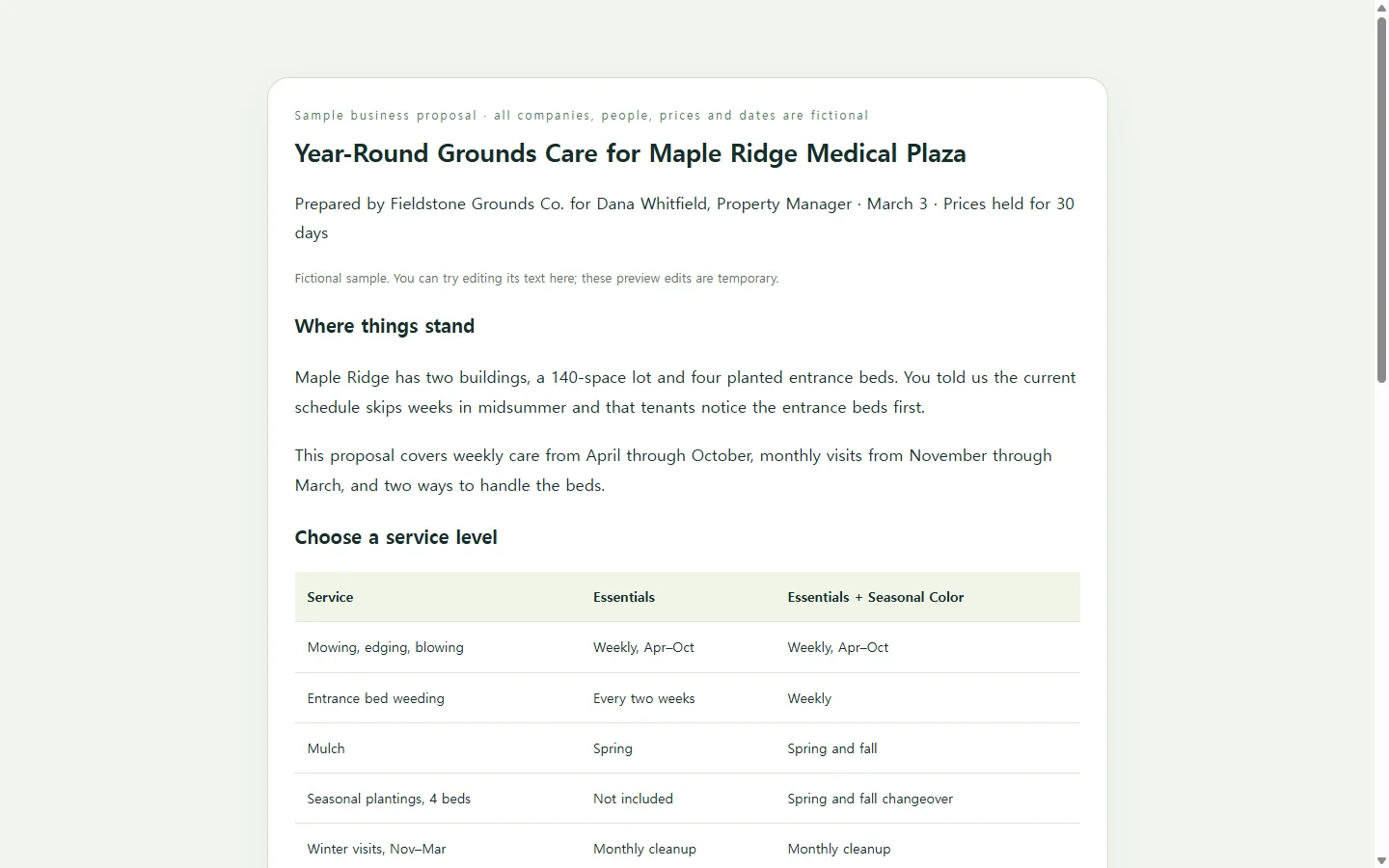
It opens with the client's situation in a few sentences rather than the vendor's history. Then it sets two monthly service levels side by side, names what neither covers, shows the first month as a short timeline, and ends with the three things the client has to confirm. That last block does more than it seems to: a proposal that spells out what “yes” requires is easier to act on than one that closes with “let us know.”
Why the price sits in a table next to the exclusions
Two options in columns let the reader weigh scope against cost without hunting through paragraphs. One common template layout covers problem statements, market opportunities and pricing, and uses tables for price breakdowns and timelines. The example keeps the pricing and the timeline and drops the market analysis, because a property manager choosing a maintenance contract doesn't need one.
The exclusions block, with snow removal billed per event and irrigation repairs quoted separately, answers the question the client would otherwise raise in February. If your proposal grows past a few pages, a table of contents helps the reader move around; this one is short enough to skip it.
Picking a way to build it
If the client has asked for a Word file or a PDF, start from a word processor template and send exactly that. Pre-formatted templates hold the layout steady while you replace placeholder text and headings, and the finished document can be exported to PDF for an email attachment.
Design-tool galleries offer polished multi-page layouts, which suit a pitch that needs visual weight but can be more document than a short service offer calls for. Hiring a writer or designer makes sense when the contract is large enough to justify the cost and the wait. When you already know the scope and the numbers, the slow part is layout, and that is the part an AI assistant can take on.
One way to do it is to ask for a single HTML file. HTML is the format web pages are written in: your browser opens the file directly, and the same file can be published as a page with its own link.
Making your own version with AI
Before you open a chat, write down what only you know: the client's name and contact, their situation in their words, the work, your price levels, what's excluded, a start date and the steps to accept. The assistant should arrange those facts, not supply them. The prompt marks every fact as a placeholder and tells the model to flag gaps instead of filling them.
When the page comes back, check every number against your notes, then open it on your phone and make sure the options table still reads on a narrow screen.
When the client asks for one change
Follow the client's submission instructions first. If they want a PDF or Word attachment, send that; a web link is not a substitute.
When a link is welcome, such as a preview before the formal copy or a follow-up after a call, you can add the HTML page to NOS, publish a sharing link and send it. The recipient can open the page without creating an account.
Suppose the property manager writes back asking for an April 14 start instead of April 7, plus a note about Saturday mowing. In NOS you edit those words on the page directly, without another round of AI generation for two small changes. The link you sent stays the same, so the manager opens the address they already have and sees the new date.
Direct edits change text only. If you move a price, update any total or comparison that depends on it yourself, and say in your reply what changed rather than counting on the client to spot it.
A prompt to adapt
Create a single, self-contained HTML file for a business proposal. Use only the facts below. If something needed is missing, write [TO CONFIRM: what is missing] in its place. Do not invent names, prices, dates, results, testimonials or credentials.

FACTS
- My business: [Business name], [one-line description, e.g. commercial grounds maintenance in Dayton, OH], contact [name, email, phone]
- Client: [Client company], attention [contact name, title]
- Their situation in their words: [2-3 sentences, e.g. The current crew skips weeks in midsummer; tenants complain about the entrance beds first.]
- Scope: [services and frequency, e.g. weekly mowing and edging Apr-Oct, monthly cleanup Nov-Mar]
- Option 1: [name] - [price and billing period] - includes [items]
- Option 2: [name] - [price and billing period] - includes [items]
- Not included or billed separately: [items with prices or how they are quoted]
- Start and first-month steps: [dates and what happens on each]
- To accept, the client confirms: [e.g. option chosen, start week, billing contact]
- Proposal date and how long prices hold: [date], [e.g. 30 days]

OUTPUT REQUIREMENTS
- One HTML file with all CSS in a <style> tag. No external scripts, fonts, images, trackers or API calls.
- Display only: no forms, no sign or Accept buttons, nothing that looks like it submits data.
- Section order: opening on the client's situation; scope; options as a comparison table; exclusions; start timeline; how to accept; contact.
- One h1, then h2 headings in order. Options in a real <table> with a <caption> and <th scope="col"> header cells. Timelines and acceptance steps as lists.
- Text contrast at least 4.5:1 against its background; body text at least 16px; never use color alone to show a difference.
- Mobile first: readable at 360px wide with no sideways scrolling of the page. On narrow screens, let the options table scroll inside its own container or stack into one card per option.
- Add print styles so the page prints cleanly on US letter paper.
- Plain, direct business English. No slogans or claims I have not given you.
- Return only the HTML.