A consulting proposal template needs only six parts: the problem, the scope, the timeline, the fees, the terms and the next step. Put them on one short page and send a single link instead of a deck.
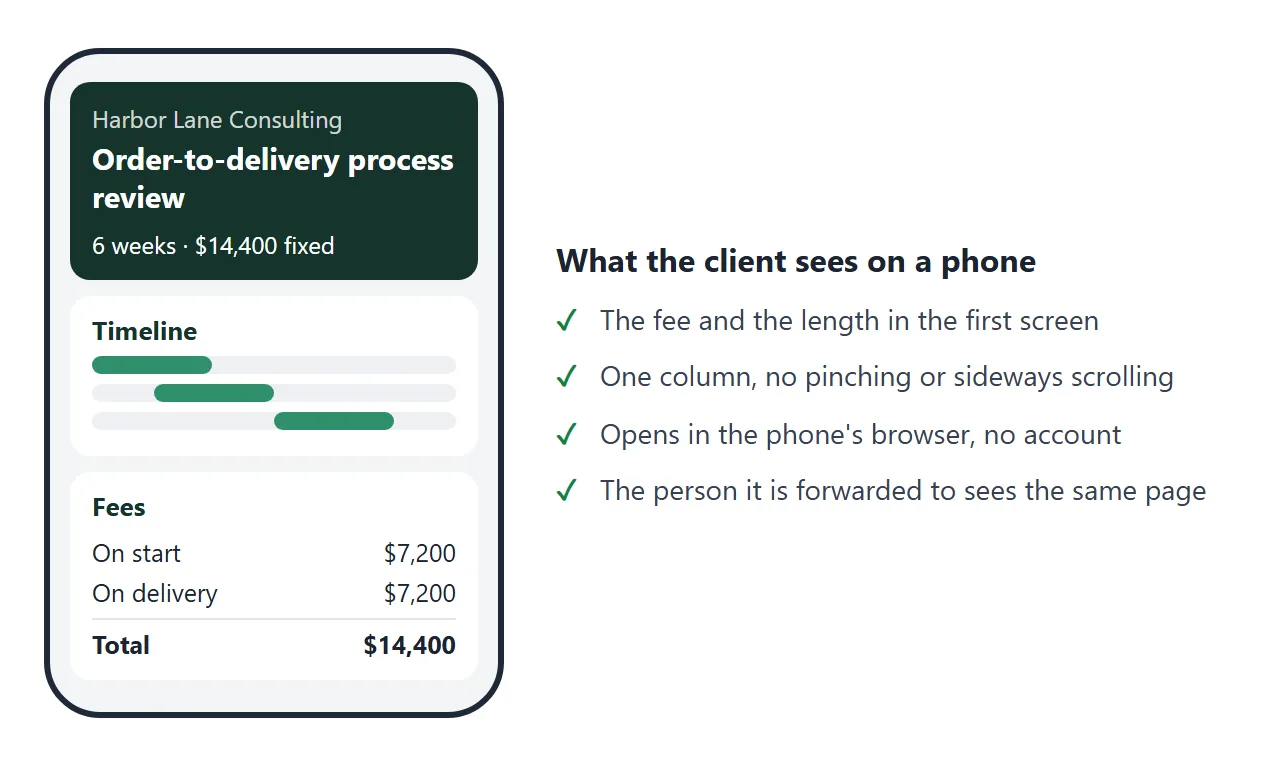
The people who open it are your contact and whoever they forward it to, often on a phone and often without having heard your call. A short page with the fee near the top works for all of them.
Try the example. Switch between the two options and the timeline, the payments and the total change together.
<!doctype html>
<html lang="en">
<head>
<meta charset="utf-8">
<meta name="viewport" content="width=device-width, initial-scale=1">
<title>Proposal: order-to-delivery review</title>
<style>
* { box-sizing: border-box; }
body {
margin: 0; background: #f3f4f6; color: #1f2937;
font: 15px/1.5 system-ui, -apple-system, "Segoe UI", sans-serif;
}
.page { max-width: 820px; margin: 0 auto; padding: 14px 14px 20px; }
.cols { display: grid; grid-template-columns: 1fr 1fr; gap: 0 12px; }
.cols section { margin-top: 10px; }
header { background: #14342b; color: #fff; border-radius: 14px; padding: 16px 18px 14px; }
header small { display: block; opacity: .75; font-size: 13px; letter-spacing: .02em; }
header h1 { margin: 4px 0 8px; font-size: 22px; line-height: 1.25; }
.sum { display: flex; flex-wrap: wrap; gap: 8px 22px; font-size: 15px; }
.sum b { font-size: 19px; display: block; }
section { background: #fff; border-radius: 14px; padding: 13px 18px; margin-top: 10px; }
h2 { margin: 0 0 8px; font-size: 17px; color: #14342b; }
p { margin: 0 0 8px; }
ul { margin: 0; padding-left: 20px; }
li { margin: 3px 0; }
.two { display: grid; grid-template-columns: 1fr 1fr; gap: 6px 24px; }
.two h3 { margin: 0 0 4px; font-size: 14px; text-transform: uppercase; letter-spacing: .04em; color: #6b7280; }
.opts { display: flex; gap: 8px; margin: 4px 0 14px; flex-wrap: wrap; }
.opts button {
font: inherit; font-size: 14px; padding: 8px 14px; border-radius: 999px; cursor: pointer;
border: 1.5px solid #14342b; background: #fff; color: #14342b;
}
.opts button[aria-pressed="true"] { background: #14342b; color: #fff; }
.row { margin: 6px 0; }
.row span { display: block; font-size: 14px; margin-bottom: 3px; }
.track { display: grid; height: 14px; background: #eef0f3; border-radius: 7px; overflow: hidden; }
.bar { background: #2f8f6b; border-radius: 7px; }
.wk { display: flex; justify-content: space-between; font-size: 12px; color: #6b7280; margin-top: 4px; }
table { width: 100%; border-collapse: collapse; font-size: 15px; }
td, th { padding: 5px 0; border-bottom: 1px solid #e5e7eb; text-align: left; }
td:last-child, th:last-child { text-align: right; }
tr.total td { font-weight: 700; border-bottom: 0; font-size: 17px; }
.note { font-size: 14px; color: #4b5563; }
.next { background: #e8f3ee; }
@media (max-width: 640px) { .two, .cols { grid-template-columns: 1fr; } header h1 { font-size: 20px; } }
</style>
</head>
<body>
<div class="page">
<header>
<small>Proposal for Brightwater Foods · from Harbor Lane Consulting · valid for 30 days from 1 October 2026</small>
<h1>Order-to-delivery process review</h1>
<div class="sum">
<div>Duration<b id="s-weeks"></b></div>
<div>Fixed fee<b id="s-fee"></b></div>
<div>Starts<b>Monday after sign-off</b></div>
</div>
</header>
<section>
<h2>The problem</h2>
<p>Orders reach the warehouse late and some are shipped with the wrong items. Nobody has mapped the steps between the order and the delivery, so each team fixes its own part.</p>
</section>
<section>
<h2>Scope</h2>
<div class="two">
<div>
<h3>Included</h3>
<ul>
<li>Interviews with up to 8 staff</li>
<li>One map of the process, start to finish</li>
<li>Written findings and a ranked list of fixes</li>
<li>One 90-minute readout</li>
</ul>
</div>
<div>
<h3>Not included</h3>
<ul>
<li>Changing any software</li>
<li>Hiring or staffing advice</li>
<li>Work on other sites</li>
</ul>
</div>
</div>
</section>
<div class="cols">
<section>
<h2>Timeline</h2>
<div class="opts" role="group" aria-label="Choose an option">
<button type="button" id="o-std" aria-pressed="true">Standard</button>
<button type="button" id="o-ext" aria-pressed="false">Extended, with pilot</button>
</div>
<div id="timeline"></div>
<div class="wk" id="weeks"></div>
</section>
<section>
<h2>Fees</h2>
<table>
<tbody id="fees"></tbody>
</table>
<p class="note" style="margin-top:10px">Amounts exclude sales tax. Invoices are payable within 14 days.</p>
</section>
</div>
<section class="next">
<h2>Next step</h2>
<p>Reply to the email that brought you here with the option you choose and the words “Accepted”. I will send a contract to sign before work starts.</p>
</section>
</div>
<script>
const RATE = 1200; // fictional day rate
const OPTIONS = {
std: { days: 12, weeks: 6, pay: [['On start', 50], ['On delivery of findings', 50]],
phases: [['Interviews', 1, 2], ['Process map', 2, 3], ['Findings and fixes', 4, 5], ['Readout', 6, 6]] },
ext: { days: 18, weeks: 9, pay: [['On start', 40], ['After findings', 30], ['After pilot', 30]],
phases: [['Interviews', 1, 2], ['Process map', 2, 4], ['Findings and fixes', 5, 6], ['Readout', 7, 7], ['Pilot support', 8, 9]] }
};
const money = (n) => '$' + n.toLocaleString('en-US');
const $ = (id) => document.getElementById(id);
function render(key) {
const o = OPTIONS[key];
const fee = o.days * RATE;
$('s-weeks').textContent = o.weeks + ' weeks';
$('s-fee').textContent = money(fee);
$('timeline').innerHTML = o.phases.map(([name, from, to]) =>
'<div class="row"><span>' + name + ' <small>(week ' + (from === to ? from : from + '-' + to) + ')</small></span>' +
'<div class="track" style="grid-template-columns:repeat(' + o.weeks + ',1fr)">' +
'<div class="bar" style="grid-column:' + from + ' / ' + (to + 1) + '"></div></div></div>').join('');
$('weeks').innerHTML = '<span>Week 1</span><span>Week ' + o.weeks + '</span>';
$('fees').innerHTML =
'<tr><td>' + o.days + ' consulting days at ' + money(RATE) + '</td><td>' + money(fee) + '</td></tr>' +
o.pay.map(([label, pct]) =>
'<tr><td class="note"> ' + label + ' (' + pct + '%)</td><td class="note">' + money(Math.round(fee * pct / 100)) + '</td></tr>').join('') +
'<tr class="total"><td>Total</td><td>' + money(fee) + '</td></tr>';
$('o-std').setAttribute('aria-pressed', key === 'std');
$('o-ext').setAttribute('aria-pressed', key === 'ext');
}
$('o-std').addEventListener('click', () => render('std'));
$('o-ext').addEventListener('click', () => render('ext'));
render('std');
</script>
</body>
</html>
The six parts, in order
Each part answers one question the reader already has. If a part does not answer a question, cut it.
| Part | The question it answers | Keep it to |
|---|---|---|
| Problem | Why is this work needed? | Two or three sentences |
| Scope | What do I get, and what do I not get? | Two short lists |
| Timeline | When does it start and end? | Weeks from sign-off |
| Fees | What does it cost and when do I pay? | A total, then stages |
| Terms | What else am I agreeing to? | Validity, tax, payment days |
| Next step | What do I do now? | One action |
Put a three-item summary in the header: length, fee and start. A reader who stops after one screen then still has the decision. Proposal link goes deeper on writing for the person who forwards it.
Write scope, timeline and fees so nobody has to ask
Most follow-up questions come from three places, and each one can be answered on the page.
- Scope: list what is not included next to what is. An exclusions list settles disagreements before work starts.
- Timeline: count weeks from sign-off instead of using calendar dates. The page stays true if the start moves.
- Fees: show the total first, then the payment stages. Say whether sales tax is included and how many days an invoice is payable within.
Add a short line on what you need from the client, such as interview time or access to a system. It saves a round of email later. Send a proposal to a client covers who reads each part.
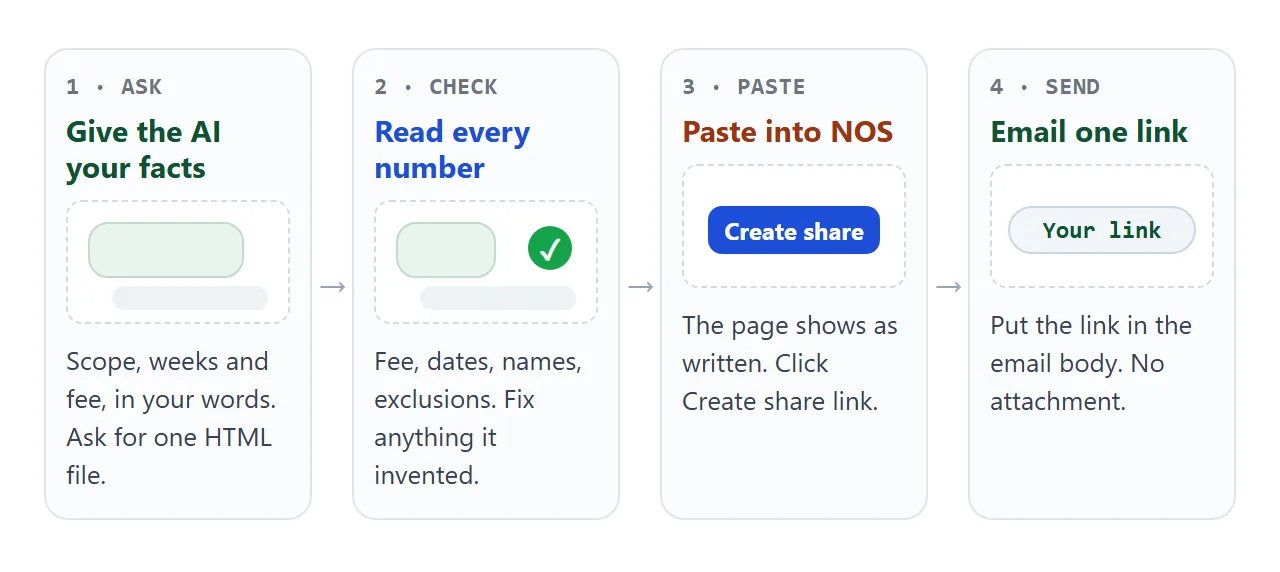
Make it with AI
Fill in the square brackets and paste this into ChatGPT, Claude or Gemini.
Write ONE self-contained HTML file: a one-page consulting proposal.
Plain HTML, CSS and a little JavaScript. No external images,
no web fonts, no forms that send data. One column that works
on a phone, with a viewport meta tag.

Header: project title, client [CLIENT NAME], from [MY NAME],
valid until [DATE], and a summary of length, total fee and start.
Sections: The problem, Scope (Included and Not included),
Timeline (weeks counted from sign-off), Fees, Next step.

Use only these facts. If something is missing, write TODO.
Problem: [2-3 SENTENCES]
Included: [LIST]   Not included: [LIST]
Phases and weeks: [PHASE, WEEKS; PHASE, WEEKS]
Fee: [DAYS] days at [RATE], paid in [STAGES AND PERCENTAGES]
Tax: [INCLUDED OR NOT]. Invoices payable within [N] days.
Next step: reply to my email with "Accepted".
Then check the result before you send it:
- Do the numbers add up? The stages must equal the total. Work out days times rate yourself.
- Is anything invented? Remove guarantees, past clients or results you did not give it. Search for TODO.
- Are names and dates right? Client name, your name, the validity date.
- Does it fit a phone? Narrow your browser window to about 390 pixels wide and scroll down.
Let the client tick optional extras
If you sell extras, a scope picker lets the client see the price move as they tick. Here the core review is fixed and four extras are optional.
<!doctype html>
<html lang="en">
<head>
<meta charset="utf-8">
<meta name="viewport" content="width=device-width, initial-scale=1">
<title>Scope picker</title>
<style>
  * { box-sizing: border-box; }
  body { margin: 0; background: #f3f4f6; color: #1f2937; font: 16px/1.5 system-ui, -apple-system, "Segoe UI", sans-serif; }
  .page { max-width: 640px; margin: 0 auto; padding: 18px 16px 28px; }
  h1 { font-size: 21px; margin: 0 0 4px; color: #14342b; }
  .sub { margin: 0 0 14px; color: #4b5563; font-size: 15px; }
  .card { background: #fff; border-radius: 14px; padding: 14px 18px; margin-bottom: 12px; }
  .base { display: flex; justify-content: space-between; gap: 12px; font-weight: 600; }
  .base small, label small { display: block; font-weight: 400; color: #6b7280; font-size: 13px; }
  label { display: flex; gap: 12px; align-items: flex-start; padding: 10px 0; border-top: 1px solid #e5e7eb; cursor: pointer; }
  label:first-of-type { border-top: 0; }
  label input { width: 22px; height: 22px; margin-top: 2px; flex: none; accent-color: #2f8f6b; }
  label .t { flex: 1; }
  label .p { white-space: nowrap; font-weight: 600; }
  .total { background: #14342b; color: #fff; display: flex; justify-content: space-between; align-items: baseline; gap: 12px; flex-wrap: wrap; }
  .total b { font-size: 24px; }
  .total span { font-size: 14px; opacity: .85; }
  textarea { width: 100%; height: 76px; font: 14px/1.4 ui-monospace, Consolas, monospace; border: 1px solid #d1d5db; border-radius: 10px; padding: 8px 10px; resize: none; }
  .hint { font-size: 13px; color: #6b7280; margin: 6px 0 0; }
</style>
</head>
<body>
<div class="page">
  <h1>Choose your scope</h1>
  <p class="sub">The core review is included. Tick any extras, and the fee and the length update.</p>

  <div class="card">
    <div class="base"><div>Core process review<small>6 weeks, up to 8 interviews, one readout</small></div><div>$12,000</div></div>
  </div>

  <div class="card" id="extras"></div>

  <div class="card total">
    <div><span>Total fee</span><br><b id="total"></b></div>
    <div><span>Length</span><br><b id="weeks"></b></div>
  </div>

  <div class="card">
    <strong>Your choice, ready to paste into a reply</strong>
    <textarea id="summary" readonly></textarea>
    <p class="hint">Select the text and copy it into your reply. The page does not send anything.</p>
  </div>
</div>

<script>
  const BASE = { fee: 12000, weeks: 6 };
  const EXTRAS = [
    { id: 'visit', name: 'Warehouse site visit', note: 'One day on site', fee: 1800, weeks: 0 },
    { id: 'survey', name: 'Supplier survey', note: 'Questionnaire to 20 suppliers, summary of replies', fee: 2400, weeks: 1 },
    { id: 'workshop', name: 'Team workshop', note: 'Half day with the findings', fee: 2000, weeks: 0 },
    { id: 'checkin', name: '90-day check-in', note: 'One call and a one-page update', fee: 1600, weeks: 0 }
  ];
  const money = (n) => '$' + n.toLocaleString('en-US');

  const box = document.getElementById('extras');
  box.innerHTML = EXTRAS.map((x) =>
    '<label><input type="checkbox" id="' + x.id + '"><span class="t">' + x.name + '<small>' + x.note +
    (x.weeks ? ' (+' + x.weeks + ' week)' : '') + '</small></span><span class="p">+' + money(x.fee) + '</span></label>').join('');

  function update() {
    const picked = EXTRAS.filter((x) => document.getElementById(x.id).checked);
    const fee = picked.reduce((s, x) => s + x.fee, BASE.fee);
    const weeks = picked.reduce((s, x) => s + x.weeks, BASE.weeks);
    document.getElementById('total').textContent = money(fee);
    document.getElementById('weeks').textContent = weeks + ' weeks';
    document.getElementById('summary').value =
      'Accepted: core review' + picked.map((x) => ' + ' + x.name).join('') +
      '. Total ' + money(fee) + ', ' + weeks + ' weeks.';
  }

  box.addEventListener('change', update);
  update();
</script>
</body>
</html>
There is a catch. In NOS, changes you make yourself in View mode, such as ticks, are saved. A visitor's changes are not.
So the client's ticks only help them see the price, and the answer has to come back by reply. That is why the page writes a line they can paste.
Send it as a link
Copy the HTML from the chat, paste it into a NOS document, and choose Create share link. HTML to link walks through it. Then paste the link into the body of your email.
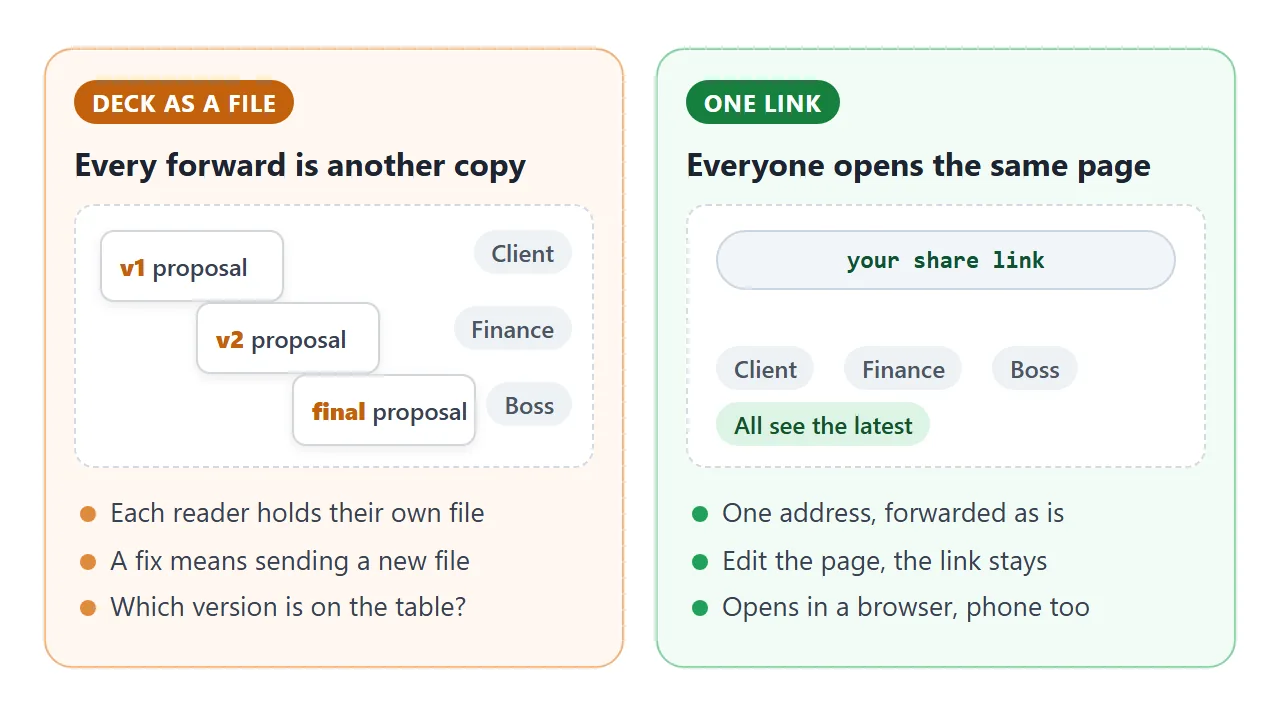
The client opens it in a browser, on a phone too, with no account. They cannot edit it. If you change the code later, the same link shows the new version, so fix a number and tell them it is updated.
NOS does not tell you who opened the link, so follow up by message instead of waiting. For a printed leave-behind, a QR code of the link works; see QR code link.
A proposal page is not a signed contract. When you need a signature, send the contract as its own document; see contract link.
Ways to send a proposal compared
The question is what happens after you send it, not how the page looks.
An independent consultant filed a feature request on Anthropic's GitHub repository, since closed as not planned. It described the need as handing a polished deliverable to someone outside your org.
The request said the Share button in their AI tool was limited to Team and Enterprise plans. Tools and plans change, so check yours as of October 2026.
| Way | What the client gets | After you fix a number |
|---|---|---|
| Deck or PDF attached | A file copy per reader | Send a new file, copies drift |
| Share button in your AI tool | Depends on the tool and plan | Depends on the tool |
| Link to your own page | One address for everyone | Edit the page, same link |
If a procurement portal asks for a file, send the file. Use the link for the people you actually talk to. HTML or PDF for client documents compares the two further.
When it does not work
| Symptom | Cause | Fix |
|---|---|---|
| Payments do not add up to the total | The AI did the arithmetic in prose | Recalculate and correct, or ask for the totals to be computed from days and rate |
| Page is tiny or wide on a phone | No viewport tag or fixed widths | Ask for a viewport meta tag and one column |
| Your logo or photo is missing | Images from other sites are blocked | Use text, inline SVG or CSS shapes |
| An Accept button does nothing | Sending a form to a server is blocked | Ask the client to reply by email |
| Client says their ticks vanished | A visitor's changes are not saved | Ask them to reply with the summary line |
| Fonts look different from the preview | A font that is not loaded falls back | Use system fonts, or one from Google Fonts |