Start with the decision, not the cover page
A project proposal asks someone to approve a piece of work. Before you pick a layout, write one sentence that names who decides and what you want them to approve. That sentence tells you which parts your proposal needs and which ones it can skip.
A design-tool guide on project proposals suggests thinking through the questions you might be asked, including who, what, where, when and why. Then consider adding two more for your approver: what it costs, and how you'll tell whether it worked. If your project has no budget, leave that part out instead of padding it.
A filled-in example: a Saturday pickup pilot
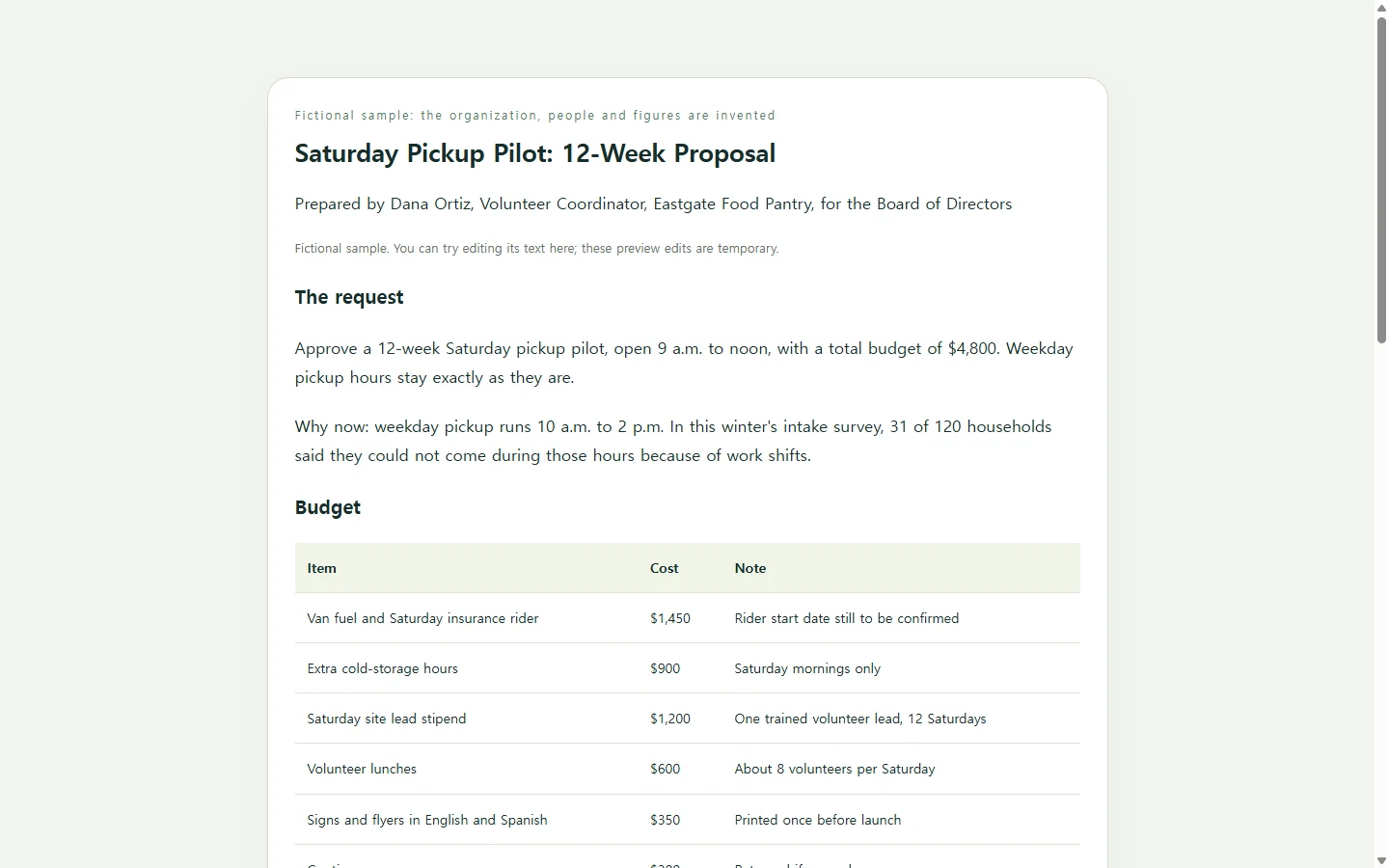
The sample below is fictional. Eastgate Food Pantry, volunteer coordinator Dana Ortiz, the survey count, the budget and the targets are invented to show how the parts fit together. In the sample, Dana is asking the pantry's board to approve a 12-week Saturday pickup pilot for $4,800.
Notice what the sample does more than how it looks. The opening states the request and the amount in two sentences, so a board member who reads nothing else still knows what the vote is about. The budget is a short table because a treasurer will compare lines, and the total is written out rather than left for the reader to add. Each risk sits beside what Dana will do about it. The page ends with the exact decision requested and the questions still open, so the meeting can end with an answer.
Your project will need a different middle. A school project might trade the budget for materials and a schedule; a change to an internal process might need a short note on what stays the same. Keep the request-first opening and the decision at the end, and swap what sits between them.
Choose how to build yours
If your reviewer asked for a Word document or a PDF, give them that. Start from a word processor or a printable design template and deliver the file they requested; a web link should not stand in for a required file.
If a link is welcome, as with an internal proposal people will read on laptops and phones, a single web page is another option. You don't have to design it yourself. You can ask an AI chat tool to write the page as HTML, the code a browser reads to display a page, from notes you supply.
The prompt below keeps the AI working from your facts. It asks the AI to mark anything missing as [TO CONFIRM] rather than invent a number, but you still need to read every figure, date and name before you send the page.
After you send it, details move
Picture the fictional board reading Dana's page on Monday, then the treasurer replying that the van insurance rider won't be active until two weeks after the planned start. With an attached file, Dana would edit the document and send a new version, and the board would need to sort out which copy is current.
If Dana keeps the page in NOS, she can change the start week directly in the page's text, without asking an AI to regenerate the whole page for a one-line fix. The link the board already has stays the same after the edit, so anyone who opens it sees the new start week. Board members can open the shared page without an account.
One thing to handle yourself: the sample's budget total is typed text, not a formula. If you change a line item, update the total in the same edit. And if the board later wants a file for its records, give it the format it asks for.
Start with your one-sentence request, fill in the prompt with your own facts, and check every number before the link goes out.
A prompt to adapt
Build a single, self-contained HTML page for a project proposal. Use only the facts I give below. If something is missing or unclear, show [TO CONFIRM] in that spot instead of inventing a number, name, date or result.

Project name: [PROJECT NAME]
Who decides: [APPROVER, e.g., board of directors / my manager / course instructor]
What I'm asking them to approve: [ONE-SENTENCE REQUEST, including the amount if any]
Why now: [2-3 SENTENCES OF BACKGROUND, with any real numbers you have]
Plan and timing: [PHASES OR WEEKS, AND WHO DOES WHAT]
Budget lines: [ITEM - AMOUNT - NOTE, one per line, plus my total; or write: no budget]
Risks: [RISK - WHAT I'LL DO ABOUT IT, one per line]
How we'll judge it: [MEASURES AND TARGETS]
Decision and open questions: [WHAT I NEED THEM TO DECIDE; WHAT IS STILL UNRESOLVED]
Prepared by: [YOUR NAME, ROLE, DATE]

Page requirements:
- Open with the request and the amount in two sentences or fewer, then the background.
- Show the budget as a real HTML table with a header row and a total row. Do not change my numbers. If my lines don't add up to my total, add a visible [CHECK TOTAL] note next to the total. If I wrote no budget, leave the budget section out.
- Show the plan as an ordered timeline and the risks as risk/response pairs.
- End with a short checklist of the decision requested and the open questions.
- One HTML file with CSS inside a <style> tag. No JavaScript. No external fonts, images, scripts or links to other files.
- No forms, input fields, sign-up boxes, or buttons that look like they submit, download, export or send anything.
- Accessibility: exactly one <h1>, headings in order without skipping levels, strong text contrast against the background, body text at least 16px, and no information conveyed by color alone.
- Mobile: readable at 375px wide without zooming; the table must scroll sideways inside its own container or stack into rows, and nothing may make the page wider than the screen.
- Plain, calm design with one accent color and generous spacing.
- Return only the complete HTML code.