A marketing proposal template is a page with the same few sections every time: the client's goal, what you will do, the timeline, the price, and how to accept.
The quickest route for a freelancer is to copy a sample, let an AI fill it from your facts, check the numbers, and send it as one link.
Sending the proposal is where it gets messy. One solo professional who shares AI-made analysis described the routine: "export to PDF, email the attachment, and field replies by email. Every revision is a new attachment. Nobody is sure which version is current."
Here is a sample you can copy. Press a package and tick an add-on to see the total change. Every name and number is made up, so replace them with yours.
<!doctype html>
<html lang="en">
<head>
<meta charset="utf-8">
<meta name="viewport" content="width=device-width, initial-scale=1">
<title>Marketing proposal: Harbor and Pine Coffee</title>
<style>
  * { box-sizing: border-box; }
  body { margin: 0; font-family: system-ui, sans-serif; color: #1d2330; background: #f4f5f7; line-height: 1.55; }
  .page { max-width: 720px; margin: 0 auto; padding: 22px 18px 30px; background: #fff; }
  .tag { display: inline-block; font-size: 12px; font-weight: 700; letter-spacing: .4px; color: #9a3412; background: #ffedd5; border-radius: 999px; padding: 2px 10px; }
  h1 { font-size: 26px; line-height: 1.2; margin: 10px 0 6px; }
  .meta { color: #5b6473; font-size: 14px; margin: 0 0 16px; }
  .sum { background: #eff6ff; border-radius: 10px; padding: 12px 14px; margin: 0 0 6px; }
  .sum b { color: #1d4ed8; }
  h2 { font-size: 18px; margin: 24px 0 6px; }
  p { margin: 0 0 10px; }
  ul { padding-left: 20px; margin: 0; }
  li { margin-bottom: 5px; }
  .pk { display: grid; grid-template-columns: repeat(3, 1fr); gap: 8px; margin: 8px 0 12px; }
  .pk button { font: inherit; text-align: left; padding: 10px 12px; border-radius: 10px; border: 1px solid #c9ceda; background: #fff; cursor: pointer; }
  .pk button b { display: block; font-size: 15px; }
  .pk button span { font-size: 13px; color: #5b6473; }
  .pk button[aria-pressed="true"] { border-color: #1d4ed8; background: #eff6ff; box-shadow: 0 0 0 1px #1d4ed8; }
  .add { display: block; margin: 0 0 6px; font-size: 15px; }
  .add input { margin-right: 8px; }
  .total { margin-top: 12px; padding: 12px 14px; border-radius: 10px; background: #f0fdf4; border: 1px solid #bbf7d0; display: flex; justify-content: space-between; gap: 10px; flex-wrap: wrap; }
  .total b { font-size: 22px; color: #0f5132; }
  .note { font-size: 13px; color: #5b6473; border-left: 3px solid #d5d9e0; padding-left: 10px; margin-top: 10px; }
  .accept { margin-top: 22px; padding: 12px 14px; border-radius: 10px; background: #fff7ed; border: 1px solid #fed7aa; }
  footer { margin-top: 18px; padding-top: 12px; border-top: 1px solid #e5e7eb; font-size: 14px; color: #374151; }
  @media (max-width: 480px) { h1 { font-size: 22px; } .pk { grid-template-columns: 1fr; } }
</style>
</head>
<body>
<main class="page">
  <span class="tag">SAMPLE - replace every name and number with yours</span>
  <h1>Marketing proposal: spring launch for Harbor and Pine Coffee</h1>
  <p class="meta">Prepared by Fieldnote Studio (made-up) - valid until 30 November 2026 - version 1</p>

  <div class="sum">
    <p><b>The goal.</b> Get more people to try the new seasonal menu in the first month after it opens.</p>
    <p><b>What we will do.</b> Plan the launch, write and design the content, and report what happened.</p>
    <p style="margin:0"><b>What it costs.</b> From the amount in the choice box below, depending on the package.</p>
  </div>

  <h2>Scope: what is included</h2>
  <ul>
    <li>One planning call and a written launch plan.</li>
    <li>Launch posts, an email to the existing list, and a poster for the counter.</li>
    <li>A short report at the end, with the numbers you can check yourself.</li>
  </ul>

  <h2>Choose a package</h2>
  <p>Press a package, then tick any add-ons. The total changes as you go. Nothing is sent or saved.</p>
  <div class="pk" role="group" aria-label="Packages">
    <button type="button" data-p="starter" aria-pressed="true"><b>Starter</b><span>6 posts, 1 email</span></button>
    <button type="button" data-p="growth" aria-pressed="false"><b>Growth</b><span>12 posts, 2 emails, poster</span></button>
    <button type="button" data-p="full" aria-pressed="false"><b>Full launch</b><span>20 posts, 3 emails, poster, report</span></button>
  </div>
  <label class="add"><input type="checkbox" data-a="photo"> Photo styling day (sample 400)</label>
  <label class="add"><input type="checkbox" data-a="ads"> Ad set-up, two weeks (sample 350)</label>
  <div class="total" aria-live="polite">
    <span id="pname">Starter package</span>
    <b id="ptotal">1,200</b>
  </div>
  <p class="note">All amounts are invented sample figures in one currency. Say what is not included, such as ad spend or printing.</p>

  <h2>Timeline</h2>
  <ul>
    <li><b>Week 1:</b> planning call, launch plan agreed.</li>
    <li><b>Weeks 2 to 3:</b> content drafted and sent to you for comments.</li>
    <li><b>Week 4:</b> publish, then a short report.</li>
  </ul>

  <div class="accept">
    <b>To accept:</b> reply to the email that came with this link, saying which package and add-ons you want. This page does not collect signatures or payments.
  </div>

  <footer>Fieldnote Studio - hello@example.com</footer>
</main>

<script>
  const packages = {
    starter: { name: 'Starter package', price: 1200 },
    growth: { name: 'Growth package', price: 2100 },
    full: { name: 'Full launch package', price: 3400 }
  };
  const addons = { photo: 400, ads: 350 };
  let current = 'starter';

  function render() {
    let total = packages[current].price;
    document.querySelectorAll('[data-a]').forEach((box) => {
      if (box.checked) total += addons[box.dataset.a];
    });
    document.getElementById('pname').textContent = packages[current].name;
    document.getElementById('ptotal').textContent = total.toLocaleString('en-US');
    document.querySelectorAll('[data-p]').forEach((b) => {
      b.setAttribute('aria-pressed', String(b.dataset.p === current));
    });
  }

  document.querySelectorAll('[data-p]').forEach((b) => {
    b.addEventListener('click', () => { current = b.dataset.p; render(); });
  });
  document.querySelectorAll('[data-a]').forEach((box) => box.addEventListener('change', render));
  render();
</script>
</body>
</html>
What goes in a marketing proposal
Keep the order the same each time, so you can reuse the page for the next client. The reader should be able to stop after the first screen and still know what you are offering.
- Goal. One or two sentences in the client's own words.
- Scope. What is included, and what is not, such as ad spend or printing.
- Packages. Two or three options with one price each.
- Timeline and payments. Weeks, not vague promises.
- How to accept. One plain sentence, such as replying to your email.
Make it with AI
An AI is good at turning rough facts into a tidy page. It is also willing to fill gaps with plausible numbers, so the prompt has to forbid that.
Anthropic's documentation on reducing hallucinations suggests letting the model say it does not have enough information, and restricting it to documents you provide. It adds that these techniques do not eliminate hallucinations.
Paste the prompt below into ChatGPT, Claude or Gemini and replace the facts at the bottom.
Turn my facts into a marketing proposal as ONE self-contained HTML file.

Rules:
- Use only the facts below. Do not invent prices, dates, results, clients or guarantees.
- If something is missing, write [ADD: what is missing] instead of guessing.
- Sections in order: Goal, What I will do, What is not included, Packages (with prices), Timeline, How to accept.
- Plain HTML and CSS. It must work on a phone. No external images, scripts or forms.
- Under 500 words.

My facts:
Client and what they want:
Services and deliverables:
Not included:
Packages and prices:
Start date, weeks, payment dates:
Valid until:
Then check the result before it goes anywhere:
- Prices and dates. Match each one to your own notes.
- Promises. Remove any result or guarantee you did not write.
- [ADD] marks. Fill each one with a fact, or delete the sentence.
- Names. Use the client's name as they spell it, and leave out other clients.
- Phone. Narrow your browser window, or ask for a viewport meta tag. See viewport meta tag.
Send it as a link
A file attached to an email is a copy you cannot fix once it is sent. A link is one page you can still correct. Proposal link covers why that suits a proposal that gets passed around.
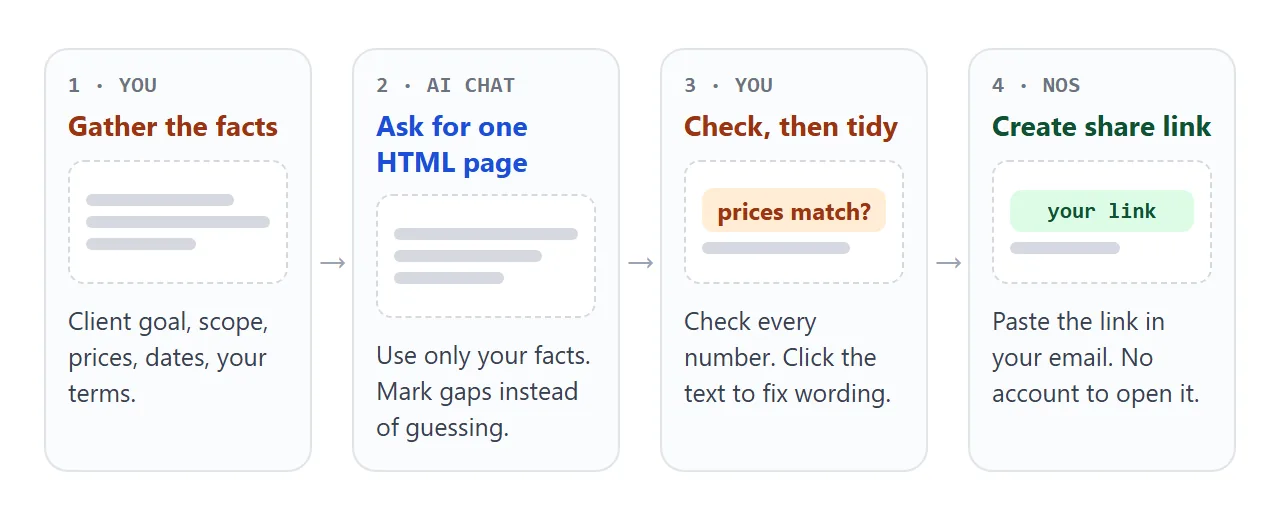
- Copy the whole HTML the AI gave you.
- Paste it into a NOS document. The page renders as written.
- Click any wording you want to improve and type. Editing HTML without coding explains this step.
- Choose Create share link. HTML to link walks through it.
- Paste the link into your email.
Whoever opens it sees the page in a browser, on a phone or a laptop, with no account to create. They cannot edit it. The sample's package buttons work for the client too, but what they tick is not saved for you.
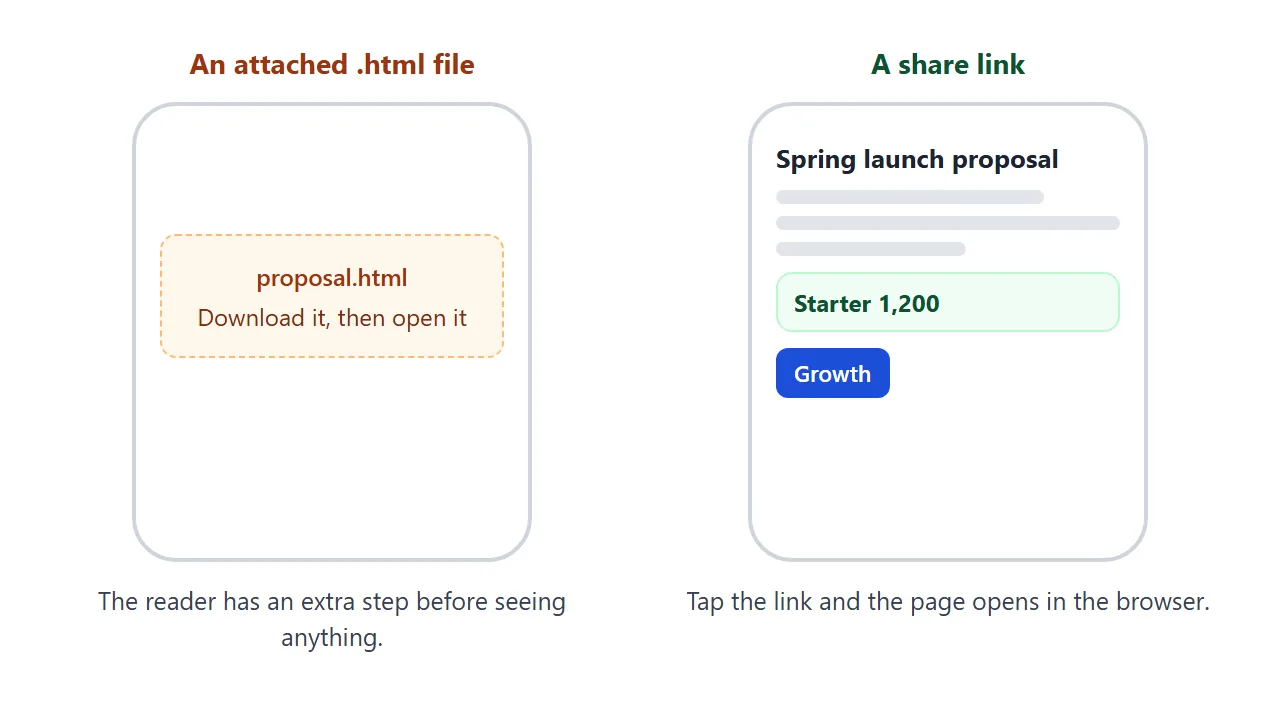
If you change a price later, you edit the text and the same link shows the new version. A form that sends data to a server is blocked, so the client says yes by replying to your email.
Anyone with the link can open the page, so leave out private data. If you are unsure how an attached file opens on a phone, read opening an HTML file on a phone.
Ways to send a proposal compared
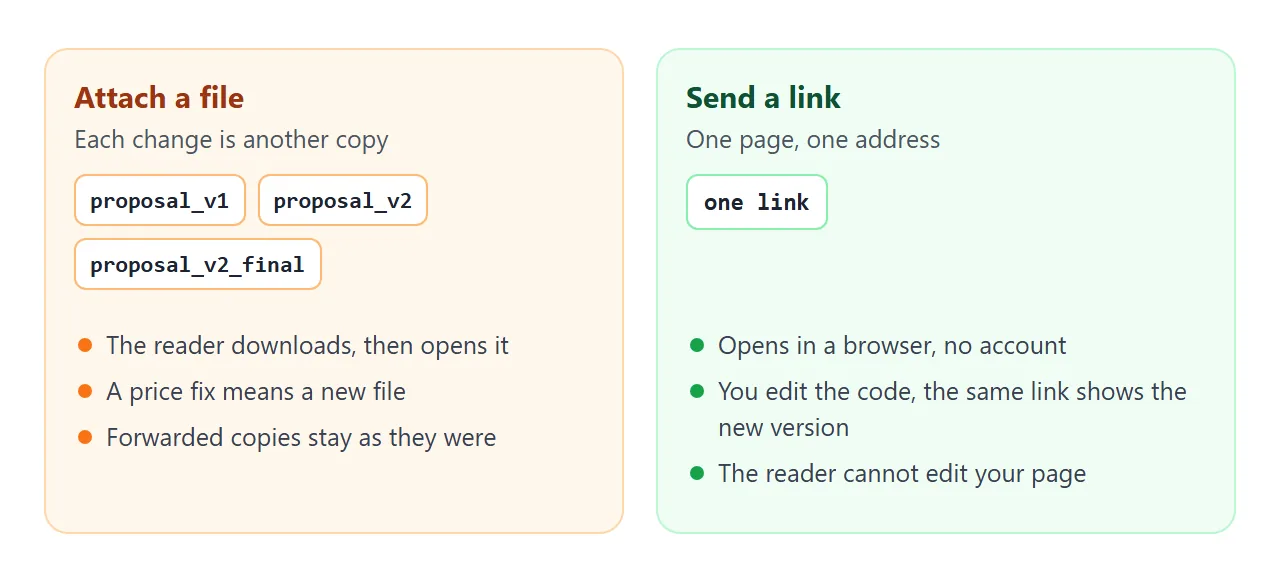
| Attach the .html file | Attach a PDF | Share link | |
|---|---|---|---|
| What the client needs | To download and open the file | To download and open the file | A browser, no account |
| Fixing a price later | Send a new file | Send a new file | Edit the text, same link |
| Copies in circulation | One per message or forward | One per message or forward | One page |
| Email size limit | Counts toward it | Counts toward it | A link is a line of text |
As of October 2026, Gmail's help says the attachment limit is 25 MB, and that Gmail adds a Google Drive link when the total is larger. A link avoids the question. Other mail services set their own limits.
Add a timeline and payment page
Clients often ask when the money is due. A second sample shows the same idea: pick a project length, and the bars and the payment dates follow.
<!doctype html>
<html lang="en">
<head>
<meta charset="utf-8">
<meta name="viewport" content="width=device-width, initial-scale=1">
<title>Timeline and payments</title>
<style>
  * { box-sizing: border-box; }
  body { margin: 0; padding: 16px 14px 24px; font-family: system-ui, sans-serif; color: #1d2330; background: #fff; line-height: 1.5; }
  .wrap { max-width: 680px; margin: 0 auto; }
  .tag { display: inline-block; font-size: 12px; font-weight: 700; color: #9a3412; background: #ffedd5; border-radius: 999px; padding: 2px 10px; }
  h1 { font-size: 22px; margin: 8px 0 4px; line-height: 1.2; }
  p { margin: 0 0 10px; color: #374151; }
  .toggle { display: flex; gap: 8px; margin: 12px 0; }
  .toggle button { font: inherit; font-size: 14px; padding: 6px 14px; border-radius: 999px; border: 1px solid #c9ceda; background: #fff; cursor: pointer; }
  .toggle button[aria-pressed="true"] { background: #1d4ed8; border-color: #1d4ed8; color: #fff; }
  .bars { display: grid; gap: 8px; margin: 6px 0 16px; }
  .row { display: grid; grid-template-columns: 110px 1fr; align-items: center; gap: 10px; font-size: 14px; }
  .track { position: relative; height: 22px; background: #f3f4f6; border-radius: 6px; }
  .bar { position: absolute; top: 0; bottom: 0; background: #93c5fd; border-radius: 6px; }
  table { width: 100%; border-collapse: collapse; font-size: 14px; }
  th, td { text-align: left; padding: 8px 8px; border-bottom: 1px solid #e5e7eb; }
  th { color: #5b6473; font-weight: 600; }
  td.amt { text-align: right; white-space: nowrap; }
  .note { font-size: 13px; color: #5b6473; margin-top: 10px; }
  @media (max-width: 480px) { .row { grid-template-columns: 84px 1fr; font-size: 13px; } }
</style>
</head>
<body>
<div class="wrap">
  <span class="tag">SAMPLE - replace with your own plan</span>
  <h1>Timeline and payments</h1>
  <p>Choose how long the work should take. The bars and the payment dates follow.</p>
  <div class="toggle" role="group" aria-label="Project length">
    <button type="button" data-w="4" aria-pressed="true">4 weeks</button>
    <button type="button" data-w="8" aria-pressed="false">8 weeks</button>
  </div>

  <div class="bars" id="bars"></div>

  <table>
    <thead><tr><th>Payment</th><th>When</th><th class="amt">Share</th></tr></thead>
    <tbody id="pay"></tbody>
  </table>
  <p class="note" id="note"></p>
</div>

<script>
  const plans = {
    4: {
      tasks: [['Plan', 0, 1], ['Draft', 1, 2], ['Review', 3, 1], ['Publish', 3, 1]],
      pay: [['Deposit', 'Week 1', '50%'], ['Final', 'Week 4', '50%']],
      note: 'Four weeks, two payments. Tasks overlap in the last week.'
    },
    8: {
      tasks: [['Plan', 0, 2], ['Draft', 2, 3], ['Review', 5, 1], ['Publish', 6, 2]],
      pay: [['Deposit', 'Week 1', '30%'], ['Midpoint', 'Week 4', '40%'], ['Final', 'Week 8', '30%']],
      note: 'Eight weeks, three payments. A midpoint payment follows the first drafts.'
    }
  };
  const bars = document.getElementById('bars');
  const pay = document.getElementById('pay');

  function show(weeks) {
    const p = plans[weeks];
    bars.innerHTML = '';
    p.tasks.forEach(([name, start, len]) => {
      const row = document.createElement('div');
      row.className = 'row';
      const label = document.createElement('span');
      label.textContent = name;
      const track = document.createElement('div');
      track.className = 'track';
      const bar = document.createElement('div');
      bar.className = 'bar';
      bar.style.left = (start / weeks * 100) + '%';
      bar.style.width = (len / weeks * 100) + '%';
      track.appendChild(bar);
      row.append(label, track);
      bars.appendChild(row);
    });
    pay.innerHTML = '';
    p.pay.forEach((r, i) => {
      const tr = document.createElement('tr');
      r.forEach((cell, j) => {
        const td = document.createElement('td');
        td.textContent = cell;
        if (j === 2) td.className = 'amt';
        tr.appendChild(td);
      });
      pay.appendChild(tr);
    });
    document.getElementById('note').textContent = p.note;
    document.querySelectorAll('[data-w]').forEach((b) => {
      b.setAttribute('aria-pressed', String(b.dataset.w === String(weeks)));
    });
  }

  document.querySelectorAll('[data-w]').forEach((b) => {
    b.addEventListener('click', () => show(Number(b.dataset.w)));
  });
  show(4);
</script>
</body>
</html>
Ask the AI to build this from your own dates and splits, then check the percentages add up to 100. For more ideas on price pages, see HTML for pricing sheets.
When it does not work
| What you see | Cause | Fix |
|---|---|---|
| Prices you never gave | The AI filled a gap | Re-run with "use only my facts", then compare line by line |
| A logo or photo is missing | The image is hosted elsewhere, and outside images are blocked | Ask for inline SVG or CSS shapes |
| A "send" button does nothing | Sending a form to a server is blocked | Add "reply to my email to accept" |
| A font or script is missing | It loads from a site that is not allowed | Use Google Fonts, cdnjs, jsDelivr, unpkg or no extras |
| Text is tiny on a phone | No viewport meta tag | Ask the AI to add one |
| The client sees an old price | They opened a copy you attached earlier | Send the link, and edit the page from then on |