You send a diagram's text to an image endpoint, but the response is an error or an empty body instead of a diagram. Check the source language, request path and returned content type together. Keep an unusable response separate; saving it under an .svg filename does not turn it into an image.
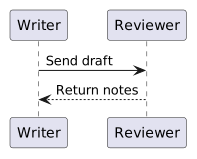
The diagram type in the request must match the syntax you supplied. This original fictional exchange uses a writer and a reviewer passing a draft and notes. It records no actual submission or review outcome.

Open the complete example · Download the full HTML source
Start with the diagram text you actually intend to render
This source uses PlantUML sequence syntax:
@startuml
participant Writer
participant Reviewer
Writer -> Reviewer: Send draft
Reviewer --> Writer: Return notes
@enduml
Keep both participant names and the two message labels with the source file. The return arrow describes the authored notes message; it is not confirmation that a person has returned anything.
The Kroki request examples document a diagram type and output format in the request path. Their plain-text form sends the diagram as the request body with Content-Type: text/plain. The service also documents a JSON form; choose one request shape and describe the one you actually use.
Send PlantUML text to the PlantUML SVG route
For the public Kroki service, a plain-text request can be:
POST https://kroki.io/plantuml/svg
Content-Type: text/plain

@startuml
participant Writer
participant Reviewer
Writer -> Reviewer: Send draft
Reviewer --> Writer: Return notes
@enduml
The Kroki documentation identifies both public and self-managed use. This reproduction sends only the explicitly fictional source above to the public service. It is not a local PlantUML execution and does not establish the configuration of a separately hosted Kroki instance.
Keep the request URL, headers, source and response together. If a real source contains material you cannot send to a public renderer, use an appropriate authorized rendering environment instead of copying the public request blindly.
Reject the wrong response before placing it in HTML
Run an isolated mismatch comparison by sending the same PlantUML text to a Graphviz route. Preserve the actual status, content type and response body separately from the accepted output. In this reproduction, the mismatched Graphviz request returned HTTP 200 with an SVG content type but an empty body. The correct PlantUML request returned the actual SVG. These are recorded observations, not a promise that every deployment returns the same mismatch status.
Require an image response and inspect the actual SVG before embedding it. The accepted fixture must show Writer, Reviewer, Send draft and Return notes. A successful HTTP result is a transport check, while the diagram labels establish whether the supplied exchange reached the image.
If you are diagnosing DOT rendering itself, the existing Graphviz source handoff guide uses an actual Graphviz browser build and checks its source relationships. This Kroki task concerns the request boundary between a source language and an image service.
Once the response has passed those checks, the SVG-in-HTML guide covers placing a drawing inside the reading page. Preserve the accepted image and inspect its labels after embedding; a correctly arranged HTML wrapper cannot repair a wrong-language response or supply missing diagram content.
Deliver a reading copy without making it a live renderer
Embed the accepted SVG in a complete reading page and keep the original diagram text available. Label the recorded mismatch response and its zero-byte body as a diagnostic from that reproduction. The prepared example displays the returned image; it does not resend its source when a reader opens the page.
Keep the SVG's view box when sizing it to the reading column, then inspect both message labels at phone width. Retain the original vector download so the recipient can inspect the diagram independently of the surrounding page.
For a review in NOS, place the two participant names and message text beside the image. A correction to a message belongs in the diagram source and a new rendering request. Hand over the accepted image with the source and request record that produced it.