A meeting agenda template works best as one page: a goal, the items in order with start and end times, a lead for each, and the decision you need. Put it online as a web page and send its link once.
When a time changes, you edit the page, not a new file. A write-up on sharing HTML files describes how, by presentation day, four versions of the file were floating around Slack and no one could say which was final. One link avoids that.
Try the agenda below. Change the start time, press the minute buttons, tick an item as done, or add one.
<!doctype html>
<html lang="en">
<head>
<meta charset="utf-8">
<meta name="viewport" content="width=device-width, initial-scale=1">
<title>Weekly team sync agenda</title>
<style>
  * { box-sizing: border-box; }
  body { margin: 0; padding: 16px; font-family: system-ui, sans-serif; color: #1f2937; background: #f3f4f6; }
  .sheet { max-width: 640px; margin: 0 auto; background: #fff; border-radius: 12px; padding: 20px; box-shadow: 0 1px 4px rgba(0,0,0,.08); }
  h1 { margin: 0 0 4px; font-size: 21px; }
  .meta { margin: 0 0 14px; color: #6b7280; font-size: 14px; }
  .goal { background: #eef4ff; border-left: 4px solid #2563eb; padding: 10px 12px; border-radius: 6px; font-size: 14px; margin-bottom: 16px; }
  .start { display: flex; align-items: center; gap: 8px; font-size: 14px; margin-bottom: 10px; }
  .start input { font: inherit; padding: 4px 6px; border: 1px solid #d1d5db; border-radius: 6px; }
  ol { list-style: none; margin: 0; padding: 0; }
  li { display: grid; grid-template-columns: auto 92px 1fr auto; gap: 8px 10px; align-items: center; padding: 10px 0; border-top: 1px solid #e5e7eb; }
  li.done .what { text-decoration: line-through; color: #9ca3af; }
  .time { font-variant-numeric: tabular-nums; font-size: 14px; color: #374151; }
  .what b { display: block; font-size: 15px; }
  .what small { color: #6b7280; font-size: 13px; }
  .tag { display: inline-block; margin-left: 6px; padding: 1px 7px; border-radius: 99px; font-size: 11px; background: #fef3c7; color: #92400e; vertical-align: 1px; }
  .adj { display: flex; align-items: center; gap: 4px; font-size: 13px; }
  .adj button { width: 30px; height: 30px; border: 1px solid #d1d5db; background: #fff; border-radius: 6px; font-size: 15px; cursor: pointer; }
  .adj span { min-width: 44px; text-align: center; }
  input[type=checkbox] { width: 20px; height: 20px; }
  .total { border-top: 2px solid #1f2937; padding-top: 10px; font-size: 14px; display: flex; justify-content: space-between; }
  form { display: flex; flex-wrap: wrap; gap: 8px; margin-top: 16px; }
  form input { font: inherit; font-size: 14px; padding: 7px 9px; border: 1px solid #d1d5db; border-radius: 6px; min-width: 0; }
  form input[name=title] { flex: 1 1 180px; }
  form input[name=mins] { width: 80px; }
  form button { font: inherit; font-size: 14px; padding: 7px 14px; border: 0; border-radius: 6px; background: #2563eb; color: #fff; cursor: pointer; }
  @media (max-width: 480px) {
    li { grid-template-columns: auto 1fr auto; padding: 8px 0; }
    .what { grid-column: 2 / 4; grid-row: 2; }
    .adj { grid-column: 3; grid-row: 1; }
  }
</style>
</head>
<body>
<div class="sheet">
  <h1>Northwind Ops weekly sync</h1>
  <p class="meta">Thursday · Room 4 or the video link in the invite · Chair: Priya Nair</p>
  <div class="goal"><b>Goal:</b> leave with the launch checklist signed off and one decision on the vendor invoice.</div>

  <label class="start">Start time <input type="time" id="start" value="10:00"></label>
  <ol id="list"></ol>
  <div class="total"><span id="count"></span><span id="end"></span></div>

  <form id="add">
    <input name="title" placeholder="New item" required>
    <input name="mins" type="number" min="5" step="5" value="5" aria-label="Minutes">
    <button>Add item</button>
  </form>
</div>

<script>
  // Each item: title, owner, minutes. Times are worked out from the start time.
  const items = [
    { t: 'Welcome and last week\'s actions', o: 'Priya', m: 5 },
    { t: 'Launch checklist review', o: 'Marcus', m: 15 },
    { t: 'Vendor invoice approval', o: 'Lena', m: 10, decide: true },
    { t: 'Q4 hiring plan', o: 'Tomás', m: 10 },
    { t: 'Parking lot and next steps', o: 'Everyone', m: 5 }
  ];
  const done = new Set();
  const list = document.getElementById('list');
  const startEl = document.getElementById('start');

  function hhmm(total) {
    const h = Math.floor(total / 60) % 24, m = total % 60;
    return String(h).padStart(2, '0') + ':' + String(m).padStart(2, '0');
  }

  function render() {
    const [h, m] = startEl.value.split(':').map(Number);
    let at = h * 60 + m, sum = 0;
    list.innerHTML = '';
    items.forEach((it, i) => {
      const li = document.createElement('li');
      if (done.has(it)) li.className = 'done';
      li.innerHTML =
        '<input type="checkbox" aria-label="Done"' + (done.has(it) ? ' checked' : '') + ' data-i="' + i + '">' +
        '<span class="time">' + hhmm(at) + '–' + hhmm(at + it.m) + '</span>' +
        '<span class="what"><b></b><small></small></span>' +
        '<span class="adj"><button data-i="' + i + '" data-d="-5" aria-label="5 minutes shorter">−</button>' +
        '<span>' + it.m + ' min</span><button data-i="' + i + '" data-d="5" aria-label="5 minutes longer">+</button></span>';
      li.querySelector('b').textContent = it.t;
      li.querySelector('small').textContent = it.o;
      if (it.decide) li.querySelector('b').insertAdjacentHTML('beforeend', '<span class="tag">decision</span>');
      list.appendChild(li);
      at += it.m; sum += it.m;
    });
    document.getElementById('count').textContent = items.length + ' items · ' + sum + ' min';
    document.getElementById('end').textContent = 'Ends ' + hhmm(at);
  }

  list.addEventListener('click', (e) => {
    const b = e.target.closest('button');
    if (!b) return;
    const it = items[b.dataset.i];
    it.m = Math.max(5, it.m + Number(b.dataset.d));   // never shorter than 5 min
    render();
  });
  list.addEventListener('change', (e) => {
    const it = items[e.target.dataset.i];
    e.target.checked ? done.add(it) : done.delete(it);
    render();
  });
  startEl.addEventListener('input', render);
  document.getElementById('add').addEventListener('submit', (e) => {
    e.preventDefault();
    const f = e.target;
    items.push({ t: f.title.value.trim(), o: 'TBC', m: Math.max(5, Number(f.mins.value) || 5) });
    f.reset();
    render();
  });
  render();
</script>
</body>
</html>
Each row has a time, a title, a lead and a length. The times are worked out from the start time, so you never retype them. One item is tagged decision, which tells people what the meeting is for before they arrive.
Make it with AI
You do not need to write the page yourself. Paste this into ChatGPT, Claude or Gemini and swap in your own meeting:
Make one self-contained HTML file for a meeting agenda.
Meeting: weekly team sync, Thursday, 10:00 to 10:45, Room 4 or video.
Show: a one-sentence goal, then the items in order with start and end time, a lead for each, and a "decision" tag on items that need a decision.
Rules: work out every time from one start time and a minutes value per item. Keep the start time and the minutes in one small list at the top of the script so I can change them. No item shorter than 5 minutes.
Use only the names I give you. Write TBC where something is missing. No external images, fonts or scripts. It must read well on a phone, so include a viewport meta tag.
Items: welcome and last week's actions (Priya, 5), launch checklist (Marcus, 15), vendor invoice (Lena, 10, decision), hiring plan (Tomás, 10), next steps (everyone, 5).
Then check four things before you share it:
- The times add up and the last item ends when the meeting ends.
- Every name is one you typed. AI tools sometimes fill a gap with a plausible person.
- Gaps say TBC, not an invented room or time.
- Open it on your phone. Rows should not run off the edge of the screen.
Send it as a link
Copy the code the AI gave you. Paste it into a NOS document and choose Create share link. HTML to link walks through it.
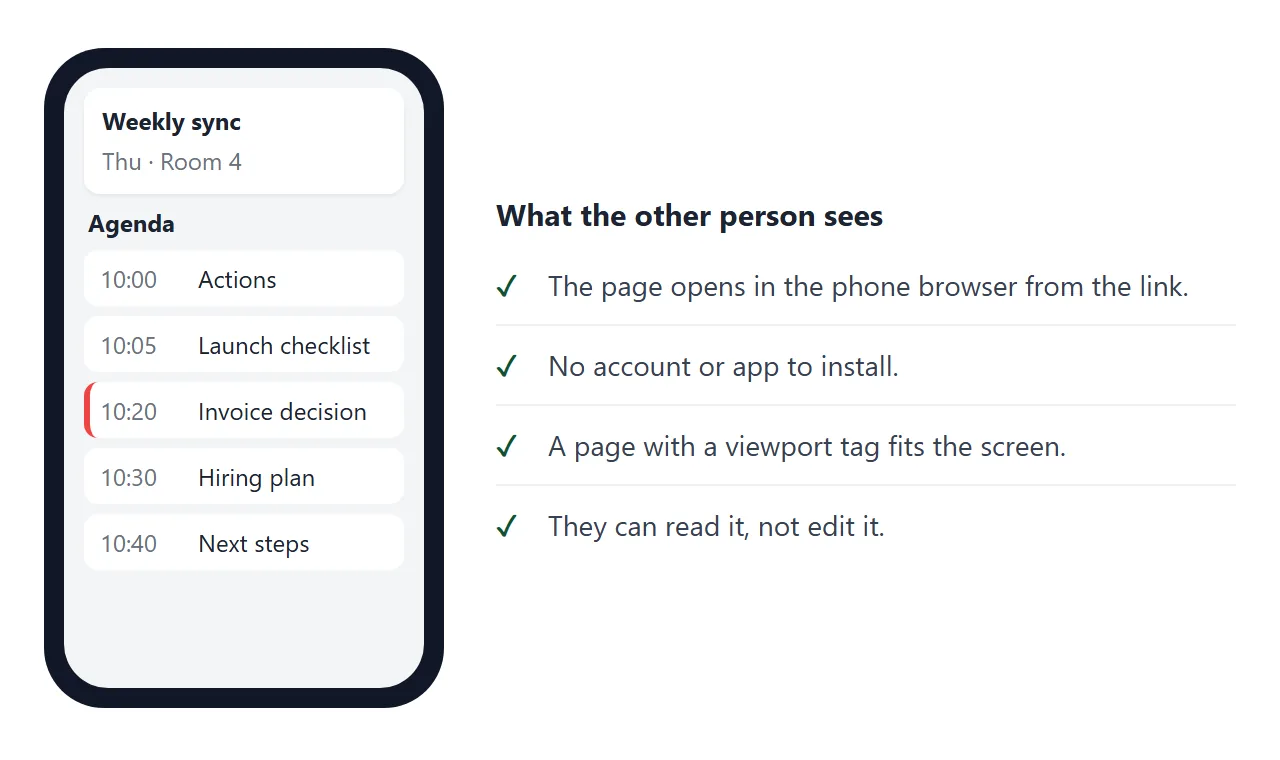
The recipient gets a normal page in their browser. It opens on a phone as well as a laptop, needs no account, and cannot be edited by the person reading it. The page renders as written and its scripts run.
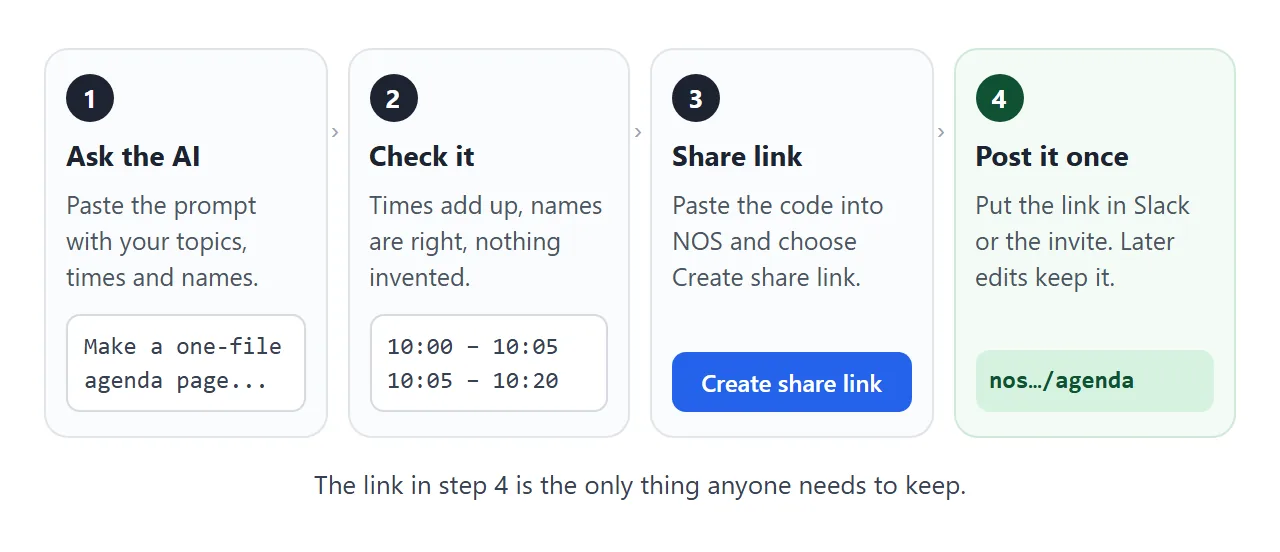
If you edit the code later, the link stays the same and shows the new version. You post it once, and it keeps pointing at the latest page.
In Slack. Paste the link into the channel. As of October 2026, Slack's help says a shared link gets a preview just below your message. More in sending an HTML file in Slack.
Slack lists missing page metadata, a link posted recently in the same conversation, and more than five links in one message as reasons a preview may not appear. The link still opens either way.
To keep it findable, Slack lets you pin a message to the channel through the three-dot menu, and add a link to the channel from the plus sign at the top. Menu names differ by plan, so check on your own screen.
In a calendar invite. Paste the link into the event description, so invitees reach the agenda from the invite itself. Google Calendar Help mentions adding a description for an event. See calendar invite links too.
On paper. Print the link as a QR code on the sheet in the room. The printed times may go out of date, but the code opens the current page. QR code links covers it.
Change a time after the link is out
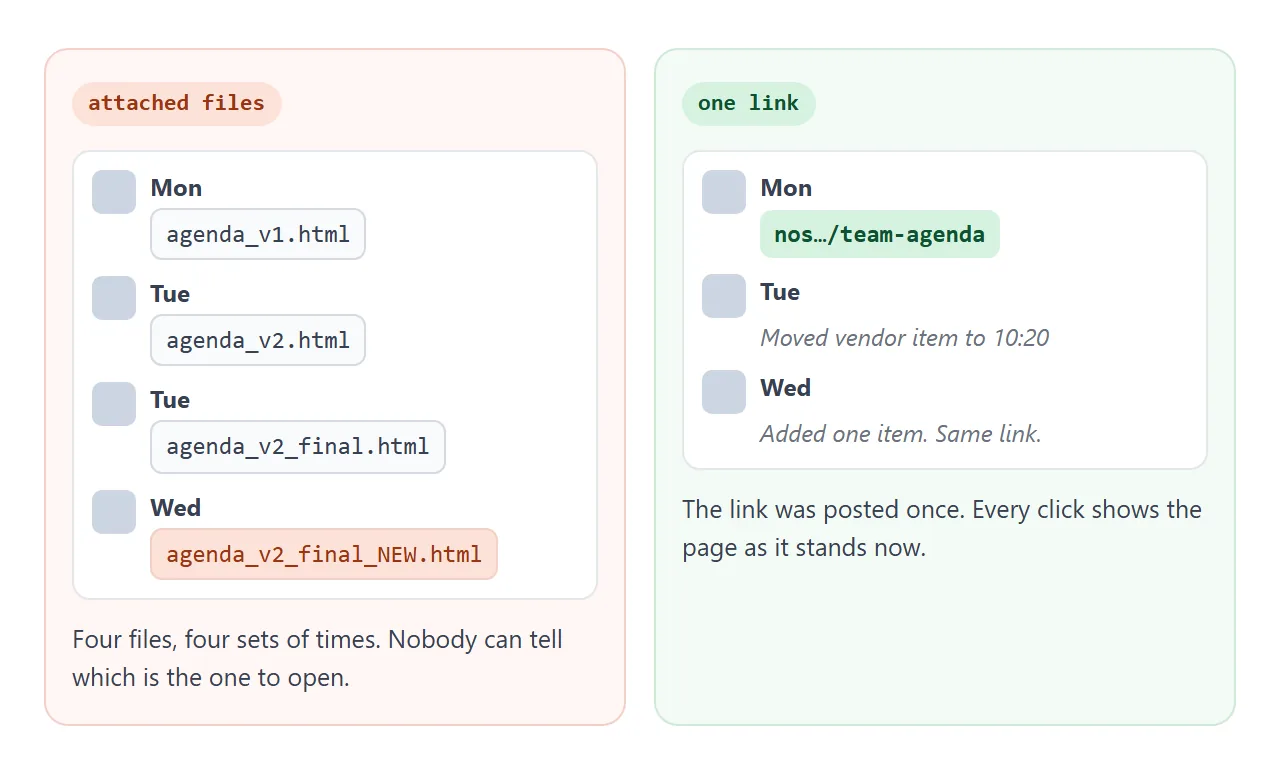
Say the vendor item moves from 10:20 to 10:25. With attached files you send agenda number five and hope. With the link you change one number and post nothing.
Use the minute buttons in the page to see what fits. Then make it official in the code: change the start time or the minutes in the code, and the same link shows the new times. The AI prompt above asks for them in one small list, so they are easy to find.
In View mode, the owner's ticks and added rows are saved. A visitor's are not, so only you can mark an item done for everyone. Send a comment in the thread instead of trying to edit.
A printable version with plain text for invites
Some meetings need a handout. This one lists who leads, what is needed from the room, and the decision. The first button turns the table into plain text for a chat message or an invite.
<!doctype html>
<html lang="en">
<head>
<meta charset="utf-8">
<meta name="viewport" content="width=device-width, initial-scale=1">
<title>Project kickoff agenda</title>
<style>
  * { box-sizing: border-box; }
  body { margin: 0; padding: 16px; font-family: system-ui, sans-serif; color: #1f2937; background: #f3f4f6; }
  .sheet { max-width: 680px; margin: 0 auto; background: #fff; border-radius: 12px; padding: 22px; box-shadow: 0 1px 4px rgba(0,0,0,.08); }
  h1 { margin: 0 0 4px; font-size: 22px; }
  h2 { margin: 22px 0 8px; font-size: 13px; letter-spacing: .06em; text-transform: uppercase; color: #6b7280; }
  .meta { margin: 0; color: #6b7280; font-size: 14px; }
  ul.pre { margin: 0; padding-left: 20px; font-size: 14px; line-height: 1.6; }
  table { width: 100%; border-collapse: collapse; font-size: 14px; }
  th { text-align: left; font-size: 12px; color: #6b7280; border-bottom: 2px solid #1f2937; padding: 6px 8px 6px 0; }
  td { padding: 9px 8px 9px 0; border-bottom: 1px solid #e5e7eb; vertical-align: top; }
  td:first-child { white-space: nowrap; font-variant-numeric: tabular-nums; }
  .out { display: inline-block; padding: 1px 8px; border-radius: 99px; font-size: 12px; font-weight: 600; }
  .Decide { background: #fee2e2; color: #991b1b; }
  .Discuss { background: #fef3c7; color: #92400e; }
  .Inform { background: #dbeafe; color: #1e40af; }
  .actions { display: flex; flex-wrap: wrap; gap: 8px; margin-top: 20px; }
  button { font: inherit; font-size: 14px; padding: 8px 14px; border: 1px solid #d1d5db; background: #fff; border-radius: 6px; cursor: pointer; }
  textarea { display: none; width: 100%; height: 190px; margin-top: 10px; font: 13px/1.5 ui-monospace, Consolas, monospace; padding: 10px; border: 1px solid #d1d5db; border-radius: 6px; }
  textarea.show { display: block; }
  .note { font-size: 13px; color: #6b7280; margin: 6px 0 0; }
  @media (max-width: 520px) {
    .sheet { padding: 16px; }
    th:nth-child(3), td:nth-child(3) { display: none; }
  }
  @media print { body { background: #fff; padding: 0; } .sheet { box-shadow: none; } .actions, textarea, .note { display: none !important; } }
</style>
</head>
<body>
<div class="sheet">
  <h1>Harbor Lane kickoff</h1>
  <p class="meta">Tue 14 Oct · 14:00–15:00 · Room 2 and video · Chair: Dana Okafor · Notes: Ravi Menon</p>

  <h2>Read before the meeting</h2>
  <ul class="pre">
    <li>One-page project brief (2 min)</li>
    <li>Draft timeline: weeks 1 to 8 (3 min)</li>
  </ul>

  <h2>Agenda</h2>
  <table id="ag">
    <thead><tr><th>Time</th><th>Topic</th><th>Lead</th><th>Needed</th></tr></thead>
    <tbody>
      <tr><td>14:00</td><td>Goals and what done looks like</td><td>Dana</td><td><span class="out Discuss">Discuss</span></td></tr>
      <tr><td>14:10</td><td>Roles and who decides what</td><td>Dana</td><td><span class="out Inform">Inform</span></td></tr>
      <tr><td>14:20</td><td>Timeline: is week 6 realistic?</td><td>Ravi</td><td><span class="out Decide">Decide</span></td></tr>
      <tr><td>14:40</td><td>Risks and open questions</td><td>Everyone</td><td><span class="out Discuss">Discuss</span></td></tr>
      <tr><td>14:55</td><td>Actions and owners</td><td>Ravi</td><td><span class="out Inform">Inform</span></td></tr>
    </tbody>
  </table>

  <h2>Decision needed today</h2>
  <p style="margin:0;font-size:14px">Keep the week 6 review date, or move it to week 7.</p>

  <div class="actions">
    <button id="txt">Show as plain text</button>
    <button id="prn">Print</button>
  </div>
  <textarea id="out" readonly aria-label="Agenda as plain text"></textarea>
  <p class="note" id="hint"></p>
</div>

<script>
  // Turn the table into plain text for a chat message or a calendar invite.
  document.getElementById('txt').addEventListener('click', () => {
    const rows = [...document.querySelectorAll('#ag tbody tr')].map((tr) => {
      const c = [...tr.children].map((td) => td.textContent.trim());
      return c[0] + '  ' + c[1] + ' (' + c[2] + ', ' + c[3].toLowerCase() + ')';
    });
    const out = document.getElementById('out');
    out.value = document.querySelector('h1').textContent + '\n' +
      document.querySelector('.meta').textContent + '\n\n' + rows.join('\n');
    out.classList.add('show');
    out.select();
    document.getElementById('hint').textContent = 'Selected. Copy it with Ctrl+C or Cmd+C.';
  });
  document.getElementById('prn').addEventListener('click', () => window.print());
</script>
</body>
</html>
It uses tags for Decide, Discuss and Inform, so people can tell which items need their opinion and which are updates.
Ways to share an agenda compared
| Way to share | What people get | When a time changes | Fits best |
|---|---|---|---|
| Attach the .html file | A file to download and open | Send a new file; the old one stays in the thread | Rarely |
| Paste the agenda as text | Plain text in the message | Post a corrected message | A short list of items |
| Share link to the page | A page in the browser, phone included | Edit the page; same link | Weekly or changing agendas |
| Link pinned in the channel | The link at the top of the channel | Same link, nothing to pin again | A standing meeting |
| QR code on paper | The link, printed | The paper stays old, the page is current | Meetings in a room |
For more on why a link beats a file in a thread, see why links beat attachments. For the notes after the meeting, meeting notes online uses the same method.
When it does not work
| What you see | Cause | Fix |
|---|---|---|
| Slack posts the link with no preview | Missing page metadata, the same link posted recently, or many links in one message | The link still opens. Add one line saying what it is |
| People still see old times | They opened an earlier copy, or you edited a different document | Reload the page. Edit the NOS document the link was made from |
| The times do not add up | The AI typed the times by hand | Ask it to work them out from the start time and minutes, as in the prompt |
| A name you did not give appears | The AI filled a gap | Tell it to use only your names and write TBC |
| A tick or added row does not stay for a visitor | Visitors' changes are not saved | Only you, as the owner in View mode, change what everyone sees |
| A picture from another site is missing | Images from other sites are blocked | Use an inline SVG or a CSS colour block |
If a form on the page tries to send answers to a server, that is blocked too. Collect replies in the thread.