What finished minutes have to do
Minutes are meant to be read later, including by people who were not in the room. A useful test for every line: could an absent member act on this without calling you?
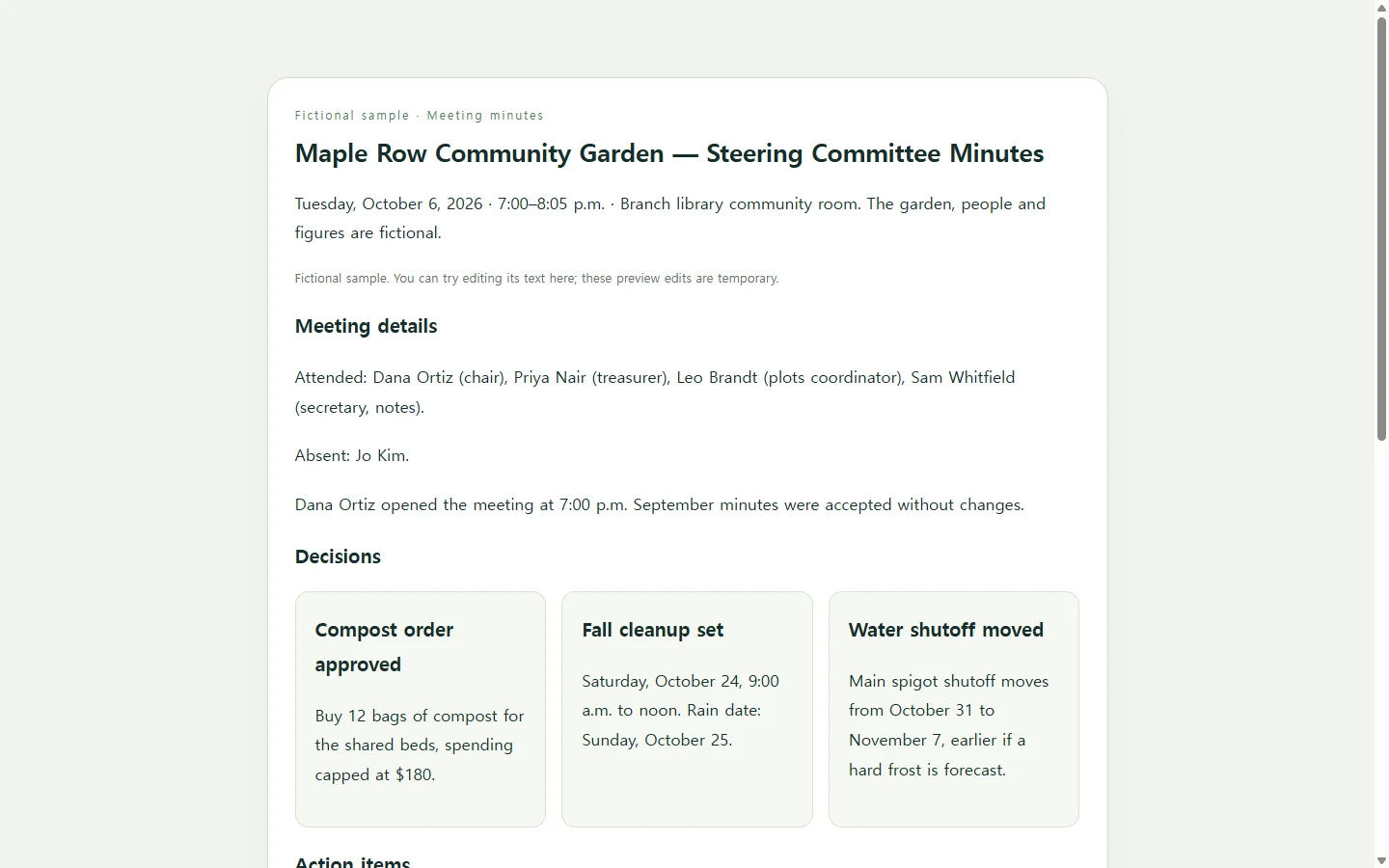
In practice that usually means the meeting date, time and place; who attended and who was absent; the decisions made; each action item with one owner and a due date; and anything raised but left open. Treat that as a working checklist, not a rule. If your board, association or employer already prescribes a format or an approval step, follow theirs.
Sort the notes before you touch a template
Before copying anything into boxes, read your notes once and mark each item as decided, assigned or still open. Much of what you wrote will turn out to be discussion that led to one of those three outcomes.
Keep the outcome and shrink the debate. In the Maple Row example, a long back-and-forth about compost suppliers becomes a single decision with a spending cap. If you can’t tell from your notes whether something was actually agreed, flag it and ask the chair rather than guessing.
A worked example: the Maple Row garden committee
The example page records an October steering committee meeting for a community garden. The garden, the people and every figure in it are invented for illustration.
Three choices in it are worth borrowing. Decisions sit apart from discussion, so the line someone needs, such as the cleanup date, isn’t buried in a paragraph. Each action item names one person, so the reader knows who to contact about it. And a short “not decided” section keeps the tabled shed-lock question from quietly disappearing before next month.
Document file, email or web page?
Pick the format the minutes will actually be used in. A word-processor template is the natural choice when your group keeps minutes as documents: you replace the sample text with your meeting details, then save, print or share the result as a PDF. If minutes must be submitted, signed or archived as a PDF or DOCX, do that; a web link is not a substitute.
For a small informal team, pasting the sections into an email may be enough. A web page makes sense when the minutes go out as a link to people who will mostly read them on their phones, and when the same record may need a correction after it is sent.
Optional: let AI handle the layout
If you want the page format but would rather not design it, an AI assistant can lay out your sorted notes. It writes HTML, the plain-text language web pages are built from, so you don’t need to write code yourself.
The prompt below asks for one self-contained file that reads well on a narrow phone screen, with a real table for action items and enough color contrast to read comfortably. It also tells the assistant not to invent anything. That instruction matters: the AI is arranging your record, not writing it. Check every name, date and dollar amount against your notes before you send the page.
When the minutes change after you send them
Suppose the Maple Row minutes go out Wednesday morning and the treasurer replies that the compost cap was $160, not $180. With an attached file, you would fix the document and send a new version, and anyone who saved the first file still has the old figure.
If the page is kept in NOS, which stores HTML pages alongside notes in a workspace, you can edit the rendered text directly and change $180 to $160 without asking the AI to regenerate the page. The shared link you already sent stays the same, so anyone who opens it afterward sees the corrected figure, and recipients don’t need an account to open it.
People who read the first version won’t necessarily know anything changed, so add a short line such as “Corrected Oct. 8: compost cap is $160.” If your group formally approves minutes, make the correction through that process rather than quietly editing an approved record.
A prompt to adapt
Turn my meeting notes into a one-page HTML meeting minutes page.

Meeting details:
- Group: [GROUP NAME]
- Meeting: [MEETING TYPE, e.g. monthly steering committee]
- Date and time: [DATE], [START TIME]–[END TIME]
- Location: [ROOM OR "video call"]
- Attended: [NAMES AND ROLES]
- Absent: [NAMES]
- Notes taken by: [YOUR NAME]

Decisions (one per line):
[DECISION 1]
[DECISION 2]

Action items (task | owner | due date):
[TASK] | [ONE OWNER] | [DUE DATE]
[TASK] | [ONE OWNER] | [DUE DATE]

Raised but not decided:
[OPEN ITEM AND WHAT IT IS WAITING ON]

Next meeting: [DATE, TIME, PLACE]

Requirements:
- Output one complete HTML file with all CSS inside a <style> tag. No JavaScript, no external fonts, images or libraries, and no forms or buttons.
- Use only the information above. Do not invent names, numbers, dates or decisions. If something looks incomplete, show it as [confirm] instead of filling it in.
- Section order: meeting details and attendance, decisions, action items, not decided, next meeting.
- Use a <main> element, one <h1> for the meeting title, and an <h2> for each section.
- Put action items in a real <table> with <th> header cells. On screens narrower than 480px, let the table scroll sideways inside its own container so the page itself never scrolls sideways.
- The page must be readable at 360px wide. Body text at least 16px with line height around 1.5.
- Text and background colors must have a contrast ratio of at least 4.5:1. Do not rely on color alone to mark decisions or open items; use headings or labels too.
- Add a print stylesheet so the page prints cleanly on US letter paper.

Level of detail I mean (fictional sample, do not copy into my page): "Decision: buy 12 bags of compost for the shared beds, spending capped at $180." / "Action: Order compost | Leo Brandt | Oct. 16."