Decide what the page has to do before you pick a layout
Four questions do most of the sorting: what the page is for, who will read it, what they should remember, and where they will read it. A page skimmed on a phone the night before a meeting calls for a different shape than one picked up at a crowded event.
It also helps to know what a one-pager is not. An executive summary condenses a longer document; a one-pager selects the few points that serve its purpose and leaves the rest out. If you can't state the reader's next step in one sentence, fix that sentence before you open any template.
A worked example: one ask for one board
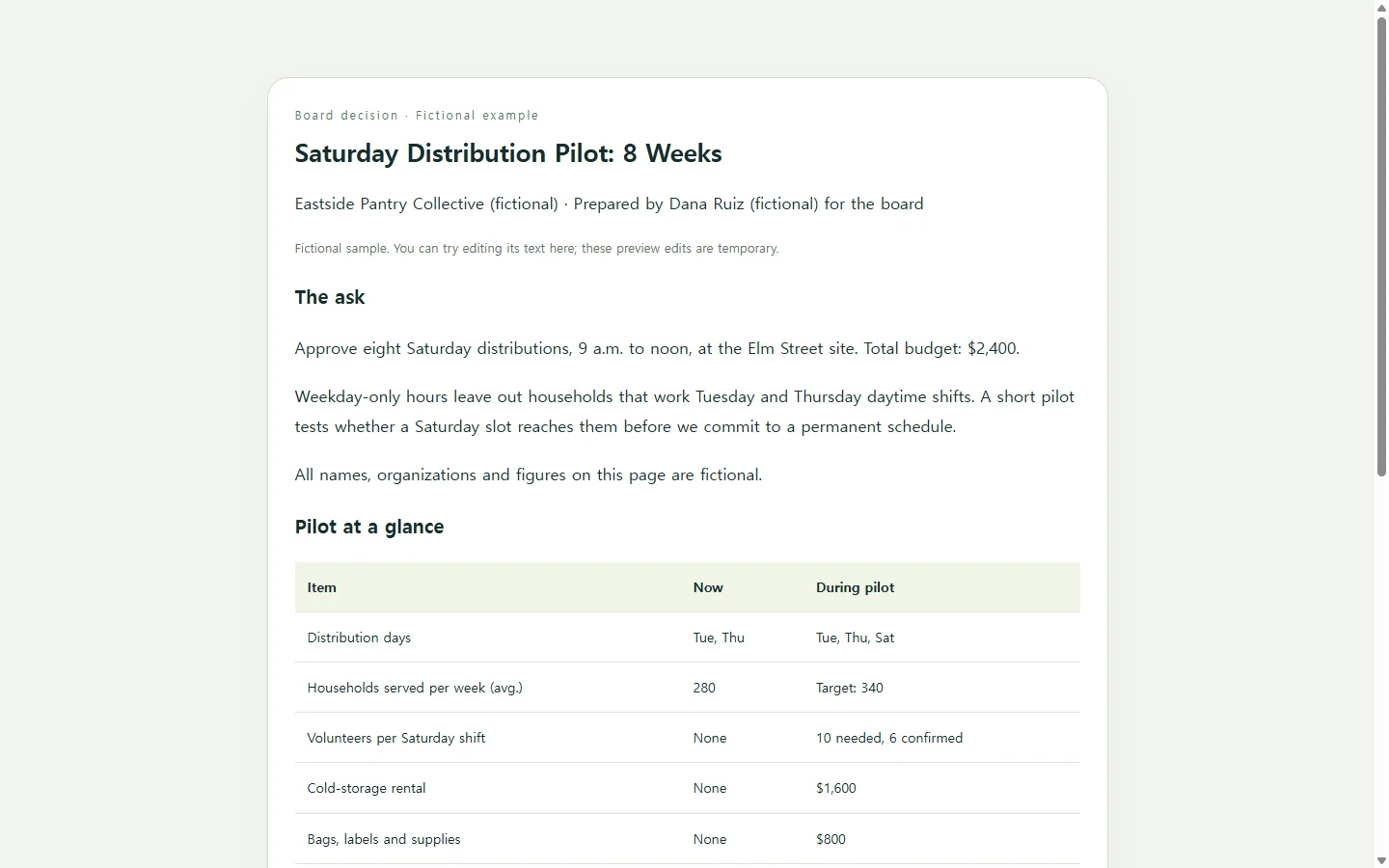
The example on this page is fictional. Dana Ruiz, volunteer coordinator at the Eastside Pantry Collective, wants the board to approve eight Saturday distributions. The person, the organization and every figure are invented to show the structure.
Look at what sits at the top: the decision and the budget, in two lines. A board member who reads nothing else still knows what the vote is about. The numbers sit in a small table so current hours and the pilot can be compared side by side, and the timeline answers the obvious follow-up: what happens after a yes.
Look, too, at what is missing. There is no mission statement, no history of the pantry, no paragraph on why food access matters. The board already knows those things, and leaving them out is what keeps the page to one page.
Adapting it to your own one-pager
Choose blocks by the question your reader will ask, not by what a template happens to offer. If they will ask how much, use a table. If they will ask when, use a timeline. If they need to weigh risks, list the open questions plainly. A product one-pager usually centers on features and benefits; a company one-pager on what you offer and what sets you apart.
Then run a cut test: read each line and ask whether the reader's decision would change without it. If it wouldn't, cut it.
Keep the page readable for everyone: legible fonts, clear contrast between text and background, alt text on any images in a digital version, and a layout that holds up on a phone as well as a laptop.
Three ways to build it, and when each fits
If the recipient asks for a Word file or a PDF, start from a document or slide template and send exactly what they asked for. That requirement settles the choice.
If you want a polished visual layout and are comfortable in a design tool, a template library gives you a running start: you swap the sample text, images and data for your own.
A third route is to have an AI chat assistant lay out the page in HTML, the code a web browser reads to display a page. You don't need to read the code; you save it and open the result in a browser. The AI handles the layout, but the facts have to come from you. The prompt below tells it to flag anything missing instead of filling the gap, and to keep the page readable on a phone.
When the details change after you send it
Say the board chair writes back the evening before the meeting: the cold-storage quote came in at $1,750, not $1,600. If the page went out as an attachment, Dana edits the file and sends a new version, and some members may still open the old copy.
If the HTML page lives in NOS, Dana can click into the displayed text and change the quote and the total directly, without asking the AI to rebuild the page. The shared link stays the same, so board members open the URL they already have and see the new numbers. They don't need an account to view it.
The same page keeps working after the vote. When the pilot ends, Dana's report can sit beside it as a subpage in the same workspace, and the original link still shows the ask as last edited. Where a file is required, send the file; the link is for readers who need the current version.
A prompt to adapt
Build a one-page summary as a single, self-contained HTML file.

Purpose: [what the reader should decide or do, e.g. approve an 8-week Saturday distribution pilot]
Reader and setting: [who reads it and where, e.g. 7 board members reading on their phones the night before Thursday's meeting]
What they must remember: [one or two points, e.g. the total cost and the start week]

My facts. Use only these. If something you need is missing, write [NEEDS INFO] in its place instead of inventing it:
- The ask: [e.g. Approve 8 Saturday distributions, 9 a.m. to noon, at the Elm Street site, budget $2,400]
- Key numbers: [e.g. current weekly households served 280; pilot target 340; cold-storage rental $1,600; supplies $800]
- Timeline: [e.g. Week 0 vote; Weeks 1-2 recruit volunteers and confirm storage; Weeks 3-10 run Saturdays; Week 11 report]
- Open questions or risks: [e.g. funding source; who signs the rental agreement]
- Contact: [name, role, how to reach them]

Layout and requirements:
- Put the ask and the budget in the first two lines, above everything else.
- Show numbers in a simple HTML table with a header row.
- Show the timeline as a short ordered list.
- Keep the content to one page. If it does not fit, shorten wording first; if you drop any fact from my list, tell me which one.
- Mobile: readable on a 375px-wide phone screen without zooming or sideways scrolling, including the table.
- Accessibility: real headings in order (one h1, then h2), body text at least 16px, high contrast between text and background, no meaning carried by color alone, alt text for any image.
- Self-contained: CSS inside a <style> tag; no external fonts, scripts, images or links to load; no forms, submit buttons, download buttons or connections to other services.

Return the complete HTML in one code block, then a short list of every place you wrote [NEEDS INFO].