An SOP template is a page with the same parts every time: title, purpose, scope, roles, numbered steps and a revision history. Write it as a web page, share one link, and fix a step by editing the page. The link stays the same.
A guide from a training-software company names the usual problem as SOPs "scattered or duplicated across tools, so no one can tell which version is current." One link answers that question: it opens the page as it stands now.
Try the page below. Tick the steps as you work, open a Why note, then press Reset.
<!doctype html>
<html lang="en">
<head>
<meta charset="utf-8">
<meta name="viewport" content="width=device-width, initial-scale=1">
<title>SOP: Process a supplier invoice</title>
<style>
  * { box-sizing: border-box; }
  body { margin: 0; padding: 16px; font-family: system-ui, sans-serif; color: #1f2937; background: #f3f4f6; line-height: 1.45; }
  .sheet { max-width: 680px; margin: 0 auto; background: #fff; border-radius: 12px; padding: 22px; box-shadow: 0 1px 4px rgba(0,0,0,.08); }
  .code { font-size: 12px; letter-spacing: .5px; text-transform: uppercase; color: #6b7280; margin: 0 0 4px; }
  h1 { margin: 0 0 12px; font-size: 22px; }
  h2 { margin: 22px 0 8px; font-size: 15px; text-transform: uppercase; letter-spacing: .4px; color: #374151; }
  .meta { display: grid; grid-template-columns: repeat(2, 1fr); gap: 8px; margin: 0 0 6px; }
  .meta div { background: #f9fafb; border: 1px solid #e5e7eb; border-radius: 8px; padding: 8px 10px; font-size: 13px; }
  .meta b { display: block; font-size: 11px; color: #6b7280; text-transform: uppercase; letter-spacing: .4px; font-weight: 600; }
  p { margin: 0 0 8px; font-size: 14.5px; }
  ul.plain { margin: 0; padding-left: 20px; font-size: 14.5px; }
  .prog { display: flex; align-items: center; gap: 10px; margin: 6px 0 10px; font-size: 13px; color: #374151; }
  .bar { flex: 1; height: 8px; background: #e5e7eb; border-radius: 99px; overflow: hidden; }
  .bar i { display: block; height: 100%; width: 0; background: #16a34a; transition: width .2s; }
  .prog button { font: inherit; font-size: 13px; padding: 5px 10px; border: 1px solid #d1d5db; background: #fff; border-radius: 6px; cursor: pointer; }
  ol { list-style: none; margin: 0; padding: 0; counter-reset: s; }
  ol li { counter-increment: s; display: grid; grid-template-columns: 28px 1fr; gap: 10px; padding: 11px 0; border-top: 1px solid #e5e7eb; }
  ol li::before { content: counter(s); grid-column: 1; grid-row: 1; width: 26px; height: 26px; border-radius: 50%; background: #eef2ff; color: #3730a3; font-size: 13px; font-weight: 700; display: grid; place-items: center; }
  ol li.done::before { background: #dcfce7; color: #166534; }
  .body { grid-column: 2; }
  label { display: flex; gap: 9px; align-items: flex-start; font-size: 15px; cursor: pointer; }
  label input { width: 20px; height: 20px; margin: 1px 0 0; flex: none; }
  li.done label span { text-decoration: line-through; color: #9ca3af; }
  details { margin: 6px 0 0 29px; font-size: 13.5px; color: #4b5563; }
  summary { cursor: pointer; color: #2563eb; }
  details p { margin: 4px 0 0; font-size: 13.5px; }
  .role { display: inline-block; margin-left: 6px; padding: 1px 7px; border-radius: 99px; font-size: 11px; background: #fef3c7; color: #92400e; vertical-align: 1px; }
  table { width: 100%; border-collapse: collapse; font-size: 13.5px; }
  th, td { text-align: left; padding: 7px 8px; border-top: 1px solid #e5e7eb; vertical-align: top; }
  th { font-size: 12px; color: #6b7280; font-weight: 600; }
  .ok { background: #f0fdf4; border-left: 4px solid #16a34a; padding: 9px 12px; border-radius: 6px; font-size: 14px; }
  @media (max-width: 480px) { body { padding: 10px; } .sheet { padding: 16px; } .meta { grid-template-columns: 1fr; } }
</style>
</head>
<body>
<div class="sheet">
  <p class="code">SOP-FIN-004</p>
  <h1>Process a supplier invoice</h1>

  <div class="meta">
    <div><b>Owner (role)</b>Accounts payable lead</div>
    <div><b>Version</b>3.1</div>
    <div><b>Last reviewed</b>1 October 2026</div>
    <div><b>Next review</b>1 April 2027</div>
  </div>

  <h2>Purpose</h2>
  <p>Every supplier invoice is checked, approved and queued for payment once, by the right person, before its due date.</p>

  <h2>Scope</h2>
  <p>Covers invoices received by email or post for goods and services. It does not cover staff expense claims (see SOP-FIN-007).</p>

  <h2>Before you start</h2>
  <ul class="plain">
    <li>Access to the finance inbox and the payments tool</li>
    <li>The matching purchase order number</li>
  </ul>

  <h2>Steps</h2>
  <div class="prog">
    <span id="count">0 of 7 done</span>
    <span class="bar"><i id="fill"></i></span>
    <button type="button" id="reset">Reset</button>
  </div>
  <ol id="steps">
    <li><div class="body"><label><input type="checkbox"><span>Open the invoice and check supplier name, date and total.</span></label>
      <details><summary>Why</summary><p>A wrong name or date can make a payment bounce back.</p></details></div></li>
    <li><div class="body"><label><input type="checkbox"><span>Find the purchase order and confirm the amounts match.<em class="role">AP clerk</em></span></label>
      <details><summary>If they do not match</summary><p>Do not approve. Email the buyer, copy the supplier, and note the date you asked.</p></details></div></li>
    <li><div class="body"><label><input type="checkbox"><span>Enter the invoice in the payments tool and attach the PDF.</span></label></div></li>
    <li><div class="body"><label><input type="checkbox"><span>Send it to the budget holder for approval.<em class="role">Budget holder</em></span></label></div></li>
    <li><div class="body"><label><input type="checkbox"><span>When approved, set the payment date to the due date.<em class="role">AP lead</em></span></label>
      <details><summary>Why the due date</summary><p>Paying on the due date keeps the cash in the account until then.</p></details></div></li>
    <li><div class="body"><label><input type="checkbox"><span>Reply to the supplier: "Received, payment on [date]."</span></label></div></li>
    <li><div class="body"><label><input type="checkbox"><span>File the PDF in the supplier folder and mark the invoice as queued.</span></label></div></li>
  </ol>

  <h2>Expected result</h2>
  <p class="ok">The invoice shows as queued, with an approver and a payment date, and the supplier has been told.</p>

  <h2>If something goes wrong</h2>
  <table>
    <tr><th>Problem</th><th>What to do</th></tr>
    <tr><td>No purchase order</td><td>Ask the budget holder to raise one, then restart at step 2.</td></tr>
    <tr><td>Approver away</td><td>Send it to their named deputy.</td></tr>
  </table>

  <h2>Revision history</h2>
  <table>
    <tr><th>Version</th><th>Date</th><th>What changed</th></tr>
    <tr><td>3.1</td><td>1 Oct 2026</td><td>Step 6: tell the supplier the payment date.</td></tr>
    <tr><td>3.0</td><td>2 Mar 2026</td><td>Approval moved to the budget holder.</td></tr>
  </table>
</div>

<script>
  // Tick steps as you work; the counter and the bar follow.
  const items = document.querySelectorAll('#steps li');
  const boxes = document.querySelectorAll('#steps input');
  function update() {
    let n = 0;
    boxes.forEach((b, i) => {
      items[i].classList.toggle('done', b.checked);
      if (b.checked) n++;
    });
    document.getElementById('count').textContent = n + ' of ' + boxes.length + ' done';
    document.getElementById('fill').style.width = (n / boxes.length * 100) + '%';
  }
  boxes.forEach(b => b.addEventListener('change', update));
  document.getElementById('reset').addEventListener('click', () => {
    boxes.forEach(b => b.checked = false);
    update();
  });
  update();
</script>
</body>
</html>
Each part of the page has one job. The header says who owns the SOP and when it was last reviewed. The steps are short and numbered. The expected result tells the reader when they are done.
What goes in an SOP template
Stack Overflow's guide to writing an SOP lists six parts: title and purpose, scope, responsibilities, procedure, references, and revision history. The page above follows that list and adds a few extras that help in daily use.
- Owner as a role. "Accounts payable lead" still works after a team change. A person's name does not.
- Review date. One line that tells the reader how fresh the page is.
- Before you start. The access and papers the reader needs, so they do not stop on step 3.
- Expected result. What the finished job looks like.
- If something goes wrong. The two or three problems that really happen, and what to do.
Keep one action in each step, starting with a verb. If a step needs the word "and" twice, split it. Put the reason in a Why note, not in the step.
Make it with AI
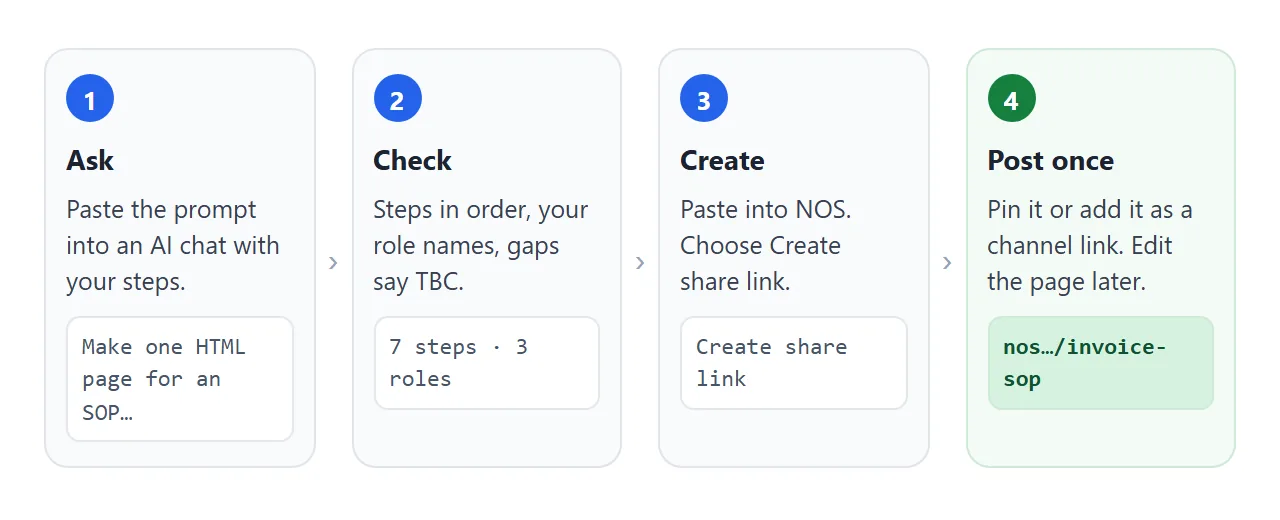
You do not have to build the page by hand. Paste this into ChatGPT, Claude or Gemini and swap in your own procedure:
Make one self-contained HTML file for a standard operating procedure (SOP).
Title: Process a supplier invoice. Code SOP-FIN-004, version 3.1, last reviewed 1 October 2026, next review 1 April 2027. Owner: a role, "Accounts payable lead".
Sections in this order: purpose (one sentence), scope (say what it does not cover), before you start, numbered steps, expected result, if something goes wrong (table), revision history (table).
Rules: one action per step, starting with a verb. Add a role tag to a step only when a different role does it. Give each step a tick box, show "x of N done" and a Reset button. Use only the roles and steps I give you. Write TBC where something is missing. No external images, fonts or scripts. It must read well on a phone, so include a viewport meta tag.
Steps: check the invoice details; match the purchase order; enter it in the payments tool; send to the budget holder; set the payment date; tell the supplier; file the PDF.
Then check five things before you share it:
- The steps are in your order, and the count in the counter matches the number of steps.
- Every role is one you gave. AI tools sometimes invent a plausible job title.
- Gaps say TBC, not an invented deadline or system name.
- The version, the review date and the revision history agree with each other.
- Open it on your phone. The steps should not run off the edge of the screen.
Send it as a link
Copy the code the AI gave you. Paste it into a NOS document and choose Create share link. HTML to link walks through it.
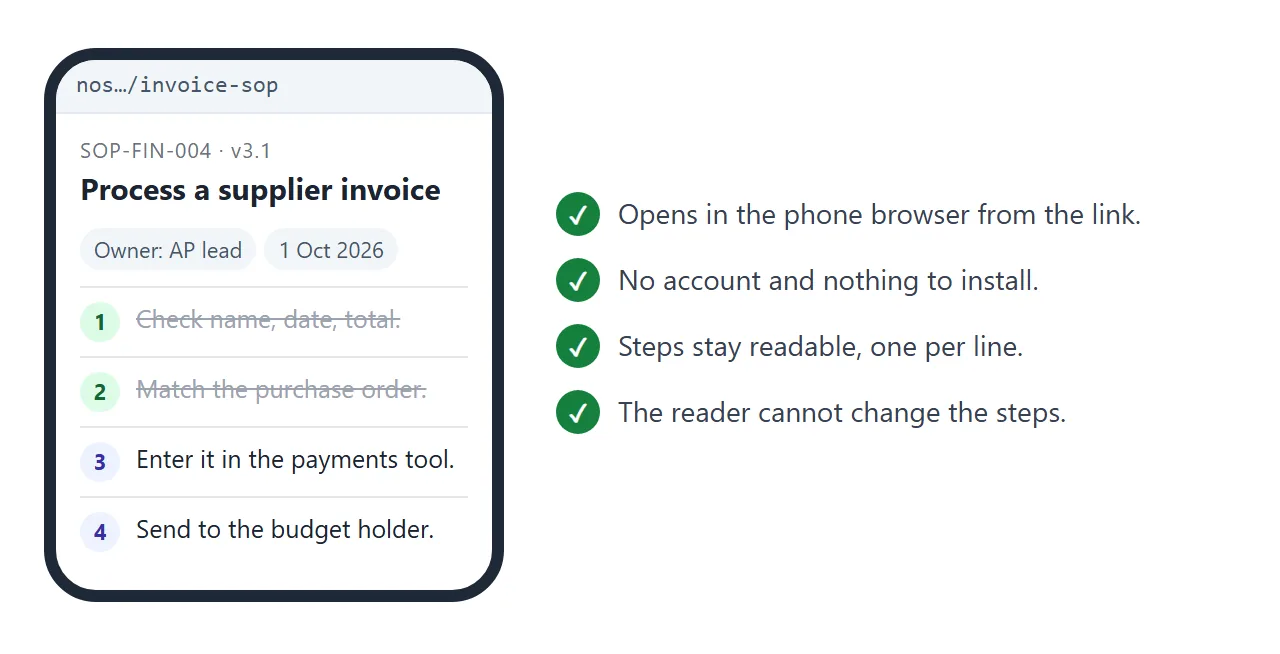
The recipient gets a normal page in their browser. It opens on a phone as well as a laptop, needs no account, and cannot be edited by the person reading it. The page renders as written and its scripts run.
In Slack. As of October 2026, Slack's help says you can pin a message from its three-dot menu, or add a link from the plus sign at the top. Menu names differ by plan. More in sending an HTML file in Slack.
In email. A link is text, so you can paste it into a message or an onboarding email. See HTML in onboarding docs for the same idea applied to a new starter's pack.
On paper. Print the link as a QR code and stick it at the workstation. The paper does not change, but the page it opens does. QR code links covers it.
Change a step without sending a new version
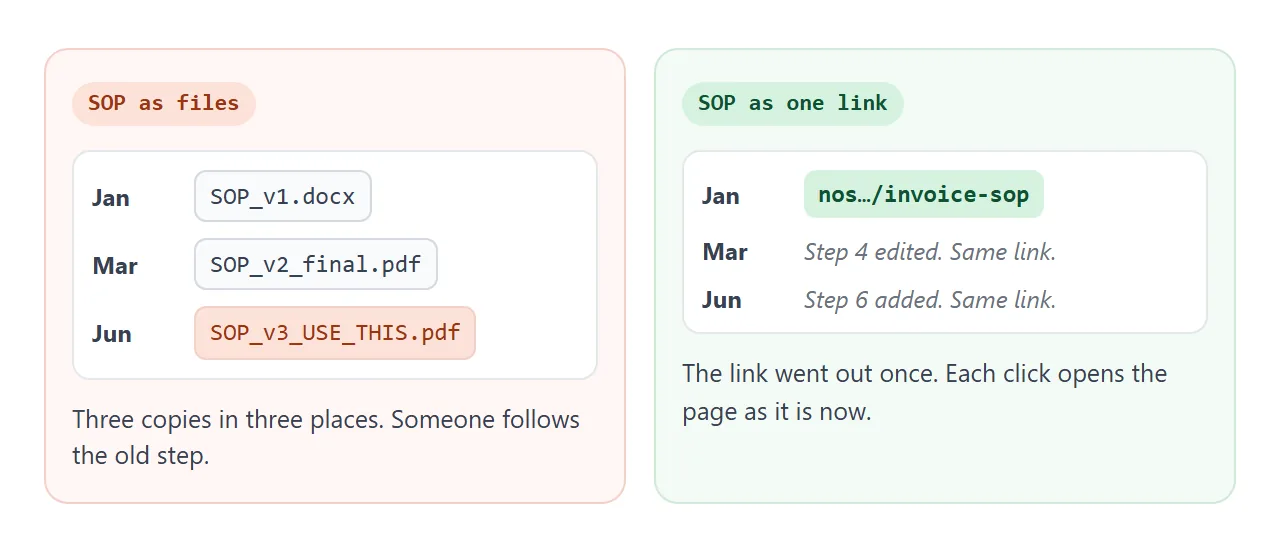
Say step 6 is new: the supplier must be told the payment date. With files, you replace the document and hope people delete the old one. With the link, you edit one step, add a line to the revision history, and send nothing.
The link always shows the current page. A reader cannot open the version from March, so keep a revision history table in the page, with the date and what changed.
If your company needs approvals or signed copies, keep those in your own records system as well. A share link does not do either.
In View mode, the owner's ticks and added rows are saved. A visitor's are not, so each person's ticks are theirs for that visit only.
One SOP, a list for each role
Some procedures involve several people. Each reader wants their own steps, not the whole page. This page lets the reader pick a role, and turns what is shown into plain text for an email.
<!doctype html>
<html lang="en">
<head>
<meta charset="utf-8">
<meta name="viewport" content="width=device-width, initial-scale=1">
<title>SOP: Set up a new starter's access</title>
<style>
  * { box-sizing: border-box; }
  body { margin: 0; padding: 16px; font-family: system-ui, sans-serif; color: #1f2937; background: #f3f4f6; line-height: 1.45; }
  .sheet { max-width: 680px; margin: 0 auto; background: #fff; border-radius: 12px; padding: 20px; box-shadow: 0 1px 4px rgba(0,0,0,.08); }
  .code { font-size: 12px; letter-spacing: .5px; text-transform: uppercase; color: #6b7280; margin: 0 0 4px; }
  h1 { margin: 0 0 6px; font-size: 21px; }
  .sub { margin: 0 0 14px; font-size: 14px; color: #6b7280; }
  .tabs { display: flex; flex-wrap: wrap; gap: 6px; margin-bottom: 12px; }
  .tabs button { font: inherit; font-size: 14px; padding: 7px 12px; border: 1px solid #d1d5db; background: #fff; border-radius: 99px; cursor: pointer; }
  .tabs button[aria-pressed=true] { background: #1d4ed8; border-color: #1d4ed8; color: #fff; }
  table { width: 100%; border-collapse: collapse; font-size: 14px; }
  th, td { text-align: left; padding: 9px 8px; border-top: 1px solid #e5e7eb; vertical-align: top; }
  th { font-size: 12px; color: #6b7280; font-weight: 600; }
  td.n { width: 34px; font-weight: 700; color: #3730a3; }
  td.w { width: 96px; white-space: nowrap; }
  .pill { display: inline-block; padding: 1px 8px; border-radius: 99px; font-size: 12px; background: #eef2ff; color: #3730a3; }
  .pill.it { background: #dcfce7; color: #166534; }
  .pill.mgr { background: #fef3c7; color: #92400e; }
  .pill.new { background: #fce7f3; color: #9d174d; }
  tr.dim { display: none; }
  .note { margin: 14px 0 0; font-size: 13px; color: #6b7280; }
  .out { margin-top: 12px; }
  .out button { font: inherit; font-size: 14px; padding: 7px 12px; border: 0; border-radius: 6px; background: #1f2937; color: #fff; cursor: pointer; }
  textarea { display: block; width: 100%; height: 150px; margin-top: 8px; font: 13px/1.4 ui-monospace, Consolas, monospace; padding: 8px; border: 1px solid #d1d5db; border-radius: 6px; }
  @media (max-width: 480px) { td.w { width: 74px; white-space: normal; } }
</style>
</head>
<body>
<div class="sheet">
  <p class="code">SOP-HR-012 · Version 2.0 · Owner: Office manager</p>
  <h1>Set up a new starter's access</h1>
  <p class="sub">Show the steps for one role, or all of them. Each person sees only their own list.</p>

  <div class="tabs" id="tabs">
    <button type="button" data-r="all" aria-pressed="true">All steps</button>
    <button type="button" data-r="Manager" aria-pressed="false">Manager</button>
    <button type="button" data-r="IT" aria-pressed="false">IT</button>
    <button type="button" data-r="New starter" aria-pressed="false">New starter</button>
  </div>

  <table id="tbl">
    <tr><th>#</th><th>Who</th><th>Step</th></tr>
    <tr data-r="Manager"><td class="n">1</td><td class="w"><span class="pill mgr">Manager</span></td><td>Send the access request form at least 5 working days before day one.</td></tr>
    <tr data-r="IT"><td class="n">2</td><td class="w"><span class="pill it">IT</span></td><td>Create the email account and add it to the team group.</td></tr>
    <tr data-r="IT"><td class="n">3</td><td class="w"><span class="pill it">IT</span></td><td>Prepare the laptop and label it with the starter's name.</td></tr>
    <tr data-r="Manager"><td class="n">4</td><td class="w"><span class="pill mgr">Manager</span></td><td>Book a 30-minute welcome call for day one.</td></tr>
    <tr data-r="New starter"><td class="n">5</td><td class="w"><span class="pill new">New starter</span></td><td>Sign in, set a new password and turn on two-step sign-in.</td></tr>
    <tr data-r="New starter"><td class="n">6</td><td class="w"><span class="pill new">New starter</span></td><td>Reply to the welcome email to confirm everything opens.</td></tr>
    <tr data-r="Manager"><td class="n">7</td><td class="w"><span class="pill mgr">Manager</span></td><td>If anything is missing, tell IT the same day.</td></tr>
  </table>
  <p class="note" id="note"></p>

  <div class="out">
    <button type="button" id="txt">Show as plain text</button>
    <textarea id="box" readonly placeholder="The list appears here, ready to paste into an email."></textarea>
  </div>
</div>

<script>
  // Filter the table rows by role, and turn what is visible into plain text.
  const rows = [...document.querySelectorAll('#tbl tr[data-r]')];
  const buttons = document.querySelectorAll('#tabs button');
  let role = 'all';

  function show() {
    let n = 0;
    rows.forEach(r => {
      const on = role === 'all' || r.dataset.r === role;
      r.classList.toggle('dim', !on);
      if (on) n++;
    });
    buttons.forEach(b => b.setAttribute('aria-pressed', b.dataset.r === role));
    document.getElementById('note').textContent = n + ' of ' + rows.length + ' steps shown';
  }

  buttons.forEach(b => b.addEventListener('click', () => { role = b.dataset.r; show(); }));

  document.getElementById('txt').addEventListener('click', () => {
    const lines = rows.filter(r => !r.classList.contains('dim')).map(r => {
      const c = r.children;
      return c[0].textContent + '. [' + c[1].textContent + '] ' + c[2].textContent;
    });
    document.getElementById('box').value =
      'Set up a new starter\'s access (SOP-HR-012, v2.0)\n' + lines.join('\n');
  });
  show();
</script>
</body>
</html>
The filter only hides rows. The full table is still on the page, so the SOP stays one document with one owner.
Ways to share an SOP compared
| Way to share | What people get | When a step changes | Fits best |
|---|---|---|---|
| Attach a Word or PDF file | A file to download | Send a new file; old copies stay in inboxes | A one-off, signed copy |
| A file in a shared folder | The file, from the folder | Replace the file; saved copies stay as they were | Documents your IT team manages |
| Share link to the page | A page in the browser, phone included | Edit the page; same link | SOPs that change |
| Link pinned in a channel | The link at the top of the channel | Same link, nothing to pin again | A team that lives in chat |
| QR code at the workstation | The link, printed | The paper stays, the page is current | Shop floor, desk or equipment |
For why a link beats a file in a thread, see why links beat attachments. For a tick-off list with no other text, HTML checklist is the shorter version.
When it does not work
| What you see | Cause | Fix |
|---|---|---|
| People follow an old step | They saved a file copy, or open an older link | Give out only the page link, and ask people to reload |
| Steps are out of order | The AI re-sorted them | Say "keep my order" in the prompt |
| A role you never gave appears | The AI filled a gap | Tell it to use only your roles and write TBC |
| Version and history disagree | You changed one and not the other | Update the header and the history table together |
| A visitor's tick does not stay | Visitors' changes are not saved | Treat ticks as personal for that visit |
| A picture from another site is missing | Images from other sites are blocked | Use an inline SVG or a coloured block |
If a form on the page tries to send answers to a server, that is blocked too. Collect replies by email or in the thread.