Decide who the page is for
Before you look at layouts, write one sentence about who will open your link and what you want them to do next. “Owners of small food brands should see that I’ve designed labels for businesses like theirs, then email me” is a usable brief. “Show my creativity” isn’t, because it can’t help you choose anything.
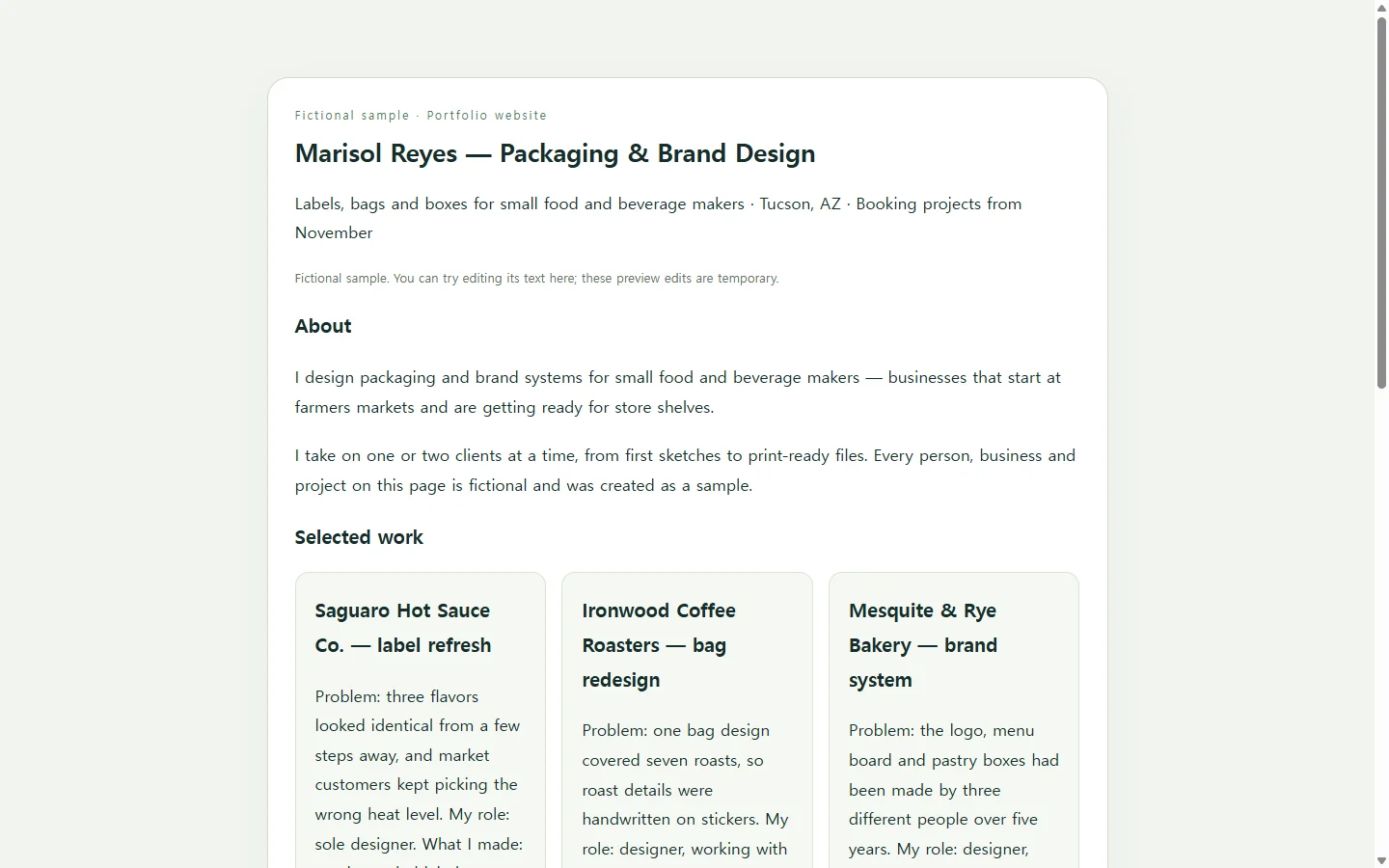
That sentence makes the hardest cut easier. If you have a dozen projects, someone looking for packaging work doesn’t need the podcast logo you made for a friend. Three projects that fit the reader often say more than a full archive, and the rest can wait for a later update.
Give each project a few plain lines
A thumbnail and a title leave the reader guessing what you actually did. For each project, cover four things: what the client or course needed, what your part was, what you made, and what happened afterward.
Be careful with that last one. If you have a real number you’re allowed to share, use it. If you don’t, describe the result in words — the labels went to print, the site launched, the instructor kept it as a model — instead of inventing a percentage. On team projects, name your own part rather than claiming the whole result.
See it in a finished sample
The sample on this page belongs to Marisol Reyes, a packaging and brand designer in Tucson. Marisol, the clients and the projects are invented for this article; none of it describes a real person or business.
Two choices in it are worth borrowing. Each project opens with the client’s problem rather than the deliverable, so a reader who skims only first lines still learns why the work mattered. And the table of project stages answers a question a prospective client may have before writing: what they need to send and what they get back.
If you’re applying for jobs rather than clients, swap that table for the tools you use and the role you want. The rest of the structure still works.
Build it with a template, by hand, or with an AI
A website builder makes sense if you want your own domain, several pages or a blog, and some builders group their portfolio templates by field, from architects to video editors. Coding the page yourself is a good choice when the code is part of what you’re showing. Hiring a designer can be worth it when your site is central to how you find work.
The middle path is asking an AI assistant to write the page as a single HTML file — the format a web browser opens as a page, with the styling kept in the same file. The AI handles layout and spacing. The facts come from you, and the prompt below tells it to mark gaps instead of filling them.
Replace the bracketed parts with your own notes. If your project images already live at public web addresses, include them; if not, the prompt asks for labeled placeholders you can swap out later.
Before you share the result, open it on your phone and check every name, date and outcome against your notes. An assistant can tidy your wording and still slip in a detail you never gave it.
When an application asks for a PDF
A portfolio website doesn’t replace a required file. If a job posting or a client’s intake form asks for a PDF or DOCX, send that format. Add your link wherever there’s room for one — the cover letter, a website field, the top of your resume — so the reader can see more if they choose.
Keep the link you’ve shared up to date
Once the page exists, the link travels: into proposals, your email signature, a profile, a reply to someone who asked. Then details change. In the sample, Marisol might notice a client’s name is misspelled, update “the labels went to print” once the product reaches stores, or change the availability line from November to January.
Those are small text changes, and they shouldn’t mean generating the whole page again. If you keep the HTML page in NOS, you can edit the rendered text directly, without asking an AI to rebuild the file.
When you publish the page, its sharing link stays the same after later edits. The address already sitting in last month’s proposal and in your signature doesn’t need replacing each time you fix a line, and the people who receive it can open the page without creating an account.
So start where this guide did: pick three projects for one kind of reader, write a few honest lines for each, build the page the way that suits you, and keep that one link current as your work changes.
A prompt to adapt
Create a one-page portfolio website as a single HTML file with all CSS inside one <style> tag. Do not use JavaScript, external libraries, fonts loaded from other sites, contact forms, or tracking code.

About me:
- Name: [YOUR NAME]
- What I do, in one line: [e.g., packaging and brand designer for small food and beverage makers]
- Location or time zone (optional): [e.g., Tucson, AZ or Remote, US Eastern]
- Who should read this page: [e.g., owners of small food brands moving from markets to store shelves]
- What I want them to do next: [e.g., email me about a label or packaging project]
- Contact: [EMAIL ADDRESS] and [ONE PROFILE LINK, optional]
- Availability line (optional): [e.g., Booking projects from November]

Projects (exactly 3). For each one:
- Title: [PROJECT TITLE]
- Client or context: [CLIENT NAME, COURSE, or personal project]
- The problem: [ONE OR TWO SENTENCES]
- My role: [WHAT I PERSONALLY DID; say if it was a team project]
- What I made: [DELIVERABLES]
- What happened afterward: [OUTCOME IN MY OWN WORDS; a number only if I have a real one]
- Image: [PUBLIC IMAGE URL, or none] with alt text: [WHAT THE IMAGE SHOWS]

How I work (optional): [3–4 short steps, e.g., intro call, two concepts, one round of feedback, final files]

Rules:
1. Use only the facts above. Do not invent clients, numbers, awards, testimonials, dates, or job titles. If something is missing, show a visible bracketed note such as [ADD OUTCOME] instead of guessing.
2. Order: a short intro with my name, one-line description, availability and contact; the three projects, each starting with the problem; the How I work section if provided; contact again at the end.
3. If an image is none, show a light gray box labeled Image: followed by the alt text.
4. Mobile first: a single column below 640px wide, no horizontal scrolling, body text at least 16px, links and buttons at least 44px tall.
5. Accessibility: exactly one h1, headings in order without skipped levels, meaningful alt text on every image, text color contrast meeting WCAG 2.1 AA, visible focus styles on links, and the email as a mailto link.
6. Keep the design restrained: one accent color, generous spacing, no animation.

Return only the complete HTML file.