A web design proposal template is one page the client opens on any screen. It starts with price, time and rounds of changes. Then come scope, phases with a price each, exclusions and one next step. Send it as a link before the call.
Freelancers keep asking how to write a quote for a website project, as in the Quora question "How do I write a quote for a web development freelance project?". A bare number is hard to defend. Scope, phases and exclusions answer the follow-ups in advance.
Here is a sample. Scroll it, open the questions at the bottom, then view it at phone width.
<!doctype html>
<html lang="en">
<head>
<meta charset="utf-8">
<meta name="viewport" content="width=device-width, initial-scale=1">
<title>Website proposal - Harbor & Pine Bakery</title>
<style>
* { box-sizing: border-box; }
body { margin: 0; font-family: system-ui, sans-serif; color: #1f2933; background: #f6f4ef; line-height: 1.55; }
.wrap { max-width: 760px; margin: 0 auto; padding: 20px 18px 40px; }
.hero { background: #fff; border-radius: 14px; padding: 22px 22px 20px; border: 1px solid #e6e1d6; }
.eyebrow { font-size: 13px; color: #6b7280; margin: 0 0 6px; }
h1 { font-size: 24px; line-height: 1.25; margin: 0 0 14px; }
.facts { display: grid; grid-template-columns: repeat(3, 1fr); gap: 10px; margin: 0; padding: 0; list-style: none; }
.facts li { background: #f6f4ef; border-radius: 10px; padding: 10px 12px; }
.facts b { display: block; font-size: 20px; }
.facts span { font-size: 13px; color: #6b7280; }
h2 { font-size: 18px; margin: 28px 0 8px; }
p { margin: 0 0 10px; }
ul.scope { margin: 0; padding-left: 20px; }
table { width: 100%; border-collapse: collapse; background: #fff; border-radius: 10px; overflow: hidden; font-size: 15px; }
th, td { text-align: left; padding: 10px 12px; border-bottom: 1px solid #ece8de; vertical-align: top; }
th { background: #efe9dc; font-size: 13px; }
td.n { white-space: nowrap; text-align: right; }
tfoot td { font-weight: 700; border-bottom: 0; background: #faf8f3; }
.two { display: grid; grid-template-columns: 1fr 1fr; gap: 14px; }
.box { background: #fff; border: 1px solid #e6e1d6; border-radius: 12px; padding: 14px 16px; }
.box h3 { margin: 0 0 6px; font-size: 15px; }
.box ul { margin: 0; padding-left: 18px; font-size: 15px; }
details { background: #fff; border: 1px solid #e6e1d6; border-radius: 10px; padding: 10px 14px; margin-top: 8px; }
summary { cursor: pointer; font-weight: 600; }
.note { font-size: 13px; color: #6b7280; }
.go { display: inline-block; margin-top: 8px; background: #1f5f4a; color: #fff; text-decoration: none; padding: 11px 18px; border-radius: 9px; font-weight: 600; }
@media (max-width: 560px) {
.facts { grid-template-columns: 1fr; }
.two { grid-template-columns: 1fr; }
h1 { font-size: 21px; }
th, td { padding: 9px 8px; font-size: 14px; }
}
</style>
</head>
<body>
<div class="wrap">
<section class="hero">
<p class="eyebrow">Proposal for Harbor & Pine Bakery · prepared by Fernwood Studio · 1 October 2026</p>
<h1>A five-page website that shows your menu and takes pre-orders by form</h1>
<ul class="facts">
<li><b>$4,800</b><span>fixed price, three phases</span></li>
<li><b>6 weeks</b><span>from the day the deposit arrives</span></li>
<li><b>2 rounds</b><span>of changes at each review</span></li>
</ul>
</section>
<h2>What you get</h2>
<ul class="scope">
<li>Five pages: Home, Menu, Pre-order, About, Contact</li>
<li>Layout that works on a phone, a tablet and a laptop</li>
<li>A pre-order form that emails you each request</li>
<li>Your logo, colours and photos set up consistently</li>
<li>Launch on your domain and a short hand-over video</li>
</ul>
<h2>Phases and price</h2>
<table>
<thead><tr><th>Phase</th><th>What happens</th><th class="n">Price</th></tr></thead>
<tbody>
<tr><td><b>1. Design</b><br><span class="note">Weeks 1-2</span></td><td>Page layouts and one colour and type direction, shown for your review</td><td class="n">$1,800</td></tr>
<tr><td><b>2. Build</b><br><span class="note">Weeks 3-5</span></td><td>All five pages built, pre-order form working, tested on phones</td><td class="n">$2,400</td></tr>
<tr><td><b>3. Launch</b><br><span class="note">Week 6</span></td><td>Domain connected, final checks, hand-over video</td><td class="n">$600</td></tr>
</tbody>
<tfoot><tr><td colspan="2">Total</td><td class="n">$4,800</td></tr></tfoot>
</table>
<h2>Payment</h2>
<p>40% ($1,920) to start, 40% ($1,920) when you approve the design, 20% ($960) at launch.</p>
<h2>What is in and what is not</h2>
<div class="two">
<div class="box">
<h3>Included</h3>
<ul><li>Two rounds of changes per review</li><li>Photo resizing and placement</li><li>30 days of fixes after launch</li></ul>
</div>
<div class="box">
<h3>Not included</h3>
<ul><li>Writing the page text</li><li>Product photography</li><li>Domain and hosting fees</li></ul>
</div>
</div>
<h2>What I need from you</h2>
<ul class="scope">
<li>Logo file and brand colours, by the end of week 1</li>
<li>Menu text and prices, by the start of week 3</li>
<li>One person who gives feedback for the whole bakery</li>
</ul>
<h2>Questions you may have</h2>
<details><summary>What if I want a sixth page?</summary>
<p>An extra page is $300 and adds two working days. We agree it in writing before I start it.</p></details>
<details><summary>What if feedback comes late?</summary>
<p>The schedule moves by the same number of days. I will tell you the new launch date the same day.</p></details>
<details><summary>Who owns the site?</summary>
<p>You do, once the final payment is made. This is a sample line: put your own terms here.</p></details>
<h2>Next step</h2>
<p>Reply to my email with "go" and I will send the start invoice. This proposal is valid until 31 October 2026.</p>
<a class="go" href="#">Reply "go" to start</a>
<p class="note" style="margin-top:14px">Sample page with made-up names and prices. Replace every figure with your own.</p>
</div>
</body>
</html>
The order matters more than the styling. The client sees the answer to "how much and how long" first, and the detail underneath for whoever wants it.
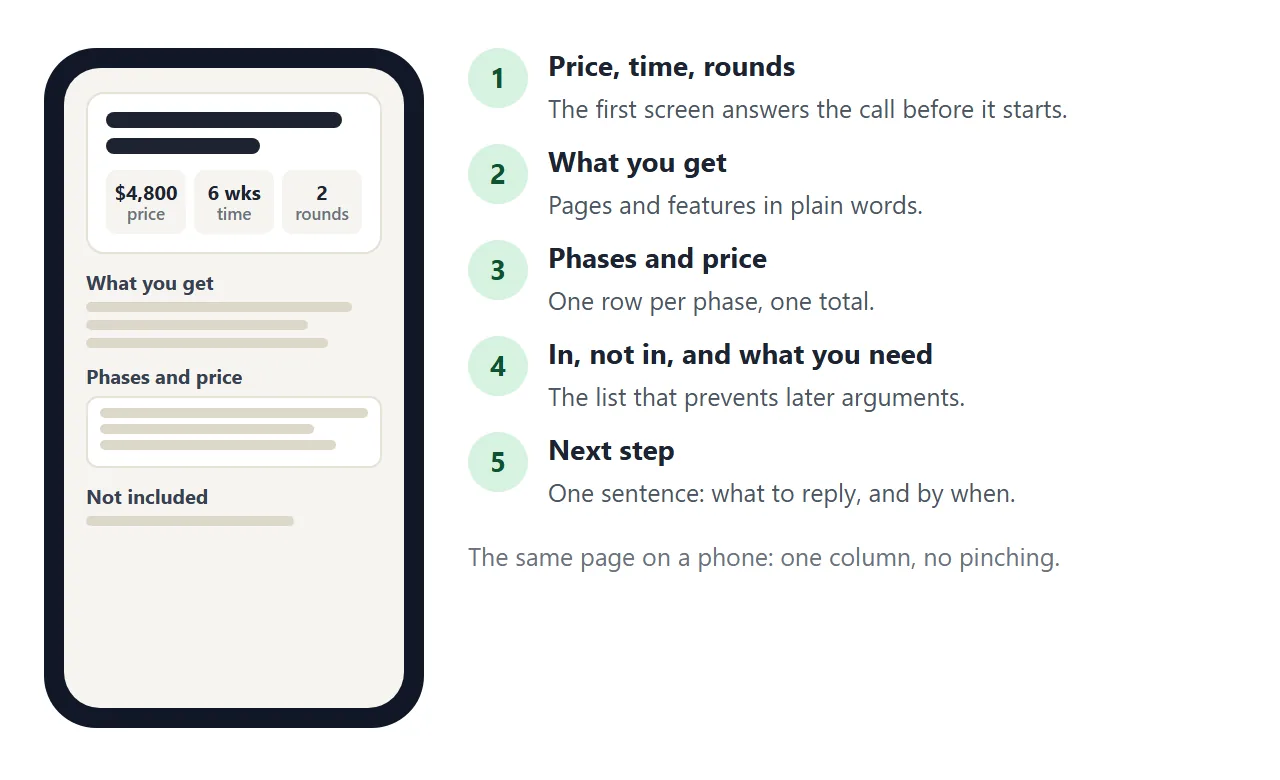
What each part of the page is for
You can reuse the order of the sample as it is. Each block answers one question the client is likely to have.
- Price, time, rounds: how much, how long, and how much change is covered.
- What you get: the pages and features, written so a non-designer can check them.
- Phases and price: one row per phase with dates, so the total is not one large number.
- Included and not included: the two lists that prevent most disagreements later.
- What I need from you: the files and decisions your schedule depends on.
- Next step: one sentence saying what to reply, and by when.
Keep the sentences short. If a section needs more than a screen, it probably holds two ideas.
Make it with AI
Writing the HTML by hand is not necessary. Ask ChatGPT, Claude or Gemini to build the page and give it your real scope and numbers. Paste this and replace the square brackets.
Create one self-contained HTML page for a website design proposal.
Use plain CSS in a style tag, no external files, no images, and make it
readable on a phone. Sections in this order: a top block with fixed price,
timeline and rounds of changes; What you get (a list of pages and features);
Phases and price (a table: phase, what happens, weeks, price, with a total row);
Payment schedule; Included and Not included (two lists); What I need from you;
Questions (three details elements); Next step (one sentence).
My details: studio [your name], client [client name], project [what the site is].
Pages: [list]. Phases and prices: [list]. Payment split: [for example 40/40/20].
Not included: [list]. Valid until: [date]. Output only the full HTML.
Then check the result before it goes anywhere:
- Add up the phase prices yourself. The total must match, and so must the payment split.
- Read every date and name. AI tools fill gaps with invented ones.
- Look for anything you did not promise, such as a free extra page or a support period.
- Resize the window to a phone width and check that the table still fits.
Let the client choose the scope
If you sell a core site with optional extras, let the client tick what they want and watch the total move. It is the same page with a small script.
It turns "what would a blog add?" into something they can try alone.
<!doctype html>
<html lang="en">
<head>
<meta charset="utf-8">
<meta name="viewport" content="width=device-width, initial-scale=1">
<title>Choose your scope</title>
<style>
  * { box-sizing: border-box; }
  body { margin: 0; font-family: system-ui, sans-serif; color: #1f2933; background: #f4f6f8; line-height: 1.5; }
  .wrap { max-width: 640px; margin: 0 auto; padding: 18px 16px 30px; }
  h1 { font-size: 21px; margin: 0 0 4px; }
  .sub { color: #5b6573; margin: 0 0 16px; font-size: 15px; }
  .base { background: #fff; border: 1px solid #dde2e8; border-radius: 12px; padding: 14px 16px; display: flex; justify-content: space-between; gap: 12px; }
  .base b { display: block; }
  .opt { display: flex; align-items: center; gap: 12px; background: #fff; border: 1px solid #dde2e8; border-radius: 12px; padding: 12px 16px; margin-top: 10px; cursor: pointer; }
  .opt input[type=checkbox] { width: 20px; height: 20px; flex: none; }
  .opt .t { flex: 1; }
  .opt .t small { display: block; color: #5b6573; }
  .price { font-weight: 700; white-space: nowrap; }
  .step { display: flex; align-items: center; gap: 8px; }
  .step button { width: 34px; height: 34px; border-radius: 8px; border: 1px solid #c3cad3; background: #fff; font-size: 18px; cursor: pointer; }
  .step output { min-width: 20px; text-align: center; font-weight: 700; }
  .total { position: sticky; bottom: 0; margin-top: 16px; background: #14342b; color: #fff; border-radius: 12px; padding: 14px 16px; display: flex; justify-content: space-between; align-items: center; gap: 10px; flex-wrap: wrap; }
  .total big { font-size: 24px; font-weight: 700; }
  .total span { font-size: 14px; opacity: .85; }
  .sum { margin-top: 12px; font-size: 14px; color: #3b4452; background: #fff; border: 1px dashed #c3cad3; border-radius: 10px; padding: 10px 14px; }
</style>
</head>
<body>
<div class="wrap">
  <h1>Choose what goes in your website</h1>
  <p class="sub">Tick the extras you want. The price and the timeline update as you go.</p>

  <div class="base">
    <div><b>Core site: 5 pages, mobile layout, contact form</b><span class="sub">Always included</span></div>
    <div class="price">$3,600</div>
  </div>

  <label class="opt">
    <input type="checkbox" data-price="600" data-days="5">
    <span class="t">Blog or news section<small>List page plus post template</small></span>
    <span class="price">+ $600</span>
  </label>
  <label class="opt">
    <input type="checkbox" data-price="450" data-days="3">
    <span class="t">Booking request form<small>Date, time and party size</small></span>
    <span class="price">+ $450</span>
  </label>
  <label class="opt">
    <input type="checkbox" data-price="700" data-days="4">
    <span class="t">Page text written for you<small>Up to 5 pages, 2 rounds</small></span>
    <span class="price">+ $700</span>
  </label>
  <div class="opt" style="cursor:default">
    <span class="t">Extra pages<small>$300 each, 2 working days each</small></span>
    <span class="step">
      <button type="button" id="minus" aria-label="One fewer page">-</button>
      <output id="count">0</output>
      <button type="button" id="plus" aria-label="One more page">+</button>
    </span>
  </div>

  <div class="total">
    <div><span>Estimated total</span><br><big id="total">$3,600</big></div>
    <div><span>Estimated build time</span><br><b id="weeks">6 weeks</b></div>
  </div>
  <p class="sum" id="sum">Core site only.</p>
</div>

<script>
  const BASE_PRICE = 3600, BASE_DAYS = 30;  // 30 working days = 6 weeks
  const boxes = document.querySelectorAll('input[type=checkbox]');
  const count = document.getElementById('count');
  let extra = 0;

  function update() {
    let price = BASE_PRICE + extra * 300;
    let days = BASE_DAYS + extra * 2;
    const picked = [];
    boxes.forEach((b) => {
      if (b.checked) {
        price += Number(b.dataset.price);
        days += Number(b.dataset.days);
        picked.push(b.closest('label').querySelector('.t').firstChild.textContent);
      }
    });
    if (extra) picked.push(extra + ' extra page' + (extra > 1 ? 's' : ''));
    count.textContent = extra;
    document.getElementById('total').textContent = '$' + price.toLocaleString('en-US');
    document.getElementById('weeks').textContent = Math.ceil(days / 5) + ' weeks';
    document.getElementById('sum').textContent =
      picked.length ? 'Core site plus: ' + picked.join(', ') + '.' : 'Core site only.';
  }

  boxes.forEach((b) => b.addEventListener('change', update));
  document.getElementById('plus').addEventListener('click', () => { extra = Math.min(extra + 1, 10); update(); });
  document.getElementById('minus').addEventListener('click', () => { extra = Math.max(extra - 1, 0); update(); });
</script>
</body>
</html>
On a shared page the script runs for the client too. Their ticks are not saved, and nothing is sent to you.
Ask them to reply with their choice. Changes you make as the owner in View mode are saved.
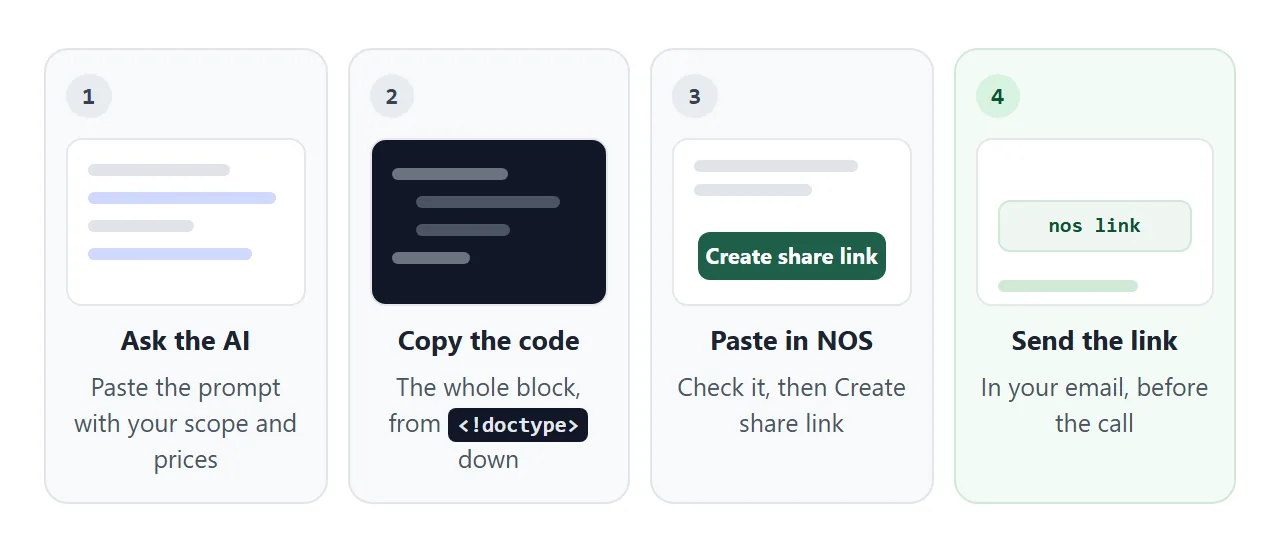
Send it as a link
Paste the finished HTML into NOS and choose Create share link. HTML to link walks through it. The address opens in a normal browser on a laptop or a phone, and the client needs no account. They can read it but cannot edit it.
Put the address in the body of your email and say what to look at: "Open this before Thursday. The price and the phases are at the top."
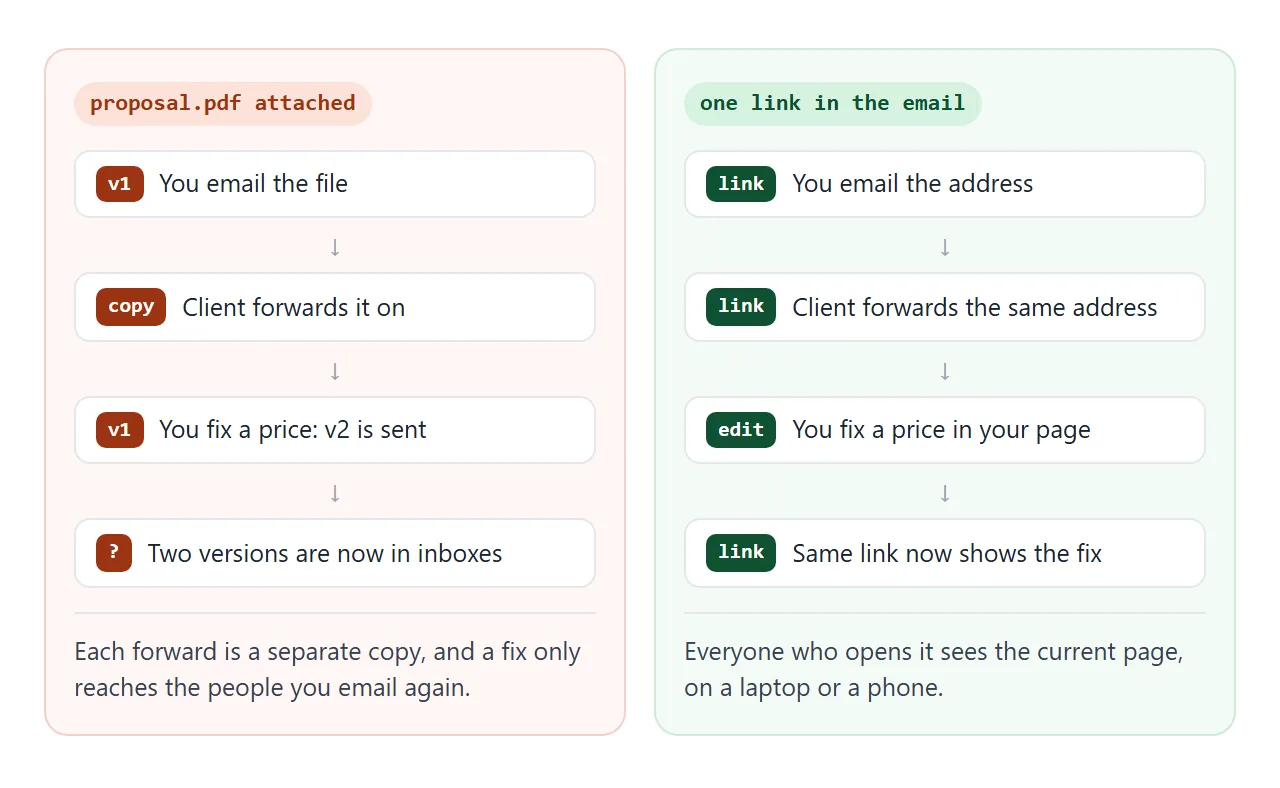
If you change a price or a date later, edit the code and the same link shows the new version. Add a dated line so the client sees what changed.
In Slack, paste the address into a message and send it. As of October 2026, Slack's help page says most links expand into a preview, with exceptions.
One exception is a link already shared in that conversation within the past hour. Another is a message with more than five links. Do not count on a preview: add one line saying what the link is.
For more on the sending side, see how to send a proposal as a link and how to send a proposal to a client.
Ways to send a proposal compared
| PDF attachment | Link to a page | |
|---|---|---|
| Opens on a phone | In whatever viewer the phone has | In the browser, as one column when the page is built that way |
| After you fix a price | You send a new file, and old copies stay around | Same link shows the fix |
| Forwarded inside the client | Each forward is a separate copy | Same address for everyone |
| Interactive options | No | Yes, such as the scope picker |
| Fits a procurement portal | Yes, if a file is required | Only as a link inside another document |
| Client can edit it | Depends on the file type | No, the share link is read only |
If a client's process requires a file, send the file they ask for and keep the link as the version you talk through. HTML vs PDF for clients compares the two in more detail.
When it does not work
| What you see | Cause | Fix |
|---|---|---|
| Total does not match the phases | The AI tool added numbers wrongly | Add the rows yourself and correct the total |
| The page looks wide on a phone | Wide table or missing viewport tag | Ask for the page to be readable on a phone, and check for the viewport meta tag |
| Client says the options did not stay ticked | A visitor's changes are not saved | Ask them to reply with their choice |
| A form on the page does nothing | Sending a form to a server is blocked | Use a reply by email as the next step |
| Pictures are missing | Pictures from other sites are blocked | Use inline SVG or CSS shapes, or leave images out |
| Slack shows no preview | Slack does not expand every link | Add one line of text next to the link |
| An older number is still in circulation | Someone is holding a PDF copy | Send the link and ask them to use only that |
A template is only a starting point. The first time you use it, change every figure, then read the page as the client would: on a phone, with no one explaining it.