What a project brief carries
A project brief is a short summary of a project’s key elements, written for stakeholders and collaborators across teams. One common breakdown has four parts: background, goals with success measures, a timeline, and the audience the project serves. Fuller versions add scope and deliverables, roles, budget, and risks.
Length follows the project. Some briefs are a single paragraph, and others run to a page. Either way, the brief is a condensed version of the project plan rather than the plan itself. The detailed budget, task breakdown, and communication plan can live in their own documents and be linked at the end.
Two other documents are easy to confuse with a brief. A creative brief centers on audience, message, tone, and brand consistency. A business case uses data, risks, and expected returns to argue that a project should happen at all. If you still need a yes, that may be the document to write first.
A one-page example you can borrow
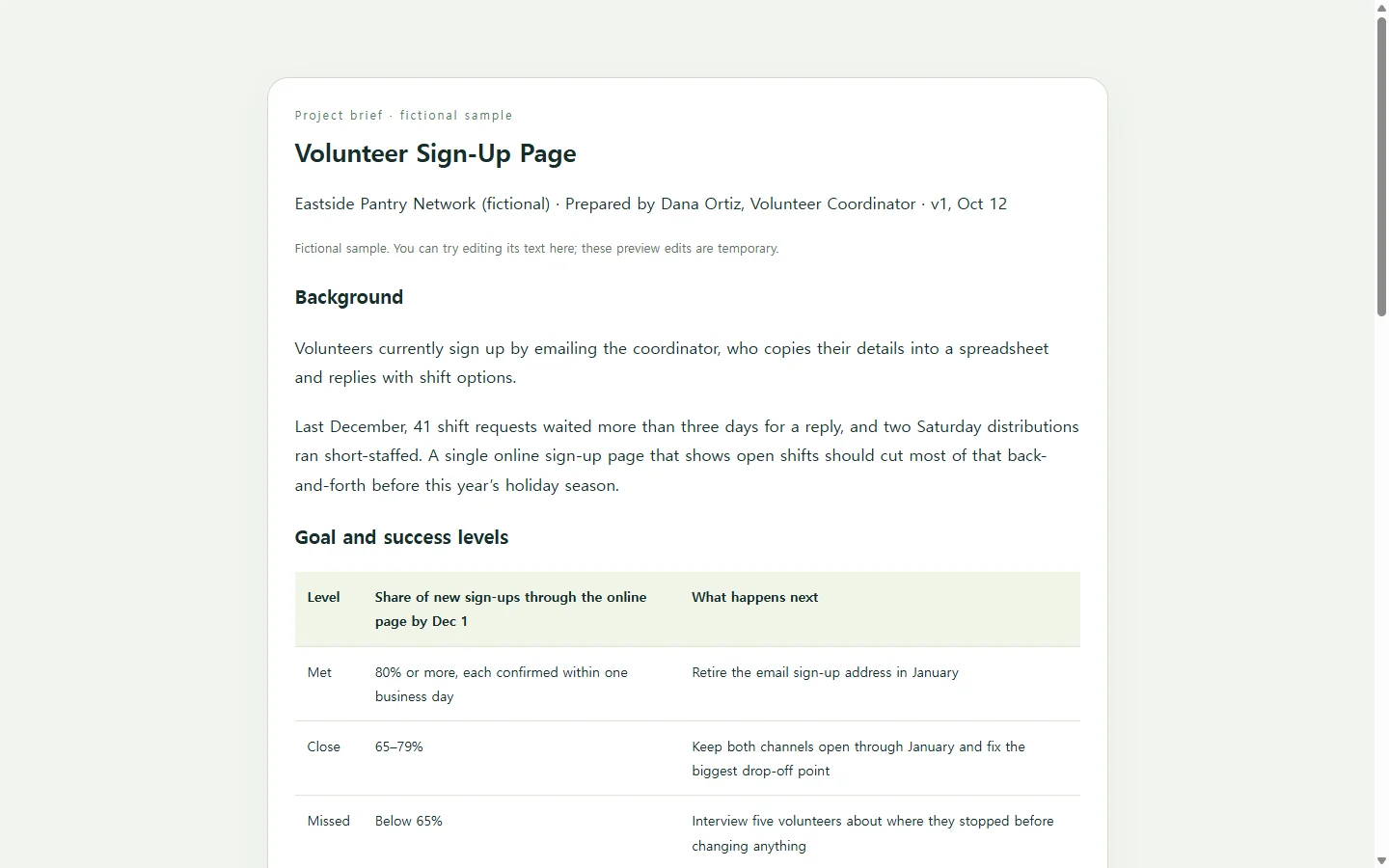
The sample below is fictional. Eastside Pantry Network, its staff, dates, and numbers were invented for this article. In the sample project, email-based volunteer sign-ups are replaced with a single online sign-up page before the holiday season.
Three choices are worth copying. The background explains why the project is happening now in a few sentences instead of retelling the organization’s history. The goal names a number and a date, and the success table spells out what “close” means and what happens at each level, so nobody has to argue about it in December. The out-of-scope list is short but explicit, because a sign-up page can quietly grow into a website rebuild.
Making it yours
Start from what you already have: the request email, kickoff notes, and any date someone has already promised. Write the goal sentence before you think about layout, since it decides what the rest of the page needs. A goal that is specific, measurable, achievable, realistic, and time-bound gives the timeline something to point at.
When something hasn’t been decided, say so. “Budget: TBD — Priya to confirm by Oct 24” is more useful than a guessed figure, and it tells readers who to ask.
Before sending, show the draft to the people named in it. Bringing stakeholders in early is common advice for briefs, and they’re the ones most likely to catch a wrong date or a role they never agreed to.
Building the page with AI, if you want a link
A word-processor template works fine, and if your client or organization asks for a Word file or a PDF, send that. If the brief is mainly something your team will check during the project, a web page that reads well on a phone is worth considering. You can ask an AI chat tool to write it as a single HTML file. HTML is the code a browser reads to display a page, and keeping everything in one file makes it easy to paste or upload somewhere else.
The prompt below asks for that kind of page. Replace each bracketed field with your real details. It tells the AI to leave visible placeholders instead of making up goals, names, or numbers. It also sets requirements for headings, contrast, and small screens, so you don’t have to fix them afterward.
When the date moves after you’ve shared it
Suppose the Eastside pilot slips from November 11 to November 18 because the page needs another round of review.
If the brief went out as an attachment, the fix is a new file and a note asking everyone to use it, while the old copy stays in people’s inboxes. If the brief is a shared page, you change the date in one place. That’s the practical case for keeping a single source of truth: when a target date shifts, there’s only one spot to update.
NOS keeps HTML pages alongside notes in a workspace. You can edit the rendered text directly, so changing “Nov 11” to “Nov 18” doesn’t mean asking the AI to regenerate the page. The published share link stays the same after edits, so the URL you sent at kickoff shows the new date. People you share it with can open it without an account.
If someone needs a fixed file for the record, keep sending that too. The shared page is the version your team checks from day to day.
A prompt to adapt
Create a one-page project brief as a single self-contained HTML file (all CSS inline or in one <style> tag; no external scripts, fonts, or images). Use only the details I give below. If a detail is missing, show a visible placeholder such as [TBD – owner – decide by date] instead of inventing it.

Project name: [Project name]
Prepared by / date / version: [Your name], [date], [v1]
Background (why now, 2–3 sentences): [Background]
Goal (one sentence with a number and a date): [Goal]
Success levels: [Met = …; Close = …; Missed = …; and what happens at each level]
Audience (who the result serves): [Audience]
In scope: [item; item; item]
Out of scope: [item; item; item]
Milestones: [date – milestone; date – milestone]
People and roles: [name – role – what they decide or approve]
Budget/resources: [amount or TBD]
Risks: [risk – plan]
Related documents (names only; I will add links later): [Document; Document]

Layout: sections in this order: background, goal with a success-levels table, audience, scope as two short side-by-side lists (in / out), milestone timeline, people and roles, risks, related documents. Keep the wording as I wrote it and don’t add marketing language.

Accessibility: one <h1> for the project name, then <h2> for each section; a real <table> with <th> header cells for the success levels; dark text on a light background with strong contrast; never use color alone to convey meaning (label each success level in words); body text at least 16px; meaningful link text.

Mobile: single-column layout below 600px wide; scope lists stack vertically; the table must not overflow the screen (let it scroll horizontally or stack rows); no fixed pixel widths on containers.

Do not add forms, submit buttons, download or export links, analytics, or calls to external services. Return only the complete HTML code.