A website audit report is a list of what you found on a site, why each item matters, and what to fix first. Sent as a page, it fits whatever screen the client opens it on. You can correct a line without a new file.
The usual route is a PDF, and that is where the time goes. One person, writing about exporting from Claude, put it this way: "save as pdf, layout shifts. always end up just screenshotting."
A page skips the export. Below is a finished audit for a made-up pottery studio. Open a finding, or tap a priority to filter the list.
<!doctype html>
<html lang="en">
<head>
<meta charset="utf-8">
<meta name="viewport" content="width=device-width, initial-scale=1">
<title>Website audit - Fernhill Pottery Studio</title>
<style>
  * { box-sizing: border-box; }
  body { margin: 0; background: #f3f4f6; font-family: system-ui, -apple-system, "Segoe UI", sans-serif; color: #1f2937; line-height: 1.5; }
  .page { max-width: 680px; margin: 0 auto; background: #fff; padding: 22px 18px 30px; }
  h1 { margin: 0 0 2px; font-size: 24px; line-height: 1.2; }
  .sub { margin: 0 0 16px; font-size: 14px; color: #6b7280; }
  h2 { margin: 26px 0 8px; font-size: 18px; }
  .lead { font-size: 16px; margin: 0 0 14px; }
  .summary { display: grid; grid-template-columns: repeat(3, 1fr); gap: 8px; }
  .stat { background: #f9fafb; border: 1px solid #e5e7eb; border-radius: 12px; padding: 10px 12px; }
  .stat.first { background: #fff7ed; border-color: #fed7aa; }
  .stat b { display: block; font-size: 22px; line-height: 1.2; }
  .stat span { font-size: 13px; color: #4b5563; }
  .filters { display: flex; flex-wrap: wrap; gap: 8px; margin: 10px 0 12px; }
  .filters button { font: inherit; font-size: 14px; padding: 6px 12px; border-radius: 999px; border: 1px solid #d1d5db; background: #fff; color: #374151; cursor: pointer; min-height: 36px; }
  .filters button[aria-pressed="true"] { background: #1f2937; border-color: #1f2937; color: #fff; }
  details.f { border: 1px solid #e5e7eb; border-radius: 12px; margin: 0 0 8px; break-inside: avoid; }
  details.f summary { list-style: none; cursor: pointer; padding: 11px 14px; display: grid; grid-template-columns: 1fr auto; gap: 2px 10px; align-items: center; }
  details.f summary::-webkit-details-marker { display: none; }
  .name { font-size: 16px; font-weight: 600; }
  .meta { grid-column: 1 / -1; font-size: 13px; color: #6b7280; }
  .chip { display: inline-block; font-size: 12px; font-weight: 600; padding: 1px 8px; border-radius: 999px; margin-right: 6px; white-space: nowrap; }
  .p1 { background: #ffedd5; color: #9a3412; }
  .p2 { background: #fef3c7; color: #92400e; }
  .p3 { background: #e0f2fe; color: #075985; }
  .body { padding: 0 14px 12px; font-size: 15px; }
  .body p { margin: 6px 0; }
  .body b { color: #374151; }
  .plus { color: #6b7280; font-size: 18px; }
  details[open] .plus { transform: rotate(45deg); }
  .fine { margin-top: 22px; font-size: 14px; color: #6b7280; }
  .scope { background: #f9fafb; border: 1px solid #e5e7eb; border-radius: 12px; padding: 12px 14px; font-size: 15px; }
  .scope ul { margin: 6px 0 0; padding-left: 20px; }
  @media print {
    @page { size: A4; margin: 16mm; }
    body { background: #fff; }
    .page { max-width: none; padding: 0; }
    .filters { display: none; }
    .stat, .chip { print-color-adjust: exact; -webkit-print-color-adjust: exact; }
  }
</style>
</head>
<body>
<div class="page">
  <h1>Website audit: Fernhill Pottery Studio</h1>
  <p class="sub">fernhillpottery.example · prepared by Jo Marlow · example data</p>

  <p class="lead" id="lead"></p>

  <div class="summary">
    <div class="stat"><b id="s-all"></b><span>findings</span></div>
    <div class="stat first"><b id="s-first"></b><span>to fix first</span></div>
    <div class="stat"><b id="s-time"></b><span>total effort</span></div>
  </div>

  <h2>Findings</h2>
  <div class="filters" id="filters"></div>
  <div id="list"></div>

  <h2>What I did not check</h2>
  <div class="scope" id="scope"></div>

  <p class="fine">Effort is my estimate for one person doing the work. Questions about any line: reply to the message this link came in.</p>
</div>

<script>
  // ---- Change the findings here. One object per finding. ----
  const LEAD = 'The site is easy to browse. Three problems cost you enquiries on phones, and they are quick to fix. Start with those.';
  const PRIORITIES = {
    1: 'Fix first',
    2: 'Next',
    3: 'Later'
  };
  const FINDINGS = [
    { p: 1, minutes: 30, name: 'The phone number is a picture, not a link',
      where: 'Header on every page',
      saw: 'The number in the header is an image. Tapping it on a phone does nothing.',
      why: 'People looking at the site on a phone cannot call you with one tap.',
      fix: 'Replace the image with text and a tel: link.' },
    { p: 1, minutes: 60, name: 'The booking form shows no message after sending',
      where: 'Contact page',
      saw: 'After pressing Send, the page reloads with an empty form.',
      why: 'A visitor cannot tell whether the request went through, so some will send it twice or give up.',
      fix: 'Show a "Thanks, we will reply within two days" message after sending.' },
    { p: 1, minutes: 45, name: 'The home page hero photo is a very large file',
      where: 'Home page',
      saw: 'The top photo is 3.2 MB (example figure).',
      why: 'On a slow connection the first screen stays blank while this file loads.',
      fix: 'Resize the photo to the size it is shown at and save it again at a smaller file size.' },
    { p: 2, minutes: 120, name: 'Eight of ten pages share one page title',
      where: 'All pages except Home and Contact',
      saw: 'The browser tab and the search result title read "Fernhill Pottery" on each.',
      why: 'Visitors cannot tell the tabs apart, and a search result for the classes page does not say classes.',
      fix: 'Write one short, different title per page, starting with what the page is.' },
    { p: 2, minutes: 60, name: 'Class prices disagree between three pages',
      where: 'Classes, Gift vouchers, FAQ',
      saw: 'A six-week course is 180 on one page and 195 on another (example figures).',
      why: 'A customer who finds the lower price will expect it.',
      fix: 'Keep the price in one place and link to it from the other two.' },
    { p: 2, minutes: 120, name: 'Photos have no alt text',
      where: 'Gallery and Classes',
      saw: 'Eleven images have empty descriptions.',
      why: 'People using a screen reader get no description of the work.',
      fix: 'Add one plain sentence per photo that says what is in it.' },
    { p: 3, minutes: 20, name: 'No icon in the browser tab',
      where: 'Whole site',
      saw: 'The tab shows a generic page icon.',
      why: 'It is a small polish item.',
      fix: 'Add a small square logo as the site icon.' },
    { p: 3, minutes: 5, name: 'The footer says 2022',
      where: 'Footer on every page',
      saw: 'The copyright line shows an old year.',
      why: 'It can make a site look unmaintained.',
      fix: 'Update the year, or remove it.' }
  ];
  const NOT_CHECKED = ['Search ranking and keywords', 'The online shop checkout', 'Anything behind a login'];
  // ---------------------------------------------------------

  const hours = (min) => min >= 60 ? (Math.round(min / 6) / 10) + ' h' : min + ' min';
  const total = FINDINGS.reduce((s, f) => s + f.minutes, 0);

  document.getElementById('lead').textContent = LEAD;
  document.getElementById('s-all').textContent = FINDINGS.length;
  document.getElementById('s-first').textContent = FINDINGS.filter((f) => f.p === 1).length;
  document.getElementById('s-time').textContent = hours(total);
  document.getElementById('scope').innerHTML = 'I looked at the public pages only. Not covered:<ul>' +
    NOT_CHECKED.map((t) => '<li>' + t + '</li>').join('') + '</ul>';

  const list = document.getElementById('list');
  const filters = document.getElementById('filters');
  let current = 0;

  function render() {
    list.innerHTML = FINDINGS.filter((f) => !current || f.p === current).map((f, i) =>
      '<details class="f"' + (i === 0 ? ' open' : '') + '><summary>' +
      '<span class="name">' + f.name + '</span><span class="plus">+</span>' +
      '<span class="meta"><span class="chip p' + f.p + '">' + PRIORITIES[f.p] + '</span>' + f.where + ' · ' + hours(f.minutes) + '</span></summary>' +
      '<div class="body"><p><b>What I saw.</b> ' + f.saw + '</p><p><b>Why it matters.</b> ' + f.why + '</p><p><b>Fix.</b> ' + f.fix + '</p></div></details>'
    ).join('');
    filters.querySelectorAll('button').forEach((b) =>
      b.setAttribute('aria-pressed', String(Number(b.dataset.p) === current)));
  }

  [[0, 'All']].concat(Object.keys(PRIORITIES).map((k) => [Number(k), PRIORITIES[k]])).forEach((pair) => {
    const b = document.createElement('button');
    b.type = 'button';
    b.dataset.p = pair[0];
    b.textContent = pair[1];
    b.addEventListener('click', () => { current = pair[0]; render(); });
    filters.appendChild(b);
  });
  render();
</script>
</body>
</html>
The order a client reads it in
The example follows one order. It is an editorial choice, not a standard, and it puts the answer to "how bad is it?" on the first screen.
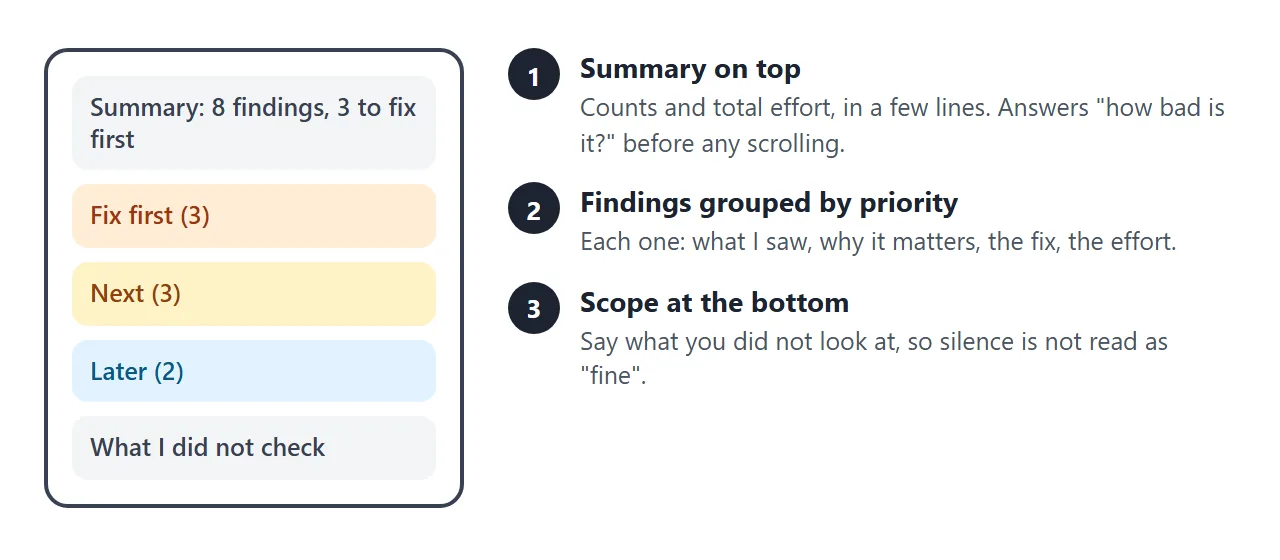
- Summary – the number of findings, how many come first, and the total effort.
- Findings by priority – fix first, next, later. Keep the first group short.
- Each finding – what you saw, why it matters, the fix, and how long it takes.
- What I did not check – so silence is not read as "this part is fine".
Clients skim. If they read only the top of the page, they should still know what you need them to approve.
For the wider case of reports you send on a schedule, see HTML for client reports.
Make it with AI
Paste this prompt into ChatGPT, Claude or Gemini. Put your own findings at the bottom.
Write ONE self-contained HTML file: a website audit report, to be read on a phone.
Rules:
- Plain HTML, CSS and JavaScript in one file. No images, no external files, no form that sends data.
- One column. Add a viewport meta tag. Text at least 16px.
- Start with three summary boxes: number of findings, number to fix first, total effort.
- Group findings under Fix first, Next and Later. Add filter buttons for the groups.
- Each finding is a collapsible block: what I saw, why it matters, the fix, effort.
- Put every finding in one list at the top of the script, with the comment "Change the findings here".
- End with a section called What I did not check.
- Add a print style: A4, no grey page background.
- If I did not give you a fact, write TODO. Do not invent findings, counts or numbers.
My site: ...
My findings, with where I saw each one and how long the fix takes: ...
What I did not check: ...
The list-at-the-top line matters. It turns a correction into one edit instead of a hunt through the page.
What to check in the result
An AI is good at layout and loose with facts. Read the page the way the client will.
- Counts. "Eleven images" and "eight pages" need to match the site.
- Every TODO. Replace each one, or delete the line.
- Invented findings. Anything you did not give it, such as a speed number or a ranking.
- The phone. Open the page on your own phone before the client does.
If the page looks wrong, fixing AI-generated HTML covers the usual causes.
Send it as a link
Paste the HTML into a NOS document and choose Create share link. HTML to link walks through it.
The result is a page anyone with the link can open in a browser, on a phone too, with no account. They can read it but not edit it. The scripts run, so the filter buttons and the collapsible findings work for the client.
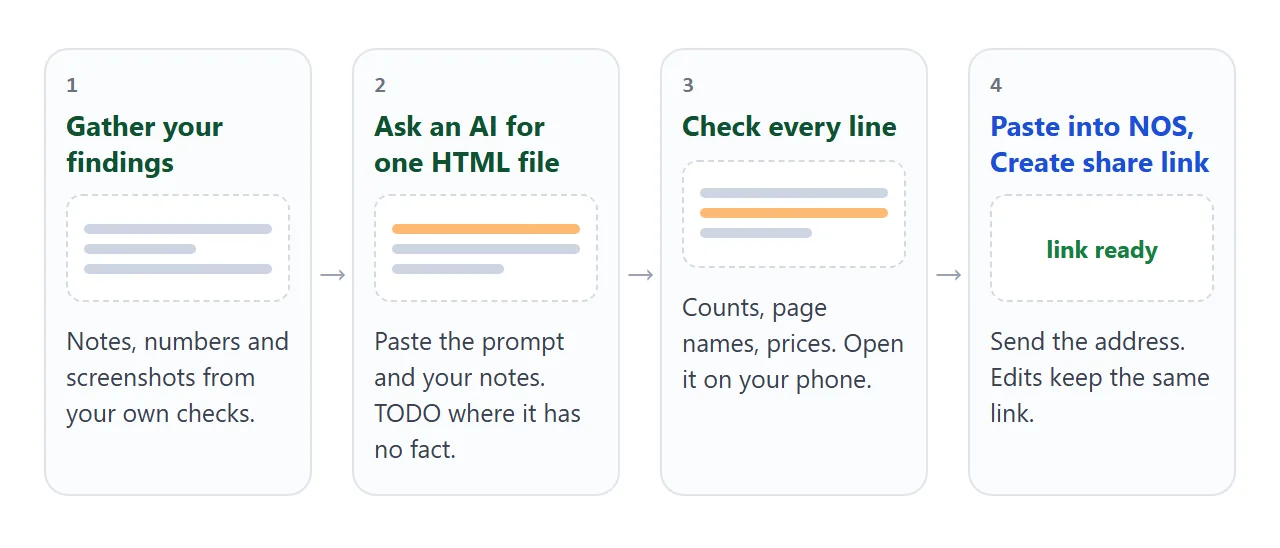
Send the address in the body of your email or message, with one line saying which site it covers.
After a correction: open the page in NOS, change the finding in the block at the top of the script, and save. The same link shows the new version.
PDF, screenshot or page: how they compare
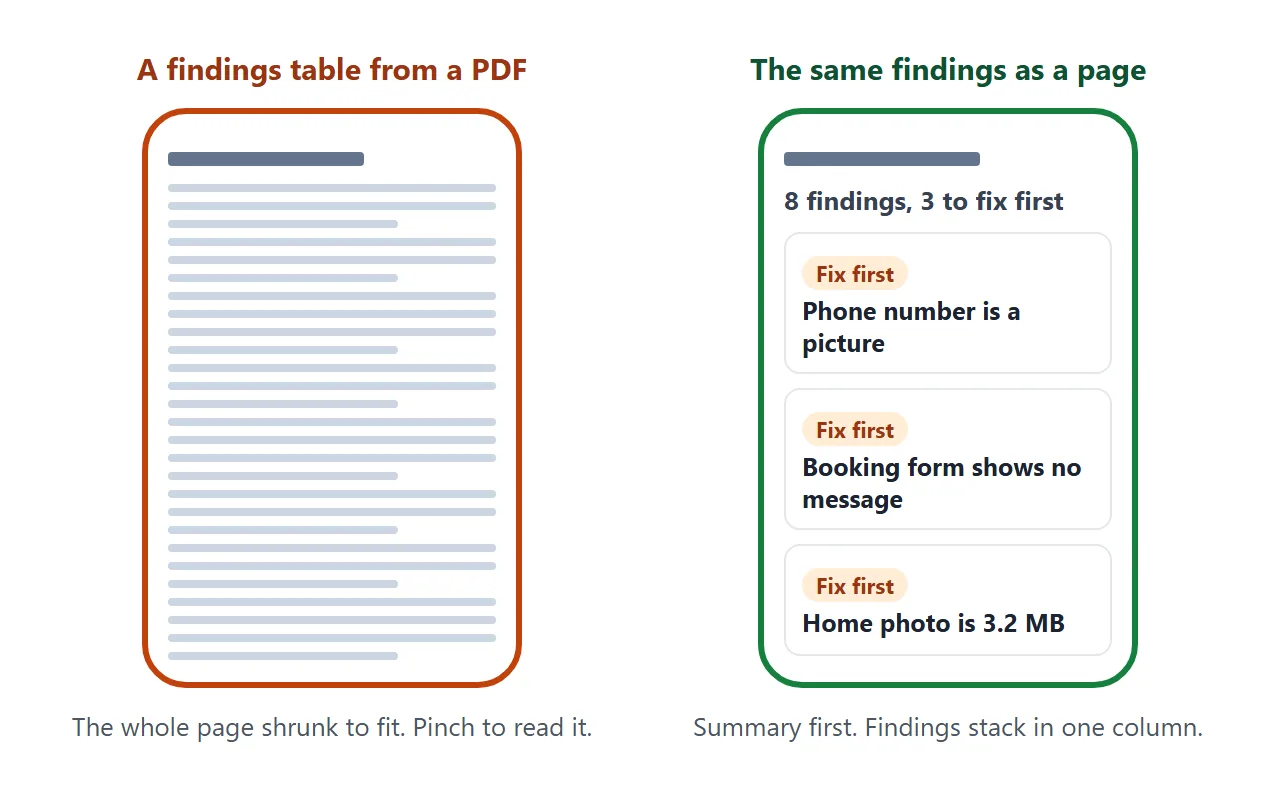
| PDF attached | Screenshot | Page as a link | |
|---|---|---|---|
| Layout on a phone | Fixed page size | Fixed picture | Fits the screen |
| Fix after sending | New file | New picture | Edit the page, same link |
| Needs an account to read | No | No | No |
For personal Gmail accounts, Google's help page says the attachment limit is 25 MB, and Gmail adds a larger file as a Drive link instead (as of October 2026).
An audit full of screenshots can pass that limit as a PDF, but size is not the main reason to prefer a link. The bigger issue is fixing a line after sending. See email vs link for documents and HTML vs PDF for clients.
Follow up after the fixes
An audit is read once. The part that gets used is the list of fixes. A second page turns each finding into a tick box, so the client sees progress at the next check-in.
<!doctype html>
<html lang="en">
<head>
<meta charset="utf-8">
<meta name="viewport" content="width=device-width, initial-scale=1">
<title>Fix tracker - Fernhill Pottery Studio</title>
<style>
  * { box-sizing: border-box; }
  body { margin: 0; background: #f3f4f6; font-family: system-ui, -apple-system, "Segoe UI", sans-serif; color: #1f2937; line-height: 1.5; }
  .page { max-width: 640px; margin: 0 auto; background: #fff; padding: 22px 18px 30px; }
  h1 { margin: 0 0 2px; font-size: 24px; line-height: 1.2; }
  .sub { margin: 0 0 16px; font-size: 14px; color: #6b7280; }
  .top { background: #f0fdf4; border: 1px solid #bbf7d0; border-radius: 12px; padding: 12px 14px; }
  .top b { font-size: 22px; }
  .bar { height: 10px; background: #e5e7eb; border-radius: 6px; margin: 8px 0 0; overflow: hidden; }
  .bar i { display: block; height: 100%; width: 0; background: #16a34a; transition: width .2s; }
  h2 { margin: 22px 0 6px; font-size: 17px; }
  label { display: grid; grid-template-columns: 24px 1fr; gap: 10px; align-items: start; padding: 10px 0; border-bottom: 1px solid #eef0f3; font-size: 16px; cursor: pointer; }
  label input { width: 20px; height: 20px; margin: 2px 0 0; }
  label small { display: block; font-size: 13px; color: #6b7280; }
  .note { margin-top: 18px; font-size: 14px; color: #6b7280; }
</style>
</head>
<body>
<div class="page">
  <h1>Fix tracker: Fernhill Pottery Studio</h1>
  <p class="sub">Follow-up to the audit · prepared by Jo Marlow · example data</p>

  <div class="top">
    <b id="count"></b> <span id="word">fixes done</span>
    <div class="bar"><i id="bar"></i></div>
  </div>

  <h2>Fix first</h2>
  <label><input type="checkbox" checked> <span>Phone number is a tappable link<small>Header, every page</small></span></label>
  <label><input type="checkbox" checked> <span>Booking form shows a thank-you message<small>Contact page</small></span></label>
  <label><input type="checkbox"> <span>Home page photo resized<small>Home page</small></span></label>

  <h2>Next</h2>
  <label><input type="checkbox" checked> <span>One page title per page<small>Eight pages</small></span></label>
  <label><input type="checkbox"> <span>One place for class prices<small>Classes, Vouchers, FAQ</small></span></label>
  <label><input type="checkbox"> <span>Alt text on gallery photos<small>Eleven images</small></span></label>

  <h2>Later</h2>
  <label><input type="checkbox"> <span>Tab icon added<small>Whole site</small></span></label>
  <label><input type="checkbox"> <span>Footer year updated<small>Every page</small></span></label>

  <p class="note">Ticked items are done and checked on the live site.</p>
</div>

<script>
  const boxes = document.querySelectorAll('input[type="checkbox"]');
  function update() {
    const done = Array.from(boxes).filter((b) => b.checked).length;
    document.getElementById('count').textContent = done + ' of ' + boxes.length;
    document.getElementById('bar').style.width = (done / boxes.length * 100) + '%';
  }
  boxes.forEach((b) => b.addEventListener('change', update));
  update();
</script>
</body>
</html>
Open this page in View mode and tick items as you confirm them on the live site. In NOS, the owner's changes made in View mode, such as ticks, are saved. A visitor's ticks are not saved, so the client sees the state you left.
Make a new page and a new link for each audit, and keep the old ones, so the first audit stays readable.
When it does not work
| What you see | Cause | Fix |
|---|---|---|
| The page shows raw code in the chat | You copied the chat text, not the code block | Copy only the code, from the doctype line to the last html tag |
| A screenshot or logo is missing | Images from other sites are blocked | Ask for no images, or describe the issue in words |
| The counts do not match the site | The AI guessed a number | Compare with the site and fix the list at the top of the script |
| A contact form does nothing | Forms cannot send to a server from the link | Write your email address as plain text |
| The client sees an older version | They opened an old file or an old link | Send only the link, never the file |
| The text is tiny on a phone | No viewport meta tag | Ask the AI to add one, and a 16px base size |
| The filter buttons do nothing | The script was cut off when copying | Copy again, down to the last html tag |
Related reading. An audit often leads to work. Sending a proposal to a client covers the next step.