What the columns in an action items template are for
The downloadable action item templates that come up for this search mostly share the same core columns: an item number, a description, an owner, the date assigned, a due date, a status and notes, and often a high, medium or low priority. You don't need all of them. You need the ones that answer three questions about each item: what exactly, who, and by when.
Status deserves some thought. You can start with four statuses: open, deferred, cancelled and closed. If deferred and cancelled items stay on the list with a reason in the notes, nobody has to argue them again at the next meeting. If high, medium and low stop meaning anything because everything ends up high, you can rank each item by its value and its difficulty instead. That way easy, high-value work rises to the top.
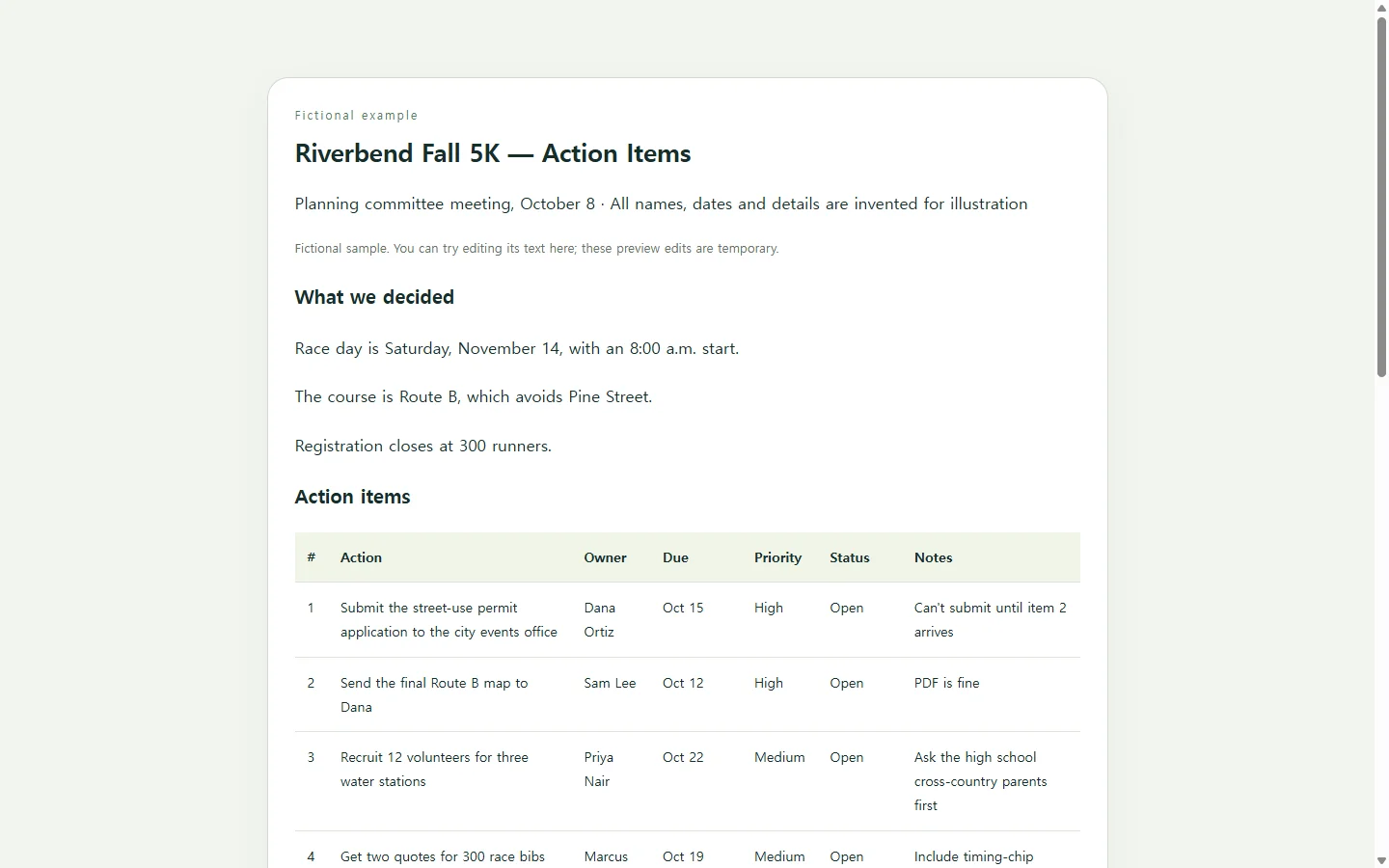
A filled-in example from a 5K planning meeting
The example below comes from a fictional planning committee for a fictional community race. Every name, date and number in it is made up. It's small on purpose: seven items from one meeting, a short note on what was decided, and a list of what comes due next.
Three details are worth copying. Item 2 exists only because item 1 can't start without it, and the notes say so. The open question about a kids' fun run has a named person bringing a recommendation, not “the committee.” And the pavilion booking, which got done during the meeting, stays on the list as Closed so nobody books it twice.
Rewrite vague items before they go in the grid
Most of the work happens before you open the template. Go through each line of your notes and rewrite it so it starts with a verb, names one person and ends with a calendar date. “Permits?” becomes “Submit the street-use permit application — Dana Ortiz — Oct 15.” “Volunteers” becomes “Recruit 12 volunteers for three water stations — Priya Nair — Oct 22.”
If nothing said in the meeting gives you an owner or a date, the gap is in the meeting, not the template. Flag the item and ask the person directly. Don't guess on their behalf.
Spreadsheet, meeting notes, or a shared page?
Where the list lives matters more than how it looks. If your team already tracks work in a project tool, put the items there. A second copy somewhere else can fall out of sync, and if each date lives in one place, you only change it once when it moves.
If your organization files minutes as a PDF or Word document, send that file. A web page doesn't replace a required attachment. A spreadsheet is the better choice when the list runs long and you need to sort and filter it. A shared web page suits a group like the race committee: volunteers who don't use the same software, reading on their phones, who only need to open one thing and find their row.
Building the page with AI
If you want the page but not the layout work, an AI chat assistant can build it. You supply the real items, owners and dates. The assistant handles the structure, the spacing and the phone layout. It will give you HTML, the plain-text format web pages are written in. You don't need to read it; just keep it as one file.
The prompt below tells the assistant not to invent anything, to keep status readable without relying on color, and to turn the table into stacked cards on a phone. When the result comes back, check it against your notes line by line: every item should be there, and no name or date should appear that you didn't supply.
After you send it, update the same link
A list like this starts changing within days. Say Sam sends the route map on Monday. If you added the page to NOS and shared its link, you can click into the status text on the page itself and change Open to Closed. You don't need to ask an AI to rebuild the whole page to change one word.
The committee keeps using the link they already have, and the next time they open it they see the new status. Volunteers can open it without creating an account. At the next meeting, the same page can be the first agenda item: go through the open rows, close what's done, and add new items at the bottom.
A prompt to adapt
Build a single self-contained HTML file for a meeting action items page. Use only the details I give you below. Do not invent names, dates, tasks or decisions. If a field is missing, put “—” in that cell, and outside the HTML, list what was missing in one short note.

Meeting name: [meeting name]
Meeting date: [date]
Decisions made (optional): [decision 1]; [decision 2]
Action items, one per line, in this format:
action | owner | due date | priority (High/Medium/Low) | status (Open/Deferred/Cancelled/Closed) | notes
[item 1]
[item 2]
[item 3]
Optional note to show under the title: [for example, who the list is for]

Page requirements:
- Order: title with the meeting name and date, a short “Decisions” section (only if I gave decisions), the action items table, then a “Due next” list of Open items sorted by due date.
- Use a real HTML table with a caption, and column headers marked up as th elements with scope attributes.
- Show status as a written word in every row. Color may support it but must never be the only signal. Text and background colors need a contrast ratio of at least 4.5:1.
- On screens narrower than 600px, show each row as a stacked card with a visible label for every field. No horizontal scrolling. Body text at least 16px.
- Put all CSS in one style tag. No JavaScript, no external fonts, images, scripts or links, no forms, no buttons, and no download, export or sharing features.
- Every value must be plain text in the HTML (no images of text, no text inserted through CSS) so I can edit the words later.
Return the complete HTML file in one code block, followed by the missing-details note if there is one.