What the HTML does, and what it doesn't
HTML is the layer of a web page that marks what each piece is: a heading, a list, a table of times. Presentation, such as colors, spacing and how the layout narrows on a phone, comes from CSS, and interactivity comes from scripting. A race-morning page needs structure and styling and very little else. That tells you what to ask for: one HTML file with its CSS inside, no scripts, and nothing loaded from other servers.
Forms need their own warning. An HTML form is made to send what someone types to a web server. A single file with no server behind it has nowhere to send that data, so a generated sign-up form can look real and do nothing. If people already register somewhere else, say so in plain words on the page.
Pick how much of the building you want to do
There's more than one sensible route. If you know HTML, writing the page yourself gives you full control. If an existing template is already close, filling it in may be faster than describing a layout from scratch. A visual site builder makes sense when you want drag-and-drop editing and hosting in one place.
An AI assistant fits a particular situation: the facts are already written down, in a notes app or last year's flyer, and what's missing is the layout. That's the situation in the example below. The organizer has every detail in a notes document. What they don't have is a page runners can pull up in a parking lot at 6:45 in the morning.
The example: one race morning, one page
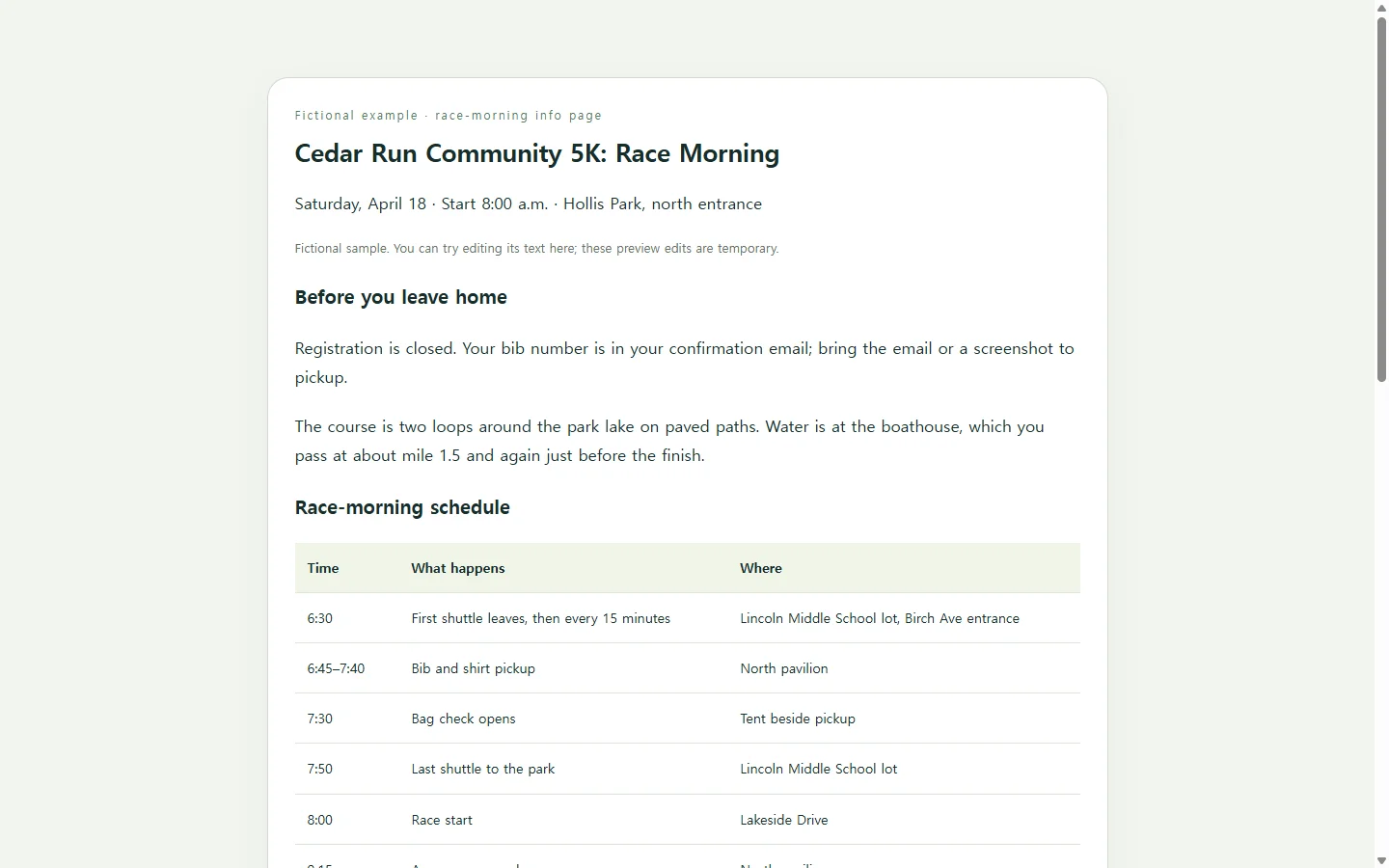
The example is a race-morning page for the Cedar Run Community 5K. The race, park, schedule and contact address are invented for this guide, so swap in your own event.
Three choices in it are worth copying. The schedule is a real table rather than an image, so every time stays as text you can correct later. The packing list is a short checklist, because it gets read once, the night before. And there is no registration button; the page says registration is closed and where to find your bib number, because a button with nothing behind it is worse than no button.
Colors and section order are taste. Change them freely.
A prompt you can paste
Replace every bracket with your own details before you send it. The line that matters most tells the AI not to invent anything: when a fact is missing, a visible [TBD] is easier to catch than a believable guess. The accessibility and mobile lines are requests, not guarantees, so you'll still check the result.
Create a single, self-contained HTML file for a one-page event information page. Put all CSS inside a <style> tag in the same file. Do not use JavaScript, forms, external fonts, external images, or outside libraries.

Use only the facts below. Do not invent names, times, addresses, prices, or contact details. If something seems needed that I haven't provided, show [TBD] in its place.
- Event name: [Event name]
- Date and start time: [Date, start time]
- Location: [Venue name, street address, which entrance]
- Schedule, one line per item (time — what happens — where): [e.g., 6:45–7:40 — Bib and shirt pickup — North pavilion]
- Getting there: [Parking, shuttle, bike, or drop-off details]
- What to bring: [Short list of items]
- Registration status: [e.g., Registration is closed; your bib number is in your confirmation email]
- Contact: [Organizer email or phone]

Structure: event name, date and location at the top; the schedule as an HTML table with a header row; a 'Getting there' section; a 'What to bring' list; contact details at the bottom.

Accessibility and mobile requirements:
- Set lang="en" on the html element.
- Use exactly one h1 and keep heading levels in order without skipping.
- Use strong contrast between text and background, and don't rely on color alone to carry meaning.
- Make the page readable on a phone about 360px wide with no sideways scrolling of the whole page; if the table is too wide, let it scroll inside its own container or stack its rows.
- Use a body font size that's comfortable to read without zooming, and give links enough space to tap easily.
- Write link text that says where the link goes, never 'click here'.

Return only the complete HTML file, with no explanation before or after it.
Check it the way runners will see it
Open the file on an actual phone, not only the desktop preview. Scroll the whole page; nothing should need sideways scrolling, and the schedule should stay readable. Then compare every time, address and name against your notes, one at a time, since that's where invented details hide. Tap each link. Finally, search the code for '<form' and '<script'; if either shows up and you didn't ask for it, ask the AI to remove it.
When race morning changes
Event details move. Say the first shuttle shifts from 6:30 to 6:45 two days before the race. You could ask the AI to regenerate the page with the new time, but a fresh draft can change lines you already checked, and then you'd have to check them all again. Changing one number by hand is the smaller job.
Once the page is in your NOS workspace, you can edit the rendered text directly, so the fix is typing 6:45 over 6:30 rather than writing a new prompt. If you've shared the page, the link stays the same after that edit. The link you already posted in the runners' group chat now shows the new shuttle time, and runners can open it without creating an account.
One boundary: the link carries information, not paperwork. If the race requires a signed waiver in a specific file format, keep collecting it the way the organizers ask.