Give the AI your facts, not just a topic
Report generator pages ask for much the same inputs: the type of report, the metrics or data points it should include, and the period it covers. Some also suggest stating the objective, the audience and limits such as length.
Those inputs do more for the result than the choice of tool. A prompt that says “write a status report on our scanner rollout” leaves the AI to guess what happened. A prompt that includes “Docks 1–3 live, Dock 4 waiting on Wi-Fi, 41 of 60 handhelds out” gives it something real to arrange. Tell it, in so many words, to leave a visible gap where a figure is missing rather than supply one.
The tools themselves treat the first output as a draft: their own instructions include a step for reviewing and editing the content before you share it.
What the finished report looks like
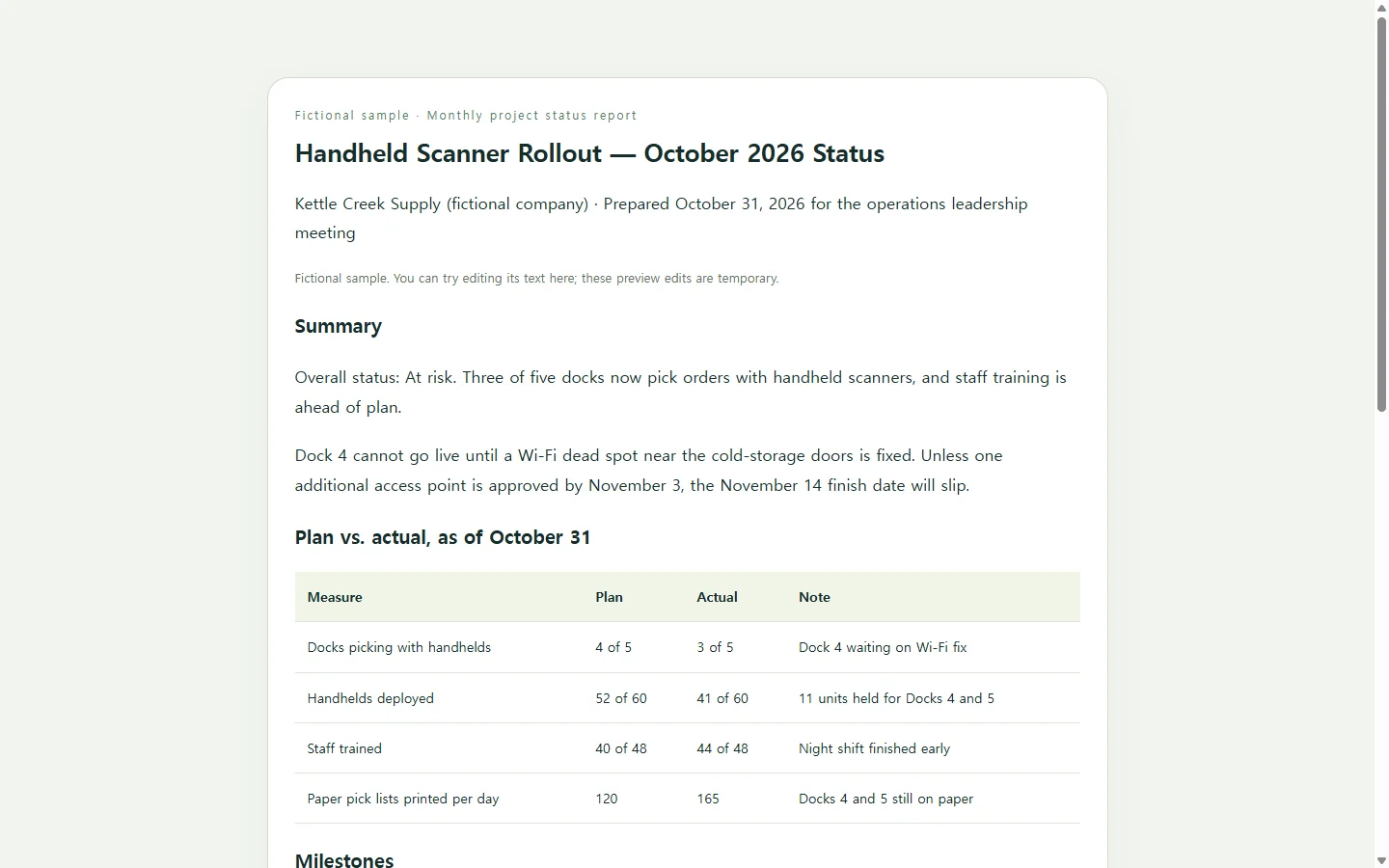
The example on this page is a one-month status report for a warehouse rolling out handheld barcode scanners. The company, roles and numbers are invented for illustration.
Notice the order more than the styling. The overall status and its reason come first, so a reader who stops after two sentences still knows the rollout is at risk and why. The plan-versus-actual table carries the numbers, the blockers spell out what someone has to decide, and each next step has an owner and a date. Milestones, blockers, current status and upcoming actions are also the pieces project-report generators say they build.
If you need a different kind of report, such as a sales summary or a research write-up, the same habit carries over: put the conclusion where a busy reader will see it, then the evidence behind it.
Generator tool, AI chat or a document file
Dedicated generators pair a prompt box with templates, and the ones reviewed for this article let you download the finished report as a PDF; one also lists DOCX. If your manager, client or school requires a PDF or Word file, that requirement settles it: use a tool or word processor that produces the file they asked for.
If the report will mostly be read on screen and revised as the project moves, a general AI chat can write it as an HTML page instead. HTML is the format web pages are written in, and a single self-contained HTML file opens in a web browser on a laptop or a phone.
Whichever route you take, checking the numbers against your records stays your job.
A prompt to adapt
The prompt below has a bracket for every fact only you know; replace each one before you send it. The output rules at the end ask for a page that reads on a phone, works with a screen reader, and has no buttons or forms that would do nothing once shared.
When the page comes back, compare each figure with your spreadsheet or notes, and open it at phone width to check that the table still reads.
Create a [REPORT TYPE, e.g. monthly project status report] for [AUDIENCE, e.g. the operations leadership team] covering [PERIOD, e.g. October 1–31, 2026].

Project or subject: [NAME AND ONE-LINE DESCRIPTION]
Overall status to report: [On track / At risk / Off track], because [ONE-SENTENCE REASON]
Figures (use exactly as given; do not round, total or recalculate):
[METRIC | PLAN | ACTUAL | NOTE — one per line]
Milestones with dates: [PASTE]
Blockers and the decision needed from readers: [PASTE]
Next steps with owner and due date: [PASTE]
Length: [e.g. readable in under three minutes]

Content rules:
- Use only the facts above. Do not invent numbers, names, dates, quotes or causes. If a section needs something I did not provide, write [needs input] in that spot.
- Open with a two-sentence summary that states the overall status and the main reason.
- Plain, direct language. No marketing tone, no filler conclusions.

Output rules:
- Return one complete, self-contained HTML file with all CSS in a single style tag. No external scripts, fonts, images or network requests.
- No forms, buttons, download links, file export or anything that needs a server or an outside service.
- Semantic structure: one main heading, section headings in order, a real data table with a caption and header cells marked with scope, and lists for steps.
- Show status as a word, never by color alone. Keep body text at sufficient contrast against its background (WCAG AA as the target).
- Mobile first: readable at 360px wide with no sideways page scrolling; wide tables scroll inside their own container; body text at least 16px.
- Add a simple print style so the page prints cleanly.
When the status changes after you send it
Status reports go out of date fast. Suppose the Dock 4 access point is installed two days after the October report goes out. If you attached a PDF, the fix is a new file and a note asking people to ignore the old one, and for a required submission that is still the right way to do it.
If you published the page in NOS, you can edit the rendered text directly, changing “At risk” to “On track” and rewriting the blocker line yourself, without asking the AI to regenerate the report. The link you already sent stays the same after the edit, so anyone who opens it sees the corrected status, and they don't need an account to read it.
Next month, if your team doesn't need October kept as a separate document, you can update the same page with November's figures and keep one link for the whole rollout.