Give the generator what only you know
Most dedicated tools start from the same inputs: a grade level and a topic. Some also accept a passage or a learning objective, and some return a printable PDF with an answer key. Those inputs get you a worksheet about the topic. They don't get you a worksheet about your lesson.
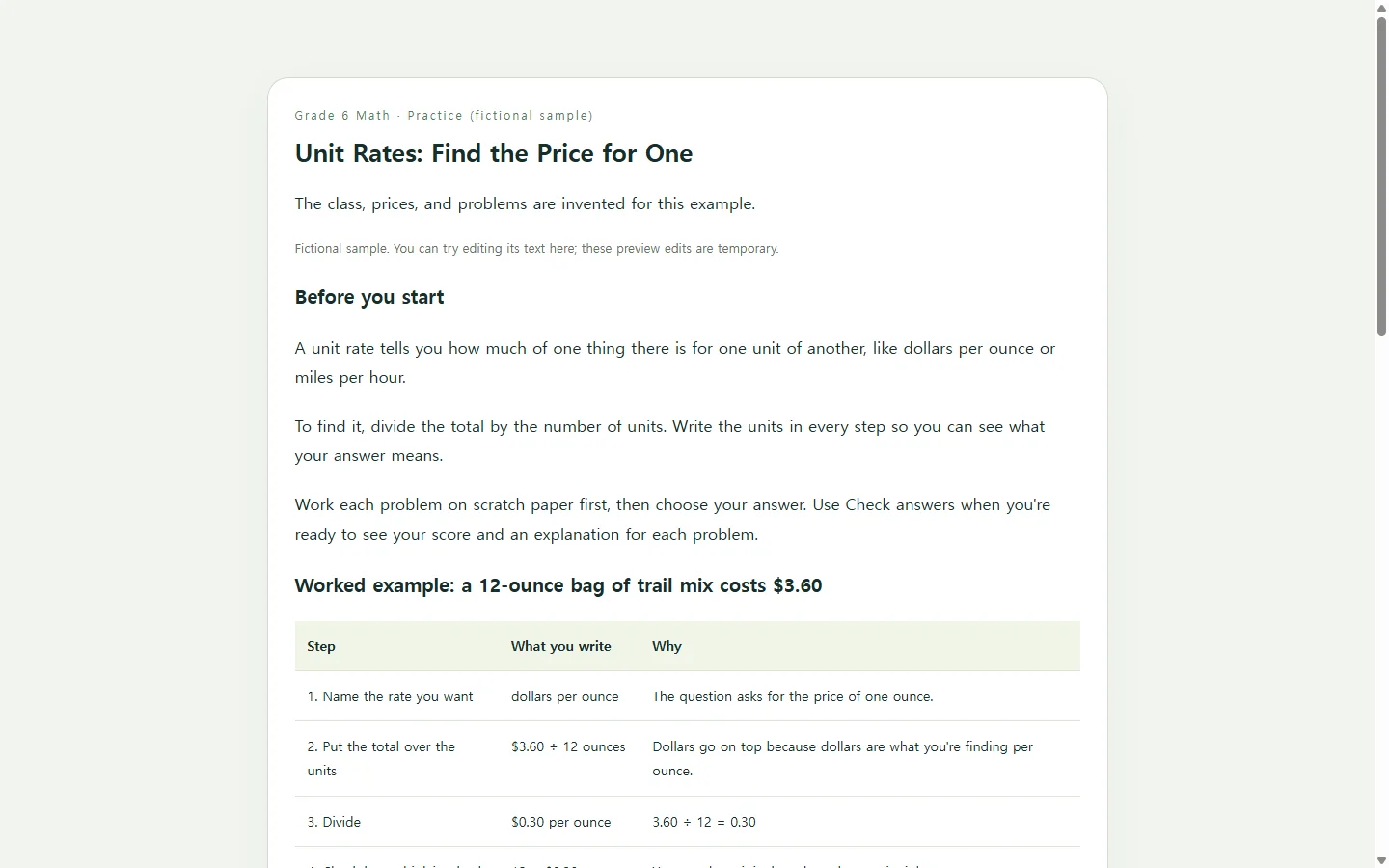
What changes the result is the material only you have. Which method did you model on the board? Which two problems did the class get stuck on? Which mistake do you expect to see most? How many problems can students finish in the time you have? Put those answers in the request, and the output reads like the next step after your class instead of a handout written by a stranger.
A sample: unit rates for a sixth-grade class
Here is one scenario, worked all the way through. Everything in it is made up for this article: the class, the prices, and the problems. A sixth-grade class has just learned to find a unit rate by dividing a total by a number of units. The teacher wants a short practice set that students can work through on their phones the next day.
Three choices in the sample are worth copying. First, the worked example writes the units into every step, so students can see that $3.60 divided by 12 ounces gives dollars per ounce, not ounces per dollar. Second, the checklist lists the checks students should run before they choose an answer. Third, the questions include common slips, such as dividing the wrong way or multiplying instead of dividing. The answer explanations show the calculation, so students can compare it with their own work.
Print it, or share it as a page
If you hand out paper, or your school expects a PDF in its learning platform, keep doing that. A printable file from a dedicated generator, or the document you usually make, is the right format in that case, and nothing here replaces it.
A web page is worth the extra step when you want students to practice away from the handout, on a phone, and check their answers and read an explanation. HTML is simply the format web pages are written in. One HTML file can hold the text, the layout, and the small piece of code that checks the answer a student picks. In this sample, that check runs on the student's own screen. It doesn't send answers or scores to anyone, so treat the page as practice, not as a graded assignment.
A prompt you can copy
You can paste this into any AI chat tool you already use. Replace every bracket with your own material. The values in parentheses only show how much detail helps.
Before any student sees the page, work every problem yourself and compare your answer with the one the page marks correct. Change anything that doesn't match the way you taught it.
Build a self-check practice worksheet as a single HTML file.

CLASS AND GOAL
- Grade and subject: [GRADE AND SUBJECT] (e.g., Grade 6 math)
- Topic: [TOPIC] (e.g., unit rates)
- What students should be able to do: [LEARNING GOAL] (e.g., find a unit rate by dividing the total by the number of units, and name the units)
- Method I modeled in class: [METHOD] (e.g., write the units in every step, then divide)
- Mistakes I expect: [COMMON MISTAKES] (e.g., dividing the wrong way, multiplying instead of dividing)

CONTENT
- Short directions, written at a reading level suited to [GRADE].
- One worked example that shows every step with units, using this problem: [YOUR EXAMPLE PROBLEM].
- A short checklist students can use before they choose an answer.
- [NUMBER] multiple-choice questions built from these problems: [YOUR PROBLEMS]. Do not add facts, names, or data I did not give you.
- Four options per question. Build each wrong option from one of the mistakes listed above.
- After each answer, show in words whether it is correct, plus a one- or two-sentence explanation that names the mistake if there is one.

TECHNICAL REQUIREMENTS
- One self-contained HTML file with inline CSS and JavaScript. No external libraries, fonts, images, or network requests.
- No forms that submit data, no login, no saving or sending scores. Answers are checked only on the page.
- Mobile first: a single column, readable on a narrow phone screen without zooming, with large tap targets for the answer options.
- Accessibility: group each question's options in a fieldset with a legend, use real radio inputs with labels, make everything work with a keyboard, keep text contrast readable, and never mark correct or incorrect by color alone (always add text).
- Keep the directions, questions, and options as plain text in the HTML so I can edit the wording later.

SEPARATELY, outside the HTML file, list each question with its correct answer and the arithmetic, so I can check your work.
After you share the link
Say you save the page in a NOS workspace, publish a sharing link, and post that link on your class page. Students and parents can open it without creating an account.
The next morning, you notice the directions never tell students to round to the nearest cent. You click into the text on the page and type the fix yourself, without asking the AI to rebuild anything. The link you already posted stays the same, so anyone who opens it after your edit sees the corrected directions.
One limit matters here. Editing text changes what students read, but it doesn't change the code that checks answers. If you change a number inside a problem, you also need to update that question's correct answer. One way is to ask the AI to revise just that question.
The workspace keeps notes and pages together, so the worksheet can sit as a subpage next to your notes for the unit. When you teach unit rates again, it is there to reuse or adjust.