What the page has to answer
API documentation is the set of instructions someone needs to use and integrate with an API: the operations it offers, the arguments each one takes, what comes back, and examples that show them in use.
The developer reading it is usually trying to finish their own project, and your API is one step in it. So put what the API does and how to make a first successful call at the top, then the reference details they'll come back to while they build.
Thin documentation has a cost you'll notice: the questions it leaves unanswered end up in your inbox.
Example: a library holds API, documented end to end
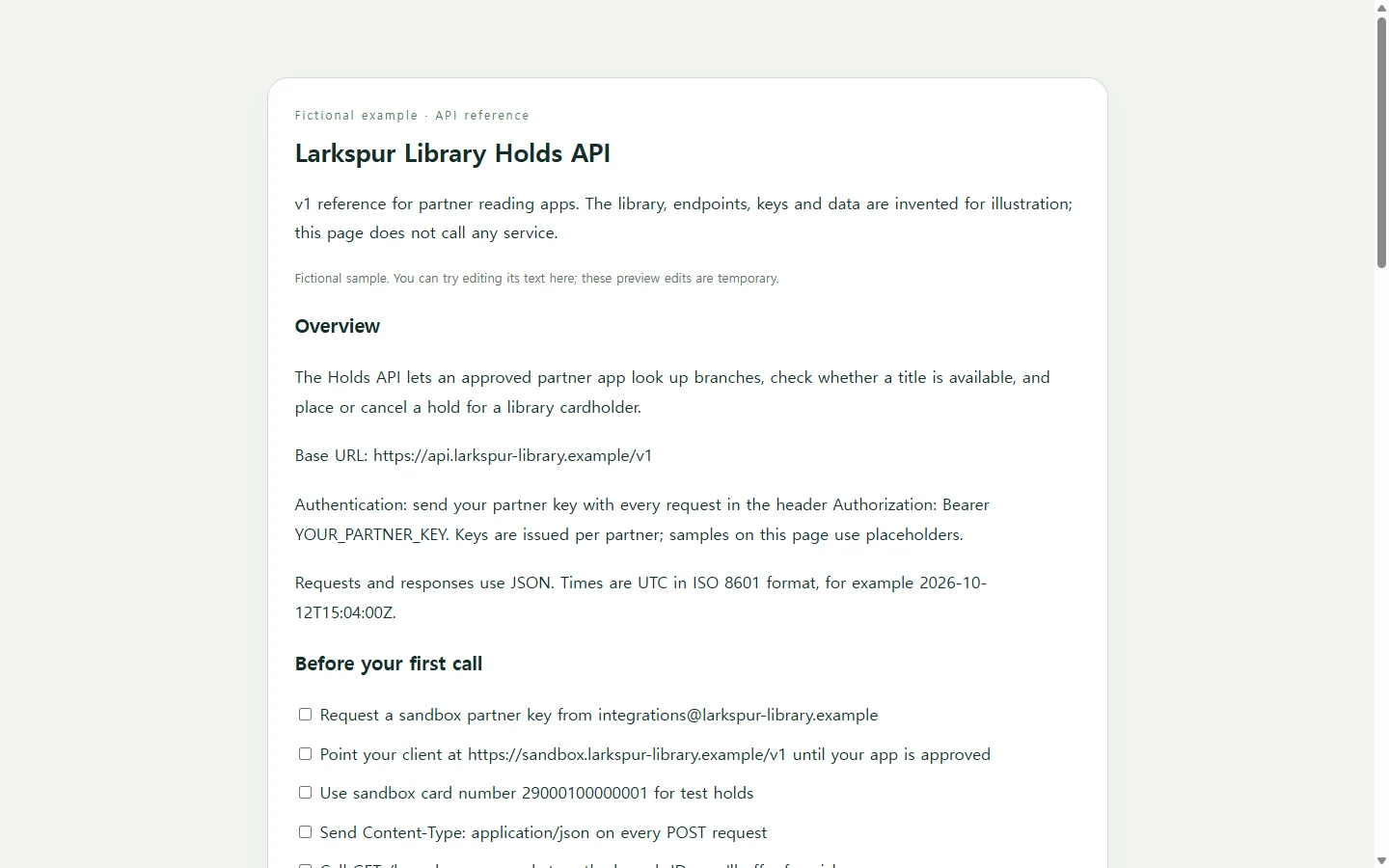
The example documents a fictional API for a fictional library network, Larkspur Public Library, that lets a partner reading app check a title's availability and place a hold for a cardholder. The library, keys, endpoints and values are invented, and the page doesn't call any service.
Three choices in it are worth copying. The overview gives the base URL and the authentication header before any endpoint, because nothing works without them. Each example shows a complete request and the full response body, so a developer can compare their own output line by line. And the errors table says what to do next for each error, which is what a stuck developer actually wants to know.
It also ends with a dated changelog. People who integrated last month need to see what has changed since then, not just how things stand today.
Where your documentation should come from
If your API already has a machine-readable description, such as an OpenAPI file, generate the reference from it. Description formats like that automate much of the documentation work, which makes it easier to keep the docs in step with the API as it grows.
A README in your repository suits readers who already work in that repository. It's meant to explain what the project does, how to get started and where to get help, and longer documentation is better kept somewhere else.
A standalone page like the example fits the case in between: a small or early API, no description file yet, and a reader outside your repository who needs one clear link.
If a partner asks for a PDF or Word file, say for a contract appendix or a review packet, send that file. A link doesn't replace a required submission.
Build yours with AI, using only your real details
AI can handle the layout and styling. The endpoints, field names, status codes and sample responses have to come from you, ideally copied from real calls against a test environment. A reference page with a guessed field name sends developers off to debug the wrong thing.
Ask for a single HTML file. That's one document a browser displays on its own, with the styling inside it, so there's nothing else to host. The prompt below rules out "try it" buttons and forms on purpose, since the page explains your API rather than calling it. It also asks for tables and code blocks that stay readable on a phone.
Before you paste in samples, replace any real key or token with a placeholder.
After you share it: fixing the page they already have
Say you send the page to the partner's developer, and two days later you notice the hold example shows pickup_branch where the API actually returns pickup_branch_id. That's a one-word fix, not a reason to rebuild the page.
If the page lives in NOS, you can edit the rendered text directly and correct the field name without asking AI to regenerate anything. The sharing link stays the same after the edit, so the developer opens the link they already have and sees the corrected example. They don't need an account to open it.
The same goes for clarifying an error description or rewording a changelog line: you edit the words, and the link you sent shows the current text. If you generated the docs from a description file, make the change there too so the two stay in agreement.
Start with your overview and one endpoint you've actually called. Build the page with the prompt, and share the link once that first example matches what your API returns.
A prompt to adapt
Build a single, self-contained HTML file that documents my API as a reference page for developers outside my team.

Use only the details below. Do not invent endpoints, fields, status codes, limits or values. If something is missing, show a visible "TODO" note in that spot instead of guessing.

API name: [API name]
What it does and who calls it (1–2 sentences): [purpose and audience]
Base URLs: [test URL] and [production URL]
Authentication: [method and exact header format; use a placeholder like YOUR_API_KEY, never a real key]
Endpoints: [for each: method, path, one-line purpose]
Fields for each endpoint that takes a body or query parameters: [name, type, required or optional, description, default if any]
One real request and response per endpoint: [paste them, with secrets replaced]
Errors: [HTTP status, error code, meaning, what the caller should do]
Changelog: [date, version, change]

Page structure: an overview (purpose, base URL, authentication) first; then a short "Before your first call" checklist; an endpoint summary table; one section per endpoint with its field table and example; an errors table; and a dated changelog. Add a short table of contents that links to each section.

Requirements:
- One HTML file with all CSS in a <style> tag. No external scripts, fonts, frameworks or images.
- No "try it" buttons, forms, or code that sends requests. The page documents the API; it does not call it.
- Show requests and responses in <pre><code> blocks in a monospace font, exactly as I provided them.
- Use headings in order (one h1, then h2 and h3), real <table> elements with <th scope="col"> headers, and descriptive link text.
- Text and code colors must meet WCAG AA contrast. Always print the HTTP method name; don't rely on color alone to tell methods apart.
- Mobile: readable at 360px wide without sideways page scrolling. Wide tables and code blocks scroll horizontally inside their own container. Body text at least 16px.
- Return only the complete HTML file.