What a filled reference shows
The example documents Lendwell, a made-up API for a tool-lending library. Every name, ID, URL and value in it is fictional, and the base URL uses example.com. It has four endpoints: list tools, get one tool, book a loan and cancel a loan. That is small enough to read in a few minutes and big enough to show the details callers trip over.
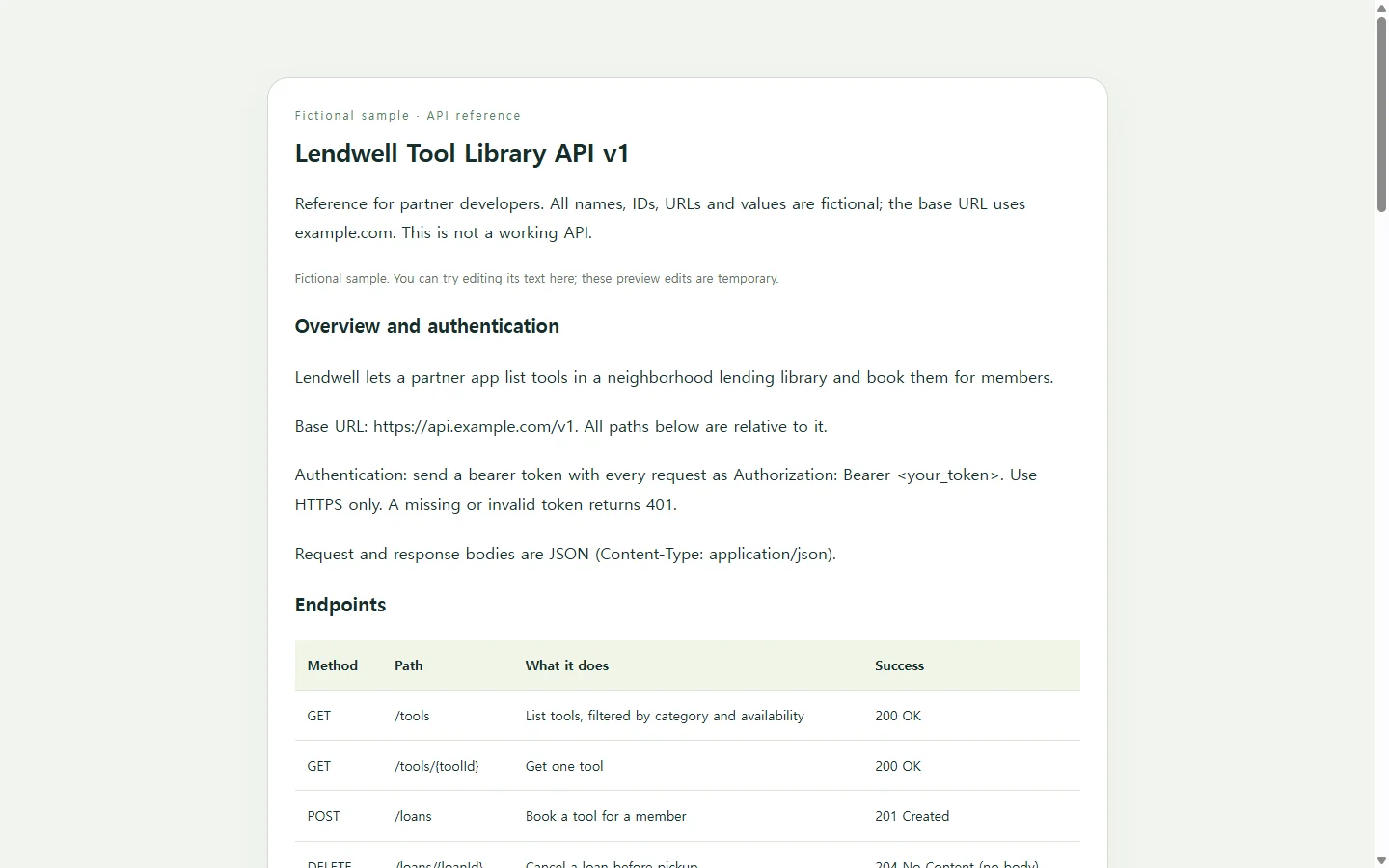
The base URL appears once, at the top. Paths such as /tools are relative to the server URL, so stating it clearly saves the reader from guessing where /tools actually lives.
Parameters are grouped by where they go. Each one gets a name, a location, a data type and a required flag, and the location is one of four: path, query, header or cookie. In the example, toolId sits in the path and is marked required, because path parameters always are.
The Default column earns its place too. A default is the value the server uses when the client leaves an optional parameter out, which is why limit shows 20. A default on a required parameter means nothing, and the Default column is not the place for a sample value. Samples go in the examples.
Authentication and errors, written out
Lendwell uses bearer tokens: the caller sends an Authorization header containing the word Bearer followed by the token on each request. Bearer authentication should only be used over HTTPS, and a request with a missing or invalid token gets a 401 response.
Errors are where templates go thin. Every operation needs at least one response, and a reference is expected to cover successful responses plus known errors, such as a 404 when a resource requested by ID doesn't exist or a 400 for invalid parameters.
The example gives every error the same two-field body, a code and a message, then uses a table to say when each one happens and what the caller should do. The 409 for a tool that's already booked is the kind of rule only the API owner knows. No template can fill in that row for you.
When a response has no body, like the 204 returned after a loan is cancelled, say so instead of showing an empty code block.
Choosing a format for how the docs will be used
If you keep, or plan to keep, a machine-readable description of the API, the OpenAPI format, written in YAML or JSON, can be read by both people and programs, and documentation tools can display the API from that file. That suits an API that changes often and needs one source of truth.
If callers start from your code repository, a README may be enough for now. A README typically says what the project does, how to get started and where to get help, and longer documentation is better kept elsewhere.
If a partner needs a readable reference this week and no spec exists yet, a single page like the Lendwell example is a reasonable first step, and you can turn it into a spec later. If the recipient asks for a PDF or DOCX attachment, send that file. A link doesn't replace a required format.
Building your version with AI
Typing tables and indented code blocks is the slow part, and AI can handle the layout if you supply the facts. Gather the base URL, each method and path, parameter details, one real request and response per endpoint, and the errors you actually return. The prompt below tells the model not to invent anything and to flag gaps instead.
The prompt asks for one HTML file: a self-contained web page with tables and code samples. Swap real tokens and customer data for placeholders before you paste anything. The result is a static reference, with no live calls, forms or connections to your API.
When a detail changes after you share it
Say you send the Lendwell reference to the partner developer, and the next day the library changes its loan period from seven days to ten. The note explaining dueDate and the date in the sample response are now wrong. If the page lives in NOS, you can correct both by editing the text on the page directly, without asking AI to rebuild it.
The published sharing link stays the same after edits, so the partner opens the link they already have and sees ten days. They don't need an account to open it.
Editing the page changes the documentation, not your API or any spec file. Update those yourself so all three say the same thing.
A prompt to adapt
Build a single self-contained HTML file that documents my API as a readable reference page. Use only the facts I give below. Do not invent endpoints, parameters, fields, status codes or error codes. Where information is missing, show a visible "TODO: confirm" note instead of guessing.

API name: [API NAME]
Version: [VERSION, e.g. v1]
Base URL: [BASE URL]
Who reads it: [AUDIENCE, e.g. partner developers building a booking app]
Authentication: [METHOD, e.g. bearer token in the Authorization header, HTTPS only]
Error body format: [FORMAT, e.g. {"code": "...", "message": "..."}]

For each endpoint:
- [METHOD] [PATH]: [WHAT IT DOES]
- Parameters: [NAME, LOCATION (path/query/header/cookie), TYPE, REQUIRED yes/no, DEFAULT, DESCRIPTION]
- Request body: [FIELDS WITH TYPES, or "none"]
- Example request: [PASTE]
- Success response: [STATUS + EXAMPLE BODY, or "no body"]
- Known errors: [STATUS, ERROR CODE, WHEN IT HAPPENS, WHAT THE CALLER SHOULD DO]

Page requirements:
1. Sections in this order: overview with base URL and authentication; endpoint summary table; one section per endpoint (parameters table, request example, response example, errors table); error body format.
2. Mark every path parameter as required. Leave Default blank for required parameters.
3. Show requests and responses in <pre><code> blocks in a monospace font, keeping the JSON exactly as I provided it.
4. Use real <table> elements with <th> header cells and a short caption for each table.
5. Mobile: readable at 360px wide. Tables and code blocks scroll sideways inside their own box instead of widening the page. Body text at least 16px.
6. Accessibility: one h1, headings in order without skipped levels, text contrast of at least 4.5:1, visible focus outlines on links, and a skip link to the endpoint list.
7. Static reference only: no "Try it" buttons, forms, network requests, external scripts or external fonts.
8. Replace any token, key or secret with <your_token>.

Return only the complete HTML file.