What a career portfolio holds that a resume doesn't
A career portfolio is a selected set of work samples and professional records that shows your skills and achievements in action. A resume condenses your history into a page or two; a portfolio goes deeper and works as proof of what you can do.
Typical contents include a current resume, diplomas and certificates, work samples such as proposals, reports, presentations and project plans, and evaluations, testimonials or reference letters. You don't need every item. Decide first who will read it and why, whether that's a job application, a graduate program or a licensure requirement, and let that answer filter what goes in.
One useful distinction: a working portfolio tracks projects still in progress, while a display portfolio holds only your best finished pieces. For a job application, the display kind is usually the right fit.
Pick one target role, then three or four samples
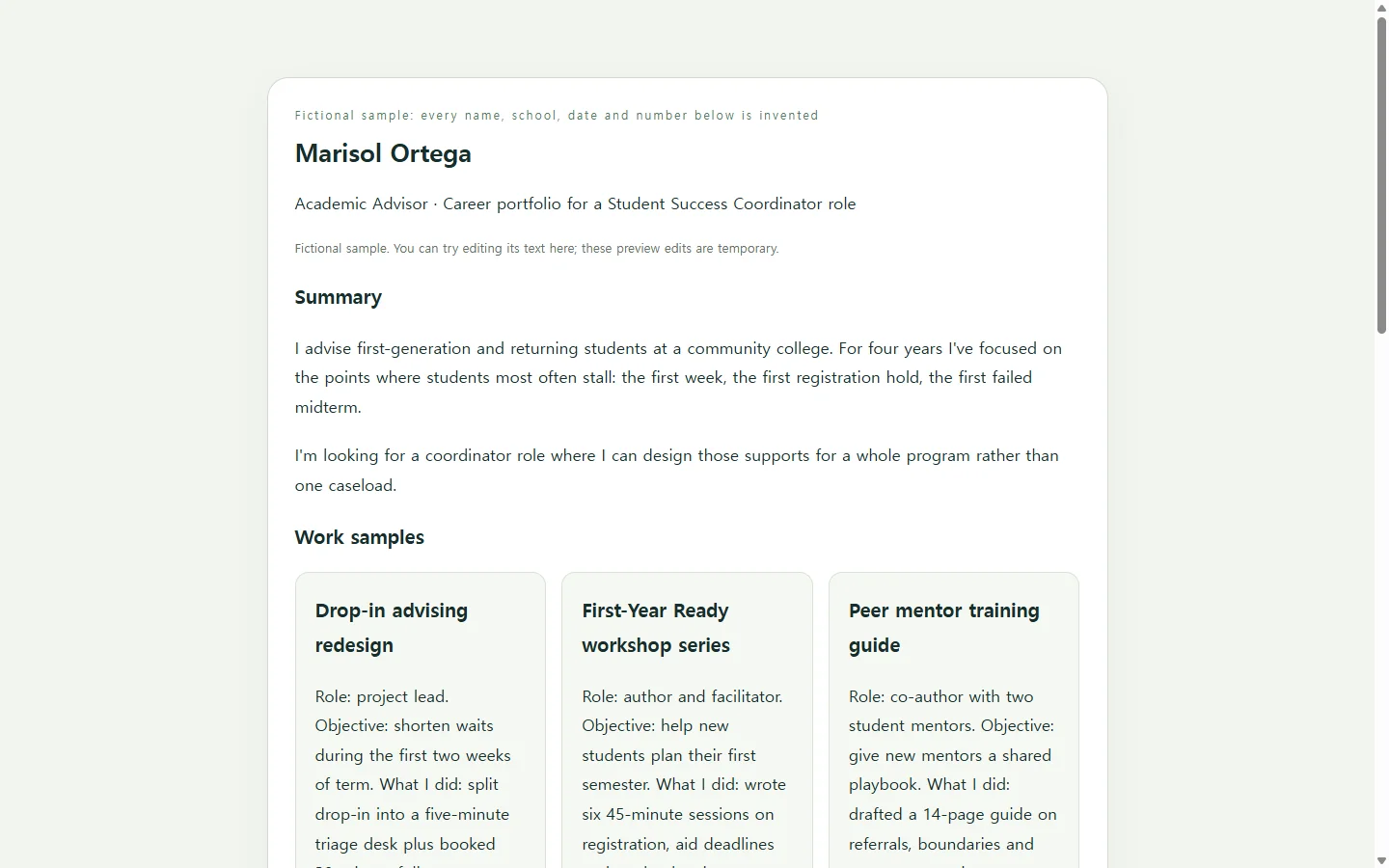
The example on this page follows one scenario. Marisol Ortega, an academic advisor at a community college, is applying for a student success coordinator role; she, her college and every number on her page are invented for this article. Her folder holds a dozen possible pieces. She keeps three: a redesigned drop-in advising process, a first-year workshop series she wrote, and a training guide for peer mentors.
For each sample, give the title, your role, the objective, the outcome and a one-sentence reflection. Show measurable results where you actually have them, such as a shorter wait time or a higher on-time registration rate. If you don't have a number, describe the change plainly instead of estimating one.
Before anything goes on a shareable page, remove details you wouldn't post publicly, such as a home address, and anything that identifies the people you served. Confirm that your employer allows you to show internal material, and ask references before listing their contact information.
PDF, website, or both
Match the format to what your reader expects. A PDF, a slide deck, a personal website and a short video are all workable, and printed copies still have a place at in-person interviews.
If an application asks you to upload a PDF or DOCX, upload that file. A web version can travel alongside it, linked from your resume header, your email signature or a follow-up note, but it shouldn't replace a file the employer requested. When you convert anything to PDF, open the result and check that the formatting survived.
For the web version, you have real choices. Site builders offer templates, though some expect a little HTML knowledge. A word processor works if you're comfortable arranging the layout yourself. If layout is the step you keep putting off, an AI assistant can take that part.
Let AI handle the layout, not the facts
Paste the prompt below into an AI chat assistant and replace every bracketed placeholder with your own details. It asks for a single HTML file, the code a web page is written in, so you get one page that opens in a browser.
The prompt hands the design work to the AI and keeps the substance with you. It rules out invented numbers and quotes, asks for a layout that reads well on a phone, and requires headings, contrast and link text that work for people using screen readers or zoom. When AI writes the substance of application materials, the result tends to sound generic, so treat the draft as a layout to fill, not a story to accept.
When the page comes back, read every line against your files. Fix wording that sounds like it describes someone else, confirm each number, and tap every link on your phone.
After you send it, keep the same link current
Say Marisol sends her link with an application on Monday. On Thursday she spots a typo in her summary. The following week, a different posting stresses workshop design, so she wants that sample first. Adjusting a portfolio for each application, by reordering sections or swapping samples, is normal upkeep.
If the page lives in NOS, she can click into the rendered text and fix the typo directly instead of asking the AI to rebuild the page. The share link she already sent stays the same, so the hiring manager who opens it sees the corrected summary, without needing an account.
For the second posting, she can ask the AI for a reordered version, keep it as a separate page in the same workspace, and send that link instead. Any PDF an application requires still goes in as an upload; the web page is the version she keeps current.
A prompt to adapt
Build a one-page career portfolio as a single self-contained HTML file: inline CSS, no external libraries, fonts or images, no forms, and no JavaScript.

Use ONLY the facts below. Do not invent employers, dates, numbers, awards, quotes or skills. If a section is empty, show a visible [TO ADD] marker instead of filling it.

Target role: [ROLE TITLE] at [TYPE OF ORGANIZATION]
Name and headline: [YOUR NAME], [CURRENT JOB TITLE]
Contact: [PROFESSIONAL EMAIL] | [LINKEDIN OR OTHER PROFESSIONAL URL] (do not include a home address)
Summary, 2-3 sentences in my words: [YOUR DRAFT SUMMARY]
Skills: [5-8 SKILLS]
Credentials and education: [DEGREE OR CERTIFICATE, INSTITUTION, YEAR] (repeat as needed)
Experience, most recent first: [YEARS, TITLE, ORGANIZATION, ONE-LINE SCOPE] (repeat as needed)
Work samples (3-4). For each give: title, my role, objective, what I did, outcome (use only numbers I supply), one-sentence reflection.
1. [SAMPLE 1]
2. [SAMPLE 2]
3. [SAMPLE 3]
References: show 'Available on request' unless I list permitted names here: [OPTIONAL]

Layout and accessibility requirements:
- Mobile-first single column; may widen to two columns above 900px. No horizontal scrolling at 360px wide.
- One h1 for my name, h2 for each section, h3 for each work sample, in reading order. Use semantic landmarks (header, main, section, footer).
- Body text at least 16px with roughly 1.5 line height; text-to-background contrast of at least 4.5:1.
- All content as real text, never text inside images.
- Descriptive link text (no 'click here') and a visible keyboard focus style.
- A print stylesheet that removes decorative backgrounds.
- System font stack, a neutral palette with one accent color, generous spacing.

Return only the complete HTML file, with no explanation before or after it.