Gather the job before you pick a design
A checklist other people can follow needs four things on each line: the task, who owns it, when it has to be done, and what done looks like. Write those down in any rough form first, even a notes app or the back of an envelope. Order matters more than looks, so group lines by when they happen rather than by who does them.
Not every list needs this treatment. If the checklist is only for you, a printable design may be all you want. If you need to sort tasks or filter by person, a spreadsheet does that better than a page. And if an organizer, school or employer asks for a PDF or DOCX file, send the file they ask for; a shared page is for your own crew, not a substitute for a required submission.
What a finished one looks like
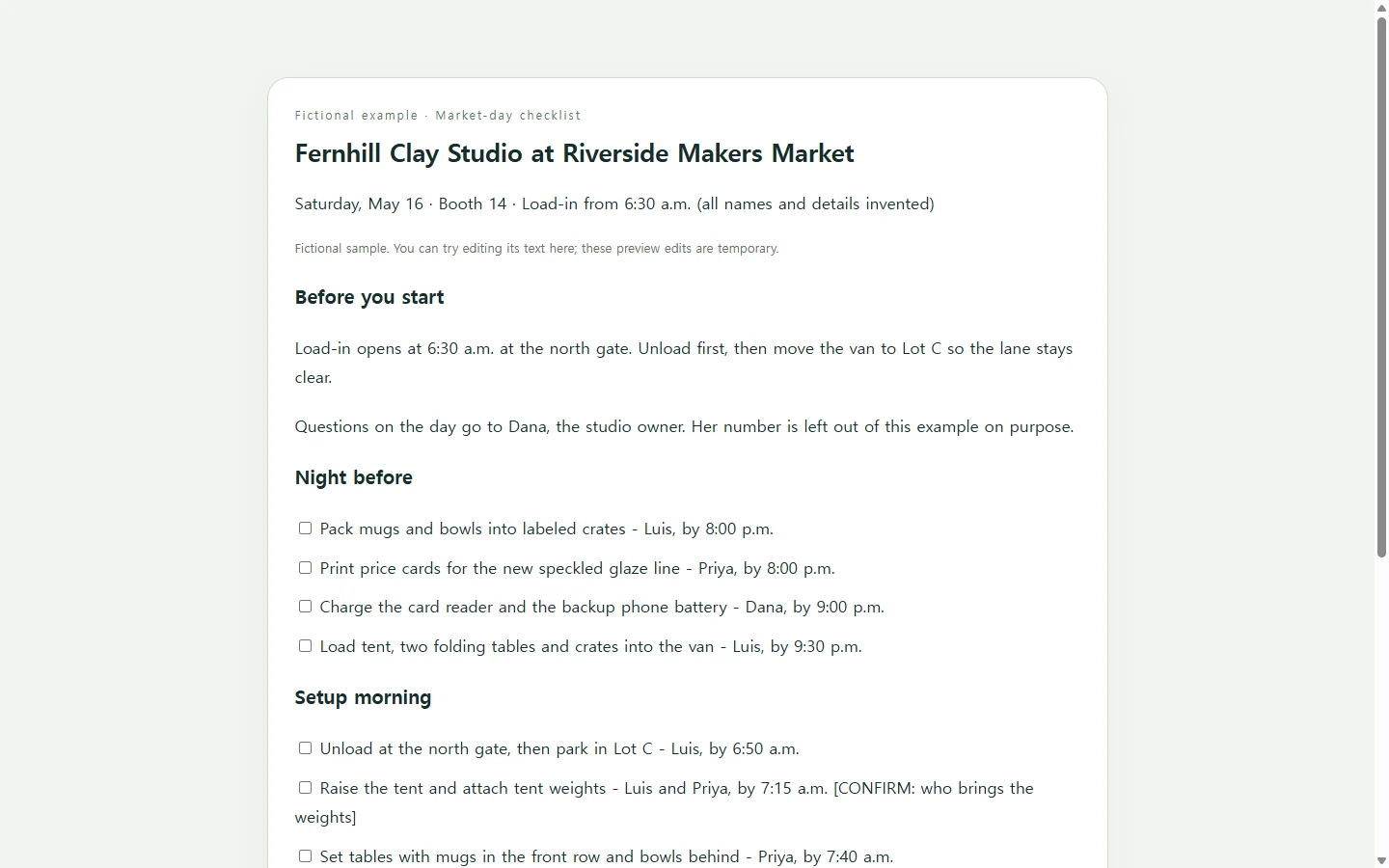
The example on this page follows a ceramics studio getting ready for a Saturday makers market. The studio, the helpers, the booth and every time and price are invented for illustration.
Three choices are worth copying. Tasks are split into the night before, setup morning and pack-down, so whoever opens the list at 6 a.m. sees what comes next instead of the whole week. Every line starts with a verb and ends with a name. And the one detail nobody has confirmed yet, who is bringing the tent weights, is flagged instead of guessed.
Build your version with an AI chat
If laying out a clean page is the part you'd rather skip, an AI chat assistant can design it from your rough list. Ask for a single HTML file. HTML is the format web pages are written in; you don't need to read it, only paste it somewhere that displays it.
The prompt below keeps the AI working from your facts. It asks for real checkboxes with labels, text that stays readable on a phone, and a [CONFIRM] tag wherever your notes are incomplete, so the model flags gaps instead of filling them with plausible-sounding tasks. It also rules out forms, outside scripts and anything that sends data, because a checklist page has no reason to.
Doing it by hand is a fair choice too, especially for a short list. The AI earns its place when you have thirty lines across three phases and don't want to fuss over spacing.
Read it like someone who missed the planning
Before sharing, open the page on your phone and read it as a helper who wasn't in the group chat. Can they tell where to be, what to bring and who to ask? Delete any task the AI added that wasn't in your notes, and check that the times run in order.
Treat the boxes as a way to work through the list in the moment. If you need a record of who finished what, a shared task tool fits that job better than a page.
When the plan changes after you've sent the link
Plans move. Say the market reassigns the studio from booth 14 to booth 22 two days out. If the checklist lives as a page in NOS, you edit the booth number right on the page and type the new one, with no new AI request for a one-word change.
Your helpers don't need a fresh message with a new attachment. The shared link stays the same after your edit, so when they open the link they already have, they see booth 22. They can open it without creating an account. Keeping the booth number in one place, rather than in a text thread and a printout, means there's one version to fix.
Next month, change the date, names and booth on the same page, and the crew's saved link still points to the current list. NOS keeps notes and HTML pages together in a workspace, so notes on what went wrong at the last market can sit beside the checklist as a subpage.
A prompt to adapt
Build a one-page checklist as a single self-contained HTML file.

Event or job: [EVENT NAME, e.g. Saturday market booth]
Date and place: [DATE], [LOCATION]
People and roles: [NAME - ROLE, one per line]
Phases in time order: [e.g. Night before / Setup / During / Pack-down]
Tasks: [paste your rough list; include owner and deadline where you know them]
Info to show at the top: [e.g. arrival time, entrance, who to contact]

Requirements:
- Use only the facts I gave. Do not add tasks, people, times, prices or numbers. Where an owner, time or detail is missing, show [CONFIRM] in that spot.
- Group tasks under the phases in the order given. Each line: checkbox, task starting with a verb, owner, due time.
- Use real <input type="checkbox"> elements, each with a <label> tied to it so tapping the text toggles the box.
- Mobile first: readable at 360px wide with no sideways scrolling, body text at least 16px, tap targets at least 44px tall.
- Dark text on a light background with strong contrast; never use color alone to show meaning.
- One h1 for the title, then h2 for each phase, so screen readers can jump between sections.
- Inline CSS only. No external fonts, images, libraries or scripts loaded from the internet. No forms, submit buttons, data collection, storage or saving.
- Add a simple print style: black text on white, no background colors.
- Output only the complete HTML file.