Pick the format by how the profile will be read
Company profile templates come in more shapes than the slide deck. Multi-page presentations, A4 documents, two-page flyers, booklets, and single cover pages all appear among published templates.
The format matters more than the color scheme, because it decides how much you have to write. A deck suits a profile you'll walk through in a meeting. A document fits a vendor packet that someone files and rereads. A single scrolling page works when the profile travels as a link in an email and gets read on a phone.
Each route is reasonable. You can start from a design template, write it in a word processor, or hire a designer if the profile will carry a lot of weight. The example below takes the single-page route because it fits a small firm with a handful of facts worth stating.
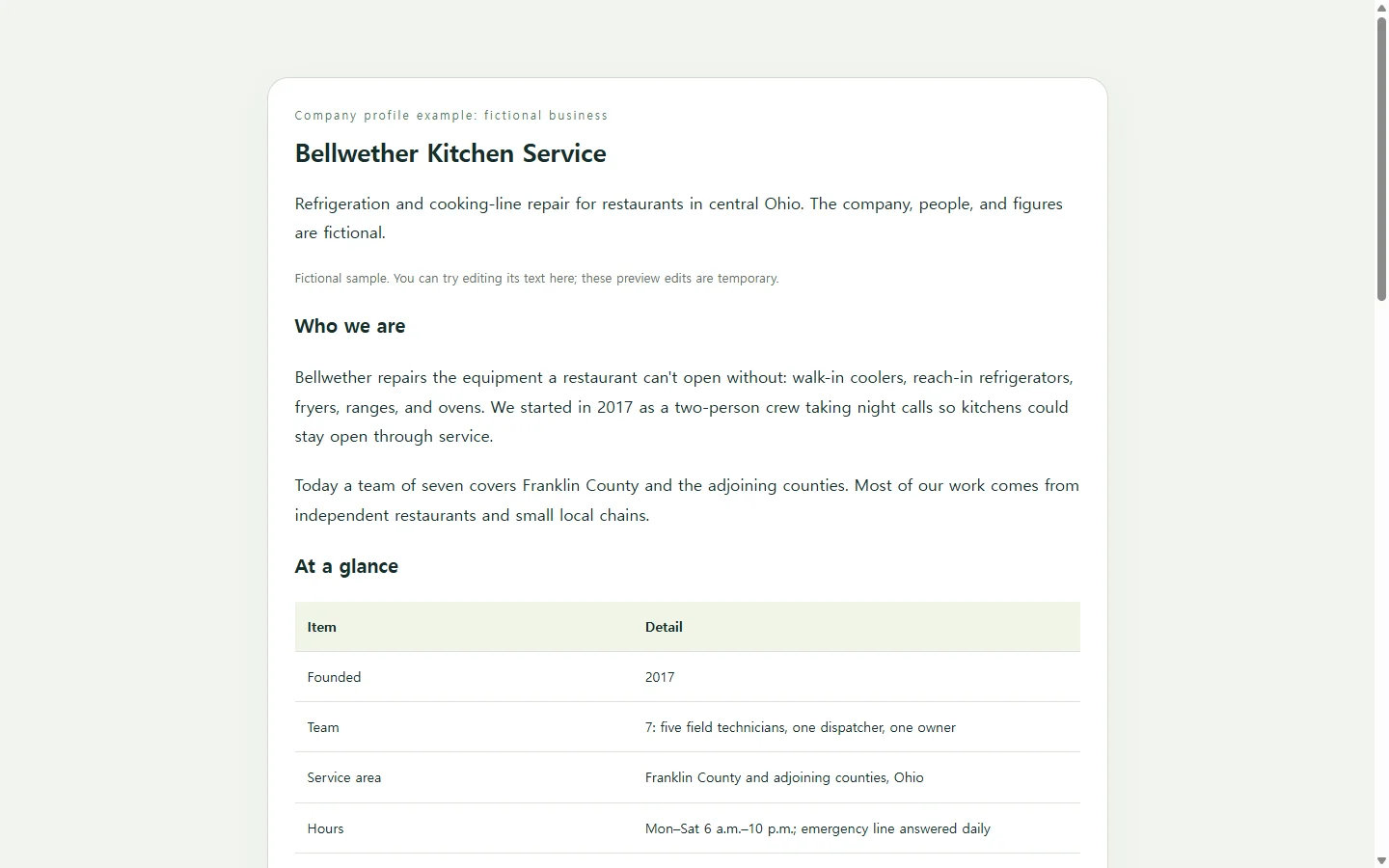
A company profile example for a small repair business
Bellwether Kitchen Service is a fictional company. Its name, people, and figures were invented for this example. It repairs refrigeration and cooking equipment for restaurants around Columbus, Ohio, and its owner sends the profile to restaurant operators after a first phone call.
Three choices are worth borrowing. The opening line says what the company fixes and where, so a reader knows in one sentence whether the rest applies to them. The facts a reader can check (founding year, team size, service area, typical arrival time) sit in one small table instead of being scattered through paragraphs. And the profile ends with what happens after a restaurant calls, because that's the decision the reader is weighing.
Notice what's left out: a long mission statement, a wall of client logos, and a list of every brand the technicians have serviced. Each section here carries one specific detail instead of filling every slot a larger template offers.
Swap in your own company
Before you design anything, write down the facts only you can supply. That means one sentence on what you do and for whom, your service area, three to five services, a few figures you can stand behind, how a new client gets started, and who to contact.
If your history is short, drop the timeline and use that space to show how a job runs from first call to invoice. If you don't have figures you're comfortable publishing, keep the table to plain facts such as hours and coverage. Leave a gap rather than guess. Every number on the page should be one you can explain if a prospect asks.
Build the page with AI if you'd rather not design it
If layout is the part you'd rather skip, an AI chat assistant can turn your facts into a single HTML file. That's one file that holds a complete web page and opens in a web browser.
The prompt below asks for exactly that, with your details in brackets. It tells the assistant to mark missing facts instead of inventing them and to keep the page readable on a narrow phone screen. It also tells the assistant to leave out forms and download buttons, since a profile page doesn't need to collect or send anything. Read every line it returns, and tone down anything phrased more boldly than you would say it yourself.
When the request says PDF or Word
If a vendor form or bid package asks for a PDF or DOCX, send that format. A link doesn't replace a required attachment.
The page version is useful where a link is welcome: a follow-up email after a call, a reply to a referral, or a message to someone who asked what your company does.
After you send the link
Say Bellwether's owner emails the profile link to a restaurant group's operations manager on Monday. On Thursday the company hires a technician who services ice machines, so the services list and team size are now out of date.
If the page is kept in NOS, the owner can edit the rendered text of the services card and the team count directly. There's no need to send the whole page back through an AI prompt for a two-line change. The shared link stays the same after the edit, so the manager opens the address already in their inbox and finds the current version. They don't need an account to view it.
The next prospect gets that same address, already up to date, and the owner only had to rewrite what actually changed.
A prompt to adapt
Create a company profile as a single, self-contained HTML file. Put all CSS inside one <style> tag. Do not load external scripts or fonts, and only use images if I supply their URLs.

Company facts (use only these). If a fact is missing, show a clearly marked [ADD: ...] placeholder instead of inventing one:
- Company name: [COMPANY NAME]
- What we do and for whom, in one sentence: [e.g., We repair refrigeration and cooking equipment for independent restaurants in central Ohio.]
- Location and service area: [CITY, STATE / AREA SERVED]
- Founded: [YEAR]
- Team: [NUMBER OF PEOPLE AND THEIR ROLES]
- Services, 3 to 5, one line each: [SERVICE 1: SHORT DESCRIPTION] [SERVICE 2: SHORT DESCRIPTION] [SERVICE 3: SHORT DESCRIPTION]
- Figures we can verify (leave this out if there are none): [FIGURE 1] [FIGURE 2]
- Milestones (optional): [YEAR: EVENT] [YEAR: EVENT]
- What happens after a new client contacts us: [STEP 1] [STEP 2] [STEP 3]
- Contact: [NAME, ROLE, PHONE, EMAIL]

Layout, in this order:
1. A header with the company name and the one-sentence summary.
2. An 'At a glance' table of the plain facts.
3. Service cards.
4. A milestone timeline, only if milestones were provided.
5. A 'What happens after you call' checklist.
6. A contact section.
Use a plain, specific tone. Don't use superlatives or marketing claims I didn't provide.

Requirements:
- Mobile first: readable at 360px wide with no sideways scrolling of the page. The table should restack or scroll inside its own container.
- Accessibility: use one h1 and headings in logical order, a real <table> with header cells, and strong contrast between text and background. Show visible keyboard focus styles, and never use color alone to carry meaning. Give any image alt text.
- Don't add contact forms, submit buttons, download or export buttons, analytics, or calls to outside services. Phone numbers and emails can be plain tel: and mailto: links.

Return only the complete HTML.