Start from what the reader has to decide
One large template site lists the building blocks as headlines, company history, a mission statement, images, a services overview, key information and contact details. That's a useful menu, not a rulebook. The person who asked is probably trying to answer a few questions: what you do, for whom, whether you've done similar work at a similar size, and how to reach you.
So size each section to those questions. A sentence of history is enough if your projects already show experience. A mission statement can go if it would only repeat your services. Recent work deserves the most room, because it's the part a reader can check.
A sample: one fictional cabinet shop
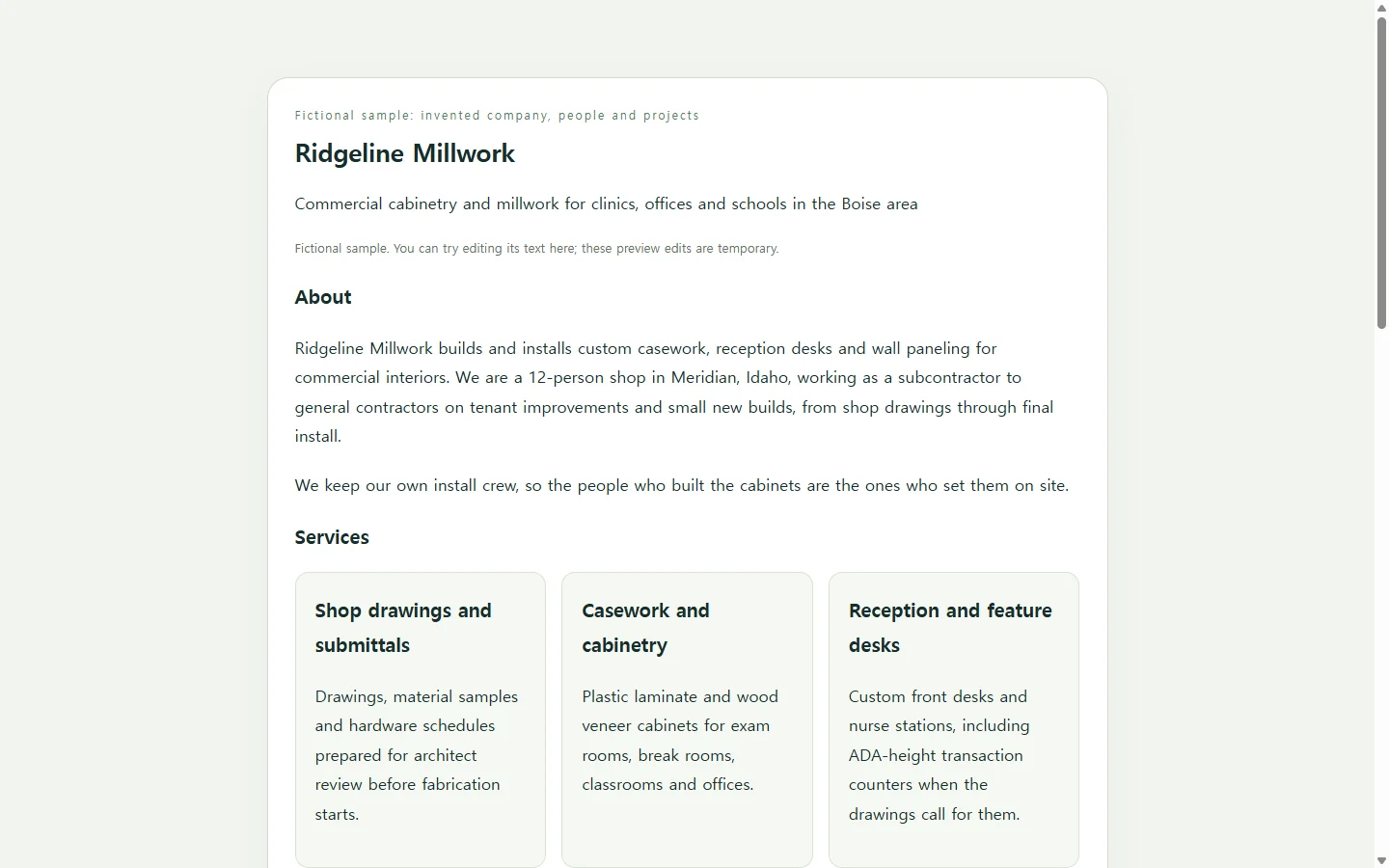
The example on this page is a profile for Ridgeline Millwork, an invented commercial cabinetry shop. Its people, projects and numbers are made up to show the layout, not to suggest what yours should say.
Two choices in it are worth borrowing. The project table puts scope and timeline next to each job, so a contractor can judge the kind and size of work without reading paragraphs. The history is four dated lines rather than a story, which keeps the founding years from crowding out recent jobs. Swap in your own trade and the structure holds: services as short cards, proof as a table, contact details last.
Three reasonable ways to make yours
If the request names a file type, such as a PDF or a Word document, that settles it: build in a tool that produces that file. Downloadable company profile templates come in Word, PowerPoint and PDF formats, among others, and one template site says 8.5 × 11 inches and A4 are the common sizes.
A designer makes sense when the profile will anchor your sales materials for years or has to match a lot of existing brand work. For a single request, it may be more than you need.
The third route is to have an AI assistant write the profile as a web page. An HTML file is plain text that a browser displays as a formatted page; you don't need to read the code, only check what it shows. This suits a profile you'll share by link, and it lets you describe the layout in words instead of nudging boxes around a slide.
Building yours with the prompt
Before you paste the prompt, gather the facts only you have: legal name, services, three to five recent projects you can name, years in business, service area, license or insurance details, and contact information. The AI's job is layout and wording; yours is accuracy.
The prompt asks for a single self-contained file with real headings, enough color contrast and a layout that fits a phone screen, so people using screen readers or small screens get the same profile. It also tells the assistant to write [TBD] wherever a fact is missing instead of filling the gap. Read the result line by line anyway: a plausible certification you don't hold is worse than a blank.
Create a company profile as a single, self-contained HTML file. Put all CSS in one <style> tag inside the file. Do not use JavaScript, external fonts, external scripts, forms or submit buttons. Use only the facts I give below. Do not invent clients, numbers, awards, certifications, testimonials or photos. Where a fact is missing, write [TBD] so I can fill it in.

Company name: [COMPANY NAME]
One-line description: [WHAT YOU DO AND FOR WHOM, e.g. 'Commercial cabinetry and millwork for clinics, offices and schools']
Location and service area: [CITY, STATE] / [AREA YOU SERVE]
Year founded and team size: [YEAR] / [NUMBER OF PEOPLE]
Services (3 to 5, one sentence each):
- [SERVICE 1]: [WHAT IT COVERS]
- [SERVICE 2]: [WHAT IT COVERS]
- [SERVICE 3]: [WHAT IT COVERS]
Recent projects (3 to 5), one per line: [PROJECT NAME OR TYPE] | [SCOPE] | [TIMELINE] | [YEAR]
History milestones (up to 4): [YEAR] - [WHAT HAPPENED]
Licenses, certifications, insurance: [LIST, or 'none to list']
Available on request: [e.g. certificate of insurance, references, W-9]
Contact: [NAME, TITLE] | [PHONE] | [EMAIL] | [WEBSITE, optional]
Brand color (optional): [HEX CODE]
Logo (optional): [IMAGE URL, or leave out]

Layout, top to bottom:
1. Header with the company name and the one-line description.
2. 'About' paragraph of 60 to 90 words written only from the facts above.
3. Services as cards.
4. Recent projects as a table with columns Project, Scope, Timeline, Year.
5. History as a short dated timeline.
6. Licenses, insurance and 'available on request' items as a list.
7. Contact details last, as text. mailto: and tel: links are fine.

Requirements:
- One <h1> for the company name and an <h2> for each section, in order.
- Text and background colors meet WCAG AA contrast for normal text; never use color alone to convey meaning.
- Readable on a 360px-wide phone with no sideways scrolling of the page. On narrow screens, let the projects table scroll inside its own container or stack each row.
- Body text at least 16px; keep desktop line length to roughly 75 characters.
- If a logo URL is given, include alt text with the company name.
- Add print styles so the page fits US Letter paper without cut-off text.
- Plain, specific wording. No slogans such as 'industry-leading' or 'world-class'.

Return only the complete HTML file.
Send the format that was asked for
If a prequalification form or bid package calls for a PDF or Word attachment, send that file; a link is an extra, not a substitute. Where a link is welcome, such as an introduction email or a follow-up after a site walk, a web page keeps the profile one click away in the thread.
When something changes after you've sent it
Profiles go stale in small ways. Say Ridgeline finishes a fifth project the month after sending its link, or a new estimator takes over bids. Asking the AI to regenerate the whole page for one table row risks rewording sections you already checked.
If you keep the page in NOS, you can change that row yourself by editing the rendered text directly. The published link stays the same after the edit, so the contractor who saved it finds the new project there the next time they open it, without signing up for an account and without you sending a revised file. The same page then goes to the next contractor already up to date.