A filled-in example, and the lines that matter most
The example below is a brief for a climbing gym’s new after-school program, written for a freelance designer who will make a poster and social graphics. The gym, the people, the dates and the budget are all fictional; they are there to show how specific each line can be, not to be copied.
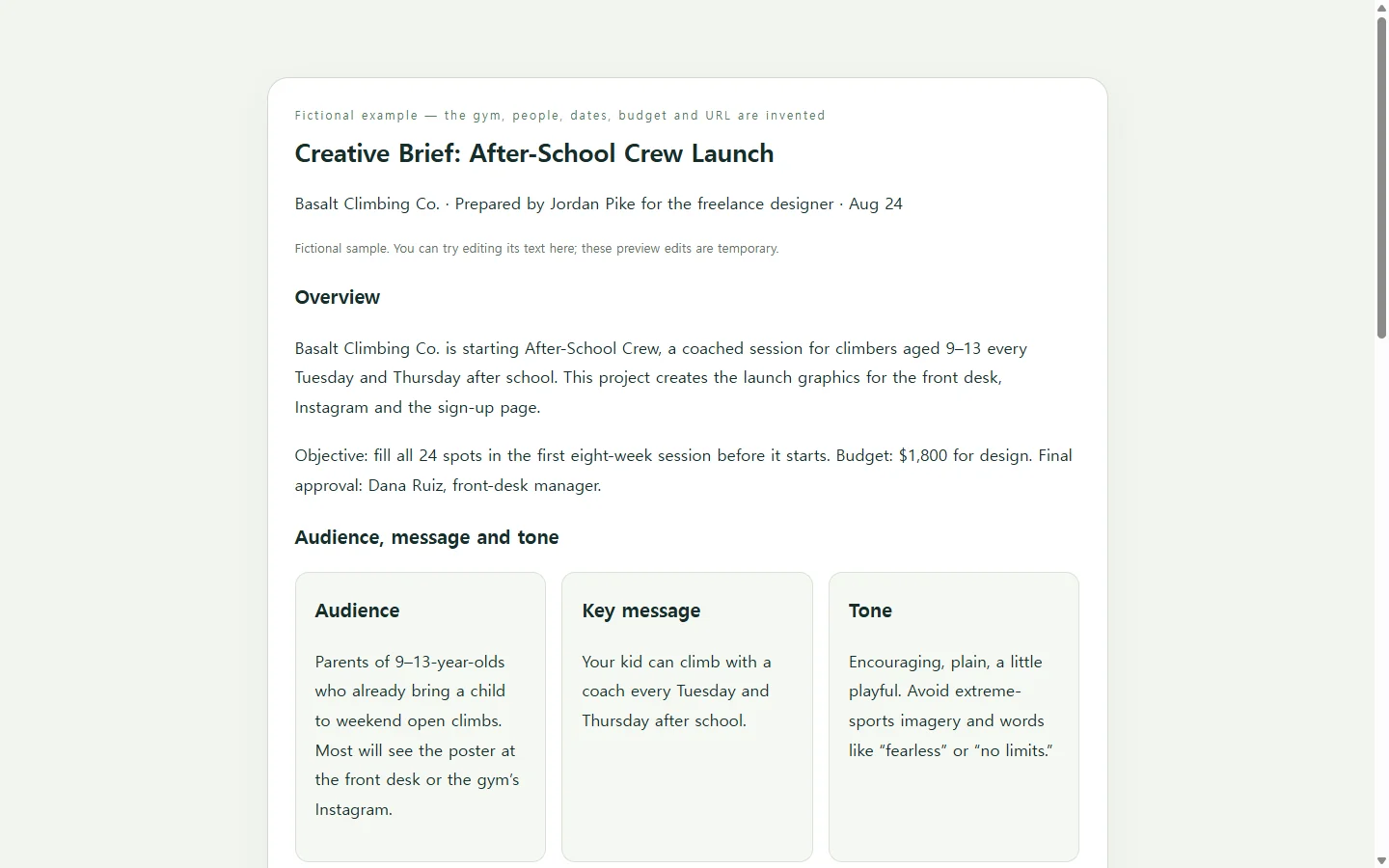
One widely read guide lists the usual sections: project description, purpose, objectives, audience, messaging and tone, deliverables, stakeholders, budget, timeline and distribution. The same guide says a brief is typically one or two pages. That length is a useful limit when you are tempted to paste in the whole kickoff call.
Within that page, spend your words where the designer has to make a choice. “Families” could mean anyone, while “parents of 9–13-year-olds who already come to weekend open climbs” tells the designer whose faces and which questions belong on the poster. One message sentence gives clearer direction than three competing taglines. A deliverables table with sizes and due dates answers the “do you also need a story version?” email before anyone has to write it.
Written scope helps later, too. When goals and deliverables are not pinned down, extra requests tend to get absorbed, and tasks, costs and deadlines grow with them. A table you both saw at the start gives you something specific to point to.
Doc template, slide deck, or your own page
If your agency or client hands you its own form, or the job asks for a Word or PDF file, use that format. The advice about specific wording applies just the same. A document template is the quickest route when the headings are all you need, and a short deck works if you plan to walk the team through the brief at a kickoff meeting.
Building your own page makes sense when you want the layout to fit this project: a deliverables table that stays readable on a phone, the timeline close to the message, and no boxes you did not ask for. That is where AI is a practical helper. It can handle the arranging and styling, while every fact still comes from you.
Turn your notes into the page with AI
Ask for a single HTML file. HTML is the code a web browser reads to display a page, and one self-contained file keeps the layout and the text together. The prompt below has slots for your own details and tells the model not to fill gaps on its own. Anything you have not decided appears as “TBD” with the name of the person who will confirm it, which helps a designer more than a confident guess.
When the page comes back, open it on your phone as well as your laptop, and check every date, size and number against your notes. A model can misread a messy note as easily as a tired person can.
When the brief changes after you send it
Briefs change once people start reading them: reviewers point out details that are inaccurate or not feasible, and the document gets revised. Say the gym’s manager moves the first session back a week and swaps the print poster for a second story size. If you attached a file to an email, you fix it and send it again, and the designer has to make sure they are working from the newest copy rather than the one they saved.
If a link is acceptable to the people you are briefing, you can keep this page in NOS and share it from there. You can type the new date straight into the displayed page, so a one-line change does not mean asking AI to rebuild the whole brief. The published link stays the same after the edit, so the designer opens the address they already have and sees the new date. They do not need an account to open it.
It also helps to state each date once, in the timeline, instead of repeating it in three sections; a schedule change then takes one edit instead of a search. If someone needs a file for their records, the same words can go into that file. Otherwise, share the one page and correct it there as the project moves.
A prompt to adapt
Create a single self-contained HTML file for a one-page creative brief. Use only the facts I give below. Do not invent names, numbers, dates, quotes or results. If a field is empty, show “TBD — confirm with [OWNER NAME]”.

Project name: [PROJECT NAME]
Prepared by: [YOUR NAME, ROLE]
Prepared for: [DESIGNER / AGENCY / TEAM]
Purpose (why this project exists): [1–2 SENTENCES]
Objective we can check: [E.G. “FILL 24 SPOTS BEFORE SEPT 22”]
Audience: [WHO THEY ARE, WHAT THEY ALREADY KNOW, WHERE THEY WILL SEE THIS]
Key message (one sentence): [MESSAGE]
Tone: [3 WORDS]   Avoid: [WORDS, IMAGERY OR CLAIMS TO AVOID]
Deliverables, one per line: [ASSET — SIZE/FORMAT — DUE DATE]
Must include: [LOGO VERSION, REQUIRED TEXT, URL, OTHER MANDATORIES]
Budget: [AMOUNT OR “NOT SHARED”]
Approver: [NAME, ROLE]
Timeline, one per line: [MILESTONE — DATE]
Where it will run: [CHANNELS]

Layout and output requirements:
- Sections in this order: overview (purpose, objective, budget, approver), audience and message, deliverables, timeline, must-include checklist.
- Put deliverables in a real HTML table with column headers.
- Use one h1 for the project name and h2 for each section; body text at least 16px; dark text on a light background with strong contrast; do not use color alone to show status.
- It must read on a 360px-wide phone without the page scrolling sideways; if the table is too wide, let only the table scroll inside its own container.
- Write each date only once, in the timeline or deliverables table.
- Inline CSS only. No external fonts, images, scripts, forms or tracking.
- Keep the content to about two printed pages.
- Return only the complete HTML file.