What a developer portfolio page has to do
There is no single correct look. One public, community-maintained list of developer portfolios counts more than 2,000 entries, ranging from plain software-engineer pages to terminal-style and iOS-style designs.
What matters more is whether someone who never opens your code can tell what each project does, which part you built and what it runs on. A practical target is a line about the role you want, two to four projects explained in a few sentences each, the tools you can actually discuss, a brief work history and an email address that is easy to find.
General resume advice carries over well: be specific instead of general, put numbers on results only where you honestly have them, and write for a reader who scans quickly.
A sample page: one developer, three projects
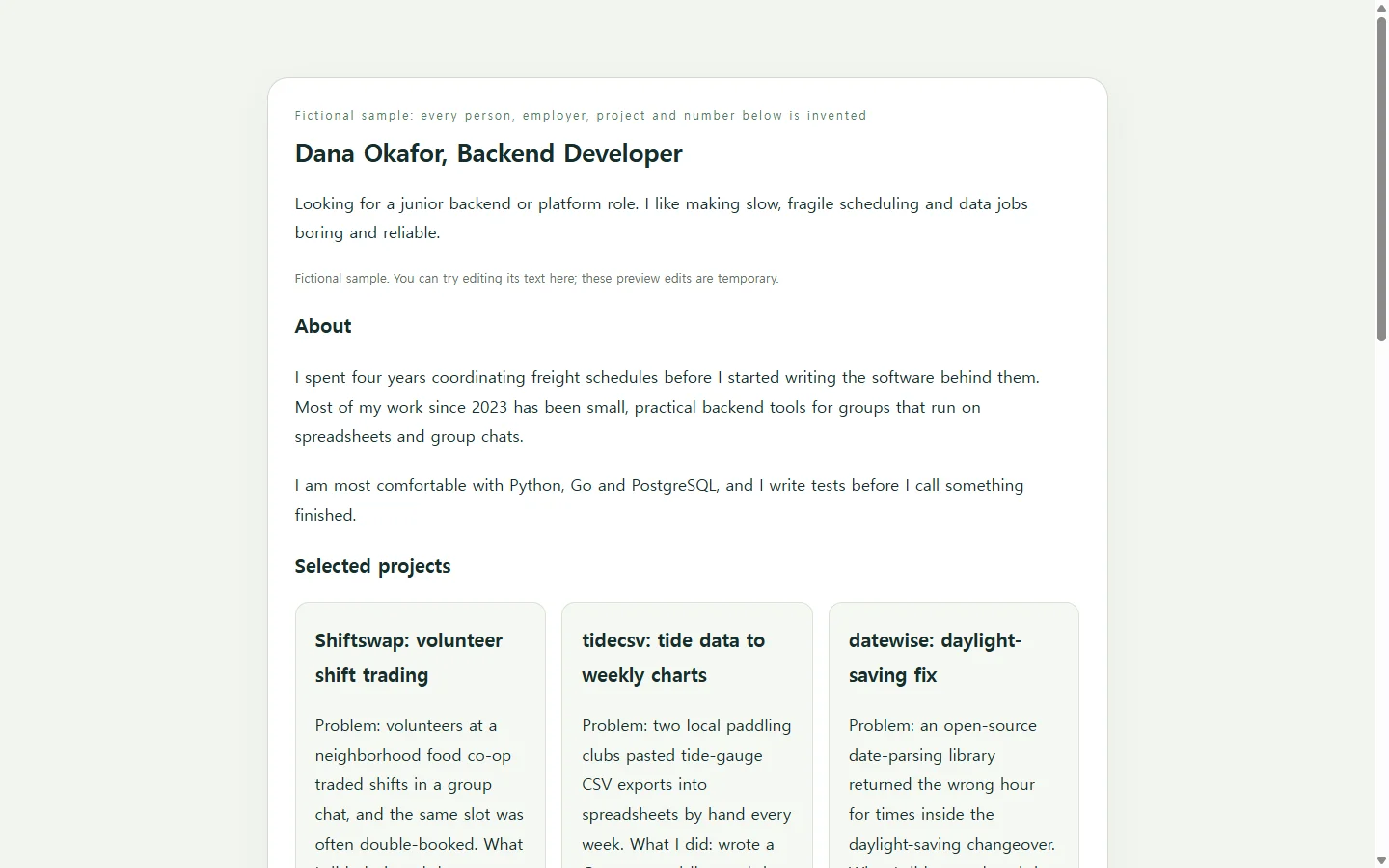
The example on this page belongs to Dana Okafor, a fictional career switcher looking for a junior backend role. The person, employers, projects and numbers are all invented to show the format.
Notice that the volunteer-scheduling project starts with the problem: shift trades were happening in a group chat, and people kept getting double-booked. Only after that does it name a framework. The stack comes next, and the result says where its number came from.
The stack table links each tool to a project, so a reviewer can see where Dana used PostgreSQL instead of trusting a bare skills list. The work history stays short but keeps the pre-developer job, because it explains how a logistics background led to scheduling software.
Ways to build yours
Hand-coding the page is a real option. For frontend roles, the page itself can double as a work sample. It also takes the most time.
A website-builder template gets you online quickly, though you will still spend effort fitting project write-ups into a general-purpose design. Pinning your best repositories on your code-hosting profile can be enough when your READMEs already explain each project well. It does not give you one place that connects them, though.
A middle path is to write the facts yourself and ask an AI tool to handle layout and styling. The AI does the design work. It should not supply your projects, numbers or job titles.
Building the page with AI
Before you open a chat, gather your target role, two to four projects (the problem, your part, the stack and an honest result), links to code or demos, and your contact email.
Ask for a single HTML file. HTML is the plain-text format web pages are written in. If the styles are kept inside the file, you can open it in a web browser without extra setup.
The prompt below asks for a page that works on phones and is accessible. It also tells the AI to leave a bracketed note instead of filling in gaps. When the page comes back, open it on your phone and check that nothing scrolls sideways. Then compare every number and link with your own notes, and delete anything you did not supply.
Where the link goes when you apply
A portfolio link supports an application. It does not replace the documents the employer asked for. If a posting asks for a resume as a PDF or DOCX, send that file. Put the portfolio link in the resume header, or in a website field if the application form has one.
If you convert your resume to PDF, check that the formatting survived the conversion before you upload it.
Keeping the same link current
Once the link is in your applications, the page will keep changing. Dana might release a new version of the tide-chart tool, notice an outdated version number in the stack table, or decide the scheduling result should say over the first three months.
If the page lives in a NOS workspace, you can click into the rendered text and fix those words directly. You do not have to ask an AI to regenerate the whole page for one sentence.
The published sharing link stays the same after you edit. The address already on your resume shows the corrected version, and the people you sent it to can open it without creating an account.
Bigger changes, like adding a fourth project with its own layout, are still a job for your AI tool. For everyday wording fixes, start with your three strongest projects, publish the page once and keep that one link up to date.
A prompt to adapt
Build a one-page developer portfolio as a single self-contained HTML file. Use only the facts below. If something is missing, insert a visible bracketed note such as [ADD RESULT] instead of inventing it. Do not make up metrics, employers, testimonials, logos or links.

ABOUT ME
- Name: [YOUR NAME]
- Role I want: [e.g., junior backend developer]
- One-sentence pitch: [the kind of problems you like to work on]
- Email: [YOUR EMAIL]
- Code profile URL: [YOUR CODE PROFILE URL]

PROJECTS (2 to 4; repeat this block for each)
- Name: [PROJECT NAME]
- Problem it solved: [one or two sentences]
- What I personally did: [your part, especially on team projects]
- Stack: [languages, frameworks, databases]
- Result: [an honest outcome and where the number came from, or 'not measured']
- Links: [repository URL] [live demo URL, or 'none']

EXPERIENCE
- [YEARS] - [ROLE], [ORGANIZATION]: [one line about what you did]

LAYOUT AND STYLE
- Order: name and target role, a short about paragraph, project cards (problem first, then what I did, stack, result, links), a table matching each tool to the project where I used it, a short experience timeline, then contact.
- Tone: [e.g., calm and plain / bold and colorful]. Accent color: [COLOR].

TECHNICAL REQUIREMENTS
- One HTML file with all CSS in a <style> tag. No external fonts, libraries, frameworks, images, scripts or APIs. No JavaScript.
- No contact form. Show the email as visible text and as a mailto link.
- Semantic HTML: <html lang='en'>, a descriptive <title>, one h1, h2 for sections, h3 for project names, real lists, and a real <table> with header cells.
- Accessibility: text contrast of at least 4.5:1 against its background, visible focus styles on links, link text that makes sense on its own (never 'click here'), and no information conveyed by color alone.
- Mobile: single column below 640px wide, no horizontal scrolling, body text at least 16px, and tap targets at least 44px tall.
Return only the complete HTML file.