What the estimate has to answer
One accounting publisher’s guide to estimates lists nine pieces: your business and contact details, the client’s details, an estimate number and date, an itemized description of the work, pricing for each item, a projected timeline, terms, the total, and next steps. Use it as a checklist. It isn’t a legal standard.
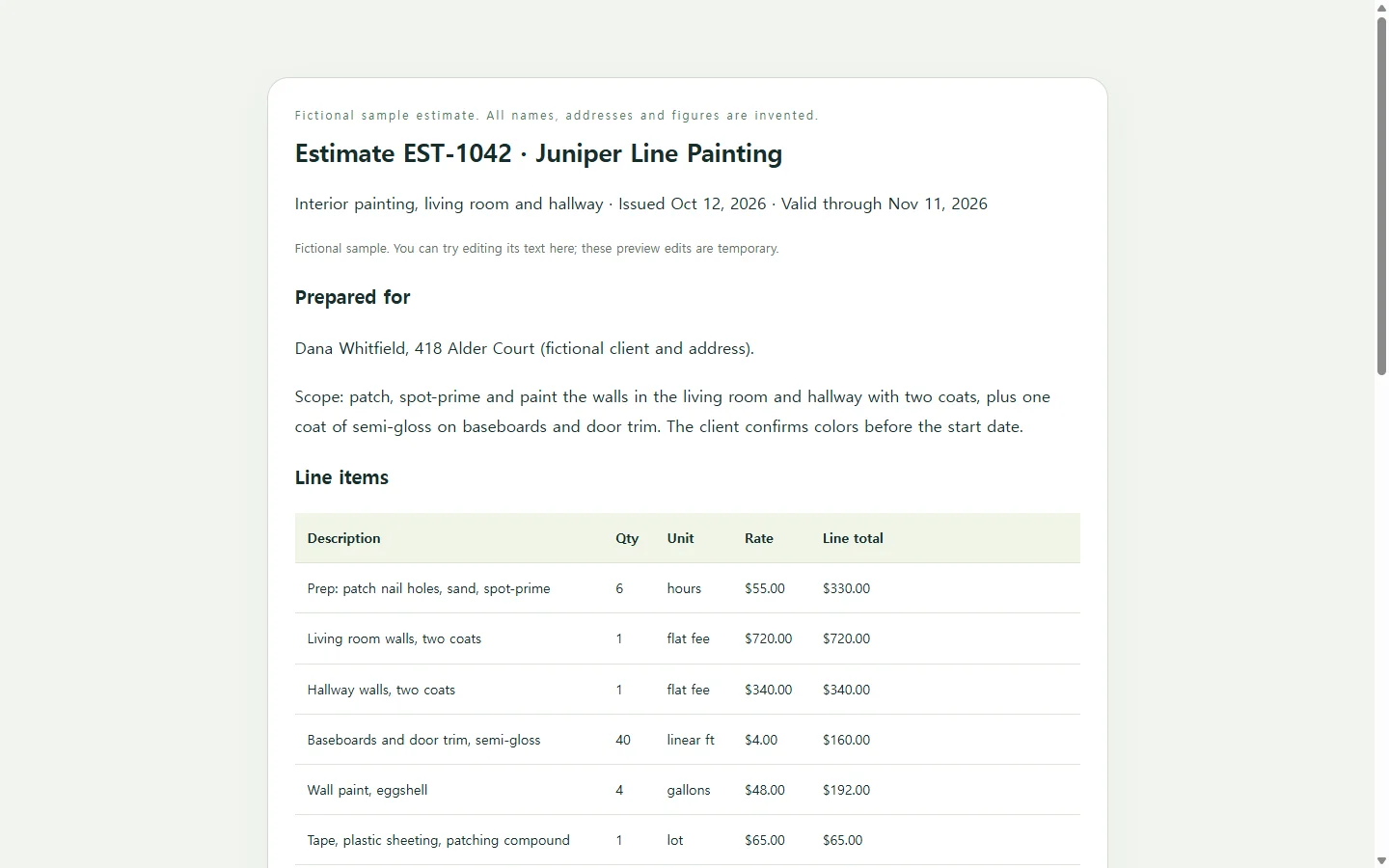
The line items carry most of the weight. A single line reading “Interior painting: $1,807” asks the client to take your word for it. Six hours of patching at $55, two flat-fee rooms and four gallons of paint show them where the money goes. The same guide notes that showing how you calculated each price makes questions and disputes less likely later.
Two lines are easy to forget. An expiration date means you don’t have to honor an old price after your costs go up. A plain next step tells the client exactly how to say yes: reply to approve, sign and return, or book a call.
A filled-in example: two rooms of interior paint
Everything in the sample below is made up: Juniper Line Painting, the homeowner, the address, the dates and every price. The figures show how an estimate is put together, not what you should charge.
A few choices are worth borrowing. Prep is billed by the hour because the amount depends on what turns up once the walls are bare. The walls are flat fees because they were measured during the site visit. Paint and supplies get their own lines, so a client comparing two bids can tell whether the difference is labor or materials.
The “not included” list matters as much as the prices. Naming ceilings, furniture moving and drywall replacement up front means nobody assumes those are covered. The 30-day validity and $500 deposit are only illustrations, so set terms that fit your business.
Three ways to make your own
If you send an estimate now and then, a downloadable Word, Excel or PDF template is the fastest way to start. Swap in your details, check the math and save the file.
If you send them every week, invoicing or estimating software can store client details and rates. Some products can also turn an accepted estimate into an invoice. That starts to pay off once you’re retyping the same customers and rates for every job.
The third route suits people who want the estimate to look like their business, not a generic form. HTML is the code web pages are written in, and a single HTML file opens in a web browser. You describe the job to an AI chat assistant and it writes that file. You supply every fact (scope, quantities, rates and terms) and the AI handles the layout. It should never choose a price for you.
A prompt you can paste
Copy the prompt and replace everything in square brackets with details from your own job. The bracketed sample lines show how much detail helps. Delete them once your own lines are in.
Before you send anything, check that each line total equals quantity times rate, that the subtotal and total add up, and that no brackets or sample values are left. The prompt asks for totals written as plain text, a table that stays readable on a phone, real text rather than images, and no buttons that look like they submit an order or take a payment. A static estimate page shouldn’t pretend to do either.
Build a one-page job estimate as a single self-contained HTML file (inline CSS only; no JavaScript, external fonts, images or libraries).

Use only the details below. Do not invent prices, quantities, names, dates or terms. If something is missing, show it in [brackets] on the page so I can spot it.

From: [Your business name], [phone], [email], [license number, if you list one]
For: [Client name], [job address]
Estimate number: [EST-0000]   Date issued: [date]   Valid until: [date]
Job summary (one sentence): [e.g., Interior painting of living room and hallway, walls and trim, two coats]

Line items (description | quantity | unit | rate | how priced):
[e.g., Prep: patch nail holes, sand, spot-prime | 6 | hours | $55 | hourly]
[e.g., Living room walls, two coats | 1 | flat fee | $720 | flat]
[e.g., Wall paint, eggshell | 4 | gallons | $48 | per unit]
[add your own lines]

Taxes or discounts: [describe, or write “none”]
Not included: [e.g., ceilings, moving large furniture, drywall replacement]
Timeline: [start date and short milestones]
Payment terms: [e.g., $500 deposit to book the start date, balance due at final walkthrough]
How to accept: [e.g., reply “approved” to the estimate email, or call]

Requirements:
- Calculate each line total, the subtotal and the total, and write them as plain text on the page. After the code, list your arithmetic separately so I can check it.
- Put the line items in a real HTML table with a caption and header cells.
- On screens narrower than 600px, keep the table readable without zooming: either let it scroll sideways inside its own box or stack each row as a labeled block.
- Body text at least 16px, dark text on a light background with strong contrast, and headings in order with one h1.
- Use my brand colors [#hex, #hex] for headings and accents only. Keep the table plain.
- Add print styles so the page fits on US letter paper without background colors.
- Include no forms, buttons, signature pads, payment links, or anything that looks like it submits an order or takes payment.
When the client asks for a change
Suppose the homeowner in the sample replies that they want to skip the hallway for now. If you emailed a file, you edit it, save it again and send a second attachment. Now the email thread holds two estimates with different totals.
If the estimate is a page in NOS, you can click into the text and change it directly. Delete the hallway line, change the paint from four gallons to three, update the subtotal from $1,807 to $1,419, and change the balance due from $1,307 to $919. You don’t have to ask an AI to rebuild the whole page to change a few numbers. Because the totals are plain text, edit every figure the change affects yourself. Correcting one number won’t recalculate the others.
The sharing link stays the same after you edit. The client opens the URL you already sent and sees the revised scope, and they don’t need an account to view it. Add a note near the top, such as “Revised Oct 15: hallway removed,” so they know which version they’re reading. If they need the final estimate as a PDF or Word file for their records or a formal submission, send that file as well. The link is for the version that’s still being worked out.