Start with what a guest has to decide
Before picking colors, list the questions a guest will have after one read: what is this, when exactly, where do I go once I arrive, and how do I say yes. If an answer is missing, the design can't cover for it, and the guest ends up emailing you.
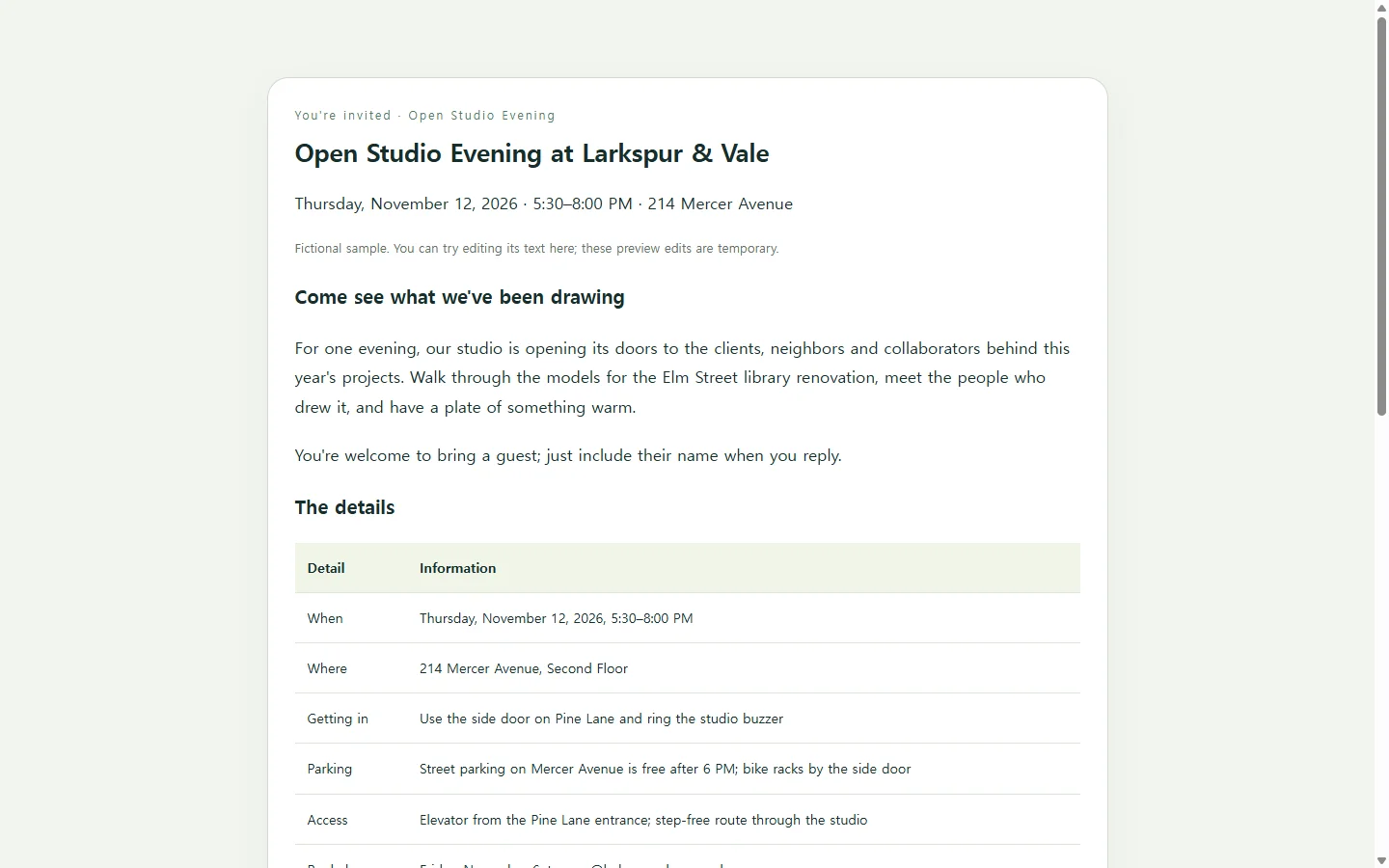
Write the date with its weekday, give both a start and an end time, and set the reply deadline a few days before you owe a headcount to a caterer or venue. Those lines carry most of the planning, so give them the most visible spot.
A sample: an open studio evening
The example below invites clients and neighbors to an evening at Larkspur & Vale, a fictional architecture studio. The studio, address, email and schedule are invented for illustration.
Two choices are worth borrowing. The practical details sit in a short table rather than inside the welcome note, so someone checking the entrance from the sidewalk finds it at a glance. The schedule says when the short talk starts, so guests who can only come late know what they would miss.
Replies go to a plain email address. The sample has no RSVP form, guest list or reminders; if you need those, use a tool built to collect responses alongside it.
Card, document or page
Large template galleries offer printable designs for a wide range of occasions and let you change the text, colors and fonts without design training. That suits an invitation that will be printed, mailed or posted as a single image.
If your workplace, venue or co-host asks for a PDF or Word file, send that file; a link doesn't replace a required attachment.
A page makes sense when the details run long or are likely to change. It can hold a schedule and directions at a readable size on a phone, and guests open it from a link in an email or text message.
Making your own version, with or without AI
You can adapt the sample by hand. If you'd rather describe the result than lay it out yourself, an AI chat assistant can write it as HTML, the format web pages are made of: a single file you open in a browser to preview.
Give the assistant only details you have confirmed. The prompt below has a bracket for each one and tells it to mark anything missing instead of guessing, which matters most for times, addresses and deadlines. Check those three against your own notes in the preview before anything goes out.
When the room changes after it's sent
Say the invitation has gone out and the studio moves the evening from the second floor to the ground-floor gallery. With a printed card or an attached file, the fix is a correction sent to everyone.
If the page lives in NOS, you can click into the text on the page and change the floor yourself, without asking AI to rebuild it. The published link stays the same, so a guest who opens the original email next week sees the new room, and nobody needs an account to view it.
Anyone who printed the invitation or saved a screenshot still has the old version. For a change that affects how people arrive, send a short note too; for a typo in the parking line or a later reply date, the edit to the page may be all you need.
Fill in the prompt with your own event, read the preview on your phone, and send the link once every detail matches what you'd tell a guest at the door.
A prompt to adapt
Create a single-page event invitation as one self-contained HTML file.

Event details (use only these; if a detail is blank, show [TO CONFIRM] in its place instead of inventing it):
- Event name: [EVENT NAME]
- Host: [HOST NAME OR ORGANIZATION]
- Who is invited: [GUESTS, e.g. clients and neighbors]
- Date: [WEEKDAY, MONTH DAY, YEAR, e.g. Thursday, November 12, 2026]
- Time: [START–END TIME AND TIME ZONE]
- Address: [STREET ADDRESS, FLOOR OR ROOM]
- Arrival: [ENTRANCE, BUZZER OR CHECK-IN NOTE]
- Parking or transit: [NOTE]
- Accessibility: [ACCESS DETAILS YOU HAVE CONFIRMED WITH THE VENUE, e.g. elevator, step-free route]
- Schedule: [TIME — ITEM, one per line]
- How to reply: [EMAIL OR PHONE] by [REPLY DEADLINE WITH WEEKDAY]
- Welcome note: [2–3 SENTENCES IN YOUR OWN WORDS]
- Tone and colors: [e.g. warm and plain; deep green and cream]

Layout and content:
- Put the event name, date, time and place near the top, then the welcome note, a details table, the schedule, and how to reply.
- Keep my welcome note as written; fix only spelling.
- Make the reply email a mailto link and any phone number a tel link.
- Do not add a form, a submit button, a map embed, a countdown, analytics or tracking.

Technical, accessibility and mobile requirements:
- One HTML file with CSS in a <style> tag. No JavaScript, external fonts, libraries or images loaded from other sites.
- Every piece of event information must be real text, never part of an image.
- One h1, headings in order, and a real table with header cells for the details.
- Body text at least 16px with comfortable line spacing, and strong contrast between text and background.
- Don't use color alone to signal anything.
- A single column that reads without sideways scrolling on a 360px-wide screen, with links large enough to tap.
- Add a print style so the page fits on one letter-size sheet.

After the file, list every detail you marked [TO CONFIRM].