What an event proposal has to answer
One set of Word-format event proposal templates reviewed for this guide keeps returning to the same sections: objectives, target audience, budget, marketing and risk management. Some versions add a program schedule, logistics and sponsorship options. The same set's short outline keeps an event overview, objectives, audience, budget and marketing, and is meant for small, straightforward events where you mainly need quick agreement. A fuller version earns its length when you are asking for funding or sponsorship.
It helps to read each heading as a question your reader will ask. Objectives answer why the host should say yes. The budget answers what the event costs and where money comes back in. The risk section answers what happens if fewer people show up than you planned. If a section can't answer its question in two or three sentences, it isn't finished.
A sample proposal, filled in
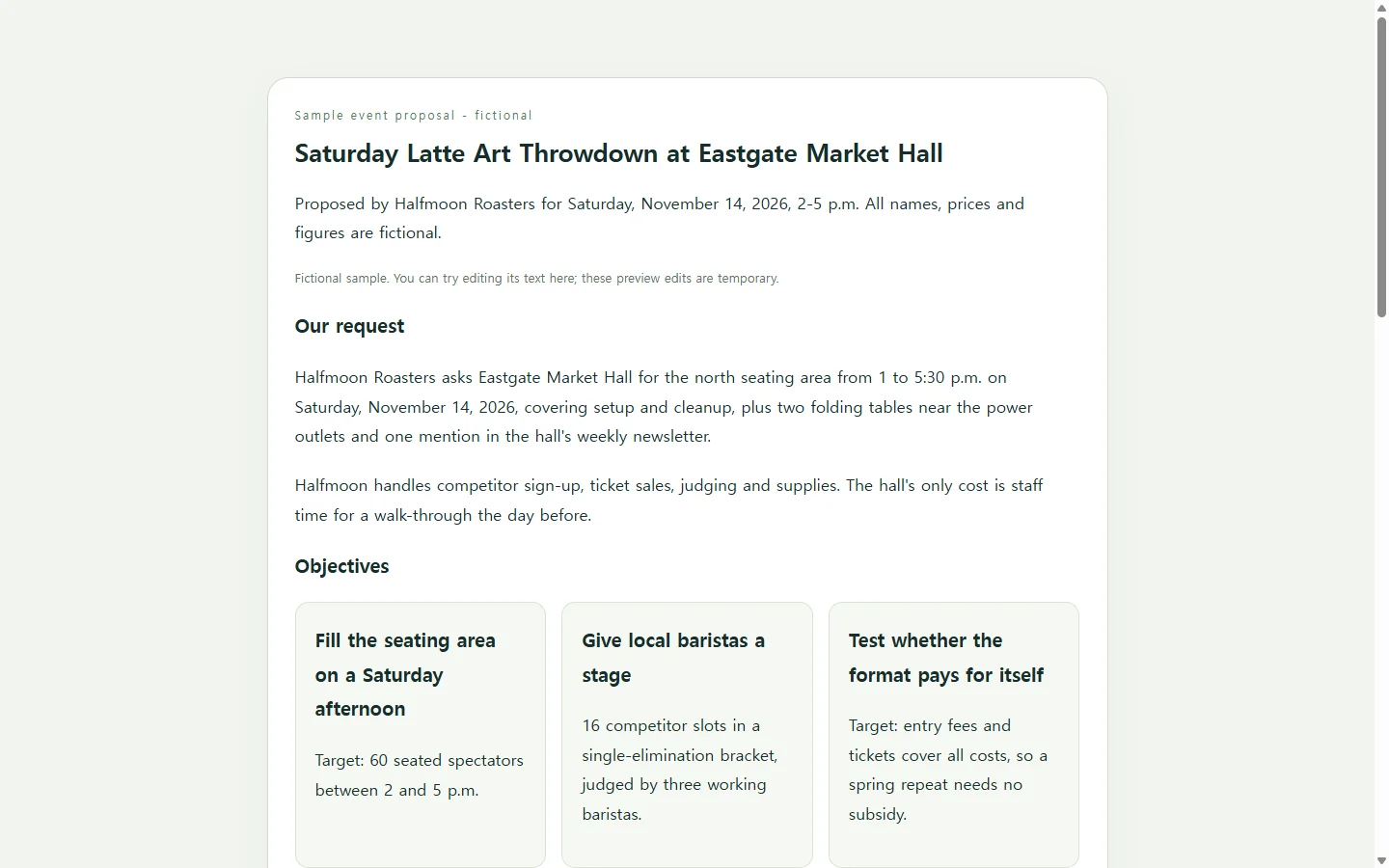
The sample below comes from Halfmoon Roasters, a fictional coffee roaster, asking the fictional Eastgate Market Hall to host a Saturday latte art competition with 60 spectator seats. Every name, date, price and figure in it is invented for illustration.
Three choices in it are worth copying. The request comes first, so the hall manager knows what they're being asked to approve before reading the details. The budget keeps costs and income in separate groups and ends with a net line, so the break-even question takes one glance. And each risk is paired with a specific response and a decision date, not a promise that everything will go smoothly.
Swap in your own event
Before you change a word, collect the facts only you can supply: two or three workable dates, the headcount you can actually handle, the quotes you have in writing, and who on your side owns each task. Then rewrite the sample section by section, keeping its order if your reader cares most about the request and the money.
Where a number is still unknown, write TBD. A visible gap is easier to discuss than a plausible-looking cost nobody checked, whether you type the figures yourself or ask a tool to help.
Pick the format your reader expects
If a venue, a grant program or an internal process asks for a Word document or a PDF, send exactly that. Downloadable event proposal templates exist as Word, PDF and PowerPoint files, and design libraries offer hundreds of more visual layouts. Those are the right choice when the format is fixed or the pitch leans on photos and branding.
When the proposal will travel by email or chat and you expect a round of changes, a single web page is a reasonable alternative. It opens in a browser and can be laid out to read comfortably on a phone, which matters if your decision-maker checks messages between other tasks.
Building the page with AI, if you want help
A web page here means one HTML file, the format a browser displays, holding your headings, text and budget table. You don't have to write it by hand. Paste the prompt below into an AI chat assistant, replace every bracketed part with your own details, and ask it to draft the page.
The prompt tells the assistant to mark missing facts as TBD rather than invent them, to build the budget as a real table that stays readable on a narrow screen, and to leave out forms or buttons that would suggest the page submits or downloads anything. When the draft comes back, check every date and total against your notes, then open it on your phone before you send it.
After you send it
Suppose you send the hall manager a link, and they reply that they'd prefer the following Saturday with 48 seats because of another booking. If the page lives in NOS, you can click into the rendered text and change the date and seat count directly, without asking an AI to regenerate the whole page. The link you already sent stays the same, so the manager reopens it and sees the new details. They don't need an account to open it.
One caution: the sample's budget figures are plain text, not formulas. Fewer seats means less ticket income, so update that row and the net line yourself before you reply. And if the hall later wants a file for its records, send the format it asks for.
A prompt to adapt
Create a one-page event proposal as a single self-contained HTML file.

Use only the details I give you. Where something is missing, write [TBD]. Never invent numbers, names, quotes, past results or testimonials.

- Proposing organization: [YOUR ORGANIZATION, e.g., a small neighborhood coffee roaster]
- Decision-maker and exactly what I am asking for: [WHO + REQUEST, e.g., market hall manager; seating area 1-5:30 p.m., two tables near power, one newsletter mention]
- Event name, date options, time, location: [DETAILS]
- Objectives (2-3, each with a measurable target): [OBJECTIVES]
- Target audience and expected headcount: [AUDIENCE + NUMBER]
- Costs, one per line with amounts: [COST ITEMS]
- Income sources, one per line with amounts: [TICKETS / ENTRY FEES / SPONSORS, or none]
- Promotion plan: [CHANNELS + START DATE]
- Planning milestones: [DATE - TASK, one per line]
- Risks and my planned response to each, with a decision date: [RISK - RESPONSE - DATE]
- Contact: [NAME, EMAIL OR PHONE]

Order: the request and date first, then objectives, audience, budget, timeline, risks, contact.
Budget: a real HTML table with a caption and header cells (th), costs and income in separate groups, a total for each group, and a net line. Compute the totals from my numbers and show them as plain text. Do not add JavaScript.

Requirements:
- Inline CSS only. No external fonts, images or scripts. No forms, input fields, or buttons or links that imply submitting, paying, booking or downloading.
- Semantic structure: one h1, an h2 for each section, lists for lists.
- Text contrast of at least 4.5:1 against its background, body text at least 16px, and never use color alone to carry meaning (label costs and income in words).
- Readable at 360px wide: single column, comfortable line length on desktop, and the budget table scrolls horizontally inside its own container instead of shrinking text.
- Plain, direct sentences. No marketing adjectives.

Return only the complete HTML.