An executive summary template is one page with five parts in a fixed order: the ask, three or four key figures, the reason, the cost of waiting, and the next steps with dates.
Built as a web page and sent as a link, it reads on a phone between meetings. When one number changes, you edit that line, and the link you already sent stays the same.
Here is a finished example you can copy. The company is made up. Tap a line under "Where the numbers come from" to open it.
<!doctype html>
<html lang="en">
<head>
<meta charset="utf-8">
<meta name="viewport" content="width=device-width, initial-scale=1">
<title>Executive summary: second roasting shift</title>
<style>
* { box-sizing: border-box; }
body {
margin: 0; background: #f3f4f6; color: #1f2937;
font-family: system-ui, -apple-system, "Segoe UI", sans-serif; line-height: 1.5;
}
.page { max-width: 640px; margin: 0 auto; padding: 22px 18px 30px; }
.meta { font-size: 13px; color: #6b7280; margin: 0 0 6px; }
h1 { font-size: 22px; line-height: 1.25; margin: 0 0 16px; }
.ask {
background: #1e3a8a; color: #fff; border-radius: 12px; padding: 16px 18px; margin-bottom: 16px;
}
.ask small { display: block; font-size: 12px; letter-spacing: .06em; text-transform: uppercase; opacity: .8; margin-bottom: 4px; }
.ask p { margin: 0; font-size: 18px; font-weight: 650; line-height: 1.35; }
.ask .by { margin-top: 8px; font-size: 14px; font-weight: 500; opacity: .9; }
.figs { display: grid; grid-template-columns: 1fr 1fr; gap: 10px; margin-bottom: 18px; }
.fig { background: #fff; border-radius: 10px; padding: 12px 14px; border: 1px solid #e5e7eb; }
.fig b { display: block; font-size: 26px; line-height: 1.1; color: #111827; }
.fig span { display: block; font-size: 13px; color: #374151; margin-top: 3px; }
.fig em { display: block; font-size: 12px; color: #6b7280; font-style: normal; margin-top: 2px; }
h2 { font-size: 15px; margin: 18px 0 6px; }
p, li { font-size: 15px; }
ul { margin: 0; padding-left: 20px; }
details { background: #fff; border: 1px solid #e5e7eb; border-radius: 10px; padding: 10px 14px; margin-top: 8px; }
summary { cursor: pointer; font-weight: 600; font-size: 14px; }
details p { margin: 8px 0 0; font-size: 14px; color: #374151; }
.next { border-left: 4px solid #1e3a8a; padding: 2px 0 2px 12px; margin-top: 8px; }
.foot { margin-top: 22px; font-size: 12px; color: #6b7280; }
@media (max-width: 420px) { .fig b { font-size: 22px; } h1 { font-size: 20px; } }
</style>
</head>
<body>
<div class="page">
<p class="meta">Executive summary · Harbor & Pine Coffee Roasters (fictional) · updated 1 Oct 2026</p>
<h1>Add a second roasting shift at the Dock Street site</h1>
<div class="ask">
<small>The ask</small>
<p>Approve 38,000 for a second roasting shift, starting 3 November.</p>
<p class="by">Decision needed by 14 October.</p>
</div>
<div class="figs" id="figs"></div>
<h2>Why now</h2>
<p>Wholesale orders now wait 9 days to ship, against a 3-day promise. Two accounts have asked about other suppliers. Without a second shift the wait grows through the winter gift season.</p>
<h2>Next steps</h2>
<div class="next">
<ul>
<li>14 Oct: decision from the leadership team</li>
<li>20 Oct: hiring starts (two roasters)</li>
<li>3 Nov: second shift runs</li>
</ul>
</div>
<h2>Where the numbers come from</h2>
<div id="notes"></div>
<p class="foot">Sample figures for illustration. To change a number, edit one line in the FIGURES list in the code.</p>
</div>
<script>
// One list drives the cards and the notes. Change a value here and the page follows.
const FIGURES = [
{ value: '38,000', label: 'One-off cost', small: 'oven servicing and hiring', note: 'Quote from the equipment supplier plus two roasters for the first month.' },
{ value: '9 days', label: 'Order wait today', small: 'target is 3 days', note: 'Average from order to dispatch for wholesale orders in September.' },
{ value: '+40%', label: 'Weekly capacity', small: 'from 5 to 7 roasts a day', note: 'Capacity of the current ovens if they run a second shift.' },
{ value: '7 months', label: 'Payback', small: 'on extra wholesale margin', note: 'Cost divided by the extra monthly margin if the backlog is cleared.' }
];
const figs = document.getElementById('figs');
const notes = document.getElementById('notes');
FIGURES.forEach((f) => {
figs.insertAdjacentHTML('beforeend',
'<div class="fig"><b>' + f.value + '</b><span>' + f.label + '</span><em>' + f.small + '</em></div>');
notes.insertAdjacentHTML('beforeend',
'<details><summary>' + f.label + ': ' + f.value + '</summary><p>' + f.note + '</p></details>');
});
</script>
</body>
</html>
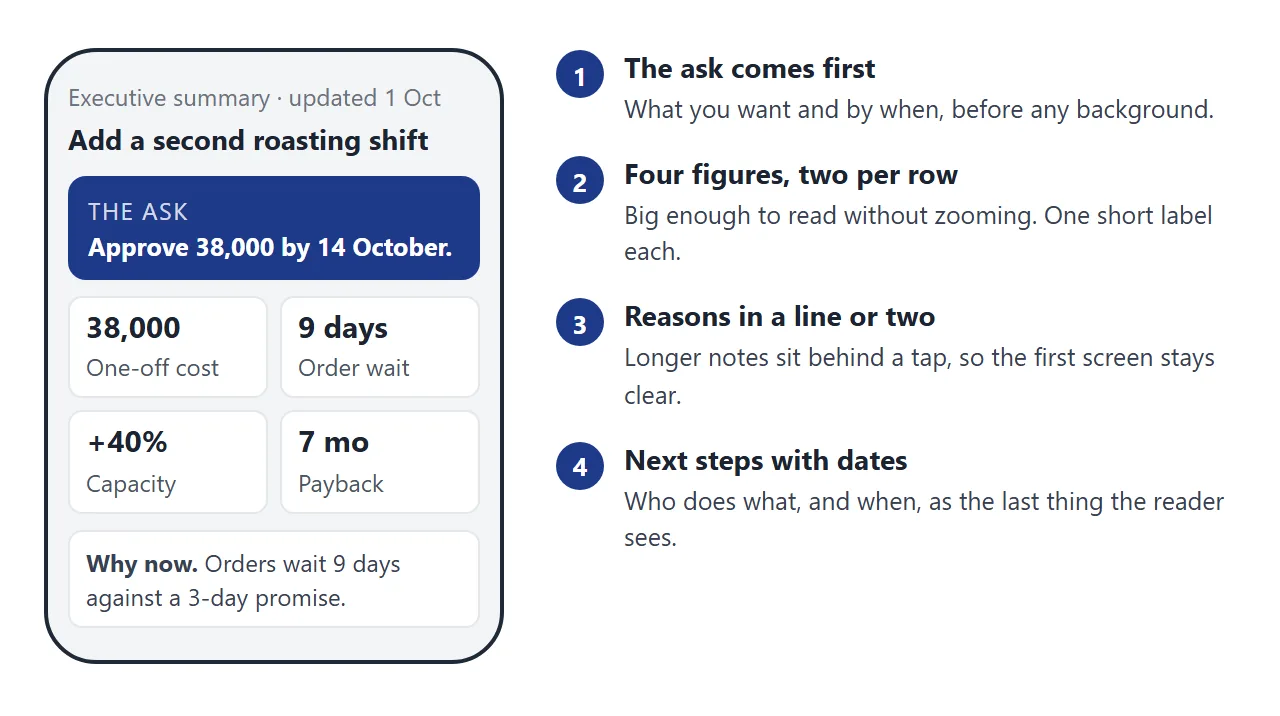
The page has five parts, top to bottom:
- The ask. What you want decided, and by when. A reader who stops here should still know what you need.
- Key figures. Three or four numbers, each with a short label. Cost, time, and the one result that matters.
- Why now. Two or three sentences. The problem in plain words, and what waiting does.
- Next steps. Dates and owners, so approval turns into action.
- Where the numbers come from. One line per figure, tucked behind a tap.
If you want the plain-text version to paste into an email or a document, this is the skeleton:
The ask: [what you need decided] by [date].
Key figures: [number + label], [number + label], [number + label].
Why now: [the problem, in two sentences].
If we wait: [what happens].
Next steps: [date: action, owner].
Make it with AI
Paste this into ChatGPT, Claude or Gemini, then add your own notes and figures under it.
Make one self-contained HTML file: a one-page executive summary
that reads well on a phone.

Order: title and date, then a highlighted box with THE ASK and
the decision date, then 4 key figures as big numbers with short
labels (two per row), then "Why now" in 2-3 sentences, then
next steps with dates, then a tap-to-open note for each figure
saying where the number comes from.

Rules: no external images, fonts or scripts. Keep the figures
in one JavaScript list at the top, so I can change a number in
one place. Include the viewport meta tag. Use only the numbers
I give you. If a number is missing, write TBC instead of
inventing one.

My notes and figures:
[paste here]
Changing one bullet should take one edit, not a new export of the whole file. That is why the prompt asks for the figures in one list.
Before you send the page, check four things:
- Every number matches your source. Read each figure on the page against your own notes. An AI chat can round, swap or invent a number, so this check is yours.
- The ask is in the first screen. If it is not, tell the chat to move it up.
- Nothing relies on an outside address. Pictures from other websites do not load in NOS, so ask for inline graphics or none.
- It fits a narrow screen. Resize the preview window to phone width and read it.
Send it as a link
Paste the HTML into NOS and the page appears as written, scripts included. Choose Create share link and copy the link. HTML to link walks through it.
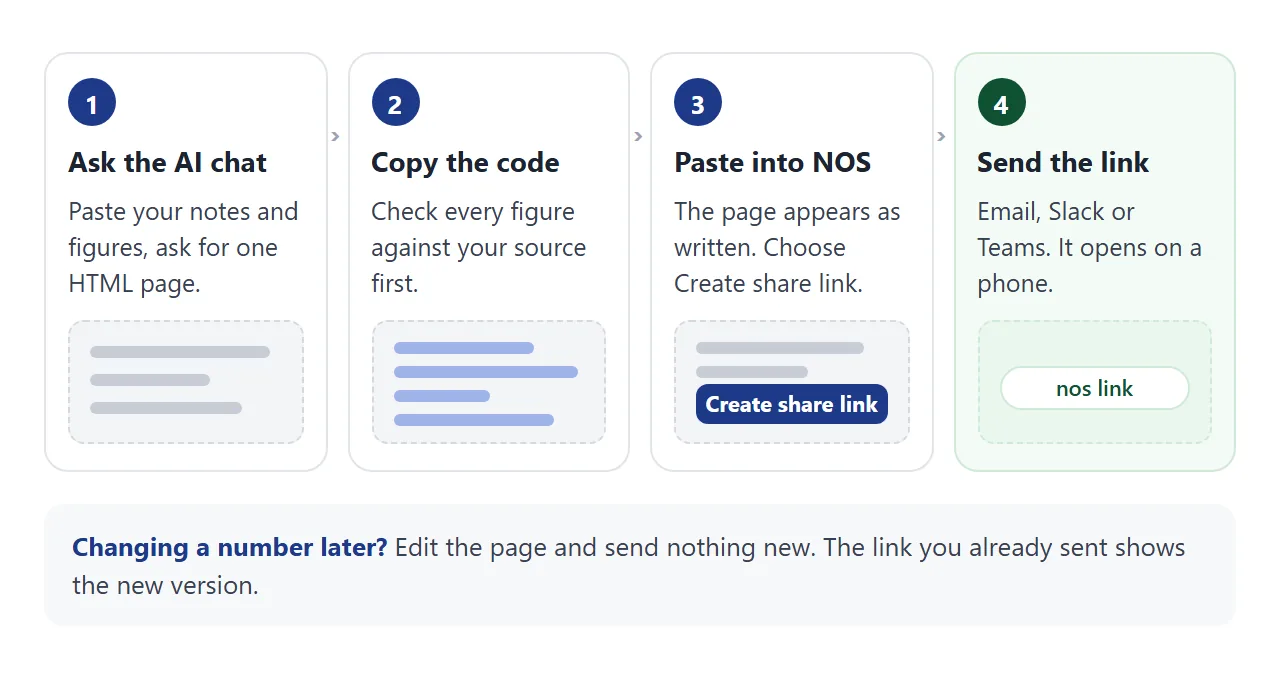
The recipient taps the link and the page opens in their browser, phone included. They do not need an account, and they cannot edit your page.
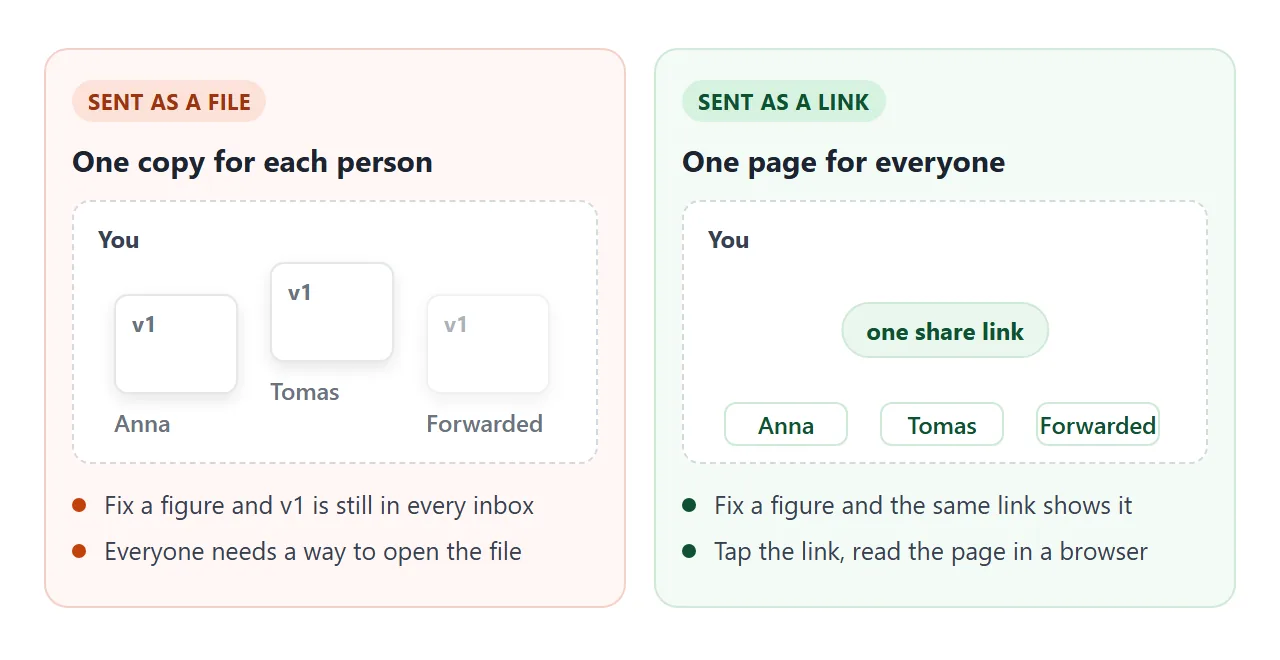
When a figure changes, edit the code in NOS. The same link shows the new version, so you do not send a second file. Ticks and rows you add as the owner in View mode are saved. A visitor's changes are not.
Where you paste the link changes what the reader sees first. As of October 2026:
- Email. Put the link in the message body. A personal Gmail account allows attachments up to 25 MB, and work or school limits are set by the administrator. A one-page file is tiny, so size is not the problem. Copies are.
- Slack. Slack shows a preview under a pasted link, and you can remove it. Slack says previews may not appear for pages without embedded data. See sending HTML in Slack.
- Teams. Whether Teams shows a preview for a pasted link depends on the URL previews setting, which an administrator controls. See sharing in Teams.
- Paper. Turn the link into a QR code and print it on a handout. See the QR code link guide.
Write it for a phone screen
Most of what makes a summary readable on a phone is order and size, not decoration. The first screen should hold the ask and the figures.
The page needs the viewport meta tag. Without it, MDN explains, some mobile browsers lay the page out in a wider virtual window and shrink it, so text turns small. The example has it. If your AI chat leaves it out, ask for it.
Two figures per row is a good fit for a narrow screen. Put the label under each number, not beside it. For more on layouts, see fixing AI pages on mobile.
Ways to send it compared
The page is the same. What differs is what the reader has to do and what happens when a figure changes.
| Way to send | What the reader does | If a figure changes |
|---|---|---|
| Link in the email body | Taps the link | Same link shows the new page |
| .html file attached | Downloads and opens a file | Every copy stays as sent |
| Link in Slack | Taps the link or its preview | Same link shows the new page |
| Link in Teams | Taps the link | Same link shows the new page |
| QR code on paper | Scans with a phone camera | Same link shows the new page |
For more on why a single address beats copies, see why links beat attachments.
A second page: a status summary
The same method suits a regular update. This one leads with a status colour, a progress bar and a table of workstreams, then lists the decisions you need.
<!doctype html>
<html lang="en">
<head>
<meta charset="utf-8">
<meta name="viewport" content="width=device-width, initial-scale=1">
<title>Project status summary: warehouse move</title>
<style>
  * { box-sizing: border-box; }
  body {
    margin: 0; background: #f3f4f6; color: #1f2937;
    font-family: system-ui, -apple-system, "Segoe UI", sans-serif; line-height: 1.5;
  }
  .page { max-width: 640px; margin: 0 auto; padding: 22px 18px 30px; }
  .meta { font-size: 13px; color: #6b7280; margin: 0 0 6px; }
  h1 { font-size: 22px; line-height: 1.25; margin: 0 0 14px; }
  .state { display: flex; align-items: center; gap: 10px; background: #fff; border: 1px solid #e5e7eb; border-radius: 12px; padding: 14px 16px; }
  .dot { width: 14px; height: 14px; border-radius: 50%; flex: none; }
  .amber { background: #f59e0b; } .green { background: #16a34a; } .red { background: #dc2626; }
  .state b { font-size: 17px; }
  .state span { font-size: 14px; color: #4b5563; display: block; }
  .bar { height: 10px; background: #e5e7eb; border-radius: 99px; margin: 14px 0 4px; overflow: hidden; }
  .bar i { display: block; height: 100%; background: #1e3a8a; border-radius: 99px; }
  .barlabel { font-size: 13px; color: #4b5563; margin: 0 0 14px; }
  h2 { font-size: 15px; margin: 18px 0 8px; }
  table { width: 100%; border-collapse: collapse; background: #fff; border: 1px solid #e5e7eb; border-radius: 10px; overflow: hidden; }
  th, td { text-align: left; padding: 9px 12px; font-size: 14px; border-bottom: 1px solid #f0f1f3; vertical-align: top; }
  th { font-size: 12px; text-transform: uppercase; letter-spacing: .05em; color: #6b7280; background: #fafafa; }
  tr:last-child td { border-bottom: 0; }
  td .dot { display: inline-block; width: 11px; height: 11px; margin-right: 6px; vertical-align: -1px; }
  .decisions { list-style: none; padding: 0; margin: 0; }
  .decisions li { background: #fff; border: 1px solid #e5e7eb; border-radius: 10px; padding: 10px 14px; margin-bottom: 8px; }
  .decisions label { display: flex; gap: 10px; font-size: 15px; cursor: pointer; }
  .decisions input { width: 20px; height: 20px; flex: none; margin-top: 2px; }
  .decisions small { display: block; color: #6b7280; font-size: 12px; }
  .done label { color: #6b7280; text-decoration: line-through; }
  .foot { margin-top: 22px; font-size: 12px; color: #6b7280; }
  @media (max-width: 420px) { h1 { font-size: 20px; } th, td { padding: 8px 9px; } }
</style>
</head>
<body>
<div class="page">
  <p class="meta">Status summary · Warehouse move (fictional) · week of 28 Sep 2026</p>
  <h1>Warehouse move: on track for 30 November, with one open risk</h1>

  <div class="state">
    <span class="dot amber"></span>
    <div><b>Amber</b><span>One item needs a decision this week.</span></div>
  </div>

  <div class="bar"><i id="fill"></i></div>
  <p class="barlabel" id="barlabel"></p>

  <h2>Workstreams</h2>
  <table>
    <thead><tr><th>Area</th><th>Status</th><th>Note</th></tr></thead>
    <tbody id="rows"></tbody>
  </table>

  <h2>Decisions needed from you</h2>
  <ul class="decisions" id="decisions"></ul>

  <p class="foot">Sample figures for illustration. Edit the STREAMS and DECISIONS lists in the code to change this page.</p>
</div>

<script>
  const PERCENT_DONE = 62;  // one number drives the progress bar
  const STREAMS = [
    { area: 'Racking and layout', status: 'green', label: 'On track', note: 'Install finishes 16 Oct.' },
    { area: 'IT and scanners', status: 'green', label: 'On track', note: 'Test run booked 4 Nov.' },
    { area: 'Moving stock', status: 'amber', label: 'At risk', note: 'Needs a second weekend.' },
    { area: 'Old lease exit', status: 'green', label: 'On track', note: 'Notice served.' }
  ];
  const DECISIONS = [
    { text: 'Approve a second moving weekend', detail: 'Extra cost 6,500, reply by 3 Oct' },
    { text: 'Confirm closing dates for customers', detail: 'Closed 21-23 Nov' }
  ];

  document.getElementById('fill').style.width = PERCENT_DONE + '%';
  document.getElementById('barlabel').textContent = PERCENT_DONE + '% of tasks done';

  STREAMS.forEach((s) => {
    document.getElementById('rows').insertAdjacentHTML('beforeend',
      '<tr><td>' + s.area + '</td><td><span class="dot ' + s.status + '"></span>' + s.label + '</td><td>' + s.note + '</td></tr>');
  });

  const list = document.getElementById('decisions');
  DECISIONS.forEach((d) => {
    list.insertAdjacentHTML('beforeend',
      '<li><label><input type="checkbox"><span>' + d.text + '<small>' + d.detail + '</small></span></label></li>');
  });
  // Strike through a decision when it is ticked
  list.addEventListener('change', (e) => e.target.closest('li').classList.toggle('done', e.target.checked));
</script>
</body>
</html>
Once the layout is right, next week's version is a change to a few lines, not a new document. For a longer client-facing format, see the proposal link guide.
When it does not work
| What you see | Cause | Fix |
|---|---|---|
| Text is tiny on a phone | The viewport meta tag is missing | Ask the chat to add it |
| A picture or chart is missing | It loads from another website, which NOS blocks | Ask for inline graphics, or none |
| A form button does nothing | Sending a form to a server is blocked | Keep the page read-only and ask for replies in your message |
| Slack shows a bare address | Slack had no data to build a preview | Add one line of context above the link |
| A reader sees an old figure | They have an earlier attachment or screenshot | Send the link, and say the file is out of date |
| A number differs from your source | The AI chat rounded or invented it | Fix the list at the top, then recheck all figures |