Pick questions by what you’ll change next time
Before choosing questions, list the parts of the session you could realistically change: the pacing, an exercise, the handout, the length. Each rating should point at one of them. A question about the venue earns its place only if you would actually book a different room.
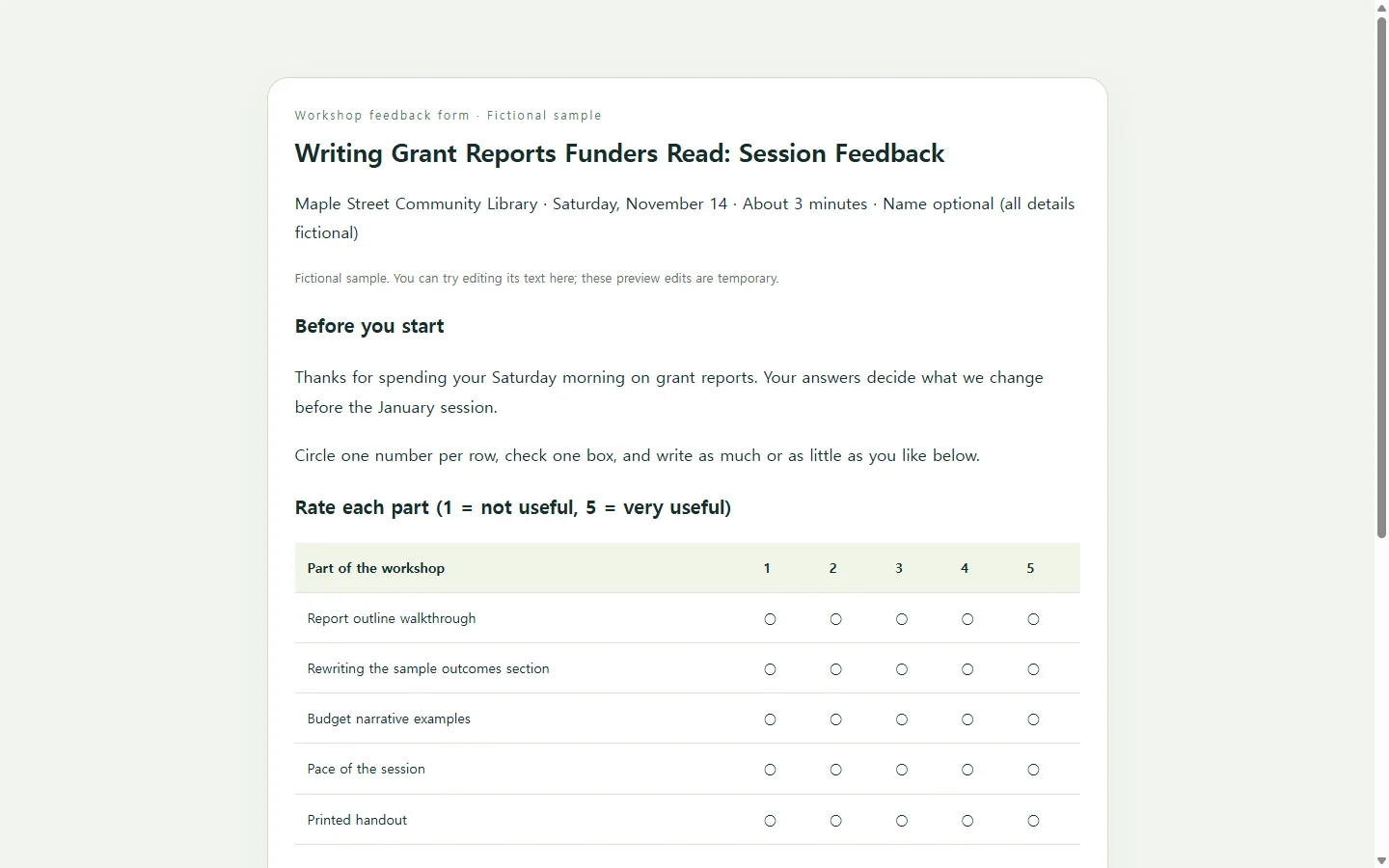
Then keep the form short. One large survey-template library reports that forms in its evaluation and feedback category average 8.2 questions, and that its forms with ten or fewer questions are completed 98.6% of the time, against 84.7% for those with 21 or more. Those figures describe online forms on one platform, but the lesson carries over to paper: a shorter form is more likely to come back filled in. A practical shape is several ratings on one 1-to-5 scale gathered into a single grid, plus an open question asking what to improve.
Hand the form out before people stand up, while the session is still fresh. If attendees are rating the person who will collect the sheets, make the name line optional. The same library advises anonymity for sensitive ratings such as manager evaluations, saying it produces more honest answers.
A finished example: one workshop, eight questions
The sample on this page is a feedback form for a fictional three-hour workshop on writing grant reports, hosted by a fictional community library. Its names, date and session details are invented; replace them with your own.
Three choices in it are worth copying. Every row in the rating grid names something the facilitators could revise, instead of asking about overall quality. The check-one question about which tool people will use first shows which part landed, without adding another score. The two open questions are split: one asks for a single change, and the other is marked optional, so nobody feels obliged to fill both.
Eight questions leave room to write on a single printed page.
Build your own version with AI (optional)
You can make this in a word processor with a table. If aligning boxes and columns is what slows you down, an AI chat assistant can lay the form out as a single HTML file, the format web browsers read to display a page. Your part is the content: the session name, the date, what you want rated and the exact wording of each question. Don’t ask the AI to invent questions or a scale you haven’t chosen.
The prompt below asks for a page that reads well on a phone, prints on one letter-size sheet and follows basic accessibility rules. Check the result on your phone and in print preview before you rely on it.
One limit matters: this page displays your form, but it does not collect or count answers. If you need responses gathered and tallied online, a form builder is the right tool, and this page can hold the agreed wording you enter there. If your organization requires evaluations on its own Word or PDF form, use that file instead.
Have the questions checked before you print
A stack of printed forms is hard to take back, so ask your co-host to read the questions first. Put the page in NOS and send them its link; they can open it without creating an account.
Suppose they reply that the date is wrong and that “Pace of the session” should read “Pace of the hands-on exercises.” You change those words directly on the page instead of asking the AI to regenerate the whole form. The link you already sent stays the same, so when your co-host opens it again, they see the corrected wording rather than an older attachment in their inbox.
When the next session comes around, update the title, the date and any rating that no longer fits on that page, then send the link to whoever checks it this time. Settle your eight questions first; they are the part no template can write for you.
A prompt to adapt
Create a one-page session feedback form as a single, self-contained HTML file.

Session details (use exactly as written; do not add or invent facts):
- Session title: [SESSION TITLE, e.g. Writing Grant Reports Funders Read]
- Host and location: [ORGANIZATION, PLACE]
- Date: [DATE]
- One-line thank-you and purpose: [ONE SENTENCE, e.g. Your answers decide what we change before the January session.]
- Name line: [OPTIONAL or REQUIRED]

Questions (keep my wording and order; do not add, remove or reword questions):
- Rating grid, scale 1 = [LOW LABEL] to 5 = [HIGH LABEL]. Rows: [ITEM 1]; [ITEM 2]; [ITEM 3]; [ITEM 4]; [ITEM 5]
- Check-one question: [QUESTION]. Options: [OPTION A]; [OPTION B]; [OPTION C]; [OPTION D]
- Open question: [OPEN QUESTION 1]
- Optional open question: [OPEN QUESTION 2]

Output requirements:
- One HTML file with inline CSS only. No external fonts, scripts, images or links.
- This page is for reading and printing only. Do not include a form element, submit button, data-sending inputs, or any wording that suggests answers are collected online. Draw rating options and checkboxes as empty printable circles or boxes.
- Mobile: readable at 360px width with no horizontal scrolling; keep the rating grid legible on narrow screens (for example, number-only column labels).
- Print: add print styles so the form fits one US Letter page, black text on white, with at least three blank writing lines under each open question.
- Accessibility: headings in logical order, a real table with header cells for the rating grid, body text at least 16px on screen, high-contrast text, and no meaning conveyed by color alone.
- Return only the complete HTML code.