What to decide before you ask for a draft
One common description of the job is short: name the learning goal, then build a timeline that fits the time you have. It also helps to note how you'll present the topic and what success will look like when you check students' work.
Those are the places where your knowledge matters most. A generator can suggest a warm-up, but it can't know that your period is 45 minutes, that two students need a read-aloud copy, or that the printed flyers are already in a bin by the door. Jot those down first. If your school asks you to list a standard, paste its exact wording yourself instead of letting the tool choose one.
Success criteria deserve one extra minute. “Students will understand unit rates” gives you nothing to look for. “Students can find the price of one item and say which package costs less per item” gives you something to check on an exit ticket.
A worked example: one 45-minute lesson on unit rates
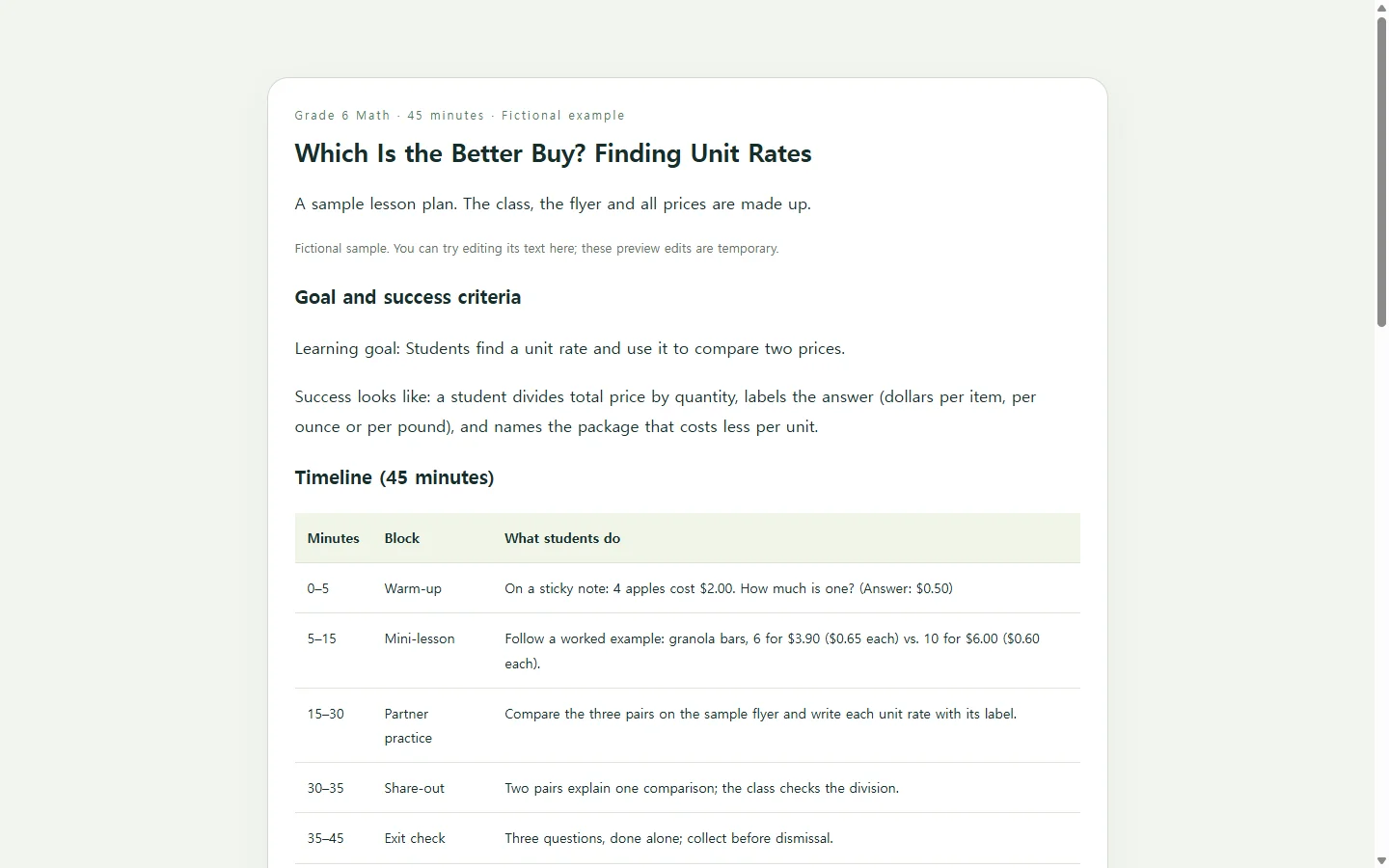
The example shows a fictional sixth-grade math lesson built around a single question: which is the better buy? The class, the flyer and every price are made up for illustration.
Two choices in it are worth borrowing. The timeline is a table, so you can confirm the blocks add up to 45 minutes and change one without rereading paragraphs. And the exit check tests the same skill named in the success criteria, so the top and bottom of the plan agree.
The marker pair on the practice flyer is there on purpose: the bigger pack costs more per marker. One case where the obvious answer is wrong gives you a quick way to see who is dividing and who is guessing.
Teaching another subject? Keep the skeleton and swap the content: goal, minutes, one main activity, and a check that matches the goal.
Build your own with a copy-paste prompt
You have real choices here. If your school provides a lesson plan form, or your planner already works, filling that in may be quicker than any generator. Teacher-focused generators ask for details like grade and subject up front. A general chat assistant gives up those fields but lets you decide exactly how the finished page looks.
The prompt below takes the chat route. It asks for a single HTML file: one file that holds both the text and the layout and opens in a web browser, so the plan reads as a clean page instead of a chat transcript. Replace every bracket with your own details.
Notice what it rules out: invented standards codes, outside scripts, and buttons that pretend to send data anywhere. You want a page that shows the plan and nothing more. It also asks the tool to mark its assumptions, so read the draft once as if you were the substitute and resolve every [CHECK] before you share it.
Build a one-page lesson plan as a single, self-contained HTML file.

My lesson:
- Grade and subject: [GRADE] [SUBJECT]
- Topic: [TOPIC]
- Period length: [MINUTES] minutes
- Learning goal, in my words: [GOAL]
- What success looks like (what I will see students do): [SUCCESS CRITERIA]
- What students already know: [PRIOR KNOWLEDGE]
- Materials I actually have: [MATERIALS]
- Supports some students need: [SUPPORTS, e.g., read-aloud copy, calculator]
- Standard to list (paste the exact wording, or write NONE): [STANDARD]

Content requirements:
- Sections in this order: goal and success criteria; a timeline table with columns Minutes, Block, What students do; materials and supports; a 3-question exit check with an answer key.
- Timeline blocks must add up to exactly [MINUTES] minutes. Show start and end minutes for each block.
- Use only the facts I gave. Do not invent standards or codes, student names, scores, or materials. If you must assume something, mark it [CHECK].
- Every exit-check question must test the success criteria above.

Page requirements:
- One HTML file with CSS inside it. Do not load fonts, libraries, images or scripts from other sites, and do not call any API.
- No forms, sign-ups, or buttons that claim to save, send or submit anything.
- Use real headings in order (one h1, then h2s), a table with a caption and header cells, and body text of at least 16px.
- Must be readable on a 360px-wide phone without sideways page scrolling: let the table scroll inside its own box or stack each row as a card.
- Use strong contrast between text and background (dark text on a light background), and never use color alone to show meaning.
- If you add an interactive answer check, it must work with a keyboard and show feedback as text.
- Keep all lesson text as real text, not images.

Return only the HTML.
When someone else teaches from it
A plan only you will use can live anywhere. It needs more care when it travels: to a co-teacher running the next section, or to a substitute walking in on Thursday.
If your school requires plans as a PDF or Word file, submit them in that format; a shared page doesn't replace it. The page is for the people standing in front of the class.
In NOS, the HTML page sits in your workspace alongside your notes and other pages. You can publish a sharing link, and the substitute can open it without creating an account.
Now say Thursday's schedule changes and the period shrinks to 35 minutes. You click into the timeline, cut the share-out, trim partner practice from 15 to 10 minutes, and adjust the times that follow. The text changes on the page itself, so you don't write a new prompt or regenerate the layout for a small fix.
The link you sent on Monday stays the same after the edit, so the substitute opens it and sees the 35-minute version. There's no second file to send and no question about which copy is current.
Next year the lesson comes back. Change the flyer prices, check that the minutes still add up, and the plan is ready for the class in front of you.