Pick three projects that point the same way
A portfolio that lists every task you've touched reads like a job description. Three projects picked for the role you want say more. If you're applying for lifecycle roles, lead with the retention work, even if the brand-awareness campaign got more attention inside the company.
A simple sequence keeps each case short. Start with the background, meaning who the brand is and what the brief was. Then give the challenge (the goal and what made it hard), the process (what you decided and why) and the results. A few sentences per part is often enough. The process is where a reader sees how you think, so don't shrink it to a list of tools.
Results carry the most weight and the most risk. Use numbers you can trace back to a report. Give each one a starting point and a time period so that "5.4%" actually means something. If a client agreement keeps you from naming the brand, describe it by category, such as "a regional credit union," and keep only the figures you're allowed to share.
What the finished page can look like
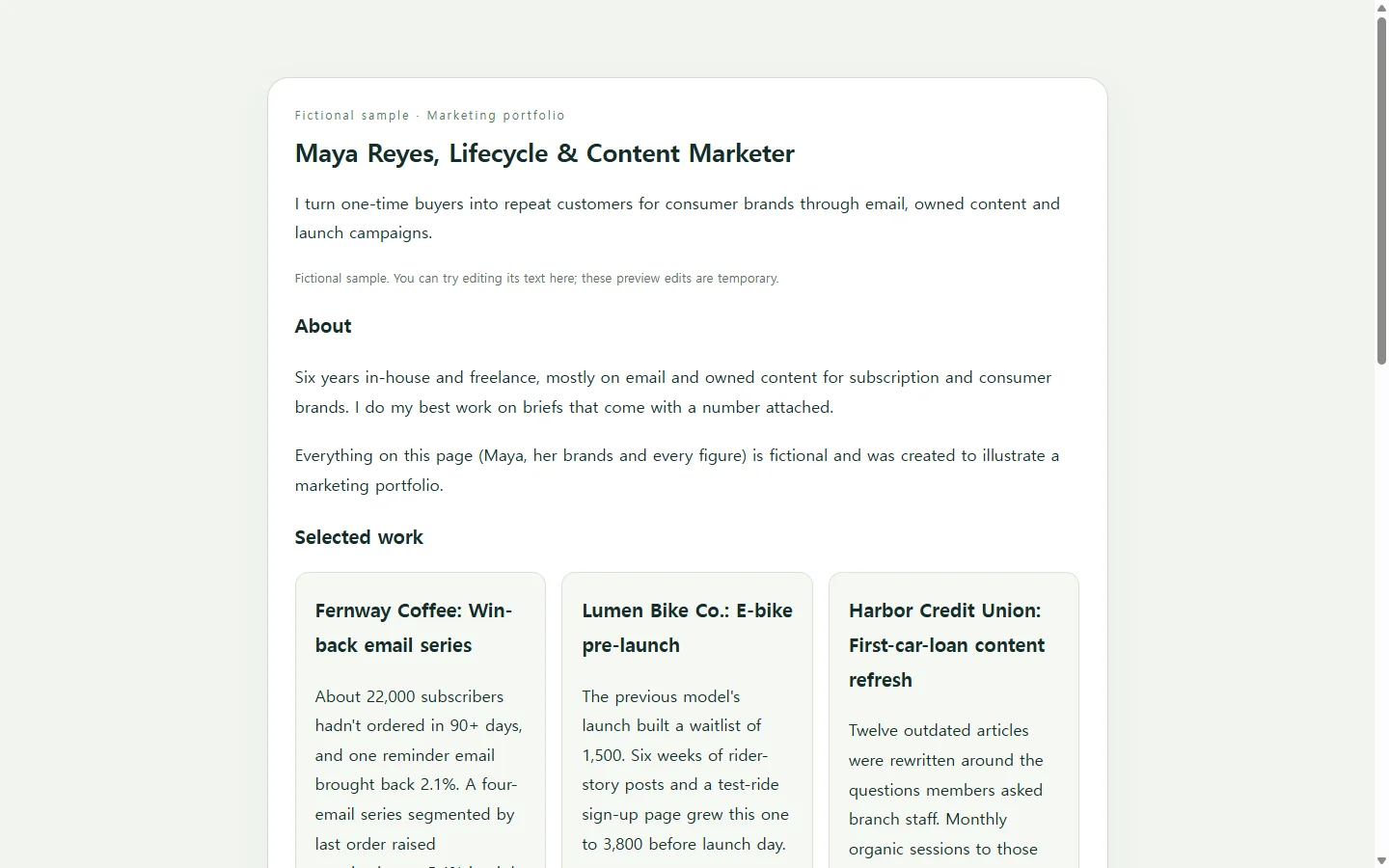
The sample below belongs to Maya Reyes, a fictional lifecycle and content marketer. Her brands and results are invented to illustrate the approach. Don't copy it line by line; look at a few of the choices instead.
Her opening line says what she does and for whom, so a reader knows from one sentence whether to keep going. Each project card names the problem before the tactic. Only one project, the coffee subscription win-back, opens into a full case. The other two stay short and point to the results table, where every figure sits next to its starting point and time frame.
Your version might lead with paid social or product launches instead. Keep the structure and swap in your own three projects.
Choosing how to build it
There's more than one reasonable route. A portfolio builder is quick if one of its templates fits your projects. A slide deck saved as a PDF works well when an application asks for a file. A designer will make it more polished, and whether that's worth the cost depends on how often you'll use the result.
Maybe you want a page shaped around your three cases and don't want to learn a design tool. In that case an AI assistant can write it for you as an HTML file, which is the code a web browser reads to display a page. You don't need to read the code yourself. Your job is to give the assistant your real facts, tell it what not to invent, and check the result on your phone.
The prompt below does that. Replace every bracket with your own details. The filled-in project is Maya's fictional one, and it's there only to show how much detail helps. Let the AI handle the layout and polish the wording, but don't let it write your accomplishments.
Check it before anyone else does
When the page comes back, open it on your phone first. Compare every number against your source report. Delete anything you didn't supply, such as a testimonial, a logo or a rounded-up metric. Then press Tab to move through the links with your keyboard and make sure you can always see which link you're on.
If a job posting asks you to upload a PDF or DOCX, send that file. The link is for places that welcome one, like your resume header, a follow-up email or your professional profile.
When a number changes after you've sent it
Say you send the link to a recruiter on Tuesday. On Thursday, the final report for one of your three projects arrives with a better figure than the preliminary one on your page. Or you spot a typo in your headline.
If the page is in NOS, you can click into the text and change the number directly. You don't have to send the whole page back through the AI for one figure and then recheck a layout that may have shifted.
The sharing link stays the same after you edit. When the recruiter opens it from Tuesday's email, they see Thursday's number, and they don't need an account to view it. When your next application comes up, you can send that same link again because the page is already up to date.
A prompt to adapt
Build a one-page marketing portfolio as a single, self-contained HTML file.

ABOUT ME (use exactly; do not add claims):
- Name: [Your name]
- Role I'm targeting: [e.g., Lifecycle Marketing Manager]
- One-line positioning (what I do + for whom): [e.g., I turn one-time buyers into repeat customers for consumer brands]
- Short bio, 2-3 sentences: [paste]
- Contact email: [you@example.com]
- Location / remote preference: [City, ST - open to remote]
- Links to show: [LinkedIn URL] [other URL, or delete this line]

PROJECTS (exactly 3). For each, give:
- Title: [Brand, or brand category if under NDA] - [project type]
- Background: [1-2 sentences: the brand and the brief]
- Challenge: [the goal and what made it hard]
- Process: [2-4 sentences: what I did and why]
- Results: [metric, before value, after value, time period, where the number came from]

PROJECT 1: [fill in]
PROJECT 2: [fill in]
PROJECT 3: [fill in]

The following filled project is FICTIONAL. It only shows the level of detail I will give you. Do not include it in the page:
Title: Fernway Coffee - Win-back email series. Background: online whole-bean coffee subscription; about 22,000 subscribers had not ordered in 90+ days. Challenge: a single reminder email reactivated 2.1%; goal was to double that without discounting more than one bag. Process: segmented by time since last order and last roast ordered; wrote a four-email series, saving the one free-bag offer for the final email. Results: 5.4% reactivated in 8 weeks (about 1,190 people vs. about 460 before), from email platform and order reports.

IMAGES (optional): [image URL + one-sentence alt text for each, or write NONE]

REQUIREMENTS:
1. Use only the facts above. Do not invent metrics, clients, logos, testimonials, awards or job titles. If something is missing, show a visible placeholder like [ADD: result period] instead of guessing.
2. Structure: a header with my name, target role and positioning line; three project cards that each state the problem before the tactic; Project 1 expanded into a full case with Background, Challenge, Process and Results headings; a results table with columns Project, Metric, Before, After, Period; and a contact section.
3. Contact uses a plain mailto: link only. No contact form, no newsletter signup, no analytics or tracking, no external scripts, no web fonts. Put all CSS inside the file. Use only the image URLs I provided; if NONE, use no images.
4. Accessibility: exactly one h1, headings in order (h2, then h3), a real table element with header cells, alt text on every image, body text at least 16px, text contrast of at least 4.5:1, and a visible focus outline on links.
5. Mobile: readable at 360px wide with no sideways scrolling of the page; on narrow screens the results table either scrolls inside its own container or stacks into rows; tap targets at least 44px tall.
6. Tone: plain, specific sentences. No hype words.
7. Return only the complete HTML file, starting with <!DOCTYPE html>.