What families need to find first
It helps to treat each issue as something parents look things up in: when, where, and what to send back. Put dates and reminders where the eye lands first, and let the welcome and class highlights frame them.
A teacher-focused newsletter guide we reviewed suggests a friendly opening note, important dates, classroom highlights, reminders, helpful links and a way to reach you. It also favors headings, bullet points and short paragraphs over long blocks of text, and recommends sending on the same day each week or month so families know when to expect it.
Student photos can make the highlights feel warmer, but that guide adds photos only 'if allowed.' Check your school's photo permissions before including any child's face or name.
A filled-in sample to borrow from
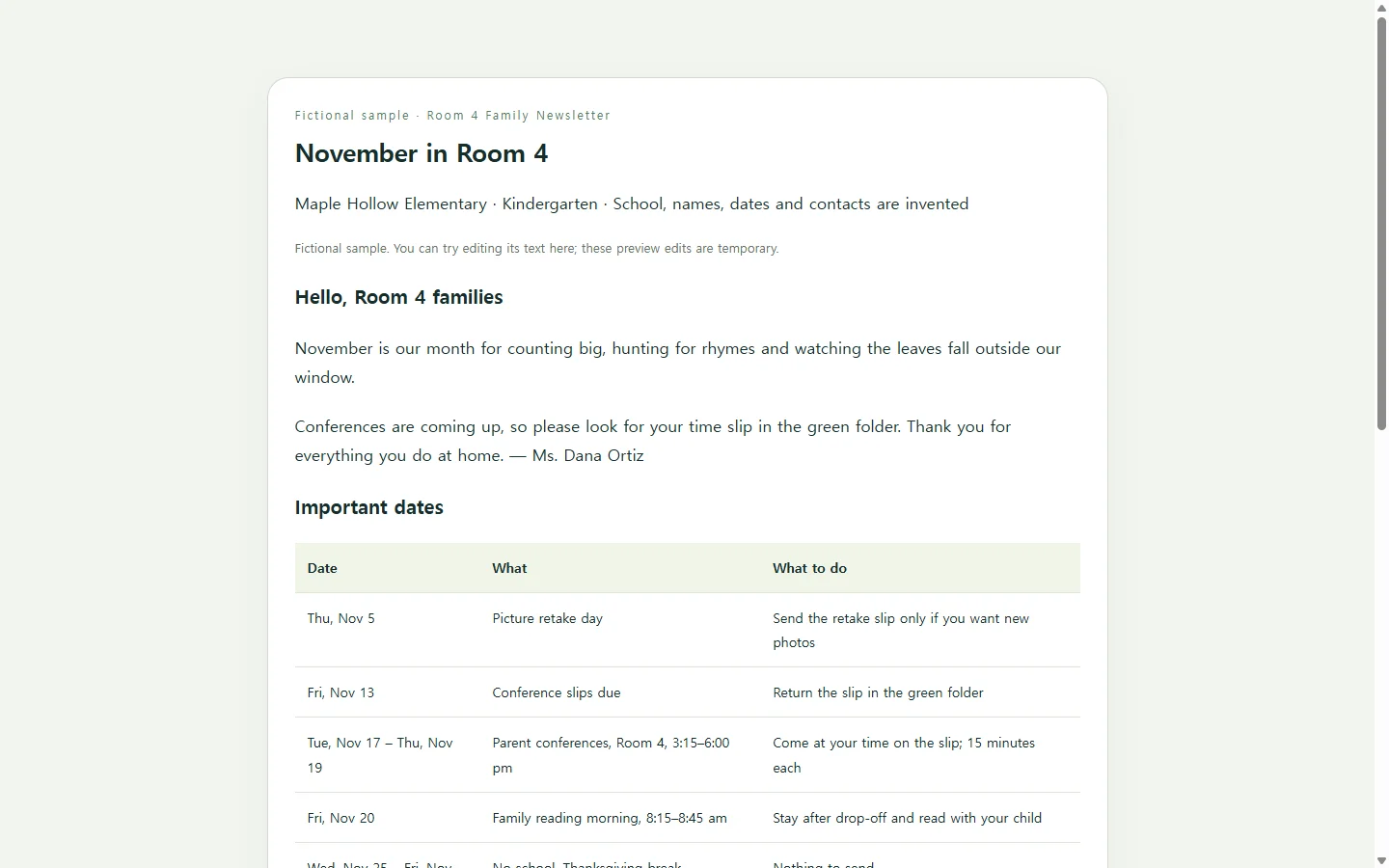
The example below is a November issue for Room 4, a kindergarten class at Maple Hollow Elementary. The school, teacher, dates and contact details are invented for illustration, so replace every one of them with your own.
Three choices are worth copying. The dates sit in a table with a 'what to do' column, so a parent reading 'Fri, Nov 13' also sees that the conference slip is due. The learning highlights are three short cards, each ending with something to try at home. The reminders are a checklist a parent can work through one item at a time.
Notice what the sample leaves out: there is no sign-up form or upload button. Conference slips go back in the paper folder, and yours should follow whatever process your school already uses.
Paper, a document, or a page link
A web page is not the only answer. One printable school newsletter gallery we checked listed 516 designs, and related searches for this keyword include Word and free-download versions.
If your school sends paper copies home or asks you to submit a PDF or Word file for approval, use that format; a link does not replace it.
A page link makes the most sense when families mostly read on their phones. A single-column page can reflow to a narrow screen, so a long reminder pushes the next section down instead of overflowing a fixed box.
Building your version with AI
If you want help with the layout, an AI chat assistant can draft the page as HTML, the file format a web browser displays as a page. You supply the facts; the assistant handles headings, spacing and color.
Gather your real details first: the month, each date with its time and place, what parents must send or sign, three things the class is learning, and how families can reach you. The prompt below gives each of these a bracketed placeholder and tells the assistant not to fill gaps on its own, because an invented date is worse than a missing one.
Before you share it, check every date against the school calendar, open the page on a phone, and read it once zoomed in. If the assistant added anything you did not provide, such as a motto or a pickup time, delete it.
When a date changes after it goes out
Say the Thursday conferences move to Friday after families already have the November issue. On paper, the fix is a correction note. With a link, you would rather fix the page they already have.
In NOS, you can keep this newsletter as an HTML page in your workspace and edit the rendered text directly, so changing one date doesn't mean asking an AI to rebuild the page.
The published sharing link stays the same after you edit, so families who tap the link in your earlier message open the corrected page, and they don't need an account to view it.
Printed copies and any PDF you sent won't change on their own, so mention the update in your next message as well. When December arrives, run the same prompt with the new month's dates.
A prompt to adapt
Build a one-page parent newsletter as a single, self-contained HTML file.

Details (use only these; if anything is blank or marked [TBD], show 'To be confirmed' and do not invent it):
- Class or group: [GRADE, ROOM OR GROUP NAME]
- School or program: [SCHOOL NAME]
- Issue: [MONTH AND YEAR]
- Opening note, in my words: [2-3 SENTENCES]
- Important dates, one line each: [DAY, DATE, TIME, PLACE, WHAT PARENTS NEED TO DO]
- What we're learning, three items: [TOPIC + ONE THING FAMILIES CAN TRY AT HOME]
- Reminders: [ITEMS TO SEND, SIGN OR RETURN, WITH DUE DATES]
- Contact: [EMAIL, PHONE OR MESSAGING APP, BEST TIMES TO REACH ME]

Level of detail I mean (fictional example): 'Tue, Nov 17, 3:15-6:00 pm, Room 4 - parent conferences; return the time slip by Fri, Nov 13.'

Layout and accessibility:
- Section order: opening note, important dates, what we're learning, reminders, contact.
- Show dates in a table with columns Date, What, What to do. On screens narrower than 600px, display each row as a stacked card instead of a wide table.
- Single column on phones, with no horizontal scrolling at 360px wide.
- Body text at least 16px, line height about 1.5, dark text on a light background with strong contrast.
- Don't use color alone to flag deadlines; add a word such as 'Due'.
- Use real heading tags in order (one h1, an h2 per section) and a real list for the reminders.
- If I supply images, add alt text describing each one; otherwise use no images.
- Inline CSS only. No external fonts, scripts, trackers, forms, sign-up buttons, or links I did not give you.
- Warm, plain wording at about a [READING LEVEL, e.g. 6th-grade] level; keep paragraphs to two or three sentences.

Return only the complete HTML file.