Give the first version one job
A personal website can be a portfolio, a blog, an online résumé or a loose collection of interests. Trying to be all four at once makes the first version hard to finish, so pick the job that matters now. If people mostly look you up for work, the page should answer three questions fast: who you are, what you've done and how to reach you. If it's mainly a home for writing or a hobby, lead with that.
Then add one thing only you would put there. In one blogger's roundup of favorite personal sites, some were praised for design, but others were praised for what the owner chose to share: a gear page, a reading tracker, a page listing the tools they use. The roundup's highest praise went to a site it called "authentic, fun and with a clear fingerprint from the owners taste." That kind of detail comes from you, not from a theme.
Four ways to build it
A site-builder template gets a page online without code, though you're fitting your content into a layout made for someone else. Writing the HTML yourself gives full control and makes sense if you know it or want to learn. Hiring a designer is reasonable when the site is central to your work; for a single page, the cost and back-and-forth may feel out of proportion.
The fourth route is to describe the page to an AI chat assistant and ask it to write the code. It handles layout and styling. It shouldn't write your bio or invent projects. You supply the facts; the AI arranges them.
What the sample shows
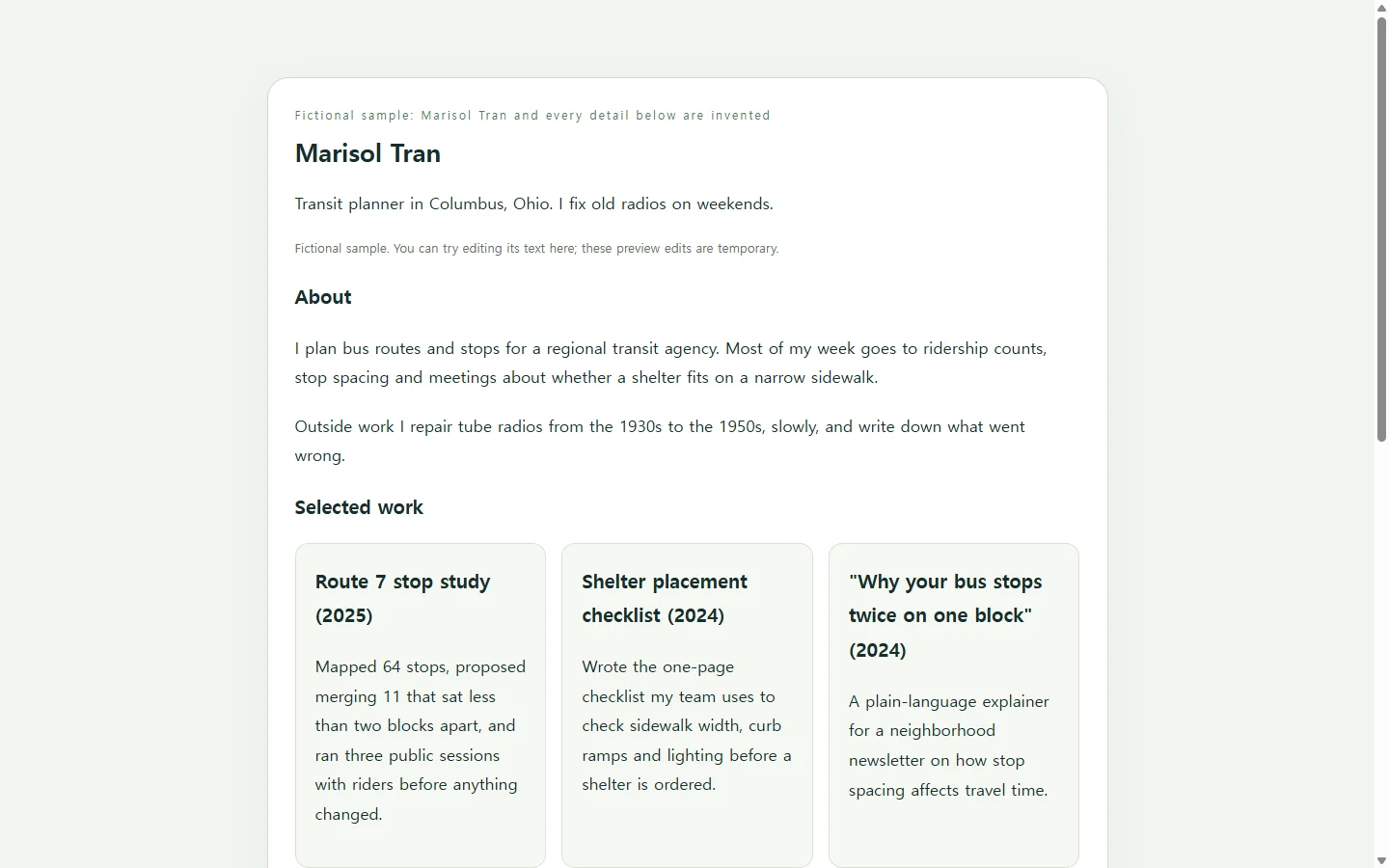
The sample belongs to Marisol Tran, a made-up transit planner in Columbus, Ohio, who repairs old radios on weekends. The name, projects, dates and radios are all fictional.
Three choices are worth copying. The About section is two plain sentences, the way you'd introduce yourself at a meeting. Each work card says what the project was and what Marisol personally did, with a number where one exists. And the radio bench table is the fingerprint: a small, specific record a visitor is more likely to remember than a color scheme.
Swap the bench for whatever you'd happily talk about for ten minutes: books you've finished, recipes you've tested, trails you've hiked. Contact is an email address written out. There's no form, so nothing has to be connected for the page to work.
Draft your own with the prompt
Before you paste the prompt, write your notes: a two-to-four sentence bio, three pieces of work with a year and one line each, what you're doing now, and the rows for your personal section. Where you don't have something yet, leave the bracket. The prompt tells the AI to show [TODO] instead of filling the gap with invented details.
Ask for a single HTML file with the styling inside it, so the whole page arrives as one piece. The accessibility and phone requirements are spelled out because they're easy to skip when you're focused on looks: real headings, a real table, strong contrast and no sideways scrolling on a narrow screen.
When the draft comes back, open it on your phone and read it top to bottom. Check every date and link. If a sentence doesn't sound like you, rewrite it in your own words.
Build a one-page personal website as a single, self-contained HTML file with all CSS inside it. Do not use external libraries, web fonts, images from other sites, scripts, or forms.

About me (use my words; fix grammar only; do not add facts):
- Name: [YOUR NAME]
- One-line description: [e.g., Transit planner in Columbus, Ohio. I fix old radios on weekends.]
- Short bio: [2-4 sentences in your own words]

Sections, in this order:
1. About: my bio.
2. Selected work: [3 items, each with a title, a year, and one sentence on what I personally did]
3. Now: [what I'm working on this month] plus [2 recent milestones with month and year]
4. [MY PERSONAL SECTION, e.g., Radio bench]: a small table with columns [COLUMN NAMES] and these rows: [ROWS]
5. Contact: show my email as plain text and as a mailto link: [EMAIL]. No contact form.

Look and feel: [MOOD, e.g., calm and warm, off-white background, one accent color such as deep green]. One column of readable text.

Requirements:
- If any detail above is missing or still in brackets, show [TODO] in its place. Never invent names, numbers, dates, employers, or links.
- Use one h1 for my name and an h2 for each section, in order.
- Build the table with a real <table>, a header row using <th>, and a short caption.
- Keep strong contrast between text and background, and do not use color alone to show status.
- Body text at least 16px; links underlined and visibly focused when using a keyboard.
- On narrow phone screens, nothing may cause sideways page scrolling; let the table scroll inside its own container or stack its rows.
- Return only the complete HTML file, nothing else.
When a résumé is what's being asked for
A personal website doesn't replace a required document. If an application asks for a résumé as a PDF or Word file, send that file in that format. Add the website link where there's room for it, as something a reader can open if they want more.
Share it, then keep the same link current
Once it's ready, put the link where people already look: your email signature, a speaker bio, a social profile. With the page in NOS, the people you send it to can open it without creating an account.
The page will go stale in small ways. Picture Marisol three months later: the Now section still describes October's ridership counts, and the 1949 walnut table radio finally works. In NOS, Marisol edits the text right on the rendered page, changing "Waiting on a replacement capacitor" to "Working; hum is gone" and rewriting the Now line. There's no need to ask the AI to regenerate the page for a few words.
The shared link stays the same after those edits, so anyone who saved it from the email signature or the speaker bio sees the updated page and nothing needs to be resent. Keep the AI for bigger changes, like a new section or a different layout, and fix wording directly.
Start with your notes, get one honest page drafted and put the link where people will find it. Keeping it current is then a matter of changing a few words.