What example galleries are good for
In the galleries that rank for this search, sites are sorted by field, with filters such as photography, graphic design, illustration, art, makeup, modeling and architecture. That makes them good at one job: finding a look that suits your kind of work. Filter to your own field first, since a layout built around one large image per screen serves a photographer differently than it serves someone whose work needs a sentence of explanation.
Those filters lean toward visual fields. If you work in marketing, writing or research, borrow structure rather than style: how many projects appear on the first screen, and how much text each one gets.
One sample portfolio and the three choices behind it
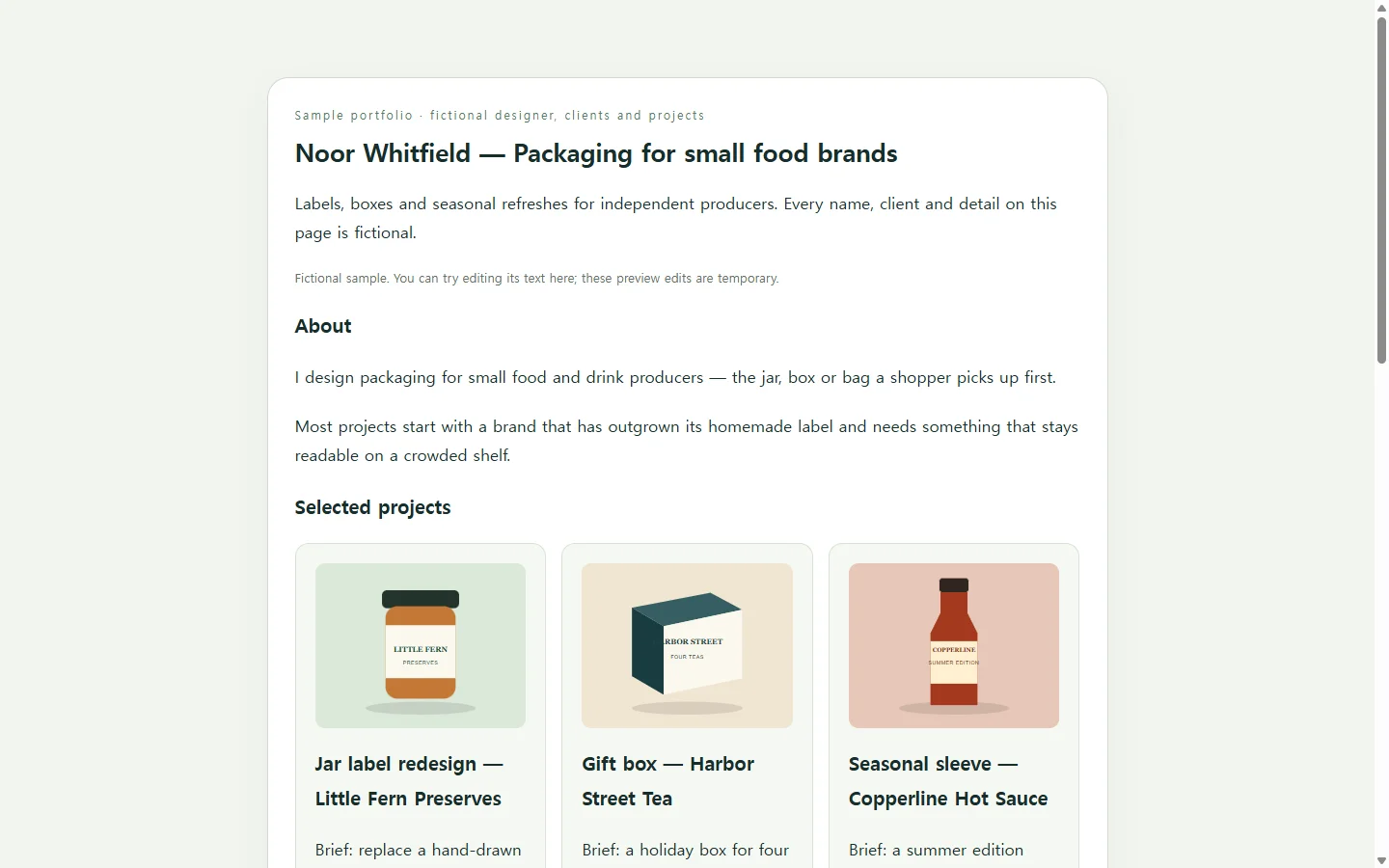
The sample below belongs to Noor Whitfield, a fictional packaging designer for small food brands; the name, clients and project details are invented for illustration. It is short on purpose: one line about the work, three projects, a note on where it gets sent, and an availability line. Three choices in it are worth copying.
The opening line names the kind of work and the kind of client, so a visitor knows right away whether they’re in the right place. Each project is titled by what it is — a jar label, a gift box, a seasonal sleeve — with the client second, which helps when the reader has never heard of the brand.
Each project gets the same three short parts: the brief, the designer’s own role, and what changed. Saying which piece was yours matters most when you worked with a team or a print shop. A familiar piece of resume advice is to write specifically and stick to facts, quantified where possible; project captions benefit from the same habit. If you have a real result, such as a launch date or a reorder count, include it; if you don’t, describe the change instead of inventing a figure.
Choose the format your recipient asked for
Before building anything, check how the portfolio will be received. If a job application or school asks for a PDF or a file upload, send that file; a link is not a substitute. A web page fits where links are welcome: an email to a prospective client, a website field on a profile, or a line in a cover letter. You may end up keeping both, with the same projects and captions in each.
Portfolio builders offer ready-made themes and templates. That is a sensible route if you want the design and the website handled in one place. Building a single page yourself gives you exact control over the structure above, and an AI assistant can write the layout code while you supply the facts.
Build your version with an AI assistant
The prompt below asks for one HTML file — the format web pages are written in — which holds the text and layout and opens in a web browser. Gather your real material first: a one-line description of your work, three to five projects, and for each one the brief, your role, the change, and an image with a short description of what it shows.
The assistant handles design; it should not fill in clients, dates or results you didn’t give it, and the prompt says so. Replace everything in square brackets. If the first draft is close but cramped on a phone, ask for that specific fix — a single column on narrow screens, larger tap targets — rather than starting over.
After the link is out
Say Noor sends the page to a coffee roaster who asked to see past packaging work. A few weeks later the availability line still reads June, and the gift box caption says three teas when the box holds four.
If the page is kept in NOS, Noor can click into the rendered text and fix those words directly, without asking an AI to regenerate the page. A published sharing link stays the same after edits, so the roaster opens the link they already have and sees the corrected caption. They don’t need an account to open it. Direct editing is for wording; a new project with new images is a bigger revision of the page itself.
The next time someone asks to see your work and a link is welcome, send that same address — it already shows your latest words.
A prompt to adapt
Build a one-page portfolio as a single, self-contained HTML file with inline CSS. Use only the facts I give below. Do not invent clients, dates, numbers, testimonials, awards or quotes. If something is missing, leave a visible [ADD] placeholder instead of guessing.

About me: [Your name] — [what you do and for whom, in one sentence, e.g. “I design packaging for small food and drink producers.”]

Projects (3–5). For each:
- Title by project type: [e.g. “Jar label redesign”]
- Client or context: [client name, or “personal project”]
- Brief: [one sentence]
- My role: [what I did myself; name collaborators’ parts if any]
- What changed: [describe the change; include a number only if it is real]
- Image: [file name or URL] — alt text: [what the image shows]

Availability line: [e.g. “Booking new projects from June.”]
Contact: [email address, as a mailto link]

Layout: name and one-line description at the top; projects in the order I listed, each titled by project type with the client second; brief, role and change as two or three short sentences per project; availability and contact at the end.

Requirements:
- Semantic HTML: one h1, an h2 per project, real img elements using the alt text I provided.
- Body text contrast of at least 4.5:1 against its background; visible focus styles on links.
- Mobile first: single column below 640px wide, no horizontal scrolling at 360px, body text at least 16px, links and buttons at least 44px tall.
- No external scripts, no web fonts loaded from the network, no forms, no tracking, no animations that run on their own.
- Return the complete file in one code block, then list any [ADD] placeholders you left.