What the template needs to answer
A project documentation template works less like a document and more like an index: a record of which documents the project produces, how they get made and where they're stored. For each entry, a useful set of fields is a short description of the document's purpose, its location, the deliverables and dependencies it relates to, the goals it supports, and the person responsible for it.
The purpose line does more work than it looks. “Scope statement” tells a new teammate nothing about whether to open it; “What's in and out of the first release, signed off by the sponsor” does.
Long lists of document types are a menu, not a requirement. Common candidates include a project plan, charter, scope statement, schedule with milestones, roadmap, budget, communication plan and change management plan. A practical way to choose is to start from the set your last successful project actually used, then ask the other teams involved what they need to be able to find.
A filled-in example: a returns-process refresh
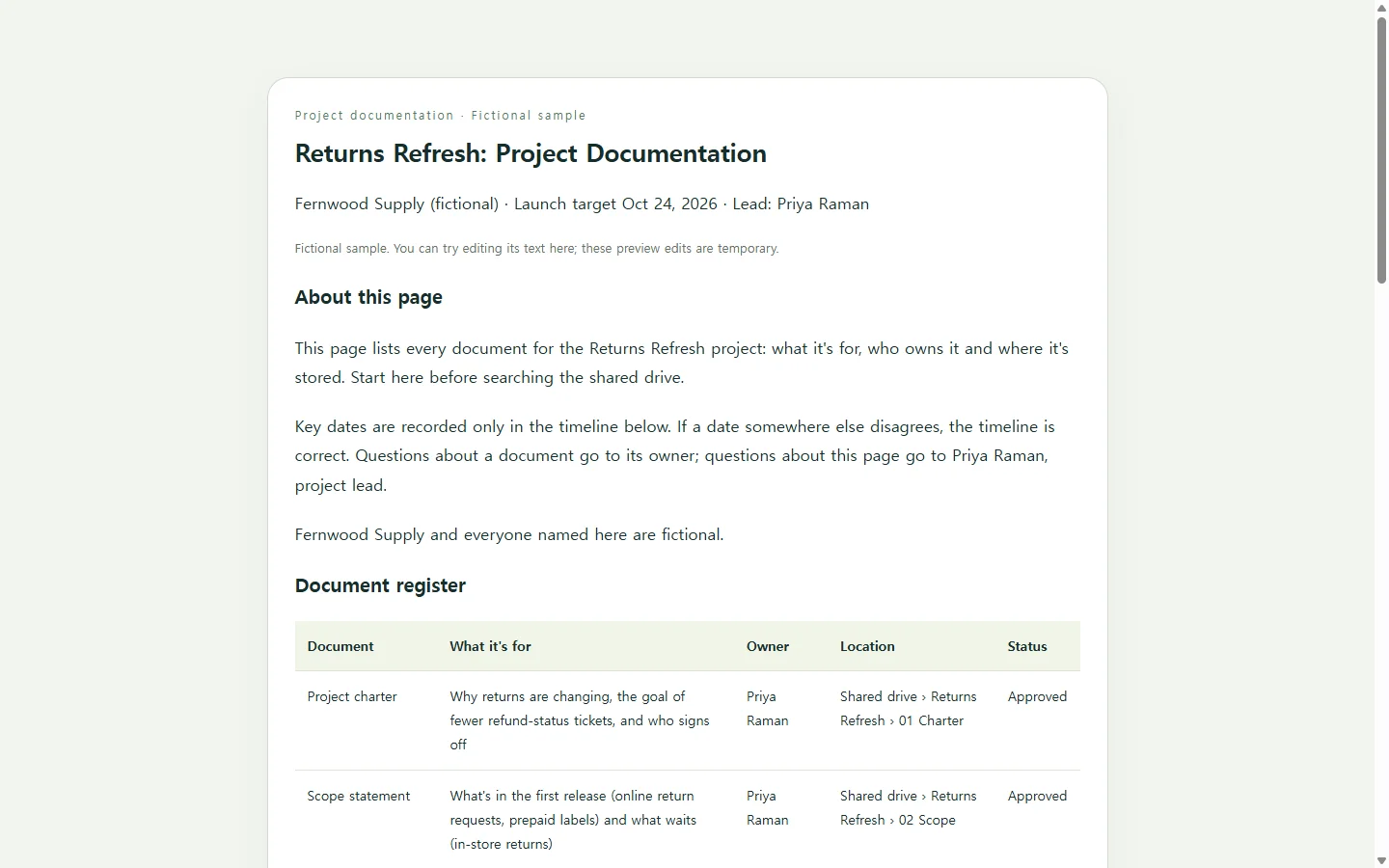
The sample below is invented. Fernwood Supply, its people and its dates are fictional, chosen to show a realistic mid-size project: a seven-week refresh of how an online store handles returns, involving customer support, the warehouse and the web team.
Two choices in it are worth copying. First, the key dates appear in exactly one place, the timeline. Other entries point to it instead of repeating dates, so when the launch moves you change one line instead of hunting through five. Second, each document has a single named owner, so “who do I ask about the budget?” has an answer on the page.
The location column shows folder paths as plain text. In your own version you can turn them into links to your real files, but check that the people you share the page with can actually open those folders.
A doc, a spreadsheet, a work tool or a page?
A Word or Google Docs template is the right call when someone expects a file: a sponsor who wants a PDF in the project folder, or a course that grades a submitted DOCX. Make that file; a web page doesn't replace it.
A spreadsheet suits a register with dozens of documents you want to sort and filter. If your team already plans its work in a project-management tool, that tool's own templates keep the index next to the tasks.
A single web page fits a different need: a short index people read rather than fill in, one that opens cleanly on a phone and can be sent as a link to someone who doesn't use your team's tools.
Building your version with AI
Collect the facts before asking for a design: your document list, a purpose line for each, owners, locations and the handful of dates that matter. AI is useful for turning that list into a clean, readable layout. It shouldn't be supplying owners or deadlines, so the prompt below tells it to mark gaps as [TBD] instead of guessing.
The prompt asks for HTML, the format web pages are written in. You get a single file you can open in a web browser, with nothing to install.
When the result comes back, check every owner and date against your list, then open it on your phone to make sure the document table is still readable.
After you share it, a date moves
Say you share the page with the team and the sponsor in week one. In week five, the warehouse asks for four more days of testing and the launch slips from October 24 to October 28. If the register went out as an attachment, the fix is a new version and a new email, while the old copy still sits in everyone's inbox.
If the page lives in NOS, you open it in your workspace, click the launch date in the timeline and type the new one. A one-line change doesn't need a new AI request. The shared link stays the same after the edit, so anyone who bookmarked it sees October 28 the next time they open it, and people outside your team can view it without creating an account.
The same goes when an owner changes or the budget moves from In review to Approved: edit the words on the page and keep sending the same link.
A prompt to adapt
Create a one-page project documentation index as a single, self-contained HTML file.

Project details (use only what I provide; where something is missing, show [TBD] instead of inventing it):
- Project name: [PROJECT NAME, e.g. Returns Refresh]
- Team or organization: [TEAM OR COMPANY]
- One-sentence goal: [GOAL]
- Launch or target date: [DATE]
- Project lead (contact for questions about this page): [NAME, ROLE]
- Documents, one per line as name | what it's for | owner | location | status: [PASTE LIST, e.g. Scope statement | What's in and out of the first release, signed off by the sponsor | Priya Raman | Shared drive > Returns Refresh > 02 Scope | Approved]
- Key dates, one per line as date | milestone: [PASTE LIST, e.g. Oct 10 | Warehouse testing begins]
- People to contact, one per line as name | role | what to ask them about: [PASTE LIST]
- Close-out checklist items: [PASTE LIST, or write 'suggest 4-5 items and label them as suggestions']

Layout, in this order:
1. Header with project name, team and target date.
2. A short 'About this page' paragraph saying what the page lists, that key dates are recorded only in the timeline, and who to contact about the page.
3. Document register as a table with columns: Document, What it's for, Owner, Location, Status.
4. Key dates as a vertical timeline.
5. 'Who to ask' cards, one per person.
6. Close-out checklist, display only.

Requirements:
- Plain HTML and CSS in one file. No JavaScript, external fonts, images, forms, scripts, or calls to any external service.
- Show locations as plain text unless I give a full URL.
- Semantic structure: one h1, an h2 for each section, a real table with column header cells (th scope="col"), and lists for the timeline and checklist.
- Text contrast of at least 4.5:1. Never use color alone to show status; always show the status word.
- Readable at 360px wide with no sideways page scrolling: below 640px, show each table row as a stacked card that repeats its column labels.
- Base font size of at least 16px, system font stack, visible focus styles on any links.
- Keep my wording for document names, owners and dates exactly as given.

Return only the complete HTML file.