What a project roadmap template should show
A project roadmap sits above your task list. The templates that rank for this search mostly share the same building blocks: a goal, a timeline split into months or quarters, milestones, and parallel workstreams drawn as lanes, often with a color-coded status.
What it leaves out matters as much. Individual tasks, subtask owners and hour estimates belong in the project plan or tracker your team already uses. A useful test: if a line wouldn't change a sponsor's decision, move it down a level.
The right shape depends on who reads it. A dated, horizontal timeline helps an execution team check sequence and spot overlaps. A board with columns such as Doing, Up Next and On the Horizon drops dates for teams that ship continuously. A portfolio view rolls several projects into one summary for leadership. Matching the format to the audience is the decision to make before you fill anything in.
A filled-in example: switching inventory systems in six months
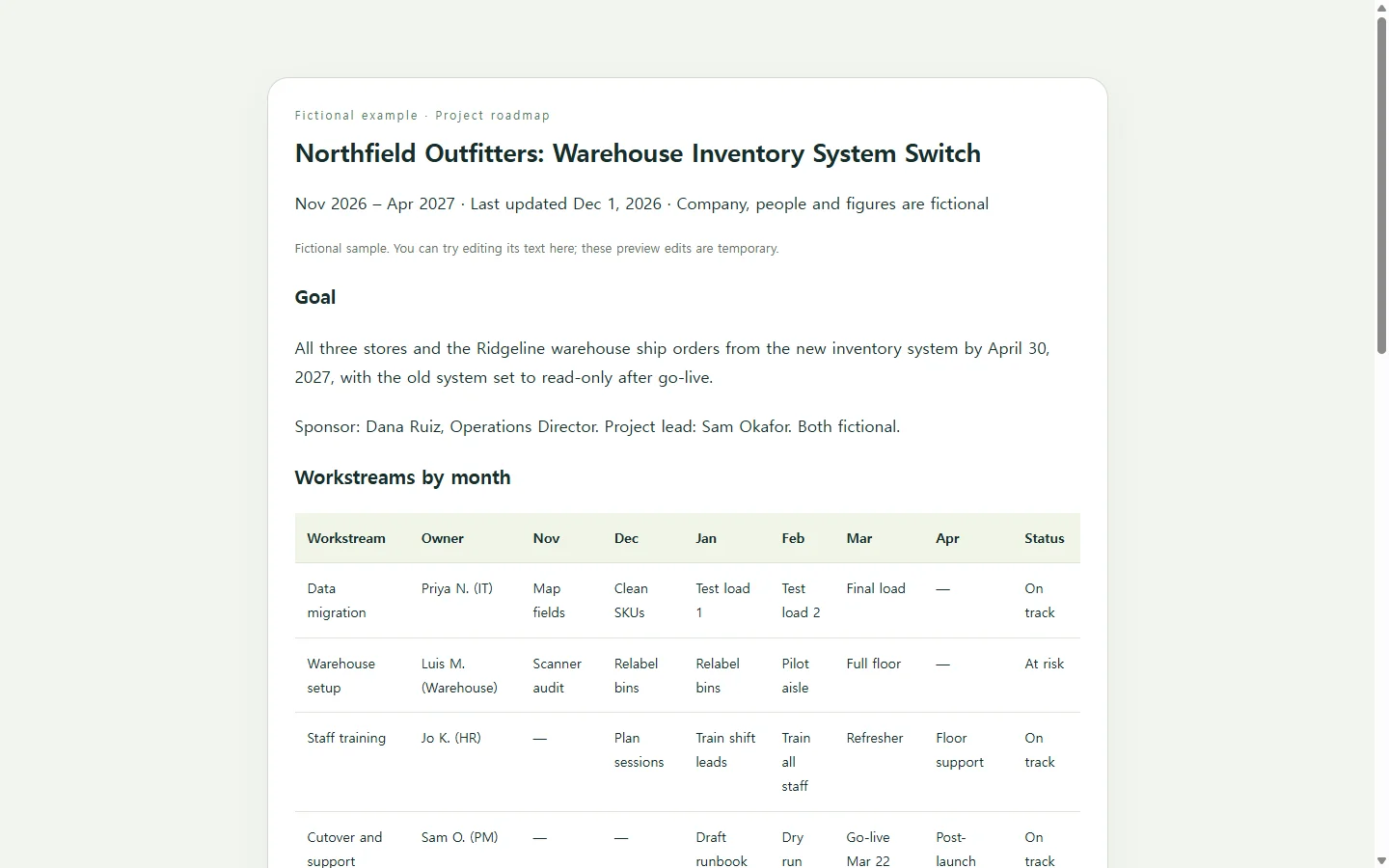
The example below is fictional. Northfield Outfitters is a made-up outdoor gear retailer moving its warehouse to new inventory software between November 2026 and April 2027; every name, date and status was invented to show how a finished roadmap reads.
Three choices in it are worth borrowing. The goal is one sentence with a finish line, so each lane can be judged against it. Each of the four workstreams gets one row, and the milestones are only the dates someone outside the team will ask about. Status appears as a word, like At risk, beside its color, so it still reads in a grayscale printout or for someone who doesn't see the color difference.
The risks block is short on purpose. It names the two things the sponsor needs to decide, so the page asks for action instead of only reporting.
Build your version with an AI assistant
Ready-made project roadmap templates are widely available in spreadsheet and slide formats. If your team lives in those tools, one of them is a reasonable choice, especially when a steering committee expects a deck. Another route is to give an AI assistant your facts and let it handle layout, spacing and the phone view.
Before you paste the prompt, collect the project name, a one-sentence goal, start and end months, three to six workstreams with owners, the milestone dates, each lane's current status, and up to three open risks or decisions. Anything you don't know yet should go in as TBD; an assistant asked to fill gaps may produce plausible dates that aren't yours.
The prompt asks for HTML, the format web pages are written in. You don't have to read the code. Save the response as a file ending in .html and open it in a browser to check it. The prompt also asks for a properly labeled table, text status labels next to colors, and a layout that stacks lane by lane on a narrow phone screen.
Then compare every date against your plan before anyone else sees it. A milestone in the wrong month is easy to miss when the page looks finished.
When a date moves, update the page people already have
Roadmaps change. Say the software vendor in the example delays the final data load and go-live moves from March 22 to April 5. If the roadmap went out as an attached file, the fix is a new file, and anyone who saved the first one is now reading old dates.
Project-tracking guidance offers a simple rule here: keep a target date in one place, so when it shifts you change it once.
If the roadmap lives as a page in NOS, that one place is the shared page itself. You click into the go-live row and type the new date and At risk directly on the page, without asking the AI to rebuild anything. The published link doesn't change, so the sponsor who opened it in November sees April 5 the next time they open the same address, and viewers don't need an account.
Two limits are worth knowing. Direct editing changes text; if you added a filter or other scripted behavior, ask the assistant to change that logic. And if a client or PMO requires a PDF or a slide deck, send the format they asked for. The link can be the copy you keep current between formal reports.
Start with the example's structure, swap in your own lanes and dates, and keep one copy you can correct the day a date moves.
A prompt to adapt
Build a one-page project roadmap as a single, self-contained HTML file.

Project details. Use only these. Write TBD for anything missing and do not invent dates, people, numbers or statuses.
- Project name: [PROJECT NAME, e.g. Warehouse inventory system switch]
- Goal, one sentence with a finish line: [GOAL, e.g. All three stores and the warehouse ship orders from the new system by April 30, 2027]
- Timeline, shown by month: [START MONTH YEAR] to [END MONTH YEAR]
- Workstreams (3-6). For each: name, owner (role or name), the short phase label for each month, and current status (On track / At risk / Blocked / Done): [WORKSTREAM 1 | OWNER | MONTH: PHASE, MONTH: PHASE ... | STATUS], [WORKSTREAM 2 | ...]
- Milestones with exact dates: [MILESTONE - DATE], [MILESTONE - DATE]
- Open risks or decisions needed, max 3, each with who decides and by when: [RISK OR DECISION]
- Last updated: [DATE]

Layout:
- Top: project name as the only h1, then the goal, date range and Last updated date.
- Middle: a month-by-workstream grid built as a real table with a caption, th header cells for months and for workstream names, and the owner and status for each row.
- Below: milestones in date order, then risks and decisions as short cards.
- Calm, professional style with one accent color. Show every status as a text label plus a color, never color alone.

Accessibility and mobile:
- Headings in order (h1, then h2). Text contrast of at least 4.5:1 against its background.
- Base font size of at least 16px.
- Below 640px wide, turn the grid into a stacked list, one block per workstream showing its months, owner and status. The page itself must not scroll sideways.

Technical limits:
- Inline CSS only. No JavaScript, external fonts, images, trackers, forms, buttons that submit anything, or links to outside services.
- Return only the complete HTML file, nothing before or after it.