Use the format your reader expects first
If your organization already has a status report format, use it. Downloadable project status report templates come in Excel, Word, PowerPoint, PDF and Google formats, ranging from simple one-page summaries to weekly, monthly, executive and dashboard versions. When a steering committee packet calls for a PDF or a Word file, deliver that file.
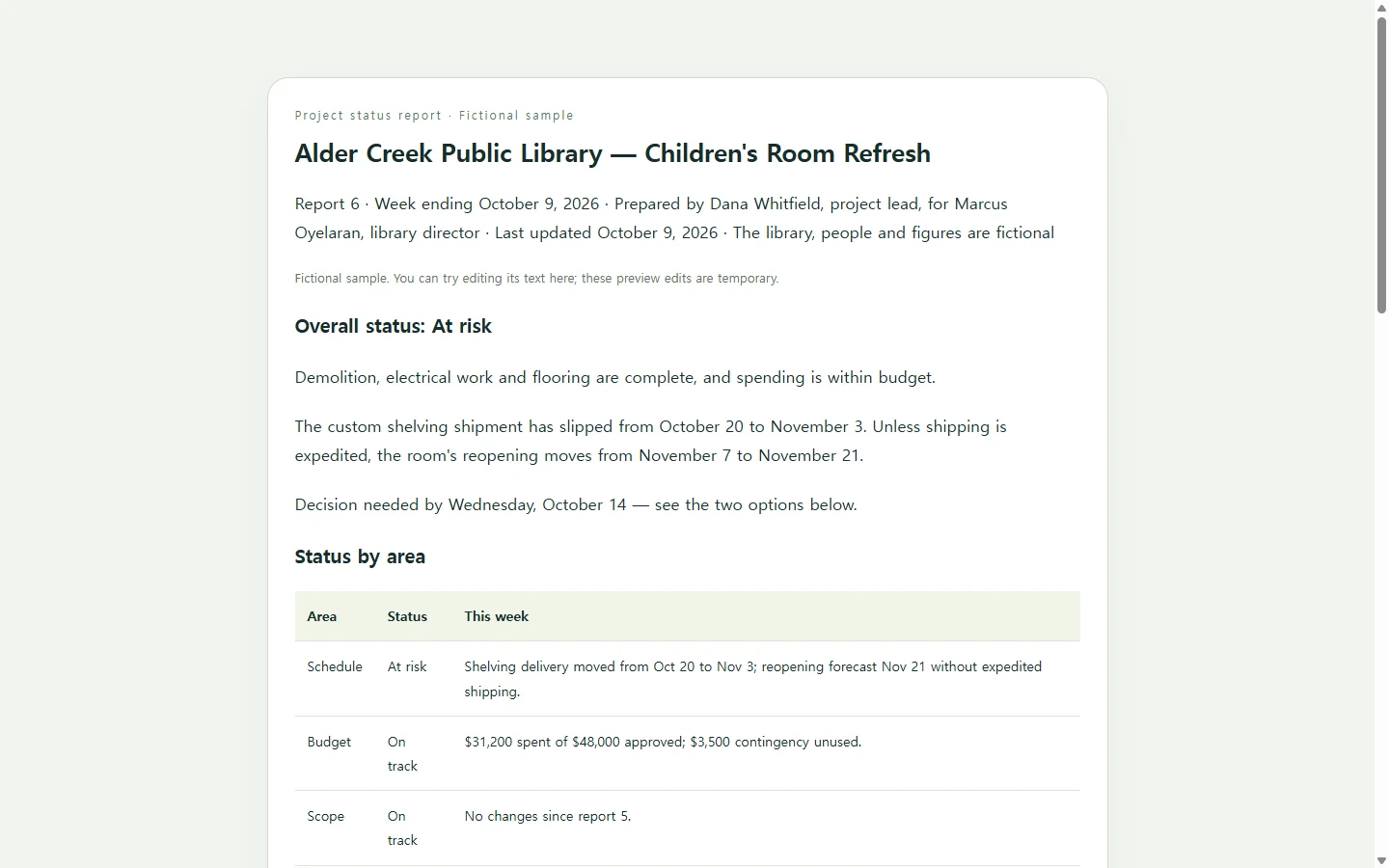
This article covers the other case: nobody has handed you a format, and you want one page a busy reader can act on. A spreadsheet works but can read like a task tracker, and slides take time to lay out. A short web page sits between the two: it opens in a browser, scrolls on a phone, and holds a table, a timeline and a few paragraphs of plain language.
A filled-in example: one slipped delivery, one decision
The sample below reports on a fictional project: the Alder Creek Public Library children's room refresh, report 6, for the week ending October 9, 2026. The library, the people and every number are invented for illustration.
Three choices in it are worth copying. The overall status sits at the top as a word, “At risk,” not only a color, so it still reads in grayscale print and for readers who can't easily tell red from amber. The milestone table puts the original date next to the current forecast, so the sponsor sees the two-week shelving slip without reading a paragraph about it. And the decision is written as two priced options with a deadline: pay $2,400 to expedite shipping and keep the November 7 reopening, or accept November 21 at no added cost. A sponsor can answer that in one reply.
Budget, scope and staffing get one line each because nothing about them needs attention this week. That imbalance is deliberate: the page spends its space where the reader has to act.
What to gather for your own report
Before you build anything, collect the facts only you can supply: the overall status, a status for each area your reader cares about, milestone dates (original and forecast), open risks and issues with an owner for each, and the decision you need, with a deadline.
Template collections offer long lists of areas. One lists project details, team contacts, update timing, scope changes, budget use, quality concerns, active risks and issues blocking the work. Treat a list like that as a menu: keep the areas your reader asks about and drop the rest instead of filling rows with “no change.”
Copy each date from the place you already track it instead of retyping it from memory. If the target date lives in your project tracker, the report should repeat that date, not keep a second version that can drift.
Building the page with AI
Laying out a clean page is the part AI can take off your hands; the facts stay yours. Ask for HTML, the text format web pages are written in: the AI returns it as code, and a browser displays that code as a formatted page. The prompt below asks for one self-contained file with no outside scripts or fonts, so the page doesn't depend on anything else loading.
Replace every bracket with your own details. The prompt tells the AI to write “[to confirm]” wherever a fact is missing, because an invented owner or date in a status report does more harm than a visible gap.
When the page comes back, check it against your notes: every date, every dollar figure, every status word, every owner's name. Then open it on your phone and make sure the tables don't run off the screen.
When a date changes after you send it
Say you send the Alder Creek report on Friday, and on Monday the shelving supplier confirms it can ship on October 23 at the standard rate. The decision you asked for no longer exists, and the sponsor may be about to answer it anyway.
If the report lives as a page in NOS, you can correct the forecast date and the decision options by editing the text directly on the page, without asking the AI to rebuild it. The sharing link stays the same after the edit, so the sponsor opens the link already in their inbox and sees Monday's version. They don't need an account to open it.
Update the “Last updated” line while you're there, and send a one-line note saying what moved so nobody acts on Friday's version. If the steering committee still needs a PDF for its records, send that too; a link doesn't replace a required file. When next week's report is due, start it as a new page and leave report 6 as it stands.
A prompt to adapt
Build a one-page project status report as a single self-contained HTML file.

Use only the facts I give below. Do not invent names, dates, amounts, owners, risks or results. If the layout needs something I haven't provided, show “[to confirm]” in its place.

Project: [project name]
Report number and period: [e.g., Report 6, week ending October 9, 2026]
Prepared by / for: [your name and role] / [reader's name and role]
Last updated: [date]
Overall status: [On track / At risk / Off track] — [one or two sentences on why]
Status by area: [area — status — one-line note, for each area your reader cares about, e.g., Schedule, Budget, Scope]
Milestones: [milestone — original date — forecast date — status]
Risks and issues: [title — what is happening — owner — next step]
Decision needed: [the question, each option with its cost and date impact, your recommendation, the deadline for a reply]
Next steps: [action — owner — date]

Layout and output requirements:
- Order: title and report details, overall status with a one-line decision summary, status by area, milestones, risks and issues, decision options, next steps.
- Show “Last updated: [date]” directly under the title.
- Every status must appear as a text label (for example “At risk”); color is only a secondary cue. Text and status labels must meet WCAG AA contrast.
- Use semantic HTML: one h1, an h2 for each section, and real table elements with header cells for tabular data.
- The page must be readable on a 375px-wide phone screen without the whole page scrolling sideways: let wide tables scroll inside their own container or stack into labeled rows.
- Put all CSS in one style tag. No JavaScript, external scripts, web fonts, images, trackers or network requests. No forms or buttons that send data.
- Keep wording tight. No decorative filler, stock phrases or placeholder text other than “[to confirm]”.
- Return only the complete HTML file.