What the README has to answer
A README is a text file that introduces and explains a project, and it belongs in the top-level folder, where someone new to your code starts. Major code hosts look for it there and show it alongside your list of files. Markdown is the most common format, and the file is usually named README.md, traditionally in capitals so it stands out.
There's no single required format, so a more useful test is whether a visitor can answer five questions: what the project does, why it's useful, how to get started, where to get help, and who maintains it. Badges, screenshots and a roadmap are optional extras that make sense for some projects and not others.
A sample README, rendered
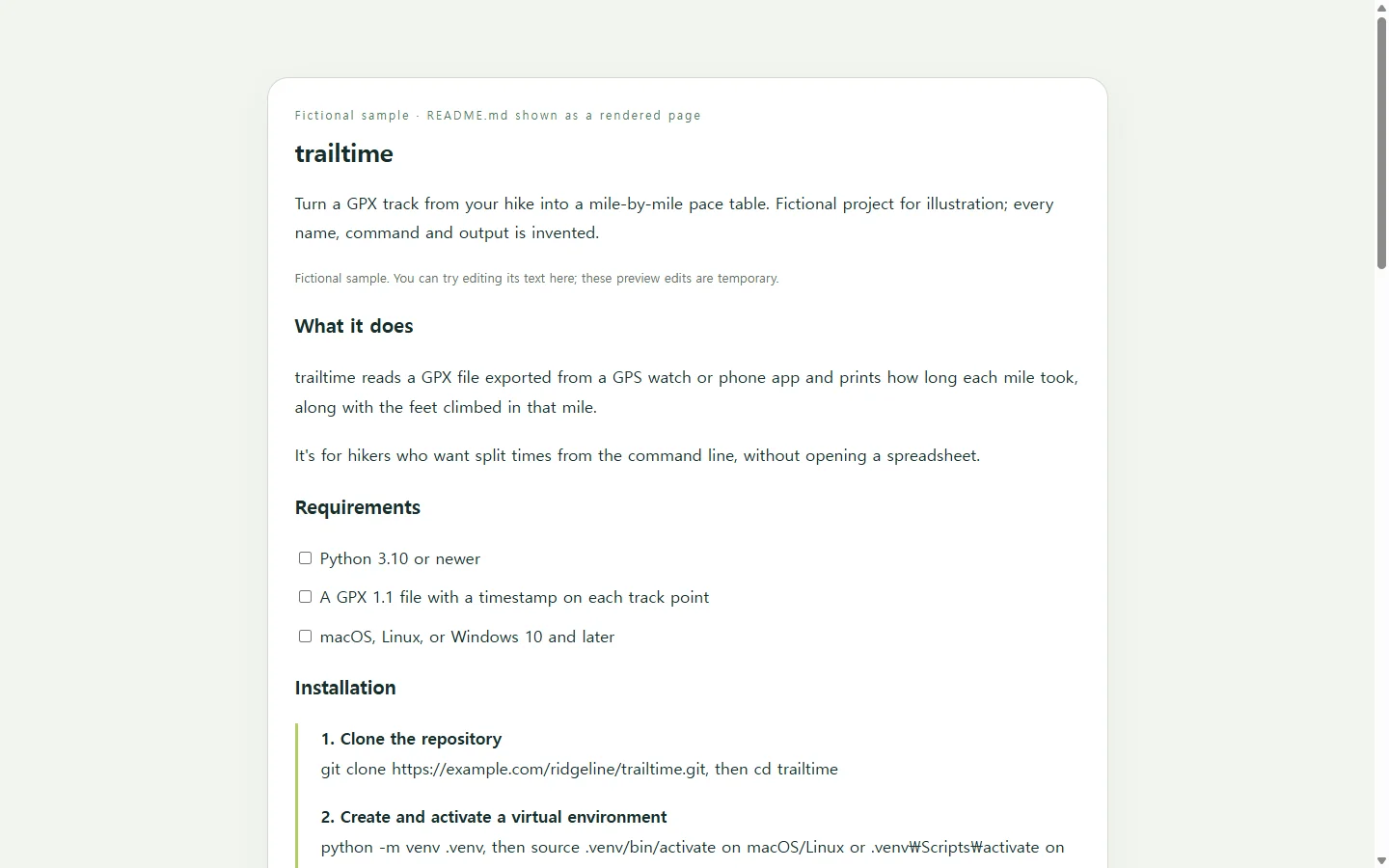
The sample below is for trailtime, a made-up Python command-line tool that turns a GPX track from a hike into a mile-by-mile pace table. The project, version numbers, commands and output are all invented so you can see how concrete detail reads.
Three choices in it are worth copying. Requirements sit above installation, so nobody learns halfway through that they need a newer Python. Installation lists each step and ends with a command whose expected output tells the reader it worked. Usage shows the smallest real example with its output instead of every flag the tool accepts.
The short status line is worth keeping too: if development ever slows or stops, a note at the top of the README says so, and someone may step in to fork or maintain the project.
Picking a way to generate it
You have several reasonable routes. A section-based online editor lets you add and customize the sections a project README usually needs. That helps most when structure is what you're missing. An editable Markdown template gives you the same skeleton as plain text you can change directly. Any text editor works as well, and many have plugins that preview Markdown while you type.
An AI chat assistant helps when the blank prose is the problem rather than the layout. Every route shares one limit: none of them knows your real install commands. A tool can produce an Installation heading, but only you can confirm which command works on a clean machine.
A prompt that keeps the facts yours
If you draft with AI, hand it the facts and ask it to flag gaps instead of filling them. The prompt below asks for two outputs: the README.md itself, and an optional single HTML file so someone can review the content as a formatted page before it goes live. HTML is the markup that sets up a web page's structure, which a browser then displays. You won't need to edit it by hand for this. The Markdown file is what belongs in your repository, and the HTML copy exists only for review.
You are helping me write the README for my project. Use only the facts below. If something a README normally needs is missing, write TODO: [what's missing] instead of inventing it.

Project name: [PROJECT NAME]
What it does, in one sentence: [e.g., Turns a GPX track into a mile-by-mile pace table]
Who it's for: [WHO USES IT]
Language/runtime and minimum version: [e.g., Python 3.10+]
Other requirements: [OS limits, accounts, system packages, or "none"]
Install steps I have actually run on a clean machine, in order: [PASTE COMMANDS]
Command that proves the install worked, and its real output: [COMMAND + OUTPUT]
Smallest useful example and its real output: [COMMAND OR CODE + OUTPUT]
Where to get help: [ISSUE TRACKER / EMAIL / CHAT]
Contribution rules: [e.g., open an issue before large changes; how to run tests]
Maintainer(s): [NAMES OR HANDLES]
License: [LICENSE NAME + FILE PATH]
Project status: [ACTIVE / MAINTAINED OCCASIONALLY / PAUSED]

Output 1 - README.md:
- Markdown only, ready to save as README.md in the repository root.
- One H1 with the project name, then H2 sections in this order: description, requirements, installation, usage, getting help, contributing, license, project status. If I gave nothing for an essential section, keep the heading and add a TODO.
- Numbered installation steps. Fenced code blocks with a language tag for every command or code sample, with the expected output shown right after it.
- Relative paths for links to files inside the repo (e.g., docs/CONTRIBUTING.md).
- Descriptive link text (never "click here"), alt text for any image I supply, and no badges, screenshots, URLs or features I didn't give you.
- Plain, direct sentences. No marketing language.

Output 2 - optional review page:
- One self-contained HTML file showing the same content as a formatted page, for a reviewer to read before I publish.
- Real heading elements in the same order as the Markdown, ordered lists for steps, and pre/code elements for commands.
- Readable on a 360px-wide phone: body text at least 16px, code blocks scroll horizontally inside their own box instead of widening the page, no fixed-width layout.
- Comfortable text/background contrast, and don't rely on color alone to mark anything.
- No external scripts, fonts, trackers, forms or network requests.

Return Output 1 first, then Output 2, each in its own code block.
Two checks before you commit
Link to other files in your repository with relative paths, such as docs/CONTRIBUTING.md, rather than full URLs. On GitHub, relative links adjust to whatever branch a visitor is viewing, and they keep working for people who clone the repo, where absolute links may not.
Then settle the length question. One view holds that a README that runs long beats one that's too thin; another says it should carry only what people need to start using and contributing, with longer material moved to a wiki or docs site. In practice both point the same way: keep setup and first use in the README, and link out for the rest.
Test it on someone who hasn't seen the code
The surest check is a reader who has never run your project. Say a friend who hikes agrees to try trailtime using only the README, and they can't see your private repo yet. You save the HTML review copy as a page in NOS and send them the link, which they can open without creating an account.
They write back that step two never says how to activate the virtual environment on Windows. You click into the page and type the missing line directly into the text, with no new AI request and no new file to send. The link they already have stays the same, so they reload it and carry on from step three.
Once the steps hold up, copy the final wording back into README.md and commit it. The repository is still where the README lives; the shared page just let one real reader find the gap before everyone else did.