“Vendor delay: high: monitor” gives a project team very little to act on. What is late? When does it threaten the launch? Who calls the vendor, and what happens if the answer is still no?
A useful risk register puts those decisions beside the risk. Start with the fields below, then use the worked example to turn a concern into a response someone can carry out. If you use AI to organize your project notes, have it leave missing owners and dates blank. A tidy row should never hide an unanswered question.
Blank template and worked example

Open the complete example · Blank PDF · Worked PDF · Editable Excel workbook
Download the HTML version to adapt the browser page. The worked material is fictional. Use the blank PDF for a printed activity or record; the browser preview switches between versions.
When an uncertainty becomes an observed problem, use an issue log to track the outcome the team needs to verify.
Copy this risk register structure
Put the project objective, review date, and rating rules above the register. Then give each risk its own row with these fields:
- ID and objective: a stable reference and the milestone or result at risk.
- Risk statement: the uncertain event, its cause, and its possible consequence.
- Existing controls: what is already in place.
- Current assessment: likelihood, impact, and a short reason for each rating.
- Response and owner: the next action, the person accountable, and its due date.
- Trigger and fallback: the observation that calls for another action, and what that action is.
- Review record: status, last review, next review, and the evidence behind any change.
For a blank row, copy this sentence into a document or turn each label into a spreadsheet column:
R-[number] | Objective: [ ] | If [event] because [cause], then [consequence] | Existing controls: [ ] | Likelihood/reason: [ ] | Impact/reason: [ ] | Response: [ ] | Owner: [ ] | Due: [ ] | Trigger/fallback: [ ] | Last review: [ ] | Next review: [ ] | Status/evidence: [ ].
These fields are a simplified working format. A published risk-register reference also separates risk drivers, events, impacts, existing controls, response plans, and ownership. Your organization may require additional fields or a different scale.
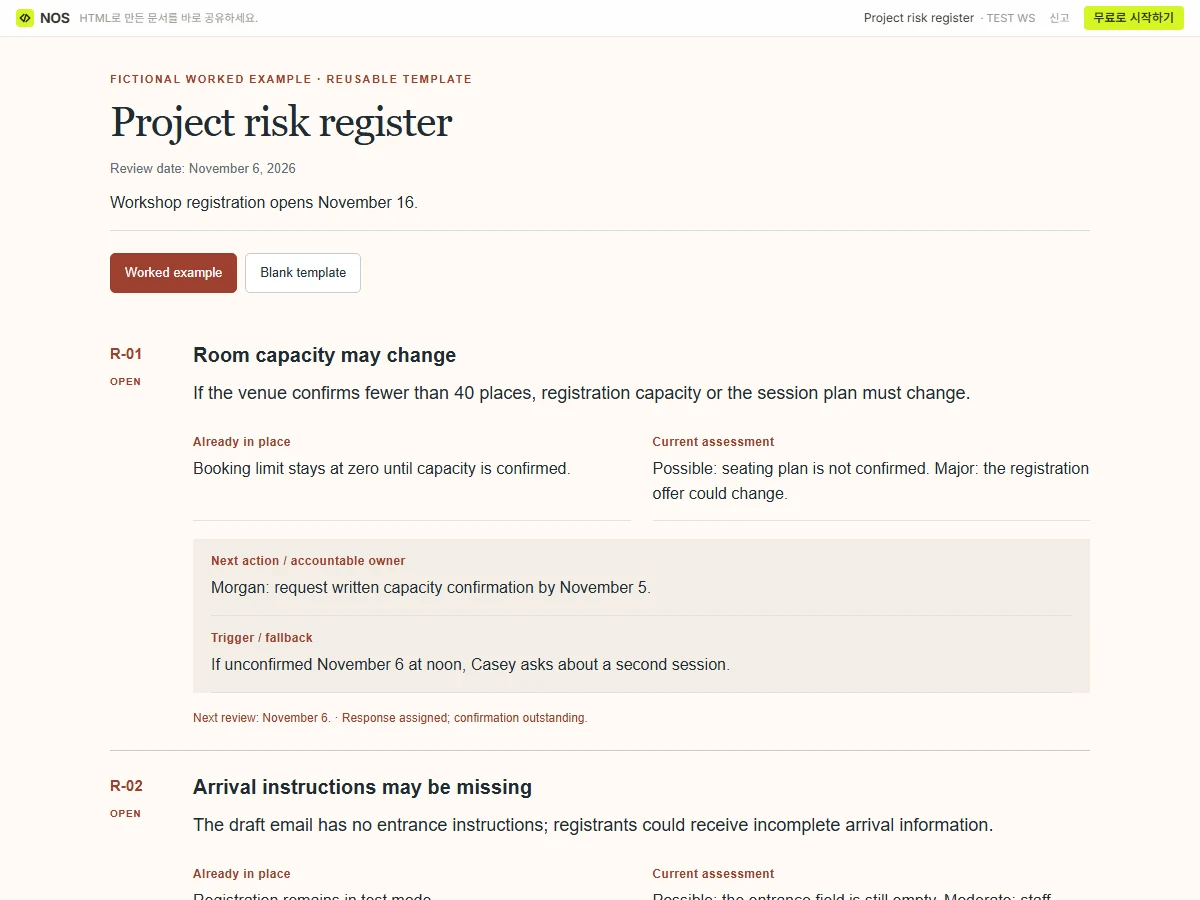
A filled example: a workshop registration launch
This fictional project needs registration to open on November 16. Its team has a test booking system but has not yet received the venue’s final room capacity.
R-01: Room capacity may change
If the venue confirms fewer than 40 places, the team may need to reduce registration capacity or offer a second session. The current control is a booking limit that stays at zero until capacity is confirmed.
- Current likelihood: Possible. The venue has not confirmed its final seating plan.
- Current impact: Major. A lower capacity would change the registration offer.
- Response: Morgan requests written capacity confirmation by November 5.
- Trigger: No confirmation by November 6 at noon.
- Fallback: Casey asks the venue about a second session before registration opens.
- Review: November 6. Status: response assigned; confirmation outstanding.
R-02: Confirmation emails may omit the arrival instructions
The team has drafted the email, but the venue’s entrance instructions are still missing. If that omission reaches the live email, registrants may receive incomplete arrival information.
- Existing control: Registration remains in test mode.
- Current likelihood: Possible. The draft still contains an empty entrance field.
- Current impact: Moderate. Staff would need to contact affected registrants.
- Response: Casey adds the confirmed instructions and sends one test registration through the full flow by November 9.
- Trigger: The test email still has an empty entrance field.
- Fallback: Keep registration closed until the content check passes.
- Review: November 10. Status: awaiting venue information.
The first response seeks information. The second checks a completed result. Neither row says the risk is resolved just because someone accepted an assignment.
Set the rating rules before coloring the cells
For this example, use three likelihood labels: Unlikely, Possible, and Likely. Define them against the project’s remaining preparation period, using the evidence available at review.
Use three impact labels: Minor means the team can correct the problem within the agreed plan; Moderate means work or communication must be replanned; Major means the registration offer or opening date may change. These are example definitions, not an industry standard.
Record the reason beside the label. Two people can select “Possible” for different reasons, and the discussion about those reasons may be more useful than the color.
A risk assessment matrix can help you compare ratings. The register keeps the response and review history attached to each risk.
Review what changed, including what did not
Suppose Morgan receives the capacity confirmation. Add the date and reference to R-01, then reconsider the event described in that row. If the venue confirms 40 places, that particular uncertainty may be closed. If it confirms 32, record the actual capacity and move the resulting work into the project’s action or issue tracking.
For R-02, “email updated” is not yet the test result. Keep the response open until someone checks the email received from a test registration.
If you record a target assessment after a planned response, label it Target, not yet demonstrated. A planned action is not an existing control. Reassess after implementation and keep the evidence beside the new rating.
Ask AI to organize your own register
Copy this prompt and replace the brackets:
Create a project risk register from the notes I provide. Objective: [result and deadline]. Scope: [what this project includes and excludes]. Notes: [paste approved project notes]. Existing rating definitions: [paste them, or write “not defined”]. Use columns for ID, objective, uncertain event/cause/consequence, existing controls, current assessment with reasons, response, accountable owner, due date, trigger, fallback, review date, and status. Separate actions already completed from actions merely planned. Do not invent probabilities, owners, dates, approvals, or completed controls. Mark unsupported entries “Needs confirmation.” If ratings are not defined, propose definitions for my review without assigning scores. Return a spreadsheet-ready register and five questions that would change the response decisions.
Check those questions before polishing the document. An unanswered capacity question matters more than a perfectly aligned heat map.
Share the review version without losing the working register
Open this example’s NOS share link.
Keep the spreadsheet as the working record if that is where your team manages risks. If a meeting needs a shorter, browser-readable review, ask for an HTML page containing the selected rows, rating key, and review date.
You can save that page in NOS and share its link. If you notice a wrong review date after sending it, edit the text in the saved page and check the same reader link. People opening that link can see the correction without receiving another attachment. Update the working spreadsheet separately; the review page is a separate copy.