A status meeting ends with “the venue problem is being handled.” The next meeting starts with the same sentence. Somewhere between them, the person who needed to approve the fix never heard that a decision was due.
Put the blockage, next action, and decision owner in the same record. An issue log should let the next reviewer see what is wrong, what happens next, and what will count as fixed. Copy the fields below before adding colors or a dashboard.
Blank template and worked example

Open the complete example · Blank PDF · Worked PDF · Editable Excel workbook
Download the HTML version to adapt the browser page. The worked material is fictional. Use the blank PDF for a printed activity or record; the browser preview switches between versions.
A risk register keeps uncertain future events and their planned responses separate from the problems already in this log.
Start with a blank issue record
Use one row per issue in your spreadsheet:
Issue ID | Date raised | Observed problem | Impact on the project | Priority and reason | Owner | Next action | Action due | Decision or help needed | Status | Last update | Closure evidence/date.
Keep longer action notes in a linked detail area if the row becomes difficult to read. Preserve the ID so a meeting note can refer to the same issue next week.
A project issue-log reference includes description, impact, priority, assignment, resolution actions, status, and closure date. The format here adds an explicit next-action deadline and decision request.
For this log, use New, In progress, Waiting for decision, and Closed. Define the labels above the sheet. “Waiting” should identify the decision and the person who can make it.
Filled example: the registration page is already wrong
The following project and people are fictional. A team is preparing an evening workshop.
ISS-01: Registration displays the wrong venue address
- Raised: November 4.
- Observed problem: The published registration page still names the former venue.
- Impact: People reading it may plan to travel to the wrong location.
- Priority: High, because registration is open and the information is wrong now.
- Owner: Avery, registration lead.
- Next action: Replace the address, then open the public registration page and compare it with the confirmed booking.
- Due: November 4, before the next invitation is sent.
- Decision needed: None; the venue booking is already confirmed.
- Status: In progress.
- Closure evidence: Not yet recorded.
The owner cannot close the issue merely by saying “updated.” In this example, closure requires the corrected public page to match the confirmed venue address. If invitations already included the old address, the team must also decide whom to contact. Changing the page does not erase the earlier communication.
ISS-02: The speaker cannot use the supplied presentation connection
- Raised: November 4.
- Observed problem: The venue’s supplied connector does not fit the speaker’s laptop.
- Impact: The planned presentation setup cannot be used as tested.
- Priority: Medium for this example; a loan laptop is available, but the speaker must approve that arrangement.
- Owner: Jordan, event producer.
- Next action: Ask the speaker to test the presentation on the loan laptop.
- Due: November 6.
- Decision needed: Speaker confirms the alternative setup or requests another arrangement.
- Status: Waiting for decision.
- Closure evidence: Not yet recorded.
“Laptop available” describes a possible fix. It does not establish that the speaker’s presentation works on it.
Distinguish an issue, a risk, and an action
In this example, the wrong published address is an issue: the problem already exists.
“The venue might change” belongs in a risk register while that event is uncertain. “Correct the venue address” is an action taken to resolve the issue.
Keeping those distinctions helps you avoid filling the issue log with every routine task. Use a risk register to track uncertain events and a risk assessment matrix to compare their ratings. Use a separate task list for work that is simply scheduled, with no problem requiring resolution.
When a risk occurs, preserve its original reference and open an issue if resolution needs tracking. Describe what actually happened instead of copying the old “might happen” wording.
Review the decision request before reading every update
For the next project review, begin with issues that need a decision or are blocking an agreed milestone. Ask each owner for the current observed condition, the next action, and the result of the previous action.
Set your escalation rule before you need it. For this fictional project, an issue owner asks the project lead for help when the next action cannot be completed within the owner’s authority or when it threatens an agreed milestone. Your team may use a different rule.
Record the decision and date when help arrives. Do not close the row just because it has been escalated. The underlying problem still needs a verified outcome.
Prompt for turning meeting notes into an issue log
Extract project issues from these notes: [paste notes]. Project objective and milestones: [ ]. Existing issue IDs: [ ]. Return an issue log with ID, date raised, observed problem, impact, priority/reason, accountable owner, next action, due date, decision needed, status, last update, and closure evidence/date. Separate uncertain future risks and ordinary tasks into two short lists. Reuse an existing ID when the notes update the same problem. Do not invent owners, deadlines, severity, completed fixes, or evidence. Write “Needs confirmation” where a necessary field is missing. A statement that someone plans a fix must remain open. Provide spreadsheet-ready rows and a concise decision agenda based only on those rows.
Read the proposed issue descriptions against the notes. If an entry combines two problems with different owners or closure tests, split it.
Send a review page when the log needs a decision
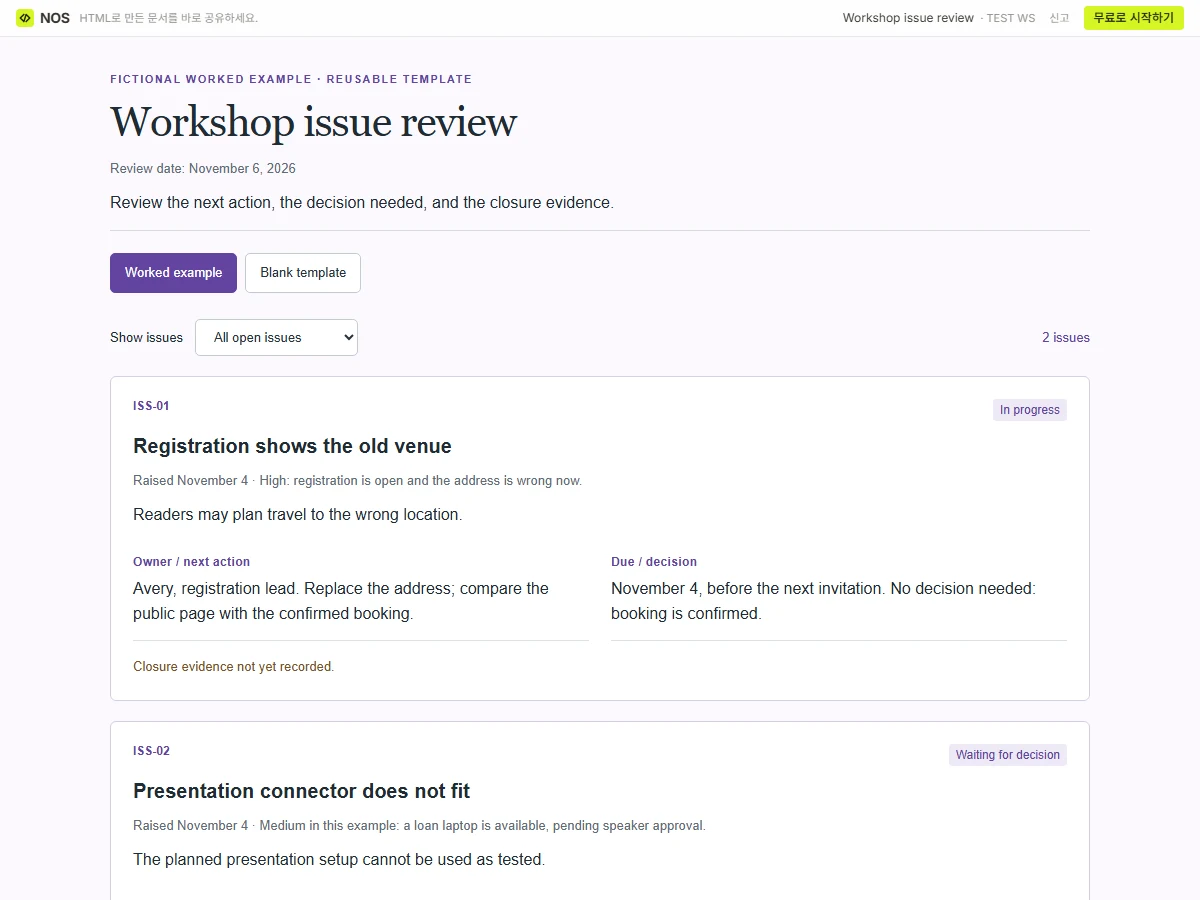
Open this example’s NOS share link.
Keep the working log in the tool your team uses. If stakeholders need a short review page, make an HTML copy showing the open decision requests and the date of the extract.
You can share that copy through NOS. If the decision deadline is corrected after you send it, edit the saved page and check the existing reader link. Readers can reopen that link for the correction. Keep the underlying log updated too, and message the decision owner directly when their action is needed.