Start from the assignment, not the grid
A rubric is a scoring guide that spells out the components of an assignment and what you expect for each one. Before you open any rubric maker, list the elements you will actually evaluate, and keep only the ones you can observe or measure in the finished work.
Next, choose a range of performance levels, such as excellent, good, and unsatisfactory, and assign each level a number. The descriptors come last and carry the most weight. Each one should describe something a grader can point to, and each level should differ clearly from the one beside it.
You don’t have to write from zero. Some rubric makers start you from a topic template, and a colleague’s rubric for a similar assignment is another reasonable starting point. Either way, read every borrowed cell against your own assignment, because a generic row about organization may not describe what your students were asked to do. If this is your first rubric, build one for one assignment this semester rather than a whole set.
A worked sample: grading a water-filter presentation
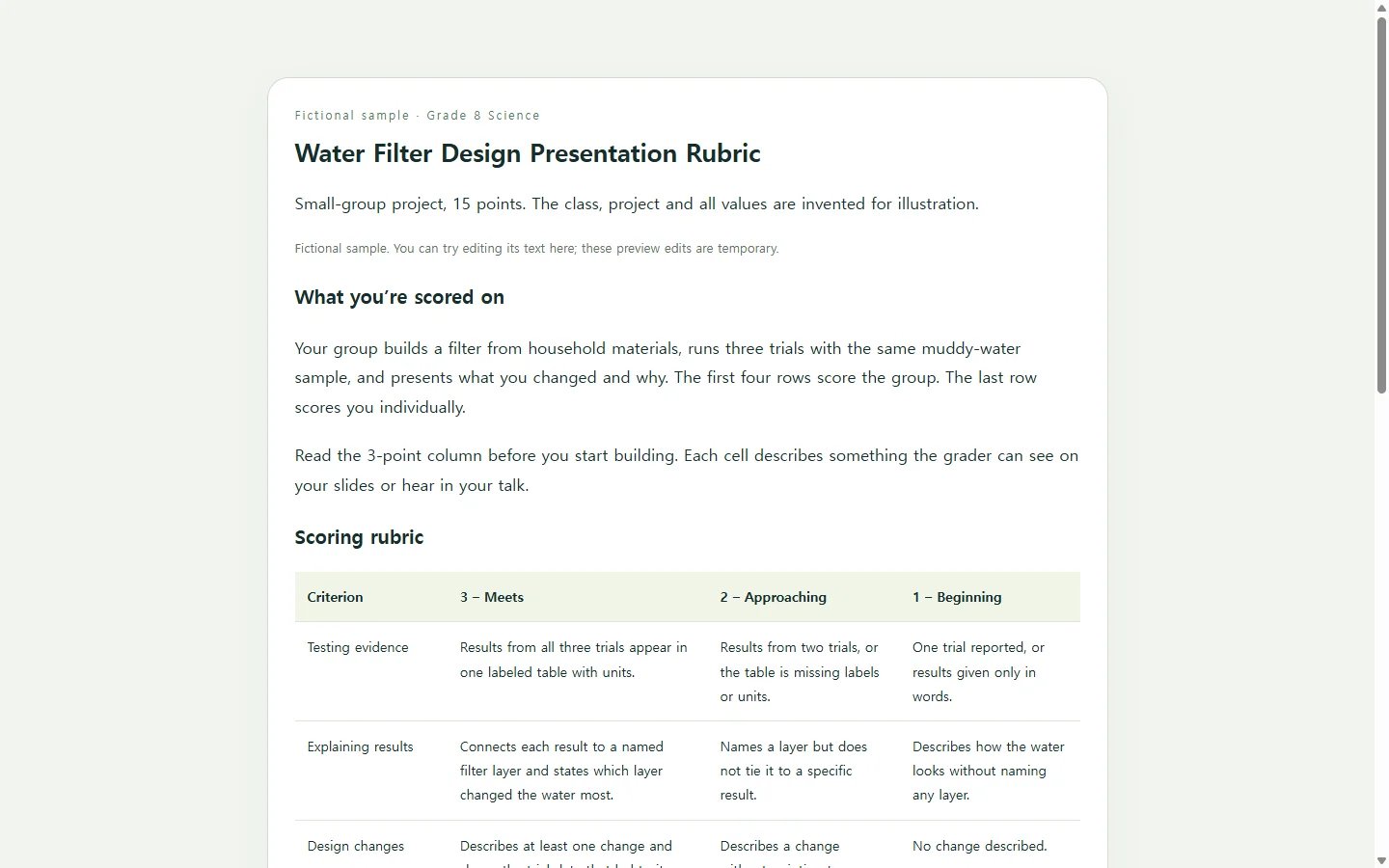
The sample on this page is fictional: an eighth-grade science class where small groups build a water filter from household materials, test it three times, and present what they changed. The school, class, and student work are invented for illustration.
Look at two things rather than the whole grid. First, no row relies on a vague word: instead of “clear explanation,” the 3-point cell asks students to connect each result to a named filter layer. Second, neighboring levels differ in one checkable way, such as three trials reported versus two, or a change backed by data versus a change only described. That one-step difference is what makes a 2-or-3 decision quicker to settle.
Because the project is group work, the sample adds one row scored per student, so each person’s own part of the presentation has a place on the rubric.
Drafting your own, with or without AI
You can fill your grid by hand with the steps above. If you want a first draft and a clean layout faster, an AI chat tool can handle the formatting and propose wording, while you supply the assignment and the levels and make the final call on every descriptor.
The prompt below asks for one HTML file, which is a web page that opens in a browser, so students can read the rubric on a laptop or a phone. If your school wants rubrics as a PDF, a document, or inside your learning platform, ask for that format or keep both. A rubric can also be a fillable PDF that you email to students. A shared page is a handy copy for students, not a replacement for a required submission format.
Replace every bracket with your own details. The water-filter details in the examples are fictional. The prompt tells the tool to mark missing information for you to confirm instead of filling it in.
Test the rubric before the first grade counts
Before using the rubric on graded work, give the draft to a colleague or TA and ask where they would hesitate. Then walk students through it and ask which cells are unclear to them. Scoring one sample together is a practical way to do that. Rework the wording based on what you hear.
The same rubric can do more than grade. Students can use it to check their own draft or to give feedback to another group. That use can surface an unclear row before presentation day.
When one descriptor needs fixing after you share it
Suppose you share the rubric page on Monday, and by Wednesday two groups ask what “shows the trial data” means in the design-changes row. That calls for changing one sentence, not a new layout or a fresh AI draft.
If the page is in NOS, you can edit the rendered text of that descriptor directly, without regenerating the page with AI. The sharing link stays the same after the edit, so students reopen the address they already have and see the new wording. Students don’t need an account to open the shared page.
NOS keeps notes, HTML pages, and subpages in one workspace, so the rubric and your planning notes for the same assignment can live in one place. If you also submitted a PDF or a platform rubric, update that copy separately, because editing the page changes only the page.
Start with the assignment due next: write rows you can observe, test them with a sample, and share the page students will reread while they work.
A prompt to adapt
I teach [grade level] [subject]. Draft an analytic grading rubric for the assignment below and format it as one self-contained HTML file.

Assignment: [1–2 sentences, e.g., “Small groups build a water filter from household materials, test it three times with the same muddy-water sample, and give a 5-minute presentation on what they changed.”]
Learning goals: [2–4 goals in your own words]
Criteria to score: [3–5 elements, e.g., Testing evidence; Explaining results; Design changes; Delivery; Individual contribution (scored per student)]
Performance levels and points: [e.g., 3 = Meets, 2 = Approaching, 1 = Beginning]
Total points: [number]
Required wording or standards: [paste them, or write “none”]

Requirements:
- Every descriptor must name something observable or countable in the student’s work. Do not use “creative,” “interesting,” “good,” or “strong” unless the sentence states what that looks like.
- Adjacent levels in the same row must differ in one way a student could check.
- Do not invent standards, codes, point values, dates, or requirements I did not give you. Where information is missing, write [TEACHER TO CONFIRM].
- Use a real HTML table with a caption, column headers, and row headers so screen readers announce each cell’s criterion and level.
- Never show levels by color alone; every level needs its text label and point value.
- Use body text of at least 16px, strong text/background contrast, and a layout that stacks each criterion into its own block on screens narrower than 600px so nothing scrolls sideways.
- Plain HTML and CSS only: no scripts, forms, buttons, download links, external fonts, or external links.
- After the HTML, list any descriptor you are unsure is measurable so I can review it.