What goes into a rubric template
Most rubric templates share four parts: a short description of the task, the criteria you will judge, a rating scale with at least three levels, and descriptive language for each level. The scale often pairs a number with a word, from a low score for beginning work up to the top score for exemplary work.
You also pick a shape. An analytic rubric scores each criterion separately, which allows finer scoring and more specific feedback. A holistic rubric groups the expectations into a few overall levels for a more general judgment. If students will revise their work based on your comments, the analytic version is usually the better fit.
The sample below is analytic, because its students draft, check, and then revise a lab report.
Sample: a lab report rubric for a plant-growth experiment
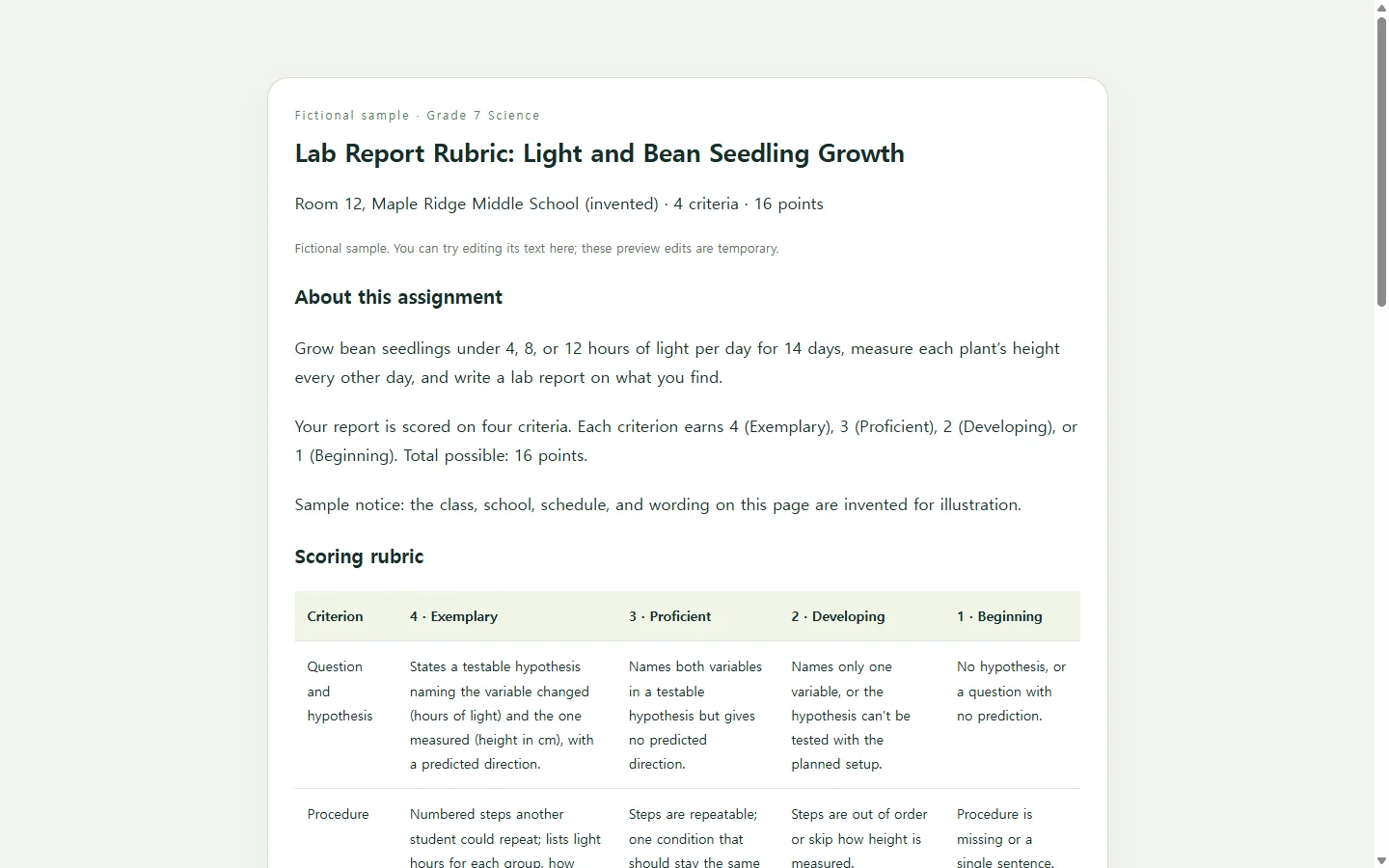
The example is fictional: an invented seventh-grade class tests whether hours of light change how tall bean seedlings grow. Four criteria—question and hypothesis, procedure, data and graph, and conclusion—are each scored from 4 down to 1, for 16 points total.
Rather than reading the whole grid, look at one row. Under data and graph, a 4 means every plant has a height in centimeters for every measuring day and the graph labels both axes with units. A 2 means some measurements are missing or the axes are unlabeled. A student can set their own graph beside those two sentences and tell which level they’re at. That’s the test every cell in your own rubric should pass.
Turn vague words into things you can point to
Words like “creative” or “interesting” come easily but are hard to score consistently, so swap them for indicators you can see in the work. Each level should also read clearly different from the one next to it.
A useful check: if two levels differ only by “some” versus “most,” ask what you would actually see on the page. In the sample, “good conclusion” became “states whether the hypothesis was supported and cites at least two measurements.”
If time is short, build one rubric for one assignment first, or adapt one a colleague already uses for similar work. A blank Word, Excel, PDF, or Google Docs grid is also a fine starting point if the table itself is all you need.
Build the page with AI (optional)
If formatting a five-column table is what’s slowing you down, an AI chat assistant can lay it out as a single HTML file, which is simply the file type a web browser opens as a page. You supply the criteria and the level descriptions; the AI arranges them. Don’t ask it to invent your standards.
The prompt below asks for real table headers that screen readers can announce, a layout that stays readable on a phone, level names printed in words rather than shown by color alone, and no forms or score calculators, because this page is meant to be read, not submitted.
Read every cell before you share the result. Smooth wording that doesn’t match what you’ll actually grade is worse than a plain table.
Share it with students, then fix the wording in place
Give students the rubric when you assign the work, not when you return grades, so they can use the expectations while there’s still time to act on them. Having them check a draft against it, or review a partner’s, puts it to work early.
That first use is often where a descriptor turns out to be unclear. It’s worth asking students which rows confused them and reworking the rubric from their answers.
If the rubric lives as a page in NOS, you can edit the rendered text directly—changing “labels axes” to “labels both axes with units,” for example—without regenerating the page with AI. The link you already gave students stays the same after the edit, so anyone who reopens it sees the revised row. Students can open it without creating an account.
If your school requires a PDF or an upload to its learning platform, follow that rule and treat the shared page as a companion, not a replacement. Share the blank rubric only, and record individual scores wherever your school keeps grades.
A prompt to adapt
Create a single self-contained HTML file for a grading rubric.

Assignment: [assignment name + one-sentence task, e.g., Grade 7 lab report on hours of light and bean seedling height]
Audience: [grade level or course]
Scale: [levels and points, e.g., 4 Exemplary, 3 Proficient, 2 Developing, 1 Beginning]
Criteria and descriptors: [paste each criterion with your description for every level]
Total points: [e.g., 16]

Use my wording for criteria and descriptors. Do not add criteria, change point values, or invent descriptors. If a level is missing or unclear, list the gap in an HTML comment at the top instead of filling it in.

Layout:
- Top: assignment title, one-line task description, a short explanation of the scale, total points.
- The rubric as a real HTML <table> with a <caption>, level headers marked <th scope="col">, and criterion names marked <th scope="row">.
- Below the table: a short student self-check list written from the top-level descriptors.

Accessibility and mobile:
- On screens narrower than 600px, restack each criterion as a card that lists its levels in order, with the level name and points written out, so nothing requires zooming or sideways scrolling.
- Body text at least 16px; text contrast at least 4.5:1.
- Never use color alone to show a level; always print the level name and points.
- Prints cleanly in black on white.

Constraints:
- Inline CSS only; no external fonts, scripts, images, or links.
- No forms, input fields, score calculators, submit buttons, or download buttons.

Return only the HTML.