What a status report has to do first
A status report answers two questions for someone outside the day-to-day work: is this on track, and do you need anything from me? If those answers sit below a budget table and a risk score, a busy reviewer may not reach them.
Template collections are still worth a look for what to gather. One collection that ranks for this search describes a full report as covering project details, team contacts, update timing, scope changes, budget use, quality concerns, active risks, and issues blocking work. Treat that as a list of things to have on hand, not an order you must present them in.
A one-page order that tends to work: overall status in plain words, the decision you need with a deadline, a short table of workstreams with owners, upcoming dates, risks paired with what you are doing about them, and next steps. Write the status as a word, such as "On track" or "At risk," beside any color, so it still reads in a grayscale printout or for someone who has trouble telling red from green.
A worked example: an office move, reported every two weeks
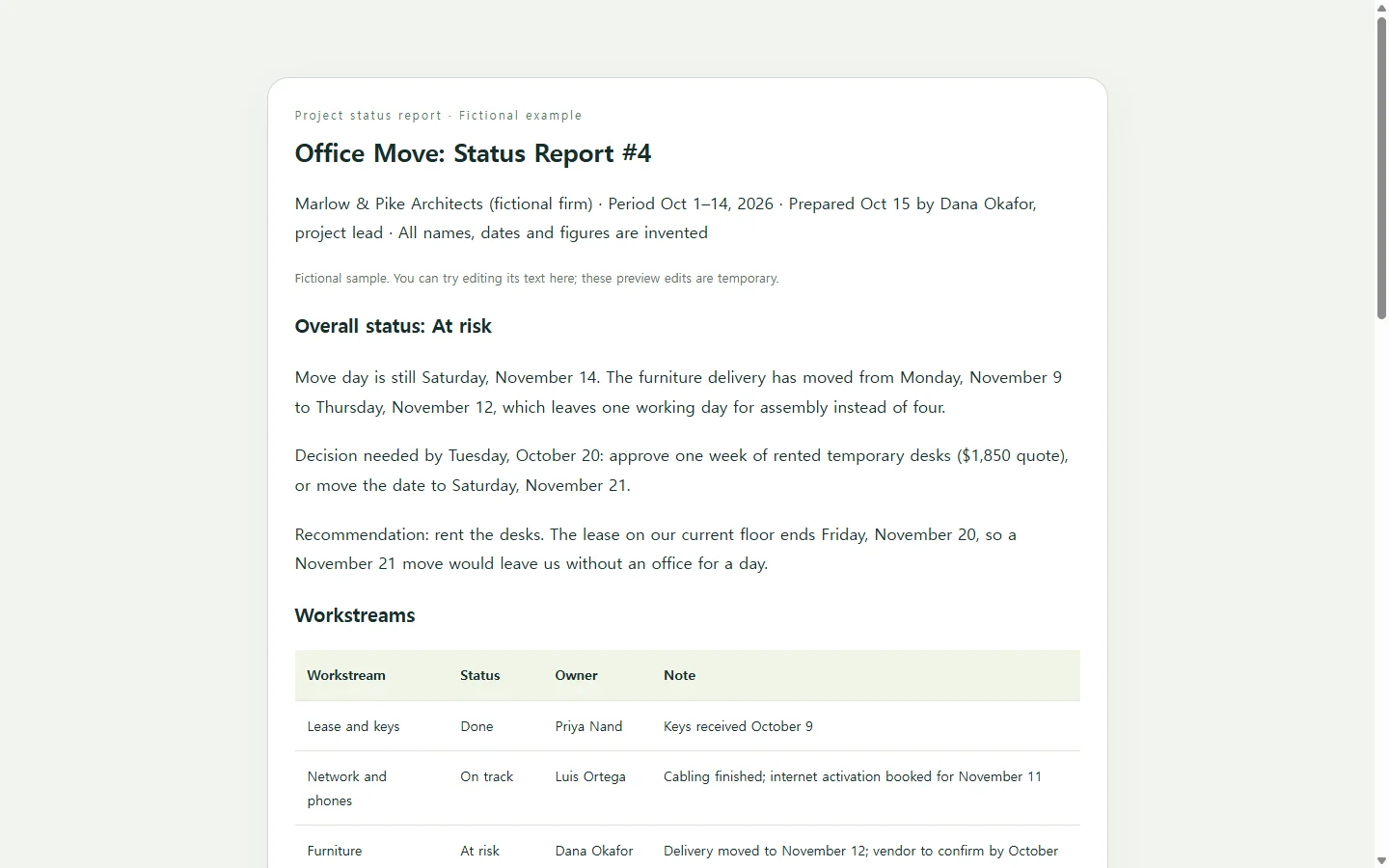
The example below is fictional: a 38-person architecture firm, Marlow & Pike, moving offices, with a project lead reporting to two partners. The names, dates, and the $1,850 quote are invented for illustration.
The report is marked At risk for one reason, stated in its first lines: the furniture delivery moved three days later, cutting assembly time from four working days to one. Directly under that is the decision, with a deadline and a recommendation, because that is the part the partners have to act on.
Two smaller choices are worth copying. Every workstream has a named owner, so a question goes to a person rather than to "the team." And each risk is paired with its next action, which keeps that section from reading like a list of worries.
Word, Excel, a project tool, or a page?
If your organization asks for a Word document, an Excel tracker, or a slide in a steering-committee deck, send that. Templates in those formats are easy to find, and a web page does not replace a format you have been asked to submit.
If your team already tracks the work in a project tool with a built-in status update, posting there keeps dates and owners in one place. Some tools let you mark a project On track or At risk and add a written update next to start and target dates.
A standalone page fits a different case: your reviewers do not use your tracker, and they open the update on whatever device is in hand. That is the version the rest of this guide builds.
Build your version with AI
The facts have to come from you: statuses, owners, dates, the decision. Where AI helps is the layout, turning those notes into a clean page that holds up on a laptop and a phone. Ask for HTML, the text format web pages are written in; the result is a single file you can open in a browser to check before sharing.
The prompt below has placeholders in brackets. Replace them with your own details, and leave a bracket in place if you do not know something yet. The prompt tells the AI to show [TBD] instead of guessing, which matters most for dates and dollar amounts.
Before sending, read every date, name, and number against your notes. Then narrow the browser window to phone width and make sure the workstream table is still readable.
After it's sent: fix the date, keep the link
Dates in a status report can change before the next one is due. Say the furniture vendor in the example calls two days after the report goes out and confirms the original delivery date after all. The status should flip back to On track, and the decision box no longer applies.
If you keep the page in NOS, you can change the date, the status word, and the decision line directly in the rendered text, without asking AI to regenerate the whole page for a few words. The published link stays the same after the edit, so the partners open the link they already have and see the corrected report. They do not need an account to open it.
That also means one version of the move date is in circulation, instead of a corrected attachment following the first one into everyone's inbox. If a partner needs a PDF for the records, give them that format; the shared page is for reading status as it changes.
A prompt to adapt
Create a one-page project status report as a single self-contained HTML file with inline CSS. Do not use external scripts, fonts, images, or frameworks.

Project: [project name]
Organization: [organization name]
Reporting period: [start date] to [end date]; report date: [report date]
Prepared by: [your name and role]
Readers: [who reads this, e.g., two partners who approve spending]
Overall status: [On track / At risk / Off track] because [one-sentence reason]
Decision needed: [the decision], needed by [date]; my recommendation: [recommendation and why]
Workstreams (name | status | owner | one-line note):
- [workstream] | [status] | [owner] | [note]
- [workstream] | [status] | [owner] | [note]
Milestones (date | milestone | done or upcoming):
- [date] | [milestone] | [done/upcoming]
Risks (risk | what we are doing about it):
- [risk] | [action and owner]
Next steps (task | owner | due date):
- [task] | [owner] | [date]

Requirements:
- Order: header with project name, period, and author; overall status and the decision box at the top; then the workstreams table, milestones, risks, and next steps.
- Use only the facts above. If a value is missing or still in brackets, display "[TBD]" instead of inventing it. Do not add numbers, names, dates, or achievements.
- Show every status as a visible text label (for example "At risk"). Color may be added but must never be the only signal.
- Use dark text on a light background with high contrast; no light-gray body text.
- Use semantic HTML: one h1, an h2 for each section, and a real <table> with <th> header cells and a <caption> for the workstreams.
- Mobile: readable at 360px wide with no horizontal page scrolling. Below 600px, show each workstream row as a stacked card that keeps its field labels (Status, Owner, Note).
- Base font size at least 16px, line height about 1.5.
- Print-friendly: nothing important hidden when printed, no dark full-page background.
- Do not include buttons, forms, download or export links, sign-up prompts, or any connection to outside services.
- Return only the complete HTML file.