Choose the format by where it's going
Before picking a look, check where the portfolio will be read. An application portal that asks for a PDF or Word upload needs a file, and a printed review needs pages that print cleanly. If you'll mostly paste a link into emails, a résumé header or a form field that accepts URLs, a single web page is easy to open on a phone.
Each common route has a real case for it. A word-processor template is the most direct way to produce the file an application asks for. A slide deck suits work you'll present in person. A site builder gives you room for many pages, at the cost of more setup. And if a friend designs for fun, asking them is a fine answer too. The example below takes the one-page web route because it fits a student whose strongest work is written and data-based rather than visual.
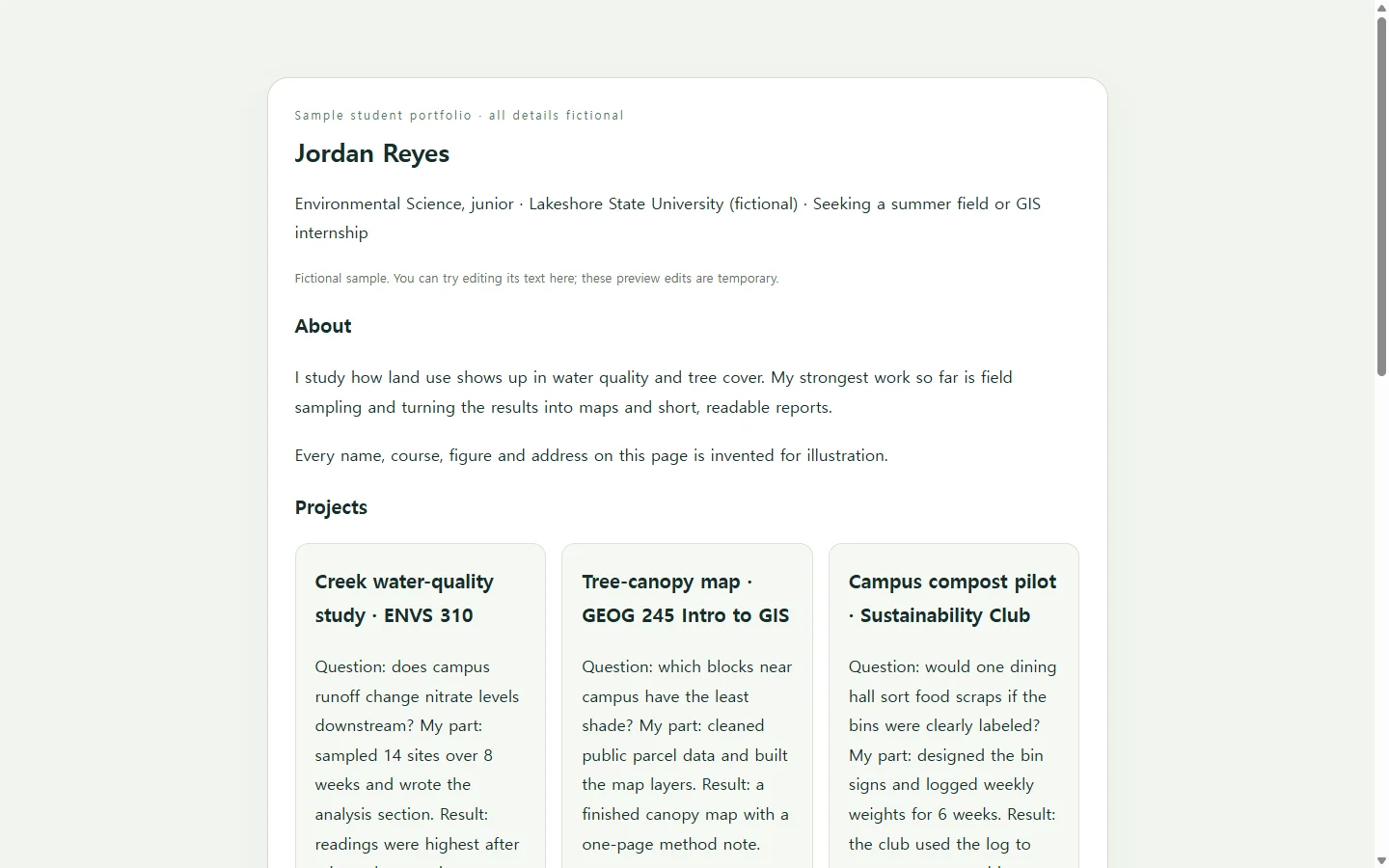
The example: three class projects on one page
The sample belongs to Jordan Reyes, a fictional environmental science junior; the name, school, courses and numbers are invented for illustration. With no internship yet, the page leads with three course projects: a creek water-quality study, a tree-canopy map from a GIS class, and a campus compost pilot.
The useful part is the card pattern, not the colors. Each project answers four things in a few lines: the question, what Jordan personally did, one result, and the course it came from. A reader who only skims the card titles and results still learns what Jordan can do. The skills table works from the other direction, pointing each skill to the project that shows it, so 'data cleaning' is backed by something the reader can check. If your projects are visual, give the images more room; if they're written, keep the summary short and link to the full paper.
Build your version with an AI assistant
Gather your facts before you open the chat: project titles, your role in each, one result you can stand behind, course names, and how people should reach you. The AI's job is layout and polish. It shouldn't supply experience you don't have, and anything missing from your notes should come back marked for you to fill in.
Ask for a single HTML file. HTML is the file type of a web page, so the result opens in a browser rather than a word processor, and keeping the styling inside one file keeps it in one piece. Paste the prompt below with your details in the brackets, then open the result on your phone as well as a laptop; long project titles and wide tables are the first things to check on a small screen. Read every line against your notes before you send it anywhere.
When a link helps, and when it doesn't
If an application says PDF or DOCX, submit that file. A link is not a substitute for a required upload, and a reviewer shouldn't have to go looking for your work. Make the file in the document tool you already use, and keep the web page for places that welcome a link: an email to a professor, the portfolio line on your résumé, or a form field that asks for a URL.
Fix it later without sending a new link
Say Jordan emails the page in October to a professor who agreed to write a recommendation. By December the GIS map is finished, so its result line needs updating, and Jordan notices the creek study card says 12 sampling sites when the report says 14. Asking an AI to regenerate the whole page for two small fixes risks changing parts that were already right.
If the page is saved in NOS, Jordan can click into the rendered text and correct it directly, with no new AI pass. The published sharing link stays the same after the edit, so the link in the professor's October email now opens the corrected page, and the professor doesn't need an account to view it. Text changes like these are the simple case; swapping a photo or reworking the layout may still mean another round with your AI tool.
When spring applications open, the same updated page goes into the next round of emails, and any portal that wants a PDF still gets one.
A prompt to adapt
Build a one-page student portfolio as a single self-contained HTML file.

About me:
- Name: [YOUR NAME]
- Program and year: [YOUR PROGRAM, YEAR]
- Focus in one sentence: [THE KIND OF ROLE, PROGRAM OR OPPORTUNITY YOU'RE AIMING FOR]
- Contact: [EMAIL] [OPTIONAL: ONE PROFILE OR WEBSITE URL]

Projects (2 to 4), one per line:
[PROJECT TITLE] | [COURSE OR CONTEXT] | [QUESTION OR GOAL] | [WHAT I PERSONALLY DID] | [ONE RESULT I CAN VERIFY] | [OPTIONAL: URL OF THE FULL PAPER, MAP OR IMAGE]
Level of detail I mean (fictional sample, replace with mine): Creek water-quality study | ENVS 310 | Does campus runoff change nitrate levels downstream? | Sampled 14 sites over 8 weeks and wrote the analysis section | Readings were highest after rain at the two sites nearest the main parking lot

Skills, one per line: [SKILL] -> [PROJECT THAT SHOWS IT]
Coursework or activities (optional): [ITEM, TERM]

Requirements:
- Use only the facts above. Do not invent projects, numbers, employers, awards, grades or quotes. Where something is missing, show a visible [ADD: ...] placeholder.
- Layout: a short intro, one card per project (question, my role, result, course), a skills table mapping each skill to a project, optional coursework, contact details at the end.
- Put all CSS in one <style> tag. No external fonts, scripts, frameworks, trackers, forms or images from other sites. Use only image files or URLs I list above.
- Mobile first: readable at 375px wide with no sideways scrolling; on small screens the skills table should stack into rows.
- Accessibility: one h1, headings in order, real text instead of text inside images, alt text for every image I provide, link text that says where it goes, and strong contrast between text and background.
- Add a simple print style so cards don't split across pages.
- Tone: plain and specific, no buzzwords.
Return only the complete HTML file.