Start with the decision, then pick questions
Before choosing a single question, write down what you will decide when the results come in. “We will choose between weekday-evening and Saturday-morning practices for spring” is specific enough to test every question against. A question either informs that choice or tells you who answered, so you can compare groups. Anything else is a candidate to cut, however reasonable it sounds.
This is where template libraries earn their place. They group surveys by purpose — customer feedback, employee feedback, events, education, nonprofits — and include ready-to-use questions with response formats. Borrow a question when it fits your decision as written. When it only roughly fits, rewrite it around your situation instead of keeping the generic version.
Example: a parent survey for one scheduling choice
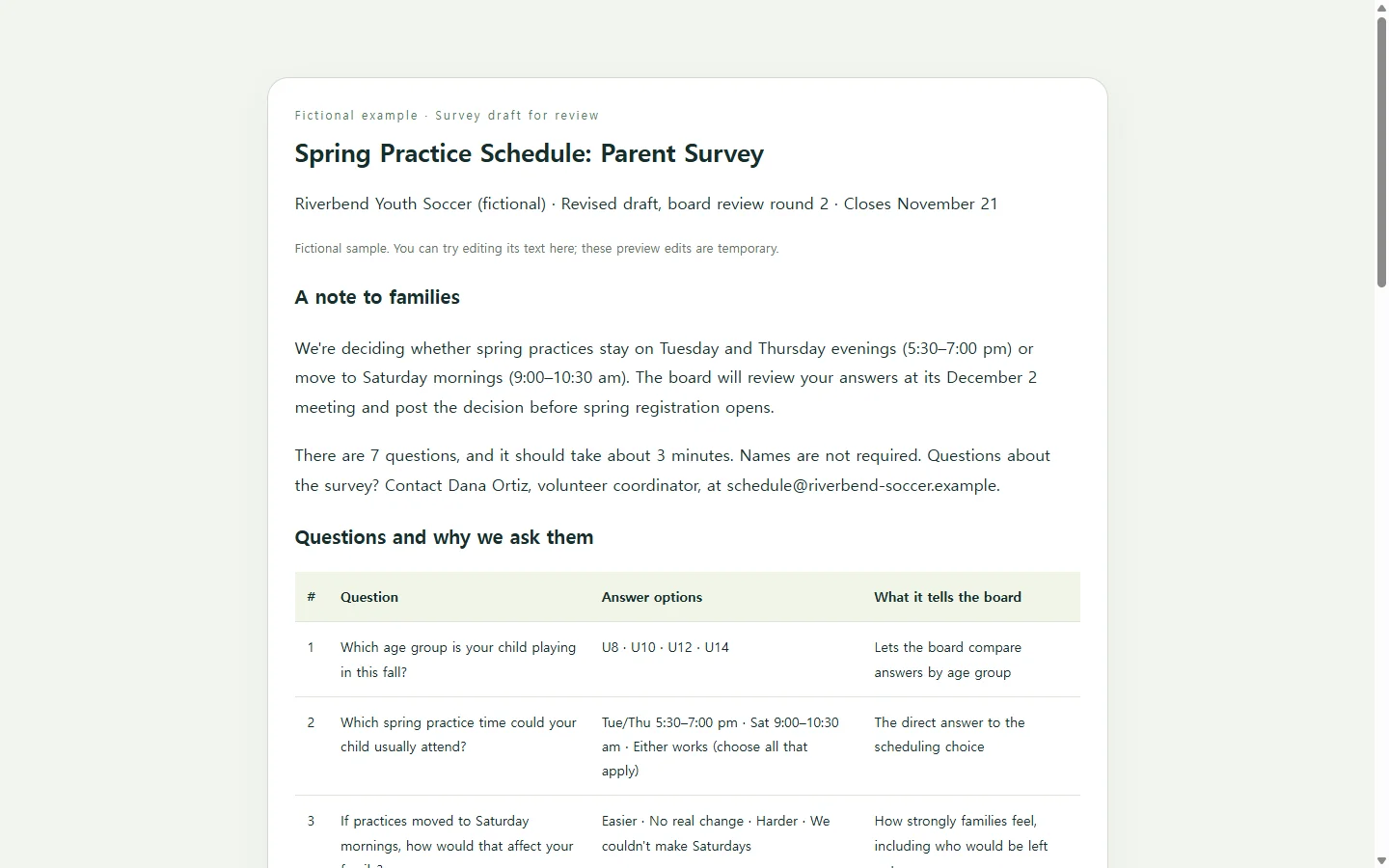
The example below is fictional. Riverbend Youth Soccer, its coordinator and its dates are invented to show how the pieces fit, not drawn from a real league. The league has one question to settle before spring registration opens: should practices stay on Tuesday and Thursday evenings or move to Saturday mornings?
Three choices in the draft are worth copying. The note at the top tells families what will be decided and how long the survey takes, so the request has a reason attached. The question plan pairs every question with what it tells the board, which makes a weak question easy to spot. And the only open-ended question comes last and is optional, so parents short on time can still finish.
If you need the survey on paper for a registration table, or your organization asks for a Word or PDF file, the same questions move straight into that format. Design template galleries also offer survey forms sized for A4 paper and posters with a QR code that points people to a survey. The questions matter more than the container.
Build your own version with AI (optional)
You can type all of this into a document yourself. If you'd rather not fuss with layout, an AI chat assistant can turn your decision and draft questions into a clean web page. Ask for it as a single HTML file, so your browser can open it as a page with the text and styling kept together. You supply the facts — audience, decision, deadline, questions — and the assistant handles the arrangement. Don't let it fill in details you haven't given it.
The prompt below asks for a review page, not a working form. It has no submit button and nothing that sends answers anywhere. You'll still collect responses in whatever survey tool or paper form you already use; the page is where the wording gets settled.
Get the wording approved, then send it
In the example, the coordinator shares the draft with two board members before any family sees it. One asks for a “we couldn't make Saturdays” option on question 3. The other wants the volunteer question softened so it doesn't read like a commitment. Each request changes a few words, not the design.
Emailing a fresh attachment after every round leaves reviewers comparing versions. If the page lives in NOS, you can correct the wording directly on the rendered page instead of asking the AI to regenerate it. The published sharing link stays the same after the edit, so reviewers reopen the link they already have. They can open it without creating an account.
When the wording is final, copy the questions into the tool or file that will collect responses. Keep the review page as the record of exactly what you asked; it saves guesswork when you write up the results. Make your draft, share it with the people who approve it, and update that same link as their notes come in.
A prompt to adapt
Create a single self-contained HTML page that presents a survey draft for review by the people who must approve it.
Do not include a submit button, form fields that send data, external scripts, external fonts, analytics or tracking. This page is for reading and reviewing questions only.
Use only the details I give below. If something is missing, show a clearly marked [TO CONFIRM] note instead of inventing it.

Organization: [ORGANIZATION NAME]
Who will answer: [AUDIENCE]
Decision the results will inform: [ONE-SENTENCE DECISION]
Survey closes: [DATE]
Results reviewed: [DATE AND WHERE]
Estimated time to answer: [MINUTES]
Are names required?: [YES / NO / OPTIONAL]
Contact for questions: [NAME, ROLE, EMAIL OR PHONE]
Questions, in order, each with answer format and options:
1. [QUESTION] | [single choice / choose all that apply / 1–5 scale with labeled ends / optional short text] | [OPTIONS] | [WHAT THIS TELLS US]
2. [QUESTION] | [FORMAT] | [OPTIONS] | [WHAT THIS TELLS US]
(continue for each question)

Page structure:
- Title, the organization name and a line saying this is a draft for review.
- A short note to respondents: why we're asking, what will be decided, when it closes, how long it takes, and whether names are required.
- The numbered questions with every answer option written out as plain read-only text.
- A question plan table with columns: #, Question, Answer format, What it tells us.
- A short 'Before we send' checklist for reviewers.

Accessibility and mobile requirements:
- Real headings in order (one h1, then h2/h3), an ordered list for the questions, and a table with header cells for the plan.
- Body text at least 16px, line height around 1.5, and text color contrast of at least 4.5:1 against its background.
- Readable on a 360px-wide phone with no sideways scrolling; on narrow screens, show each plan table row as a stacked block with its labels.
- Do not use color alone to convey meaning.
- Include simple print styles that hide decoration and keep each question with its options.

Example of how to fill in the details (fictional — replace every value with your own):
Organization: Riverbend Youth Soccer. Who will answer: parents of players in U8–U14. Decision: keep spring practices on Tue/Thu 5:30–7:00 pm or move them to Sat 9:00–10:30 am. Survey closes: November 21. Results reviewed: December 2 board meeting. Time to answer: about 3 minutes. Names: optional.