Start with what your school already requires
If your school or department publishes a syllabus template, open it before anything else. One university teaching center's syllabus page, for example, marks sections such as course learning outcomes, grading policy, attendance policy, academic integrity, a generative AI policy and disability services as required by that university's policy. Other schools set their own lists, so treat that one as an illustration, not a national standard.
Check how the syllabus has to be submitted, too. If your department collects a PDF or Word file, that file is still the copy you turn in. The page in this article is a companion for students, not a replacement for a required upload.
It also helps to make the decisions before you write the wording. One teaching center's course-design guide lists writing the syllabus after defining learning outcomes and creating an assessment plan, and it suggests deciding on policies for AI and academic integrity, classroom rules and attendance. Once those choices are made, the syllabus mostly records them.
What a filled-in version looks like
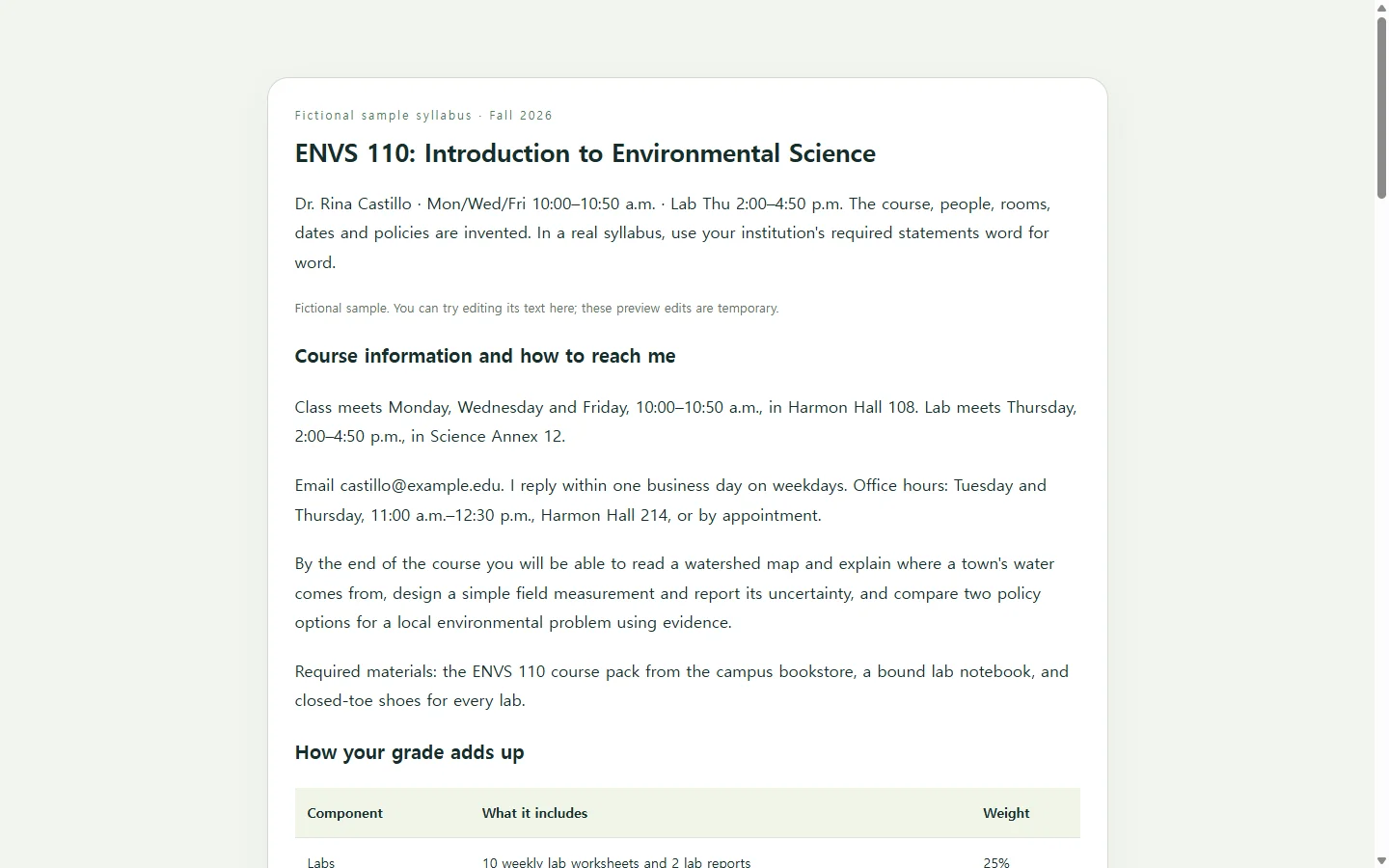
The example below is a fall syllabus for ENVS 110, Introduction to Environmental Science, taught by Dr. Rina Castillo. The course, instructor, dates and policies are all invented so you can see a complete version. None of it describes a real class.
A few choices are worth copying. The grading table shows weights that add up to 100 percent, so nobody has to guess how much the midterm matters. The schedule puts each due date next to that week's topic, which lets students see heavy weeks coming. The late policy gives a number, 10 percent per calendar day for up to three days, instead of saying late work “may be penalized.”
Rubrics help students understand what an assignment expects, so the example tells them where the lab-report rubric is posted instead of pasting the rubric in. The short syllabus check at the end asks four questions, and every answer is on the page. It checks answers in the browser and doesn't send or save anything.
Build your own with AI
AI is useful here for layout and structure, not for facts. You supply the course details, dates, grading weights and any policy language your school requires, and the AI arranges them into a readable page. Paste required statements word for word and tell the AI not to rephrase them.
Ask for a single HTML file. HTML is the format web browsers display, so you can open the file and check the result before you share it. If a detail is missing, the prompt tells the AI to leave a visible [TBD] instead of making one up.
Check it before students see it
Read the generated page against your own notes, not against the AI's summary of them. Add up the grading weights. Compare every date with your academic calendar. Put each required statement next to the original and confirm nothing changed.
Then open the page on a phone. The schedule should read as a list or scroll sideways without cutting off columns, and you should be able to get through the syllabus check using only the keyboard.
When a due date moves in week eight
Schedules change. Suppose a campus closure pushes Lab Report 2 in the example from October 16 to October 23. If you attached a PDF to an announcement, you would make a new file and post it again, and anyone who downloaded the first one would still have the old date.
If the syllabus lives as a page in NOS, next to your course notes in the same workspace, you click the date and type the new one. You don't need to regenerate the page with AI for a one-line change. The link you shared on the first day stays the same, so students who open it from your course site see October 23, and they don't need an account to view it.
Keep two limits in mind. If your school treats the submitted PDF as the official syllabus, update that copy through your usual process as well. Direct editing changes the words on the page. If you change which quiz answer is correct, don't count on that edit to change how the check scores it. Regenerate that part instead.
Build the syllabus once from your own decisions, share one link, and fix dates in place as the term moves.
A prompt to adapt
Build a course syllabus as one self-contained HTML file. Use only the details below. If something I haven't provided is needed, show [TBD] in its place instead of inventing it.

Course: [course number and title, e.g., ENVS 110 Introduction to Environmental Science]
Term and meeting times: [term, days, times, room or online meeting info]
Instructor: [name, email, office hours and location, expected reply time]
Course description and learning outcomes: [paste]
Required materials: [textbooks, lab supplies, software]
Grading: [each component and its percentage; must total 100]
Schedule: [week, topic, readings, exact due dates]
Policies: [late work, extensions, attendance, AI use]
Required institutional statements (reproduce word for word, do not edit or summarize): [paste]
Where rubrics and assignment details are posted: [location]

Page requirements:
- Sections in this order: course information, how to reach me, what you'll learn, materials, grading, schedule, policies, required statements, syllabus check.
- Grading as a real HTML table with header cells and a total row showing 100%.
- Schedule readable on a 360-pixel-wide phone screen: stack rows into cards or let the table scroll horizontally without clipping any column.
- One h1 and logical h2/h3 headings, body text at least 16px, strong text contrast, and no information conveyed by color alone.
- End with a 4-question multiple-choice syllabus check based only on facts stated in this syllabus. Make it fully keyboard operable, show the correct answer with a one-sentence explanation after each choice, and announce feedback to screen readers.
- Inline CSS and plain JavaScript only; no external libraries, fonts, images or tracking.
- No forms that submit data, no login, no saving of answers, and no links except the ones I provide.
- Include print styles so the page prints cleanly.

Return only the complete HTML file.