Start with what families need to do this week
The template collections that come up for this search describe the job in similar terms: keep parents and caregivers informed about class activities and what's coming up. Most offer themed, editable designs that you fill in and then print or send digitally. When your news fits the boxes, that's a quick and perfectly good route.
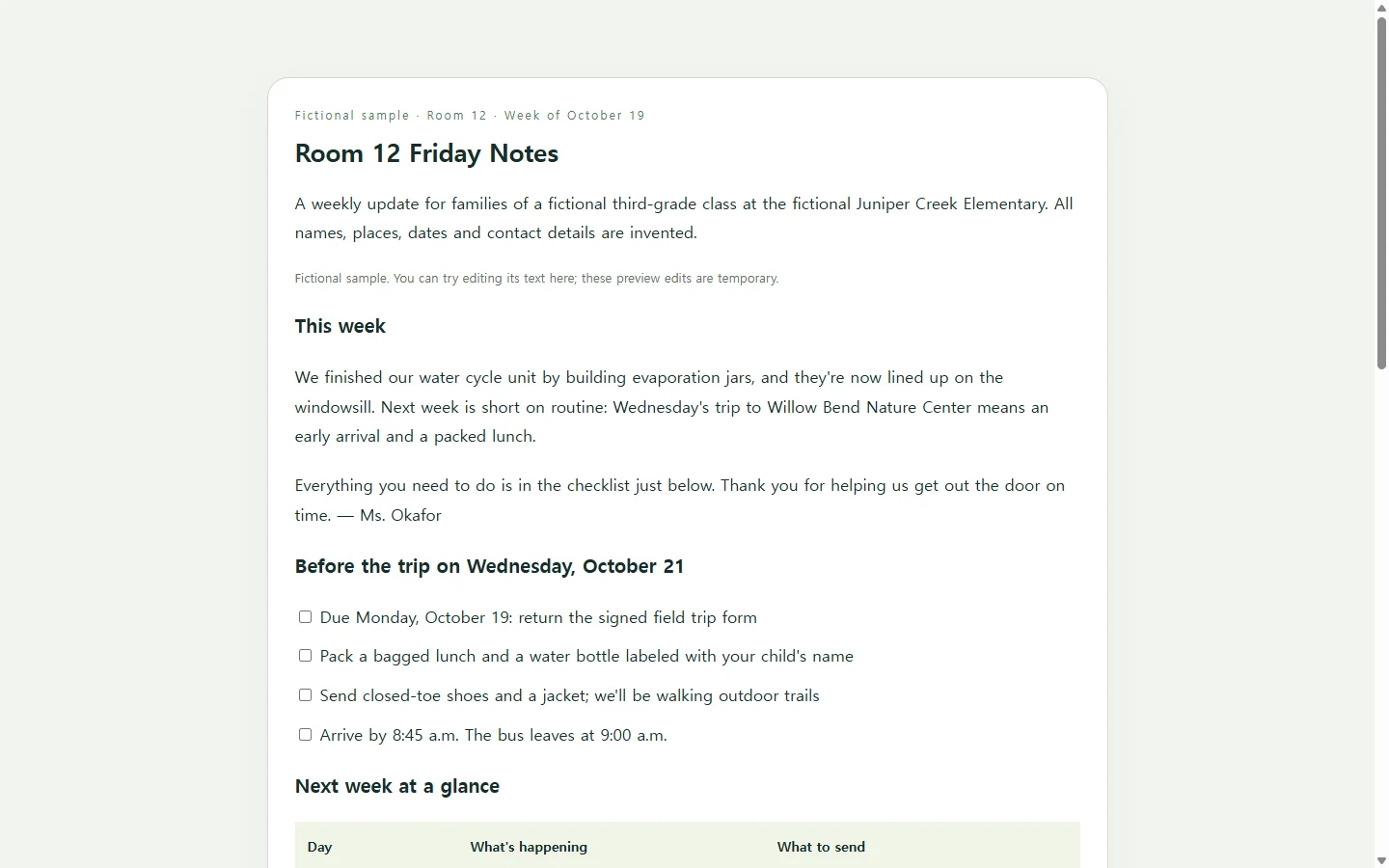
When it doesn't, reverse the order. Write down what a family has to do or remember this week, then let that decide the layout. In the sample, a Wednesday field trip reshapes the page: a short checklist sits near the top, and the notes about what the class is learning move lower, where they can be read whenever there's time.
Everything in the sample is invented, including the teacher, the school, the trip and the dates. Look at it for the order of information, not the decoration.
What to borrow from the sample
The week-at-a-glance table puts each day beside what to send. Someone checking on Tuesday night finds the Wednesday row, with lunch and shoes listed, without rereading three paragraphs.
Dates are typed as text with the weekday spelled out, not placed inside a decorative graphic, so they stay readable when someone zooms in on a phone.
Each learning note is one or two sentences and ends with something a family could ask or try at home. If a subject needs more than that, it probably deserves its own message.
Make your version with AI
AI is handy for the part that eats the time: turning a list of facts into a clean, readable layout. It shouldn't supply the facts. Give it your real dates, times and requests, and tell it to mark anything missing instead of filling the gap.
The prompt asks for HTML, the code a web browser reads to display a page. You don't have to read it. Paste the result somewhere that displays it as a page, then open it on your own phone before sending it to anyone.
Leave student names, photos and anything private out of the page. A link can be forwarded beyond the families you sent it to.
Replace the bracketed parts of the prompt and delete any line you don't need this week.
If your school expects a PDF or paper copy
If your school expects newsletters in take-home folders or uploaded as a file, follow that. The page you build here is a web page, not a print file. Keep making the required copy in the tool you already use, and treat a link as an extra for families who'd rather read on a phone.
When Wednesday's bus time changes on Monday
Say you send the link on Friday, and on Monday the trip is pushed from a 9:00 to a 9:30 departure.
If the page is in NOS, you can edit that line directly on the rendered page, changing 9:00 to 9:30 and the arrival time with it, with no new prompt and no rebuilt layout. The link you sent on Friday stays the same, so a family opening it on Tuesday night sees 9:30. They don't need an account to open it.
Families who already read the page won't necessarily open it again, so for something like a departure time, a one-line message pointing back to the newsletter is still worth sending.
Direct editing is for the words on the page. If you want a different layout, go back to the AI with the prompt.
Next Friday, add the new week as another page in the same NOS workspace, next to this one, and start from what worked.
A prompt to adapt
Create a one-page weekly class newsletter for families as a single, self-contained HTML file.

Use only the details below. If something is missing, show [TBD] in its place. Do not invent names, dates, times, events, phone numbers or learning content.

Class: [GRADE AND ROOM, e.g. 3rd grade, Room 12]
Sign-off: [HOW YOU SIGN YOUR NOTES, e.g. Ms. Okafor]
Week of: [DATE RANGE]
Top note (2-3 sentences): [WHAT MATTERS MOST THIS WEEK]
Action checklist: [EACH THING FAMILIES MUST DO, WITH ITS DEADLINE]
Day by day: [DAY AND DATE - WHAT'S HAPPENING - WHAT TO SEND OR DO]
What we're learning: [SUBJECT - ONE OR TWO SENTENCES - ONE THING TO ASK OR TRY AT HOME]
Coming up: [DATE - EVENT - TIME AND PLACE]
How to reach me: [YOUR SCHOOL CONTACT METHOD]

Layout and output requirements:
- Order: title and week, top note, action checklist, day-by-day table, learning notes, coming-up dates, contact line.
- Single column. It must read comfortably on a phone about 360px wide with no sideways scrolling, and widen to a comfortable reading width (about 680px max) on a laptop. The table must stay readable on a phone without sideways scrolling; stack its rows if needed.
- Inline CSS only. No external fonts, images, scripts, forms, embeds or tracking.
- Body text at least 16px with generous line spacing. Text-to-background contrast of at least 4.5:1. Don't use color alone to mark deadlines; also say 'Due' in words.
- Use real headings in order (one h1, then h2s), a real table with a header row, and a real list for the checklist.
- Write every date and time as text with the weekday spelled out (e.g. Wednesday, October 21, 9:00 a.m.).
- Plain, friendly wording. Keep each paragraph under 60 words.
- No student names or photos.
- Print-friendly: when printed, it should fit on one or two letter-size pages without cut-off text.
- Return only the complete HTML, starting with <!DOCTYPE html>.