What a hiring panel actually does with a portfolio
Teachers who discuss this online don't agree. One teacher returning after a break spent hours on a binder, and said the assistant principal set it aside and asked why they had brought it. Others said they had never been asked for a portfolio at all.
The more encouraging account came from someone who had sat on an interview panel. A candidate kept the portfolio in hand and turned to a specific page whenever a question called for it, and that panelist felt it let the candidate show more of their teaching than the other candidates did. The difference wasn't the binder. The evidence showed up as an answer.
That is the brief for the rest of this page: build the portfolio so each piece of evidence answers a question, and keep it short enough to find the right page in a few seconds.
Choose three to five pieces of evidence
Ready-made portfolio templates often come with a cover, a resume page, section dividers and pages for a teaching philosophy, and some run past 100 pages. Those pages can be useful prompts, but filling every one is how a portfolio turns into something nobody opens.
Start from the questions instead. Write down four you expect, such as how you plan a unit, how you support students who are behind, how you run a messy activity and how you communicate with families, then pick one artifact for each. Under every artifact, add one line telling the reader what to notice. A lesson plan with no caption asks the panel to do your explaining for you.
Before anything leaves your laptop, remove student names, faces and ID numbers, and check what your current school allows you to share. A worksheet with the name covered can still show growth.
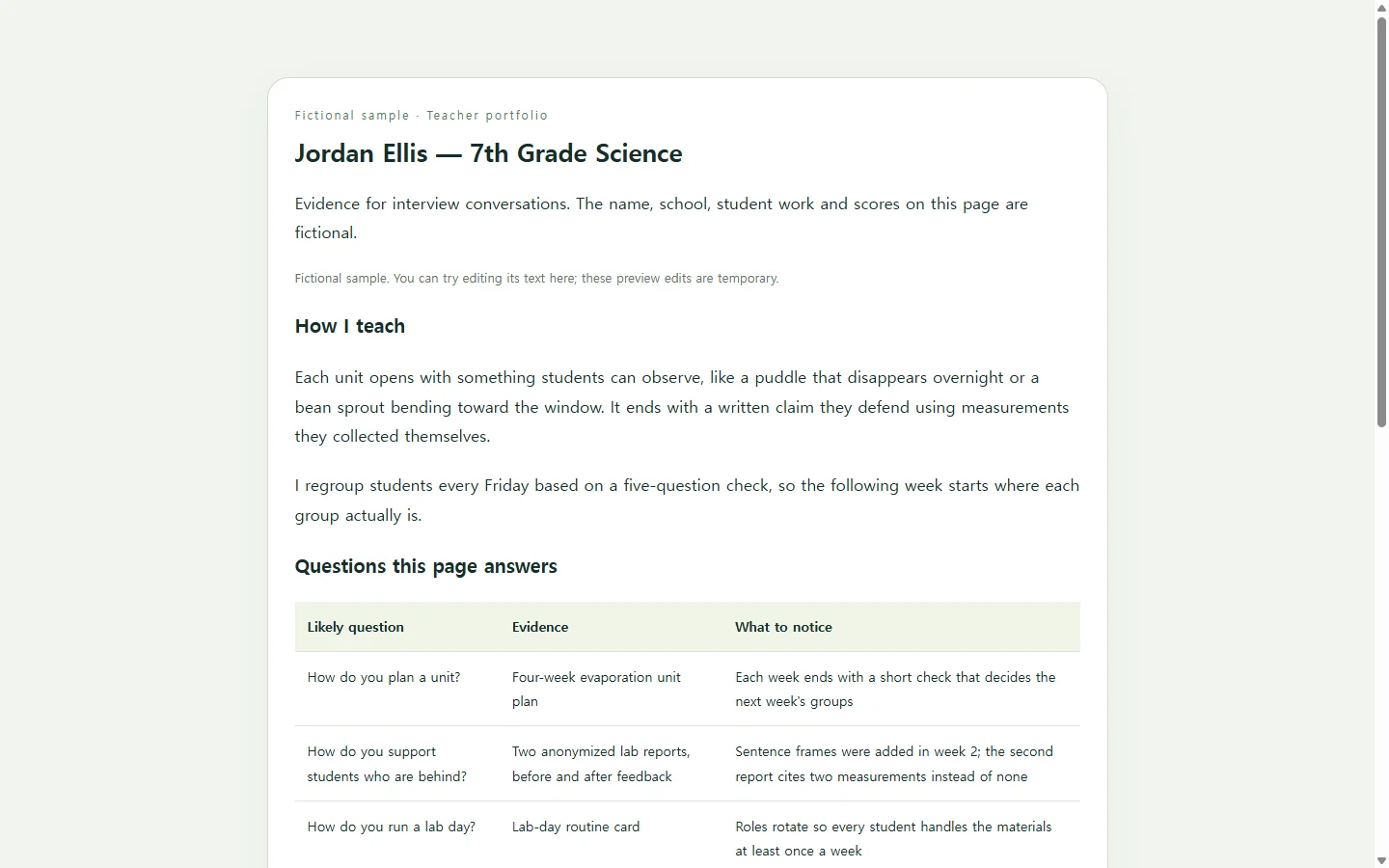
The sample page below shows this for a fictional seventh-grade science teacher; the person, school, student work and scores are invented. Look at the evidence table first. Pairing each likely question with one artifact and one 'what to notice' line is the part worth copying. The short approach and experience sections are there so the page still makes sense to someone who opens it without you in the room.
Binder, file or a page with a link
A printed binder works well if you want to turn pages during the conversation, which is how the panel story above played out. If an application asks you to upload a PDF or Word document, upload that file; a link is an extra, not a substitute.
A single web page is worth making when you want a link on your resume or on a small card you leave behind, or when someone may open it on a phone. Some teachers already do both. You can keep the binder and the page side by side, as long as they show the same evidence.
Building the page with AI
You don't need AI for this, and the hard part, choosing evidence and writing captions, stays with you. Where AI helps is layout. Ask it for an HTML file, the plain code a browser reads to display a page, and you can get a clean design without learning a design tool.
The prompt below asks for one self-contained file that reads well on a phone, uses proper headings and alt text for screen readers, and marks gaps instead of inventing achievements. Replace every bracket with your own details; the examples in parentheses only show the level of detail and should not be kept.
After the interview, keep the same link current
The link you printed on a card or added to your resume can still be opened after the interview ends. A principal may look again before a second round, or pass it to a colleague who missed the meeting.
That is when small edits pile up. A caption undersold the intervention groups you were asked about. A new unit wrapped up with better work samples. The dates on your current role are out of date. In NOS you keep the HTML page in your workspace and change those words directly on the rendered page, so a one-line fix doesn't mean asking AI to rebuild the whole page.
When you share the page, the published link stays the same after later edits, so the resume you already sent and the card you already handed over lead to the corrected version. People who receive the link can open it without creating an account. If a district asks for a file, you still send the file; the page is what keeps your evidence current in between.
A prompt to adapt
Build a one-page teacher portfolio as a single self-contained HTML file.

About me (use only what I provide; if something is missing, show a visible [ADD: ...] note instead of inventing it):
- Name and role: [your name], [grade and subject you teach or want to teach] (e.g., Jordan Ellis, 7th grade science)
- Teaching approach in 2-3 sentences: [your own words] (e.g., Each unit opens with something students can observe and ends with a written claim they defend with data they collected.)
- Experience, newest first: [years, role, school] (e.g., 2021-present, 7th grade science, Riverbend Middle School)
- Certification or endorsements: [exactly as listed on your license]
- Contact: [the email you use for job applications], shown as a mailto link

Evidence table, one row per interview question (3-5 rows):
- Question: [a question you expect] (e.g., How do you support students who are behind?)
- Evidence: [the artifact] (e.g., two anonymized lab reports, before and after feedback)
- What to notice: [one sentence] (e.g., the second report cites two measurements instead of none)
- Image: [file name or 'none'], alt text: [what the image shows]

Requirements:
- One HTML file with the CSS inside it. No JavaScript, no external fonts or scripts, no images other than the ones I name, no contact form.
- Order: name and role, approach, evidence table, experience, contact.
- Use real headings (one h1, then h2 sections), a real HTML table with header cells for the evidence, and my alt text on every image.
- Readable on a 375px-wide phone without sideways scrolling; on narrow screens, show each table row as a stacked card with the column labels visible.
- Body text at least 16px; text-to-background contrast of at least 4.5:1; links underlined.
- Calm, professional look: one accent color, generous white space, no stock illustrations or icons.
- Do not add awards, statistics, quotes or testimonials I did not provide.
- Do not include any student names, faces or ID numbers.